Run Impacted Tests in Git Repository
R2026bThis example shows how to run only the tests impacted by changes to source and test files in a Git™ repository by using the MATLAB® build tool. Running only the impacted tests rather than the entire test suite reduces testing overhead, allowing for faster regression testing and more frequent integrations.
In this example, you configure a built-in task created from the matlab.buildtool.tasks.TestTask class for test impact analysis. (Tasks that
are not created from the matlab.buildtool.tasks.TestTask class do not
support test impact analysis.) You configure the task at run time by using these task arguments:
RunOnlyImpactedTeststask argument — Run the tests impacted by changes to code and data. By default, the task runs the tests impacted by changes since the last successful task run.BaseRevisiontask argument — Run the tests impacted by changes since a specific Git source control revision (for example, since the last commit or since the feature branch diverged from themainbranch).
You can also use the RunOnlyImpactedTests and
BaseRevision properties to configure a TestTask
instance for test impact analysis at task creation time in the build file. For more
information about impact-based testing as well as common task configuration examples for
test impact analysis, see Test Impact Analysis Using MATLAB Build Tool.
Incremental Testing Scenario
In this example, you make changes to a few source and test files and then run only the
tests impacted by those changes instead of running
all the tests. You run the impacted tests since the
last successful task run, since the last commit, or
since the feature branch diverged from the main branch. To prepare
the files and Git repository for this example, see Set Up Sample Files in Git for Test Impact Analysis.
This diagram shows the actions and change detection windows used in this example. As
part of the example setup, you ran three builds that included the
"test" task (b1,
b2, and b3). You also performed the
initial commit (C1) and created a feature branch.

In the diagram, P1 represents a push to the remote repository
after C1. However, because the local repository in this example
is not configured with a remote source, P1 instead marks the
point in time when you created the new feature branch from the main
branch in the example setup. This distinction helps illustrate, later in the example,
how to qualify changes since branching from main before you typically
push to a remote repository.
In this example, you perform these actions:
Make changes to the addition-specific source and test file (Δ1), and then run the tests (b4) impacted by those changes since the last successful task run (b3).
Make changes to subtraction-specific source and test files (Δ2), and then run the tests (b5) impacted by those changes since the last successful task run (b4).
Prepare for a new commit by running the tests (b6) impacted by changes since the last commit (C1). After successful qualification, you commit the changes (C2).
Make changes to multiplication-specific source and test files (Δ3), and then run the tests (b7) impacted by those changes since the last commit (C2). After successful qualification, you perform a new commit (C3).
Prepare for merging the feature branch into the
mainbranch by running the tests (b8) impacted by changes since the feature branch diverged from themainbranch (P1). Then, you merge the qualified feature branch into themainbranch (P2).
Qualify Changes Since Last Successful Task Run
When you make changes to specific source and test files, you can use the
RunOnlyImpactedTests argument of a TestTask
instance to run only the tests impacted by those changes since the last
successful task run.
For illustrative purposes, the myAdd,
mySubtract, and myMultiply functions
provided by this example do not include function argument validation. Update these
functions by using an arguments block that requires the operands to
be numeric scalars. First, update the myAdd function by adding an
arguments block. This table shows how to update the
myAdd.m file.
| Before | After |
|---|---|
function y = myAdd(num1,num2) % myAdd - Add num1 and num2 y = num1 + num2; end |
function y = myAdd(num1,num2) % myAdd - Add num1 and num2 arguments num1 (1,1) {mustBeNumeric} num2 (1,1) {mustBeNumeric} end y = num1 + num2; end |
To test the myAdd function against invalid inputs, add a new test
to the MyAddTest test class. To add the test, in the
MyAddTest test class definition, create a method named
testWithInvalidInputs in the methods block with
the Test attribute. This table shows how to update the
MyAddTest.m file.
| Before | After |
|---|---|
classdef MyAddTest < matlab.unittest.TestCase methods (Test) function testWithPositiveNumbers(testCase) num1 = 5; num2 = 10; expected = 15; actual = myAdd(num1,num2); testCase.verifyEqual(actual,expected) end function testWithNegativeNumbers(testCase) num1 = -3; num2 = -7; expected = -10; actual = myAdd(num1,num2); testCase.verifyEqual(actual,expected) end function testWithMixedNumbers(testCase) num1 = 4; num2 = -2; expected = 2; actual = myAdd(num1,num2); testCase.verifyEqual(actual,expected) end function testWithZero(testCase) num1 = 0; num2 = 5; expected = 5; actual = myAdd(num1,num2); testCase.verifyEqual(actual,expected) end end end |
classdef MyAddTest < matlab.unittest.TestCase methods (Test) function testWithPositiveNumbers(testCase) num1 = 5; num2 = 10; expected = 15; actual = myAdd(num1,num2); testCase.verifyEqual(actual,expected) end function testWithNegativeNumbers(testCase) num1 = -3; num2 = -7; expected = -10; actual = myAdd(num1,num2); testCase.verifyEqual(actual,expected) end function testWithMixedNumbers(testCase) num1 = 4; num2 = -2; expected = 2; actual = myAdd(num1,num2); testCase.verifyEqual(actual,expected) end function testWithZero(testCase) num1 = 0; num2 = 5; expected = 5; actual = myAdd(num1,num2); testCase.verifyEqual(actual,expected) end function testWithInvalidInputs(testCase) num1 = '1'; num2 = [2 4]; testCase.verifyError(@() myAdd(num1,num2),?MException) end end end |
Run the "test" task by specifying the
RunOnlyImpactedTests argument as true.
Because test impact analysis is enabled, the task runs only the tests impacted by
changes to the myAdd.m and MyAddTest.m files
instead of running all the tests. To better
understand the changes, specify the -verbosity build option. Of the
22 tests in the tests folder, the task runs only the 10 tests defined
in the MyAddTest.m and MyCalculateTest.m test
files.
buildtool test(RunOnlyImpactedTests=true) -verbosity Detailed
** Starting test because:
** --> Input 'SourceFiles' modified
**     --> Files modified: 'source\myAdd.m'
** --> Input 'TestDerivatives' modified
**     --> Files modified: 'tests\MyAddTest.m'
** --> Arguments modified
**  Evaluating task action: runTests
Finding impacted tests...
--> Found 10 tests impacted by changes since the last successful run (22 total).
 Running MyAddTest
  ⋮
 Done MyAddTest in 0.084279 seconds
__________

 Running MyCalculateTest
  ⋮
 Done MyCalculateTest in 0.033945 seconds
__________


Test Summary:
    Total Tests: 10
         Passed: 10
         Failed: 0
     Incomplete: 0
       Duration: 0.11822 seconds testing time.

** Finished test in 11.1506 seconds

Build Successful:
    1 Task: 0 Failed, 0 Skipped
    13.789 sec total build time
Start a new development cycle by updating the subtraction-specific
(mySubtract.m and MySubtractTest.m) files. Add
the same arguments block as in the myAdd.m file to
the mySubtract.m source file. Then, add the following
testWithInvalidInputs method to the
MySubtractTest.m test file.
    methods (Test)
        function testWithInvalidInputs(testCase)
            num1 = '1';
            num2 = [2 4];
            testCase.verifyError(@() mySubtract(num1,num2),?MException)
        end
    end
Run only the tests impacted by changes since the last
successful task run. The task runs only the tests in
the MySubtractTest.m and MyCalculateTest.m test
files.
buildtool test(RunOnlyImpactedTests=true) -verbosity Detailed
** Starting test because:
** --> Input 'SourceFiles' modified
**     --> Files modified: 'source\mySubtract.m'
** --> Input 'TestDerivatives' modified
**     --> Files modified: 'tests\MySubtractTest.m'
**  Evaluating task action: runTests
Finding impacted tests...
--> Found 10 tests impacted by changes since the last successful run (23 total).
 Running MyCalculateTest
  ⋮
 Done MyCalculateTest in 0.03461 seconds
__________

 Running MySubtractTest
  ⋮
 Done MySubtractTest in 0.053507 seconds
__________


Test Summary:
    Total Tests: 10
         Passed: 10
         Failed: 0
     Incomplete: 0
       Duration: 0.088117 seconds testing time.

** Finished test in 1.8444 seconds

Build Successful:
    1 Task: 0 Failed, 0 Skipped
    4.0747 sec total build time
Qualify Changes Since Last Commit
Your plan root folder is inside a Git repository with a revision history, so you can specify a base source
control revision for test impact analysis using the BaseRevision
task argument. You can specify the value of the BaseRevision task
argument as a short, full, or relative commit ID. You can also use a commit reference,
such as "HEAD".
Since the initial commit in the example setup, you have iteratively made changes to
specific source and test files. Prepare for a new commit by qualifying the changes since
the initial commit. To run only the tests impacted by changes that you made since the
initial commit, run the "test" task by specifying its
BaseRevision argument as "HEAD". The task
detects changes to source and test files since the specified revision and then runs only
the tests that are impacted by the detected changes. The impacted tests pass, and the
task runs successfully.
buildtool test(BaseRevision="HEAD") -verbosity Detailed
** Starting test because:
** --> Arguments modified
**  Evaluating task action: runTests
Files changed since revision HEAD:
  Committed Files:
    None

  Modified Files:
    C:\work\impacted_tests_example\source\myAdd.m
    C:\work\impacted_tests_example\source\mySubtract.m
    C:\work\impacted_tests_example\tests\MyAddTest.m
    C:\work\impacted_tests_example\tests\MySubtractTest.m

  Untracked Files:
    None

  Relevant files for test impact analysis:
    C:\work\impacted_tests_example\source\myAdd.m
    C:\work\impacted_tests_example\source\mySubtract.m
    C:\work\impacted_tests_example\tests\MyAddTest.m
    C:\work\impacted_tests_example\tests\MySubtractTest.m

Finding impacted tests...
--> Found 15 tests impacted by changes since revision HEAD (23 total).
 Running MyAddTest
  ⋮
 Done MyAddTest in 0.036354 seconds
__________

 Running MyCalculateTest
  ⋮
 Done MyCalculateTest in 0.02765 seconds
__________

 Running MySubtractTest
  ⋮
 Done MySubtractTest in 0.020939 seconds
__________


Test Summary:
    Total Tests: 15
         Passed: 15
         Failed: 0
     Incomplete: 0
       Duration: 0.084944 seconds testing time.

** Finished test in 2.7969 seconds

Build Successful:
    1 Task: 0 Failed, 0 Skipped
    4.5897 sec total build time
Commit the qualified changes.
commitDetails = commit(repo, ...
    Message="Update files related to addition and subtraction");
As a final stage of updating files in this example, update the multiplication-specific
(myMultiply.m and MyMultiplyTest.m) files. Add
the same arguments block as in the myAdd.m and
mySubtract.m files to the myMultiply.m source
file. Then, add the following testWithInvalidInputs method to the
MyMultiplyTest.m test file.
    methods (Test)
        function testWithInvalidInputs(testCase)
            num1 = '1';
            num2 = [2 4];
            testCase.verifyError(@() myMultiply(num1,num2),?MException)
        end
    end
Run the tests impacted by changes since the last commit. Because you modified only the
myMultiply.m and MyMultiplyTest.m files since
the last commit, the task runs only the tests impacted by changes to those two
files.
buildtool test(BaseRevision="HEAD") -verbosity Detailed
** Starting test because:
** --> Input 'SourceFiles' modified
**     --> Files modified: 'source\myMultiply.m'
** --> Input 'TestDerivatives' modified
**     --> Files modified: 'tests\MyMultiplyTest.m'
**  Evaluating task action: runTests
Files changed since revision HEAD:
  Committed Files:
    None

  Modified Files:
    C:\work\impacted_tests_example\source\myMultiply.m
    C:\work\impacted_tests_example\tests\MyMultiplyTest.m

  Untracked Files:
    None

  Relevant files for test impact analysis:
    C:\work\impacted_tests_example\source\myMultiply.m
    C:\work\impacted_tests_example\tests\MyMultiplyTest.m

Finding impacted tests...
--> Found 10 tests impacted by changes since revision HEAD (24 total).
 Running MyCalculateTest
  ⋮
 Done MyCalculateTest in 0.041692 seconds
__________

 Running MyMultiplyTest
  ⋮
 Done MyMultiplyTest in 0.026507 seconds
__________


Test Summary:
    Total Tests: 10
         Passed: 10
         Failed: 0
     Incomplete: 0
       Duration: 0.068199 seconds testing time.

** Finished test in 2.0618 seconds

Build Successful:
    1 Task: 0 Failed, 0 Skipped
    3.9945 sec total build time
Commit the changes to the multiplication-specific files, which you qualified.
commitDetails = commit(repo, ...
    Message="Update files related to multiplication");
Qualify Changes Since Branches Diverged
The BaseRevision task argument enables you to qualify changes
since your current branch diverged from the branch it was created from. Using this task
argument, you can run only the tests impacted by changes to code and data since your
feature branch diverged from the main branch in the local or remote
repository.
After creating the feature/example branch from the
main branch in your local repository during the example setup,
you iteratively made changes to three sets of source and test files related to addition,
subtraction, and multiplication. Using the BaseRevision task
argument, run only the tests impacted by these changes, which caused your feature branch
to diverge from the main branch. The task runs the impacted tests
successfully.
buildtool test(BaseRevision="main") -verbosity Detailed
** Starting test because:
** --> Arguments modified
**  Evaluating task action: runTests
Files changed since revision main:
  Committed Files:
    C:\work\impacted_tests_example\source\myAdd.m
    C:\work\impacted_tests_example\source\myMultiply.m
    C:\work\impacted_tests_example\source\mySubtract.m
    C:\work\impacted_tests_example\tests\MyAddTest.m
    C:\work\impacted_tests_example\tests\MyMultiplyTest.m
    C:\work\impacted_tests_example\tests\MySubtractTest.m

  Modified Files:
    None

  Untracked Files:
    None

  Relevant files for test impact analysis:
    C:\work\impacted_tests_example\source\myAdd.m
    C:\work\impacted_tests_example\source\myMultiply.m
    C:\work\impacted_tests_example\source\mySubtract.m
    C:\work\impacted_tests_example\tests\MyAddTest.m
    C:\work\impacted_tests_example\tests\MyMultiplyTest.m
    C:\work\impacted_tests_example\tests\MySubtractTest.m

Finding impacted tests...
--> Found 20 tests impacted by changes since revision main (24 total).
 Running MyAddTest
  ⋮
 Done MyAddTest in 0.022684 seconds
__________

 Running MyCalculateTest
  ⋮
 Done MyCalculateTest in 0.026679 seconds
__________

 Running MyMultiplyTest
  ⋮
 Done MyMultiplyTest in 0.023189 seconds
__________

 Running MySubtractTest
  ⋮
 Done MySubtractTest in 0.020685 seconds
__________


Test Summary:
    Total Tests: 20
         Passed: 20
         Failed: 0
     Incomplete: 0
       Duration: 0.093236 seconds testing time.

** Finished test in 2.1787 seconds

Build Successful:
    1 Task: 0 Failed, 0 Skipped
    3.8756 sec total build time
Merge the feature branch into the main branch. Then, delete the
feature branch.
featureBranch = repo.CurrentBranch;
mainBranch = switchBranch(repo,"main");
merge(repo,featureBranch)
deleteBranch(repo,featureBranch)
Set Up Sample Files in Git for Test Impact Analysis
This section provides the source and test files that this example uses to demonstrate test impact analysis. To set up the sample files and prepare for the analysis, you can inspect the example code, run the tests provided by the example, and then place the files under Git source control.
Inspect Example Code
First, open the example and then navigate to the impacted_tests_example folder.
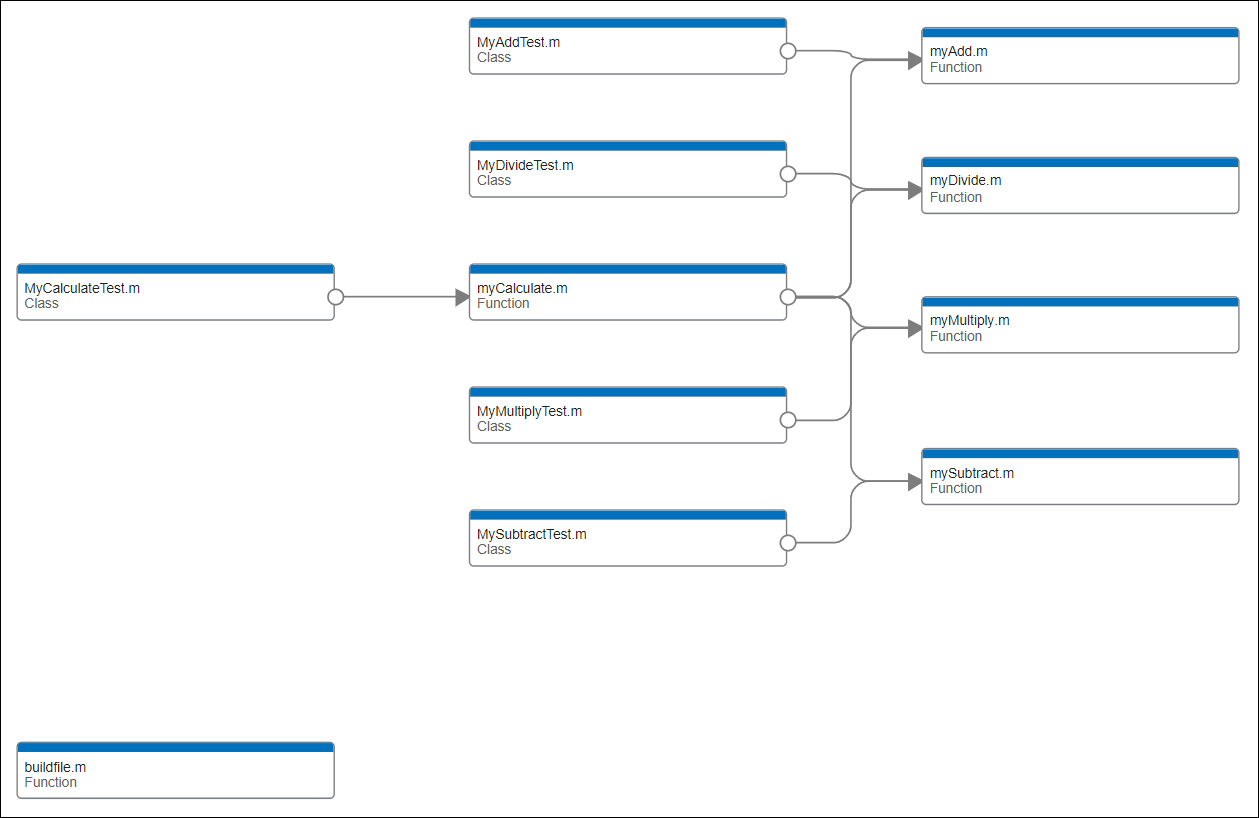
cd impacted_tests_exampleThe impacted_tests_example folder contains a build file named buildfile.m as well as source and tests folders:
The
sourcefolder contains four source files for specific arithmetic operations. For example, themyAdd.mfile includes a function for adding two numeric values. Thesourcefolder also includes themyCalculate.mfile, which depends on the other files in the folder.The
testsfolder contains a test file for each source file in thesourcefolder. For example, theMyAddTest.mfile includes a test class to test the function in themyAdd.msource file.
This dependency graph, created using the Dependency Analyzer app, shows the files in the impacted_tests_example folder and how they relate to each other.
This code shows the contents of the build file. The build file contains two built-in tasks:
The
"clean"task deletes outputs and traces of the other tasks in the build file.The
"test"task runs the tests in thetestsfolder and fails the build if any of those tests fail. Because theSourceFilesproperty of the task is nonempty, the task opts in to incremental builds.
function plan = buildfile
import matlab.buildtool.tasks.CleanTask
import matlab.buildtool.tasks.TestTask

% Create a plan with no tasks
plan = buildplan;

% Add the source code to the path
addpath("source")

% Add a task to delete outputs and traces
plan("clean") = CleanTask;

% Add a task to run tests
plan("test") = TestTask("tests",SourceFiles="source");
end
Run Tests Using Build Tool
Run the "test" task. The task runs the tests in the tests folder. In this example, the tests pass, and the task runs successfully.
buildtool test** Starting test
.......... .......... .
Test Summary:
Total Tests: 21
Passed: 21
Failed: 0
Incomplete: 0
Duration: 0.78202 seconds testing time.
** Finished test
Build Successful:
1 Task: 0 Failed, 0 Skipped
18.864 sec total build time
Run the "test" task again. The build tool skips the task because the task is up to date.
buildtool test** Skipped test (up-to-date)
Build Successful:
1 Task: 0 Failed, 1 Skipped
1.5413 sec total build time
Rerun the "test" task after deleting its trace using the "clean" task. The "test" task runs the tests.
buildtool clean test
** Starting clean
** Finished clean

** Starting test
.......... .......... .

Test Summary:
    Total Tests: 21
         Passed: 21
         Failed: 0
     Incomplete: 0
       Duration: 0.12821 seconds testing time.

** Finished test

Build Successful:
    2 Tasks: 0 Failed, 0 Skipped
    4.2363 sec total build time
Place Files Under Source Control
You can use a TestTask instance to run the tests impacted by changes to code and data since the last successful task run or a specific source control revision. You can specify a revision for test impact analysis only when using Git source control. For more information on how to use Git source control in MATLAB, see Set Up Git Source Control.
In a typical software development workflow, you clone a remote repository and then develop features locally in the cloned repository. In this example, the code is already in your current folder rather than in a remote repository, so you can create a local repository directly without using a remote source. Initialize an empty Git repository in your current folder by calling the gitinit function.
repo = gitinit;
Add the source files, test files, and build file to the repository, and then make an initial commit. For information on how to add files or commit changes interactively in the Files and Source Control panels, see Create Local Git Repository in MATLAB.
add(repo,["source" "tests" "buildfile.m"])
commitDetails = commit(repo,Message="Initial commit");
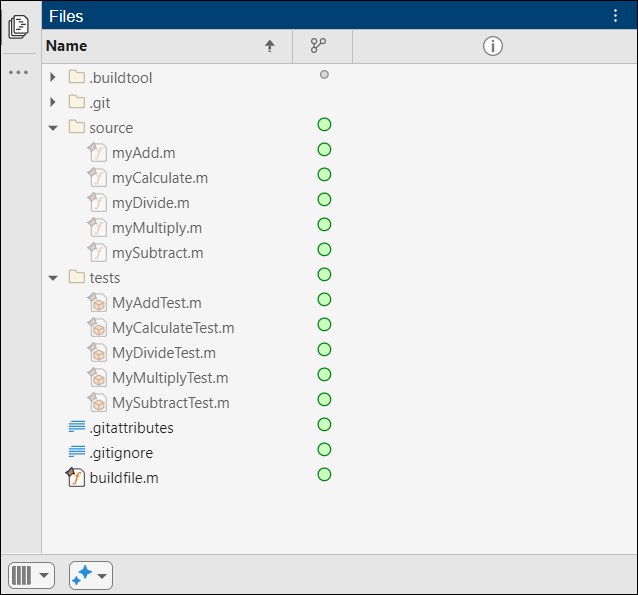
After the initial commit, the Files panel shows the source control status for the files in your repository. An Unmodified  icon appears next to each file.
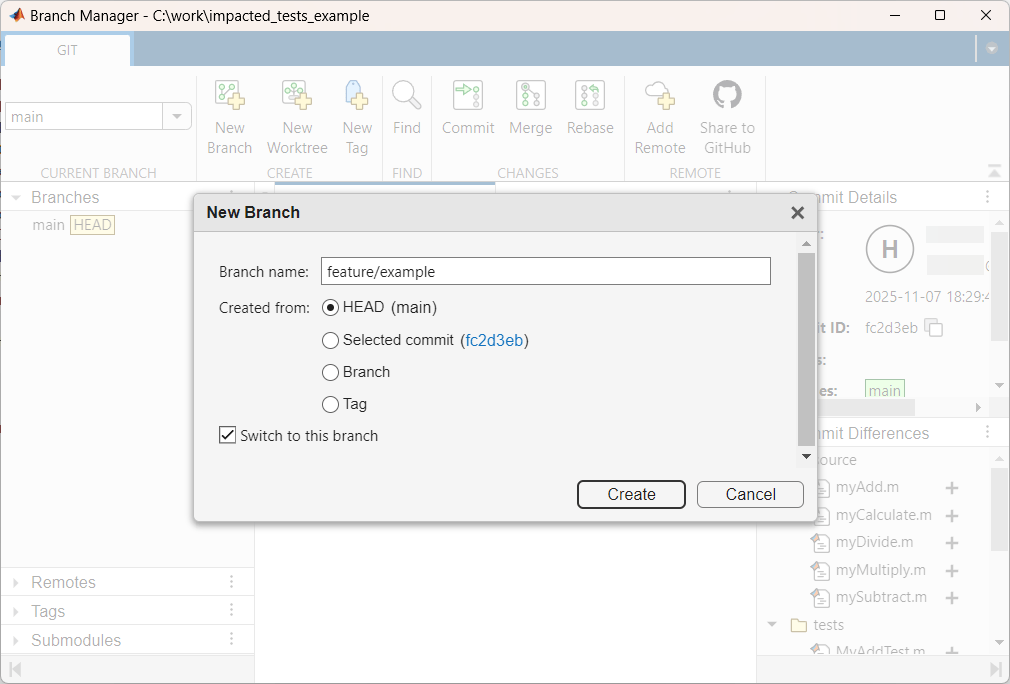
The current branch in your repository is the main branch. To make changes to the files in the repository, create a feature branch from the main branch and switch to the new branch either programmatically or by using the Branch Manager. For example, in the Files panel, right-click and select Source Control > Branch Manager. Then, on the Branch Manager toolstrip, in the Create section, click New Branch. In the New Branch dialog box, enter the branch name as feature/example, and then click Create.