polyspace-test -dccc
R2026b(System Command) Generate Data Coupling and Control Coupling (DCCC) coverage data from static and dynamic results (requires Polyspace Code Prover)
Since R2026b
Syntax
Description
The system command polyspace-test -dccc combines Polyspace®
Code Prover™ static analysis results with Polyspace
Test™ per-test coverage data to produce a data coupling and control coupling coverage
report.
polyspace-test -dccc
generates data coupling and control coupling (DCCC) coverage data by combining Polyspace
Code Prover static analysis results with Polyspace
Test per-test coverage data. The analysis identifies cross-component interactions
in your code, determines whether your tests cover them, and produces a
-code-prover-results-file <codeProverResults> -pstest-results-file <testResults> [-component-definition <componentFile>] [options].dccc file.
You can optionally provide a component definition file
<componentFile> that specifies which source files belong to which
software component. If you do not provide this file, the polyspace-test
command automatically assigns a separate component to each source file.
The command also accepts additional options that control the output format and location.
To learn about how Polyspace defines components, data coupling, and control coupling, see Calculate Coverage of Data Couplings and Control Couplings (DCCC) in C/C++ Code.
polyspace-test -dccc
generates DCCC coverage data and produces a -options-file <optionsFile>.dccc file using the
options specified in <optionsFile>.
Examples
This example shows how to generate a data coupling and control coupling coverage report from Polyspace Code Prover results and Polyspace Test results. The example uses a component definition file to group source files into logical software components.
Follow these steps using files in the folder
<polyspaceroot>\polyspace\examples\doc_cxx\data_coupling_control_coupling.
Here, <polyspaceroot> is the Polyspace
installation
folder.
Create a Polyspace Platform project from the compilation database:
polyspace-configure -output-platform-project myProject.psprjx -compilation-database ccdb.jsonRun Polyspace Code Prover on the project to generate static analysis results:
polyspace-project -generate-launching-script-for myProject.psprjx -product code-prover -output-dir cpResults
polyspace-code-prover -main-generator -results-dir cpResults
The command generates a
.pscpresults file in the foldercpResults.Run the tests with code coverage enabled to generate Polyspace Test results:
polyspace-test -run -project myProject.psprjx -profiling-mode coverage -results-dir testResultsThe command generates a
.pstestrresults file in the foldertestResults.Run the
polyspace-test -dccccommand with the Code Prover results, the test results, and a component definition file:polyspace-test -dccc -code-prover-results-file cpResults\ps_results.pscp -pstest-results-file testResults\ps_test.pstestr -component-definition component_spec.toml -results-dir dcccResultsThe component definition file
component_spec.tomlgroups source files into components:[[Component]] Name = "Engine" Spec = [ "**/engine.c", "**/engine.h" ] [[Component]] Name = "Controller" Spec = [ "**/controller.c" ]The command produces a DCCC results file (
ps_dccc.psdccc) in thedcccResultsfolder.If you are using the Polyspace Platform UI, you can open the
ps_dccc.psdcccfile and view the Data and Control Coupling Coverage dashboard.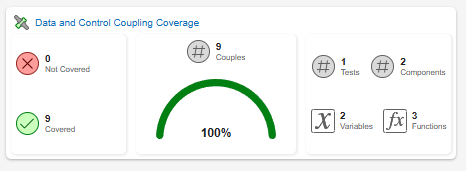
Click any button on this dashboard to open the Data Coupling and Control Coupling dashboards. Then click any button on these individual dashboards to open an HTML report for the DCCC coverage results.
If you continue to use the command line, generate an HTML report from the DCCC coverage results:
polyspace-test -report -html -report-dir htmlReport dcccResults\ps_dccc.psdcccThe HTML report shows control coupling and data coupling coverage for interactions between the
EngineandControllercomponents.Optionally, generate an XML report for integration with custom tooling:
polyspace-test -report -xml -report-dir xmlReport dcccResults\ps_dccc.psdccc
Input Arguments
Version History
Introduced in R2026b

