Connect Client to Raspberry Pi-Hosted Hotspot
R2026bAfter you configure your Raspberry Pi® board to host a hotspot, you can connect a mobile phone or laptop to the Raspberry Pi hosted hotspot to configure the connection to a local wireless network.
Power on the Raspberry Pi hardware to:
Automatically start the setup Wi-Fi® hotspot.
Automatically start the local web-based configuration portal.
Open Wi-Fi settings on your client device and look for the hotspot name you chose (in this example, MyHotSpot). Connect to it using the hotspot password you set.
Load the Wi-Fi configuration interface hosted on the Raspberry Pi hardware. On your client device, open a web browser and navigate to
https://192.168.12.1/.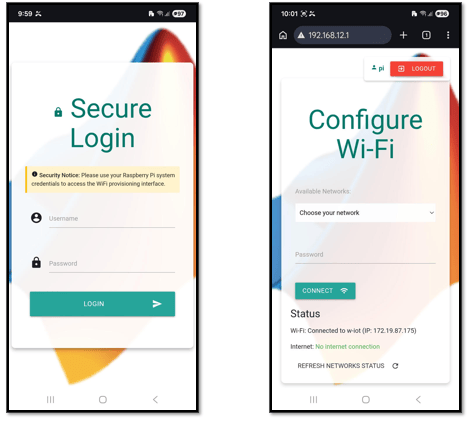
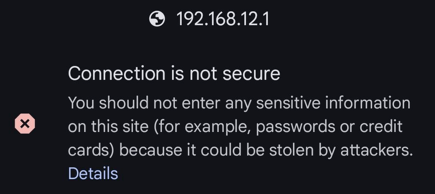
When you access the Wi-Fi provisioning interface, your browser might display a security warning. This behavior is expected because the application uses a self‑signed certificate. The provisioning application runs locally on the Raspberry Pi and uses HTTPS to encrypt communication over the private hotspot network. You can proceed to access the provisioning interface and continue the setup.
In the Secure Login page, enter the Raspberry Pi username and password.
In the Configure Wi-Fi page, choose a Wi-Fi network from the drop-down list and enter the Wi-Fi credentials. The list shows the networks the Raspberry Pi can detect around it.
Click Connect to initiate the connection. You can also view the real-time status messages indicating the progress in connecting to the Wi-Fi network.
The web page confirms the connection between Raspberry Pi and the selected Wi-Fi network.
Note
You client device may show a No internet warning when connected to the hotspot. This operation is normal. The hotspot is only for setup and not for browsing. Stay connected to the hotspot and open the browser.

