dielectric
R2026bDielectric material for use as substrate
Description
Dielectric material used as a substrate in PCB components.
Creation
Syntax
Description
d = dielectric(material)dielectric object of the dielectric material for use as a
substrate in PCB components.
d = dielectric(material1,...,materialN)dielectric object of the specified dielectric
materials.
d = dielectric(PropertyName=Value)
Input Arguments
Properties
Object Functions
getMaterialProperties | Get material properties of dielectric |
Examples
Create a PCB stripline having frequency dependent FR4 dielectric substrate using a Djordjevic-Sarkar dispersion model.
Create a PCB stripline object
Use stripLine from the RF PCB component catalog and design it at a frequency of 1 GHz.
p = design(stripLine(Substrate=dielectric("FR4"),Conductor=metal('Copper')),1e9);
Update the frequency dependent dielectric
Update the dielectric substrate to use the Djordjevic-Sarkar dispersion model.
p.Substrate.FrequencyModel = 'DjordjevicSarkar';
p.Substrate
ans =
dielectric with properties:
Name: 'FR4'
EpsilonR: 4.8000
LossTangent: 0.0260
Thickness: 0.0060
Frequency: 100000000
FrequencyModel: 'DjordjevicSarkar'
For more materials see catalog
Calculate s parameters
Turn off expected warnings:
warning('off','antenna:emcatalog:PartialFeedLocationsConversion01')
warning('off','rfpcb:rfpcberrors:FailureTraceType')
Calculate the S-parameters using the sparameters function over a frequency range of 1.01 MHz to 200 GHz using the 2-D Field Solver.
p3D = pcbComponent(p);
p3D.FeedFormat = "FeedLocations";
p2D = slice(p3D);
p2D.Layers{5}.Type = "Ground";
freq = [1.01e3 linspace(1.1e3,200e9,2000)];
s_pcb2D_ds = sparameters(p2D,freq,LineLength=p.Length);
Reset the state of expected warnings to 'on':
warning('on','rfpcb:rfpcberrors:FailureTraceType')
warning('on','antenna:emcatalog:PartialFeedLocationsConversion01')
Calculate S-parameters for no frequency dispersion in dielectric.
p2D.Layers{2}.FrequencyModel = "Constant";
s_pcb2D_c = sparameters(p2D,freq,LineLength=p.Length);
Plot the S-parameters and impulse response
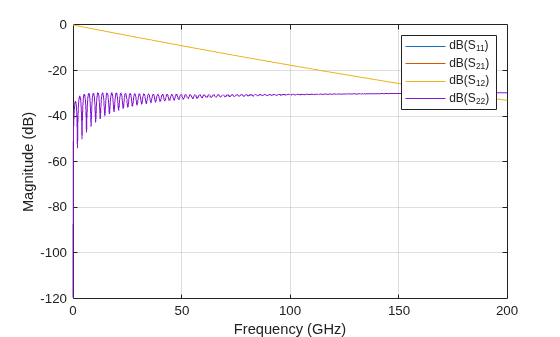
Plot the magnitude of the S-parameters over the frequency range.
rfplot(s_pcb2D_ds)
Plot the impulse response of the stripline to see the effect of frequency dispersion.
ts = 0.95/(2*max(freq));
n = round(4e-10/ts);
fit_ds = rational(s_pcb2D_ds);
[resp_ds,t_ds] = impulse(fit_ds,ts,n);
fit_c = rational(s_pcb2D_c);
[resp_c,t_c] = impulse(fit_c,ts,n);
figure
plot(t_ds{2,1},resp_ds{2,1},'-o',t_c{2,1},resp_c{2,1},'-rx')
xlabel('t[s]')
ylabel('V_{out}[V]')
title('Impulse response of a stripline produced on FR-4')
ylim([-2 12]*1e10)
legend('DjordjevicSarkar','Constant')![Figure contains an axes object. The axes object with title Impulse response of a stripline produced on FR-4, xlabel t[s], ylabel V indexOf out baseline [V] contains 2 objects of type line. These objects represent DjordjevicSarkar, Constant.](../../examples/rfpcb/CreateAStriplineHavingADjordjevicSarkarDielectricModelExample_02.png)
References
[1] Djordjevic, D., Biljic, R., Likar-Smiljanic, V., Sarker,T., Wideband Frequency-Domain Characterization of FR-4 and Time-Domain Causality IEEE Transactions on Electromagnetic Compatibility, Vol. 43, No. 4, November 2001

