show
Description
show( shows layerobj)layer
information in visual form.
show(
shows layerobj,Name=Value)layer information with optional name-values specified.
Examples
Use the show function to diplay a layer of a pcb
Read-in a pcb file
Use the pcbFileRead object to read in a file. Accepted file formats are:
ODB++
Allegro
Native
Here we are using a native format file
pfile = pcbFileRead('native_ExampleBoard_Allegro')pfile =
pcbFileRead with properties:
FileName: 'native_ExampleBoard_Allegro'
NumLayers: 5
MetalLayer: [1 3 5]
DielectricLayer: [2 4]
LayerHeight: [0.0184 0.0104 0.0092 0.0012 0]
NumCadnets: 7
NumPadStacks: 6
NumComponents: 8
NumParts: 5
Create a layer object
Crate a layer object of metal layer 1
layerobj = layer(pfile,1)
layerobj =
layer with properties:
pcBoard: [1×1 pcbFileRead]
LayerNumber: 1
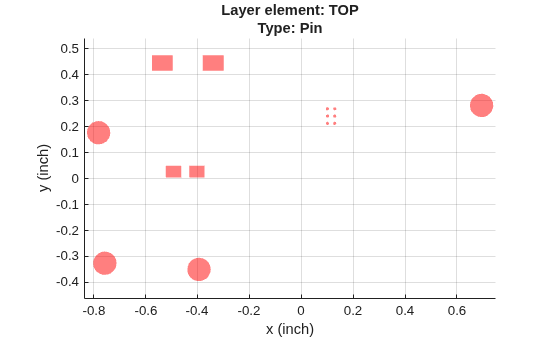
Type: 'Pin'
LayerHeight: 0.0184
NumSurfaces: 1
NumPins: 14
NumVias: 4
NumTraces: 21
EntityList: [1×1 struct]
Show the layer
Use the show function
show(layerobj)

Input Arguments
The layer object specified as a string.
Example: show(layerobjname)
Data Types: string
Name-Value Arguments
Specify optional pairs of arguments as
Name1=Value1,...,NameN=ValueN, where Name is
the argument name and Value is the corresponding value.
Name-value arguments must appear after other arguments, but the order of the
pairs does not matter.
Example: show(layerobjname,Color='red',LineWidth=1)
Use 'Color' to specify the color.
Example: Color='red'
Data Types: string
Use LineWidth to specify the line width.
Example: LineWidth = 1
Data Types: double
Use LineStyle to specify the line style.
Example: LineStyle = '-'
Data Types: char
Version History
Introduced in R2021a
MATLAB Command
You clicked a link that corresponds to this MATLAB command:
Run the command by entering it in the MATLAB Command Window. Web browsers do not support MATLAB commands.
Seleziona un sito web
Seleziona un sito web per visualizzare contenuto tradotto dove disponibile e vedere eventi e offerte locali. In base alla tua area geografica, ti consigliamo di selezionare: .
Puoi anche selezionare un sito web dal seguente elenco:
Come ottenere le migliori prestazioni del sito
Per ottenere le migliori prestazioni del sito, seleziona il sito cinese (in cinese o in inglese). I siti MathWorks per gli altri paesi non sono ottimizzati per essere visitati dalla tua area geografica.
Americhe
- América Latina (Español)
- Canada (English)
- United States (English)
Europa
- Belgium (English)
- Denmark (English)
- Deutschland (Deutsch)
- España (Español)
- Finland (English)
- France (Français)
- Ireland (English)
- Italia (Italiano)
- Luxembourg (English)
- Netherlands (English)
- Norway (English)
- Österreich (Deutsch)
- Portugal (English)
- Sweden (English)
- Switzerland
- United Kingdom (English)