RF PCB Transmission Lines
R2026bCreate planar, stripline, micro stripline and other types of PCB transmission lines using RF PCB Toolbox™.
Featured Examples
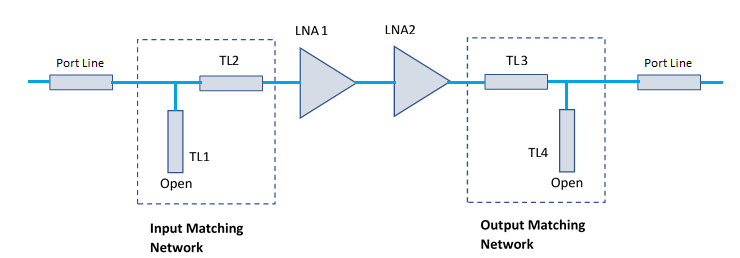
Design Two-Stage Low Noise Amplifier Using Microstrip Transmission Line Matching Network
Use the RF PCB Toolbox™ shapes and the pcbComponent object functionality to design a two-stage low noise amplifier (LNA) for a wireless local area network (WLAN) with an input and output matching network (MNW) to maximize the power delivered to the 50 ohm load.
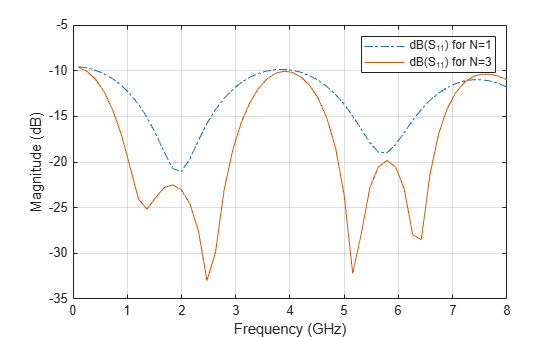
Design of Quarter-Wave Transformer for Impedance Matching Applications
Design the Quarter-wave transformer for impedance matching applications by using the pcbComponent, microstripLine, and traceRectangular object in the RF PCB Toolbox™.
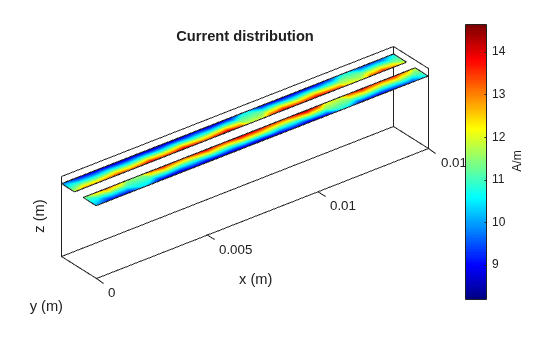
Analysis of a Coplanar Strip Transmission Line with No Conductor Backing
Demonstrates how to construct and feed a coplanar strip transmission line model using the RF PCB Toolbox's pcbComponent with feeds determined by FeedDefinition objects. The characteristic impedance of the line is calculated and compared against an analytical solution.
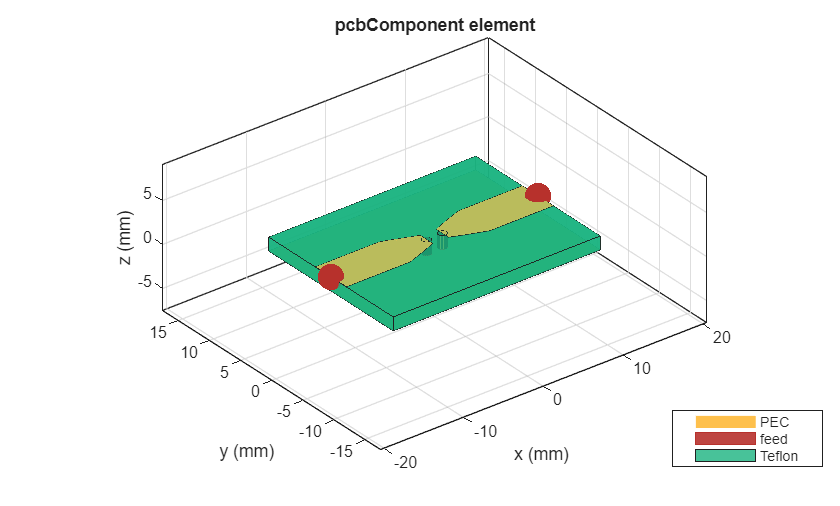
Integrated EM and Circuit Co-Simulation of Microstrip Transitions and Device Loading
Demonstrates a practical and structured workflow for combining full-wave electromagnetic (EM) simulation using RF PCB Toolbox™ with circuit-level simulation using RF Toolbox™. The objective is to show how to extract an EM model of a PCB structure, expose an internal port, and then integrate lumped elements or measured S-parameters without repeatedly re-running the EM solver.

