Contenuto principale

loadvehicle

R2026b

Load offroad vehicle model from Offroad Vehicle Library

Since R2026b

    Description

    Add-On Required: This feature requires the Robotics System Toolbox Offroad Autonomy Library add-on.

    This function loads a predefined offroad vehicle model from the Offroad Vehicle Library as a rigidBodyTree object with attached visual and collision meshes. It also returns vehicle parameters such as wheel base, track width, turning radius, and a kinematic motion model. Use this function to get started with visualizing, simulating, and virtually testing offroad vehicles.

    vehicle = loadvehicle(vehicleType) loads an offroad vehicle model from the Offroad Vehicle Library as a rigidBodyTree object specified by the vehicle type.

    [vehicle,vehicleData] = loadvehicle(vehicleType) also returns additional information about the vehicle as a structure containing kinematic parameters, performance limits, and a motion model.

    example

    [vehicle,vehicleData] = loadvehicle(vehicleType,Name=Value) specifies additional options using one or more name-value arguments. For example, DataFormat="row" sets the data format for kinematics and dynamics functions of the rigid body tree model.

    Examples

    collapse all

    Load the dump truck vehicle model and its associated data.

    [truck,truckData] = loadvehicle("dumptruck");
    disp(truckData)
              VehicleName: "DumpTruck"
                  Version: 1
                WheelBase: 6.4700
        RearAxleWheelBase: 7.1200
               TrackWidth: 2.2000
              WheelRadius: 0.6000
         MinTurningRadius: 9.2401
          MaxForwardSpeed: 14
          MaxReverseSpeed: 2.8000
              MotionModel: [1×1 bicycleKinematics]
    

    Visualize the visual and collision meshes of the dump truck.

    tiledlayout(1,2,TileSpacing="compact",Padding="compact")
    sgtitle("Dump Truck Vehicle Model")
    nexttile
    show(truck);
    title("Visual Meshes")
    axis auto
    nexttile
    show(truck,Collisions="on",Visuals="off");
    title("Collision Meshes")
    axis auto
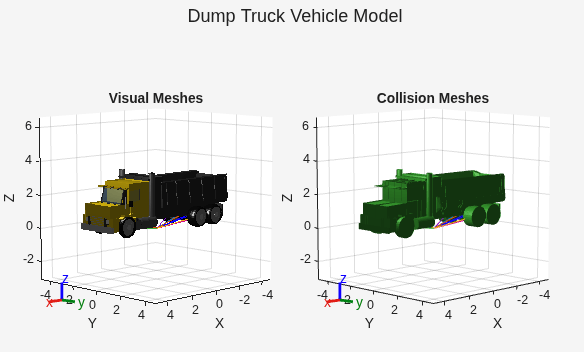
    Figure contains 2 axes objects. Axes object 1 with title Collision Meshes, xlabel X, ylabel Y contains 129 objects of type patch, line. Axes object 2 with title Visual Meshes, xlabel X, ylabel Y contains 282 objects of type patch, line.

    Load the agricultural tractor from the Offroad Vehicle Library, and create a reference path and a binary occupancy map.

    [tractor,data] = loadvehicle("agriculturaltractor",DataFormat="row");
    q = homeConfiguration(tractor);
    refPath = [0 0; 10 0; 20 0];
    map = binaryOccupancyMap(50,50,1);

    Create and configure an offroadControllerMPPI controller using the motion model and dimensions of the tractor. Note that if you need more precise dimensions, you can find vehicle diagrams on the corresponding vehicle page or by computing the bounding box from the vehicle mesh data.

    mppi = offroadControllerMPPI(refPath,Map=map,VehicleModel=data.MotionModel);
    mppi.Parameter.VehicleCollisionInformation.Dimension = [data.WheelBase data.RearTrackWidth];
    mppi.Parameter.VehicleCollisionInformation.Offset = tform2trvec(getTransform(tractor,q,"rear_axle_center"));

    See the offroadControllerMPPI page for more information about using the configured controller.

    Load the haul truck from the Offroad Vehicle Library, and create a reference path and binary occupancy map.

    [truck,data] = loadvehicle("haultruck");
    refPath = [0 0 0; 10 0 0; 20 0 0];
    map = binaryOccupancyMap(50,50,1);

    Create a controllerTEB controller and configure it using the vehicle data. Compute the angular velocity limit from the linear speed and minimum turning radius. Set the approximate vehicle dimensions using the wheel base and rear track width. Note that if you need more precise dimensions, you can find vehicle diagrams on the corresponding vehicle page or by computing the bounding box from the vehicle mesh data.

    teb = controllerTEB(refPath,map, ...
    MinTurningRadius=data.MinTurningRadius, ...
    MaxVelocity=[data.MaxForwardSpeed,data.MaxForwardSpeed/data.MinTurningRadius], ...
    MaxReverseVelocity=data.MaxReverseSpeed);
    teb.RobotInformation.Dimension = [data.WheelBase data.RearTrackWidth];

    See the controllerTEB (Navigation Toolbox) page for more information about using the configured controller.

    Input Arguments

    collapse all

    Type of offroad vehicle to load, specified as one of these valid vehicle model names:

    Vehicle ModelMesh VisualizationDescription
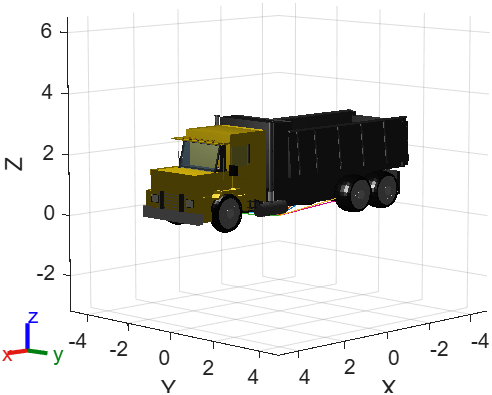
    "dumptruck"

    Dump truck rigid body tree model shown with visual meshes.

    Standard construction dump truck with front-wheel steering and tandem rear axles.

    For more information, see Dump Truck.

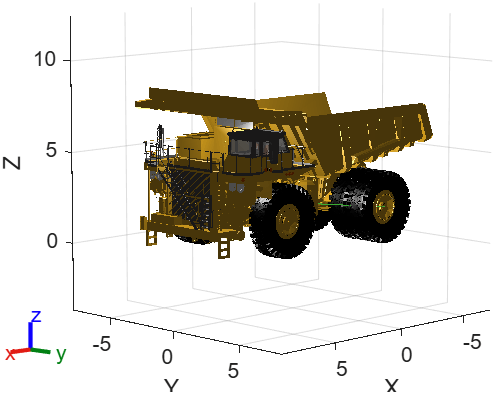
    "haultruck"

    Haul truck rigid body tree model shown with visual meshes.

    Mining haul truck with front-wheel steering.

    For more information, see Haul Truck.

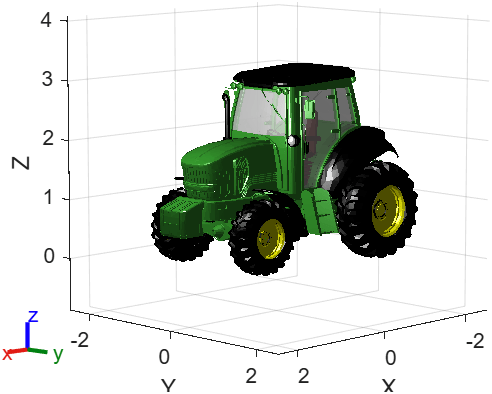
    "agriculturaltractor"

    Agricultural tractor rigid body tree model shown with visual meshes.

    Agricultural tractor with front-wheel steering and different front and rear wheel sizes.

    For more information, see Agricultural Tractor.

    Name-Value Arguments

    collapse all

    Specify optional pairs of arguments as Name1=Value1,...,NameN=ValueN, where Name is the argument name and Value is the corresponding value. Name-value arguments must appear after other arguments, but the order of the pairs does not matter.

    Example: loadvehicle("dumptruck",DataFormat="row")

    Data format for rigid body tree model configurations, specified as "struct", "row", or "column". To use dynamics functions, you must specify either "row" or "column". This name-value argument sets the DataFormat property of the rigidBodyTree output.

    Vehicle model version, specified as a positive integer. The version selects which variant of the vehicle model to load. Use this argument to access updated or alternative vehicle model variants when available.

    Output Arguments

    collapse all

    Rigid body tree model of the offroad vehicle, returned as a rigidBodyTree object. The rigid body tree includes attached visual and collision meshes for each body. The Gravity property is set to [0 0 -9.81] (standard earth gravity). Use the show function to visualize the vehicle meshes.

    Vehicle parameters and motion model, returned as a structure. The structure contains a subset of these fields depending on the vehicle type. Geometry fields are derived from the rigidBodyTree at homeConfiguration. The coordinate frame is X-forward, Y-left, Z-up, with the ground plane at Z = 0.

    • VehicleName — Display name of the vehicle, returned as a string scalar. Note that the display name differs from the input type string. For example, "agriculturaltractor" returns "Tractor".

    • Version — Version of the vehicle model, returned as a positive integer.

    • WheelBase — Distance between the front axle and the effective rear axle, returned as a positive scalar in meters. Computed as the X-distance between the mean front and effective-rear wheel-frame translations at homeConfiguration. For the dump truck, which has tandem rear axles, the effective rear axle is the midpoint of the two rear axles. This value drives MinTurningRadius and the motion model. See also RearAxleWheelBase.

    • RearAxleWheelBase — Distance from the front axle to the second (rearmost) rear axle, returned as a positive scalar in meters. Computed as the X-distance from front_axle_center to rear_axle_rearmost. Present only for the dump truck, which has tandem rear axles.

    • TrackWidth — Distance between left and right wheels on the same axle, returned as a positive scalar in meters. Computed as the absolute Y-distance between left and right wheel-frame translations at homeConfiguration. Present for vehicles with uniform track width across axles (dump truck). For vehicles with different front and rear track widths, see FrontTrackWidth and RearTrackWidth.

    • FrontTrackWidth — Distance between the left and right front wheels, returned as a positive scalar in meters. Computed as the absolute Y-distance between front left and right wheel-frame translations at homeConfiguration. Present for vehicles with different front and rear track widths (agricultural tractor, haul truck).

    • RearTrackWidth — Distance between the left and right rear wheels, returned as a positive scalar in meters. Computed as the absolute Y-distance between rear left and right wheel-frame translations at homeConfiguration. Present for vehicles with different front and rear track widths (agricultural tractor, haul truck).

    • WheelRadius — Wheel radius, returned as a positive scalar in meters. Computed as the wheel-frame Z-translation (ground plane at Z = 0). Present for vehicles with uniform wheel sizes across all axles (dump truck, haul truck). For the agricultural tractor, which has different front and rear wheel sizes, see FrontWheelRadius and RearWheelRadius instead.

    • FrontWheelRadius — Front wheel radius, returned as a positive scalar in meters. Computed as the front wheel-frame Z-translation. Present for vehicles with different front and rear wheel sizes (agricultural tractor).

    • RearWheelRadius — Rear wheel radius, returned as a positive scalar in meters. Computed as the rear wheel-frame Z-translation. Present for vehicles with different front and rear wheel sizes (agricultural tractor). The rear wheels are larger than the front wheels.

    • MinTurningRadius — Minimum turning radius, returned as a nonnegative scalar in meters. This is the rear-axle centerline path radius, computed as WheelBase / tan(MaxSteeringAngle). This value does not include track width or vehicle overhang.

    • MaxForwardSpeed — Maximum forward speed of the vehicle, returned as a nonnegative scalar in meters per second. This is a speed magnitude, not derived from geometry.

    • MaxReverseSpeed — Maximum reverse speed of the vehicle, returned as a nonnegative scalar in meters per second. This is a speed magnitude, not derived from geometry.

    • MotionModel — Kinematic motion model of the vehicle, returned as a kinematic model object, such as bicycleKinematics. The motion model is configured with the vehicle wheel base, maximum steering angle, and a VehicleSpeedRange of [-MaxReverseSpeed, MaxForwardSpeed].

    Tips

    Version History

    Introduced in R2026b