restart
R2026bSyntax
Description
Examples
Create a satellite scenario object and set the AutoSimulate property to false to enable manual simulation of the satellite scenario.
sc = satelliteScenario('AutoSimulate',false);Add a GPS satellite constellation to the scenario.
sat = satellite(sc,"gpsAlmanac.txt");Simulate the scenario using the advance function.
while advance(sc)
end
Obtain the satellite position histories.
p = states(sat);
AutoSimulate is false, so restart the scenario before adding a ground station.
restart(sc);
Add a ground station to the scenario.
gs = groundStation(sc);
Add access analysis between each satellite and ground station.
ac = access(sat,gs);
Simulate the scenario and determine the access intervals.
while advance(sc)
end
intvls1 = accessIntervals(ac)
intvls1 = 35×8 table
     "PRN:1"    "Ground station 32"    1    11-Jan-2020 23:20:25    12-Jan-2020 05:15:47    2.1322e+04    NaN    NaN
     "PRN:2"    "Ground station 32"    1    12-Jan-2020 04:03:16    12-Jan-2020 07:48:06    1.3490e+04    NaN    NaN
     "PRN:3"    "Ground station 32"    1    11-Jan-2020 19:50:06    11-Jan-2020 21:38:53    6.5273e+03    NaN    NaN
     "PRN:3"    "Ground station 32"    2    12-Jan-2020 01:52:43    12-Jan-2020 06:42:49    1.7406e+04    NaN    NaN
     "PRN:4"    "Ground station 32"    1    11-Jan-2020 19:50:06    12-Jan-2020 00:11:11    1.5665e+04    NaN    NaN
     "PRN:4"    "Ground station 32"    2    12-Jan-2020 04:54:02    12-Jan-2020 07:48:06    1.0444e+04    NaN    NaN
     "PRN:5"    "Ground station 32"    1    12-Jan-2020 05:52:03    12-Jan-2020 07:48:06    6.9624e+03    NaN    NaN
     "PRN:6"    "Ground station 32"    1    12-Jan-2020 02:43:29    12-Jan-2020 07:48:06    1.8276e+04    NaN    NaN
     "PRN:7"    "Ground station 32"    1    11-Jan-2020 21:09:52    12-Jan-2020 03:27:00    2.2628e+04    NaN    NaN
     "PRN:8"    "Ground station 32"    1    11-Jan-2020 20:33:36    12-Jan-2020 03:19:45    2.4369e+04    NaN    NaN
     "PRN:9"    "Ground station 32"    1    11-Jan-2020 19:50:06    12-Jan-2020 00:47:27    1.7841e+04    NaN    NaN
     "PRN:9"    "Ground station 32"    2    12-Jan-2020 05:08:32    12-Jan-2020 07:48:06    9.5733e+03    NaN    NaN
    "PRN:10"    "Ground station 32"    1    12-Jan-2020 00:32:56    12-Jan-2020 01:59:58    5.2218e+03    NaN    NaN
    "PRN:11"    "Ground station 32"    1    11-Jan-2020 22:15:09    12-Jan-2020 04:39:32    2.3063e+04    NaN    NaN
      ⋮
Visualize the simulation results.
v = satelliteScenarioViewer(sc,'ShowDetails',false);
play(sc);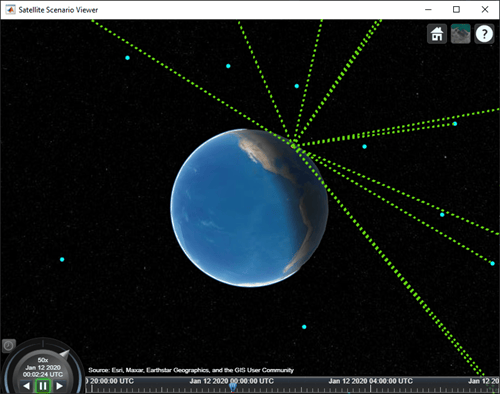
Verify that the access intervals are the same when you set the AutoSimulate property to true.
sc.AutoSimulate = true;
intvls2 = accessIntervals(ac)
intvls2 = 35×8 table
     "PRN:1"    "Ground station 32"    1    11-Jan-2020 23:20:25    12-Jan-2020 05:15:47    2.1322e+04    NaN    NaN
     "PRN:2"    "Ground station 32"    1    12-Jan-2020 04:03:16    12-Jan-2020 07:48:06    1.3490e+04    NaN    NaN
     "PRN:3"    "Ground station 32"    1    11-Jan-2020 19:50:06    11-Jan-2020 21:38:53    6.5273e+03    NaN    NaN
     "PRN:3"    "Ground station 32"    2    12-Jan-2020 01:52:43    12-Jan-2020 06:42:49    1.7406e+04    NaN    NaN
     "PRN:4"    "Ground station 32"    1    11-Jan-2020 19:50:06    12-Jan-2020 00:11:11    1.5665e+04    NaN    NaN
     "PRN:4"    "Ground station 32"    2    12-Jan-2020 04:54:02    12-Jan-2020 07:48:06    1.0444e+04    NaN    NaN
     "PRN:5"    "Ground station 32"    1    12-Jan-2020 05:52:03    12-Jan-2020 07:48:06    6.9624e+03    NaN    NaN
     "PRN:6"    "Ground station 32"    1    12-Jan-2020 02:43:29    12-Jan-2020 07:48:06    1.8276e+04    NaN    NaN
     "PRN:7"    "Ground station 32"    1    11-Jan-2020 21:09:52    12-Jan-2020 03:27:00    2.2628e+04    NaN    NaN
     "PRN:8"    "Ground station 32"    1    11-Jan-2020 20:33:36    12-Jan-2020 03:19:45    2.4369e+04    NaN    NaN
     "PRN:9"    "Ground station 32"    1    11-Jan-2020 19:50:06    12-Jan-2020 00:47:27    1.7841e+04    NaN    NaN
     "PRN:9"    "Ground station 32"    2    12-Jan-2020 05:08:32    12-Jan-2020 07:48:06    9.5733e+03    NaN    NaN
    "PRN:10"    "Ground station 32"    1    12-Jan-2020 00:32:56    12-Jan-2020 01:59:58    5.2218e+03    NaN    NaN
    "PRN:11"    "Ground station 32"    1    11-Jan-2020 22:15:09    12-Jan-2020 04:39:32    2.3063e+04    NaN    NaN
      ⋮
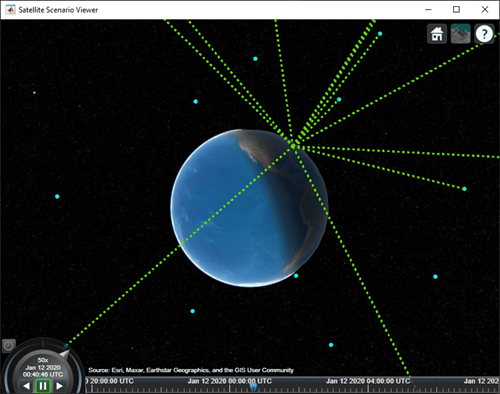
Visualize the scenario.
play(sc);
Input Arguments
Version History
Introduced in R2022a

