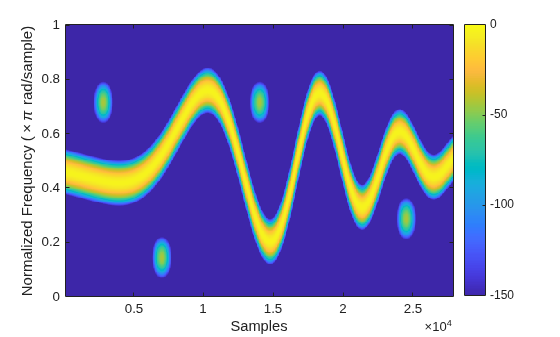
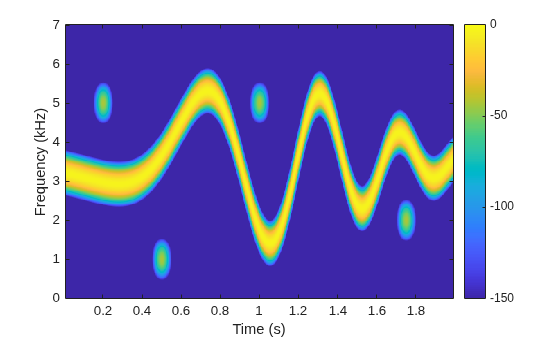
Generate a signal that consists of a voltage-controlled oscillator and four Gaussian atoms. The signal is sampled at 14 kHz for 2 seconds. Plot the spectrogram of the signal.
Create a set of spectrogram options for time-frequency labeling. Control the spectrogram resolution by leakage. Specify a leakage and an overlap of 99%.
Example: opts =
labelSpectrogramOptions("windowlength",Window="chebyshev") specifies a
labelSpectrogramOptions object that stores spectrogram options for
time-frequency labeling.
Input signal, specified as a vector or MATLAB® timetable with uniformly sampled times and one variable comprising a
column vector.
Example: x = chirp(0:1e-3:1,0,0.5,100,"quadratic") specifies a
quadratic swept-frequency signal.
Example: x =
timetable(seconds(0:1e-3:1)',chirp(0:1e-3:1,0,0.5,100,"quadratic")')
specifies a timetable containing a quadratic swept-frequency signal.
Data Types: single | double Complex Number Support: Yes
Sample rate, specified as a positive scalar.
If you specify Fs, then getTFMap
assumes that the input signal x has a sample rate of
Fs Hz.
If you do not specify Fs or set it to empty
[], then getTFMap uses a normalized
sample rate.
Do not specify Fs if you specify
x as a timetable. The getTFMap function
infers the sample rate from the time values specified in x.
Size of STFT of input signal, returned as a matrix. Time increases across the
columns of s and frequency increases down the rows.
Frequencies associated with STFT output, returned as a vector.
If you specify Fs, then f contains
cyclical frequencies in Hz.
If you do not specify Fs, then f
contains normalized frequencies in radians/sample.
The frequencies that the getTFMap function
returns in f depends on the resolution type of the spectrogram
(opts.ResolutionType), on whether
x is real-valued or complex-valued, and on whether you specify
the sample rate, Fs.
opts.ResolutionType
x
Frequency Range for
f
Fs Unspecified
Fs Specified
"leakage"
Real-valued
[0,π] rad/sample
[0,Fs/2] Hz
Complex-valued
[–π,π] rad/sample
[–Fs/2,Fs/2] Hz
"rbw" or
"windowlength"
Real-valued
[0,π] rad/sample
[0,Fs/2] Hz
Complex-valued
(–π,π] rad/sample
(–Fs/2,Fs/2] Hz
Times associated with STFT output, returned as a vector.
If you specify Fs, then t contains
time instants in seconds.
If you do not specify Fs, then t
contains sample indices in sample numbers.
The values in t correspond to the midpoint of each
segment.
You clicked a link that corresponds to this MATLAB command:
Run the command by entering it in the MATLAB Command Window.
Web browsers do not support MATLAB commands.
Seleziona un sito web
Seleziona un sito web per visualizzare contenuto tradotto dove disponibile e vedere eventi e offerte locali. In base alla tua area geografica, ti consigliamo di selezionare: .
Puoi anche selezionare un sito web dal seguente elenco:
Come ottenere le migliori prestazioni del sito
Per ottenere le migliori prestazioni del sito, seleziona il sito cinese (in cinese o in inglese). I siti MathWorks per gli altri paesi non sono ottimizzati per essere visitati dalla tua area geografica.