Define Variant Constraints for the Model
R2026bWhen you define variant configurations using Simulink® Variant Manager™, you might want to prevent certain variant combinations, such as those that are not valid for your workflow or are still under development. Variant constraints are useful in such cases. A constraint is a condition expression that uses variant control variables to disable specific variant paths in your model hierarchy.
Open Example Model
Open the VMPlantGS model.
open_system("VMPlantGS");Add Constraint
In the VMPlantGS model, create a constraint to prevent the basic
plant from being configured with noisy inputs.
Open the model.
open_system("VMPlantGS");Tip
If Variant Manager for the top-level model is open, you can right-click the row for the Plant model in the model hierarchy pane and click Open Model. This action opens the referenced model in a separate window.

Open Variant Manager for the model.
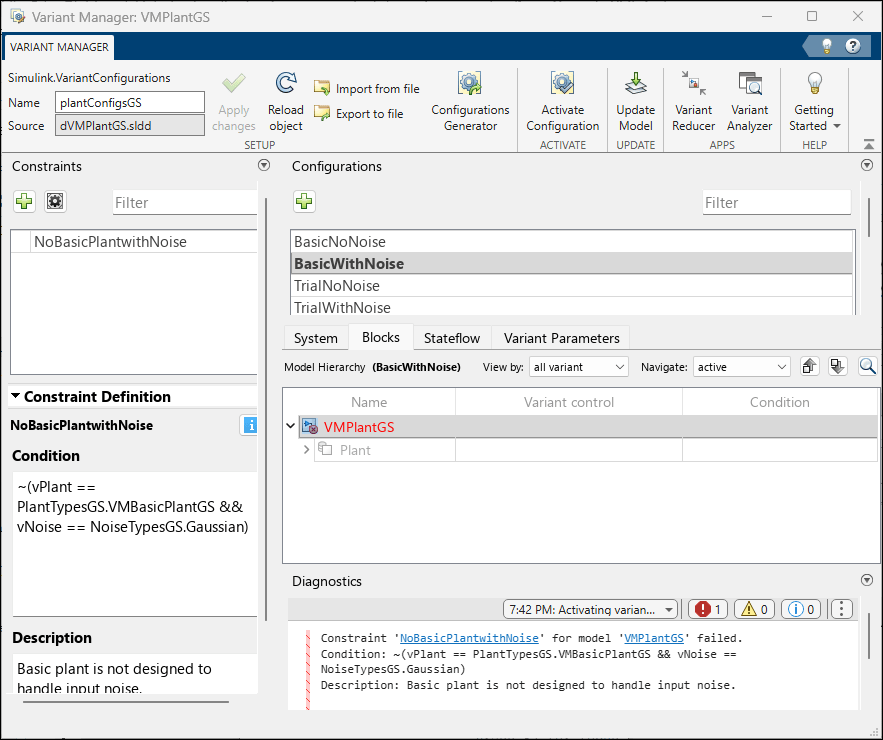
Select the configuration BasicWithNoise. Note the variant control variable names and their values in the configuration.
Go to the Constraints tab and click Add constraint. Give the newly added constraint a name, for example,
NoBasicPlantwithNoise.In the Condition box, type the constraint expression.
First, write the condition that represents the use of basic plant with noise input:
vPlant == PlantTypesGS.VMBasicPlantGS && vNoise == NoiseTypesGS.Gaussian.Then, negate the condition to disable that combination:
~(vPlant ==
                            PlantTypesGS.VMBasicPlantGS && vNoise == NoiseTypesGS.Gaussian)
.
Optionally, add a description to explain why this constraint exists.
Click Apply Changes.
Try activating the
BasicWithNoiseconfiguration. The activation fails because the constraint is not satisfied. Check that the same constraint fails when you try to simulate the model.In the Variant Manager for the top-level model
slexVariantManagerOverviewGS, try to activate theLinearBasicWithNoiseconfiguration. The same constraint fails for the top-level configuration, indicating that it is not a valid variant combination for the system.Constraints apply even if you have not defined named configurations. If the control variable values in the data source of the model match the constraint condition, the constraint takes effect.
Tip
You can change the layout of the Variant Manager window according to your preference. To move a pane, click the top of the pane and drag.
Open Completed Model
You can also access a fully set-up version of the models used in this tutorial, which already includes all configurations. To open this version, use this command.
open_system("slexVariantManagerOverview");See Also
Simulink.VariantManager.validateConstraint | Simulink.VariantConfigurations

