DateTime Time Standard Converter
R2026bDateTime Time Standard Converter block

To add a block to a model, double-click the canvas and start typing the block name. Then, select the block from the list.
Libraries:
Simulink /
DateTime
Description
The DateTime Time Standard Converter block converts a DateTime signal between time standard
formats.
Examples
This example shows how the DateTime Time Standard Converter block converts a DateTime signal from one time standard to another. The model contains three DateTime Clock blocks: ZeroLeapSeconds, OneLeapSecond, and AllLeapSeconds.
DateTime Clock block ZeroLeapSeconds outputs a DateTime signal with time standard UTC and is set to 12:00 AM UTC, January 1, 1970 at simulation time 0. This is before any leap seconds are inserted into UTC. The UTC output of ZeroLeapSeconds is converted to time standards TAI and TT, respectively, by the DateTime Time Standard Converter blocks ZeroToTAI and ZeroToTT. The TAI output is 10 seconds ahead of the UTC output. The TT output is 42.184 seconds ahead of the UTC output, but this difference is truncated to 42 seconds.
DateTime Clock block OneLeapSecond is set to 12:00 AM UTC, July 1, 1972, immediately after the first leap second was added. Its output is converted by the DateTime Time Standard Converter blocks OneToTAI and OneToTT. The difference between TAI and UTC signals has increased to 11 seconds, while the TT-UTC difference is now 43.184 seconds, truncated to 43 seconds.
DateTime Clock block AllLeapSeconds is set to 12:00 AM UTC, January 1, 2017, immediately after the most recent leap second was added. Its output is converted by the DateTime Time Standard Converter blocks AllToTAI and AllToTT. The TAI-UTC difference is 37 seconds, while the TT-UTC difference is 69.184 seconds, truncated to 69 seconds.
model='ex_datetime_time_standard_converter_block';
load_system(model)
sim(model);
open_system(model)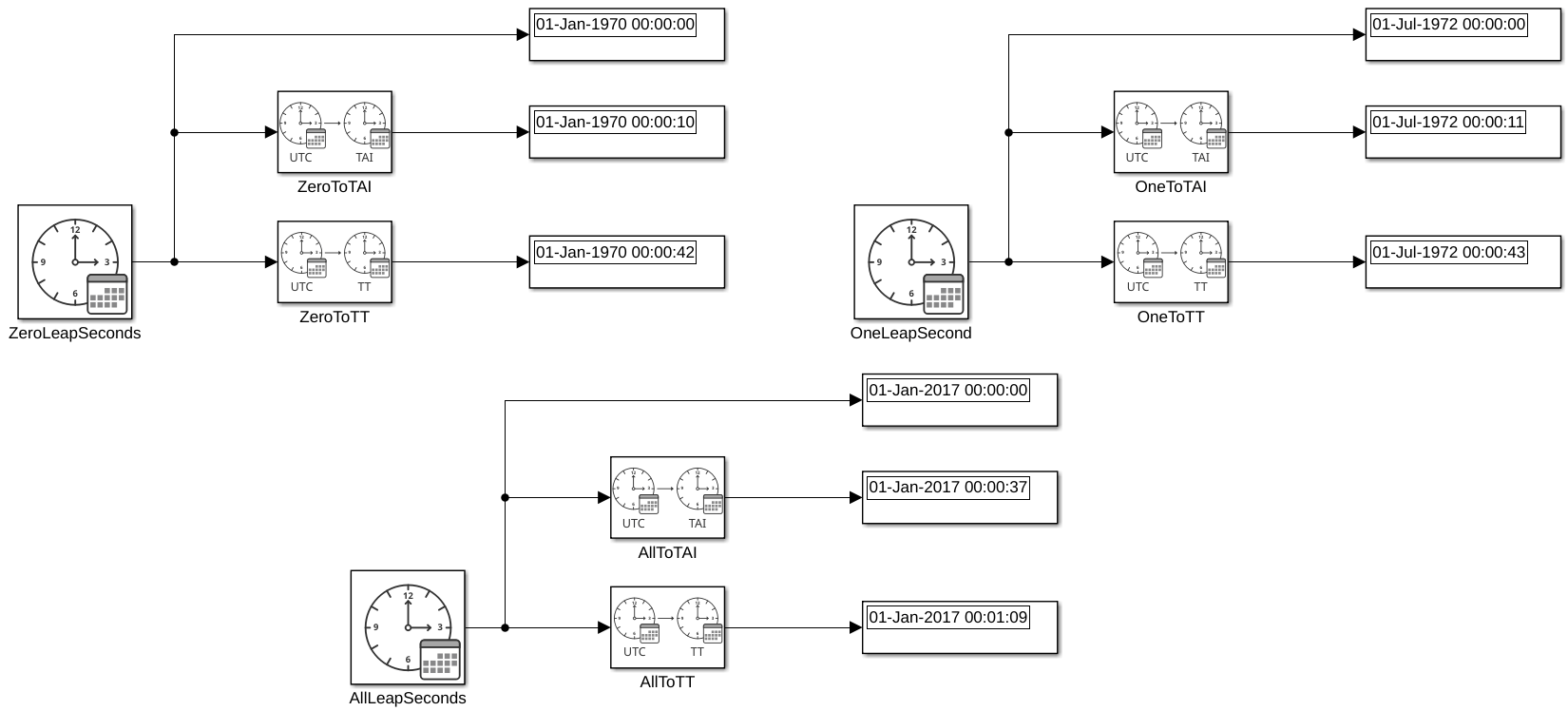
Ports
Input
Output
Parameters
Block Characteristics
Data Types |
|
Direct Feedthrough |
|
Multidimensional Signals |
|
Variable-Size Signals |
|
Zero-Crossing Detection |
|
Extended Capabilities
Version History
Introduced in R2026b
See Also
Blocks
- DateTime Clock | DateTime to Calendar Time | DateTime Data Type Converter | DateTime to Formatted String | From DateTime | To DateTime

