Serial Transmit
R2026bSerial Transmit Advanced SAMD block

To add a block to a model, double-click the canvas and start typing the block name. Then, select the block from the list.
Libraries:
Simulink Support Package for Arduino Hardware /
Advanced /
SAMD
Description
Use the Serial Transmit block to transmit a variable-length array of data on the Arduino® SAMD21 core serial port and configure a serial communication interface on hardware using a SERCOM channel.
To use the SERCOM interrupts for serial transmission, configure the Hardware Interrupt block for SAMD boards. This block allows you to enable and manage SERCOM interrupts, such as transmit complete interrupt.
During simulations without hardware, the Serial Transmit block transmits zeros.
If you use this block in a model that has the Standard Servo Read, Standard Servo Write, or Continuous Servo Write block, specify longer sample times to avoid overruns.
Note
The Serial Transmit block supports C/C++ code generation using Embedded Coder®.
Warning
Do not connect the serial port pins to an RS-232 serial interface, such as the DE-9M connector on a computer, without limiting the input voltage. The RS-232 standard allows higher voltages that can damage your hardware. For more information, read the documentation for your Arduino hardware.
Supported Arduino Boards
Arduino MKR 1000
Arduino MKR Wi-Fi® 1010
Arduino MKR Zero
Arduino Nano 33 IoT
Examples
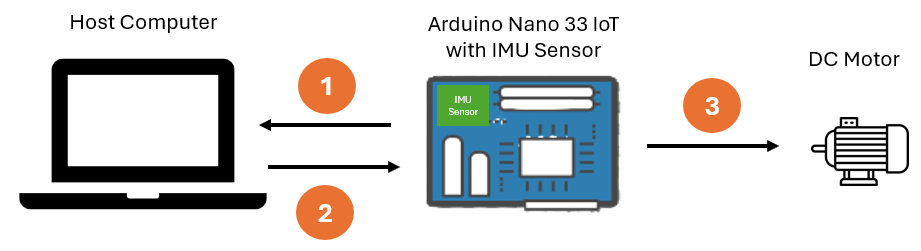
IMU-Based Motor Speed Control on Arduino Using SERCOM Serial Interrupts
Learn how to implement motor speed control on Arduino using IMU sensor data and SERCOM serial interrupts in Simulink®.
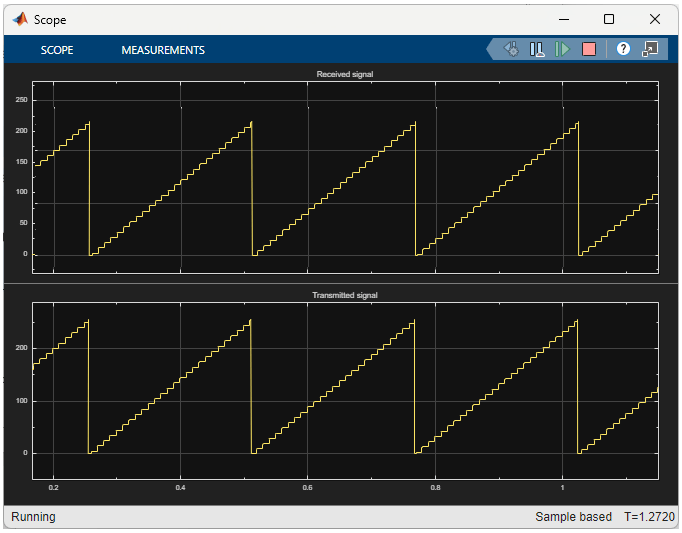
Send and Receive Data Between Arduino and Host Using Serial Communication
Use the Serial Transmit and Serial Receive blocks from the Simulink® Support Package for Arduino® Hardware to transmit and receive data between your host computer and Arduino hardware using a USB to serial converter. When the Arduino hardware receives data, it transmits back the same data to the host. The host then displays both the transmitted and received data on the scope.
Ports
Input
Parameters
Extended Capabilities
Version History
Introduced in R2026a

