Control Active Choice of Variant Subsystem During Simulation or Execution of Generated Code
R2026bYou can change the active variant of a Variant
Subsystem block during simulation or execution of the generated code by writing to a
variable that you use in a variant control expression. To enable run-time activation of
variants, in the Block Parameters dialog box of the Variant Subsystem block,
set Variant activation time to runtime. To set
the block parameter programmatically, enter this command in the MATLAB® Command
Window:
set_param("Variant Subsystem",VariantActivationTime="runtime")
Variant Subsystem is the name or handle of
the subsystem.When you use run-time variants, place the variant control variable in the base workspace, mask workspace, or model workspace. To write to that variant control variable, you can use:
A Parameter Writer block.
The
setVariablefunction of aSimulationobject.External code by using the C API interface. To enable C API code generation for variant control variables, select the model configuration parameter Generate C API for: parameters (Simulink Coder). For more information on using the C API interface, see Get Started with C API (Simulink Coder).
For information on changing the active variant of a variant parameter (Simulink.VariantVariable) or variant parameter bank (Simulink.VariantBank) during simulation or execution of the generated code, see
Change Active Choice of Variant Parameters and Variant Parameter Banks During Simulation or Execution of Generated Code.
Use System Mask and Model Arguments to Control Variant Blocks at Run Time
To control variant blocks at run time using model arguments, select a parameter in the
model workspace and tune it using the top model reference block. For example, use a
Simulink.VariantControl object as a variant control variable. By
configuring the object as a model argument, you can pass different values for the variable
to each instance of a Model block. Similarly, when you use a
Simulink.VariantControl object as a variant control variable in a
Simulink.VariantVariable object, you can configure the variant control
variable as a model argument and pass different values to each instance of a
Model block to have different values for the
Simulink.VariantVariable object in the referenced model.
Note
Using a Simulink.VariantVariable object as a variant control for
variant blocks is not supported.
When you configure a Simulink.VariantControl object as a model argument:
The object must be in the model workspace.
The value of the object must be a
Simulink.Parameterobject or a numeric type.ActivationTimeproperty must be set to'startup'or'runtime'.
To configure a Simulink.VariantControl object as a model argument, in
the Model Explorer, select Argument for the object. For more
information about model arguments, see Configure Instance-Specific Values for Block Parameters in a Referenced Model.
Change Active Variant by Using Parameter Writer Block
To use a Parameter Writer block to model the variant change, place a
Parameter Writer block inside a conditionally executed subsystem or in an
event function. Use the Parameter Writer block to write to a variable that
you use in a variant control expression. The variant control variable can be a
Simulink.VariantControl object with the
ActivationTime property set to 'runtime'.
In this case, when a Variant Subsystem block has Variant activation time set to Inherit from
Simulink.VariantControl, the block inherits a variant activation time of
runtime from the Simulink.VariantControl
object.
Set the Destination parameter of the Parameter Writer block to one of these values based on the location of your variant control variable:
Block parameter— Variant control variable is a mask parameter in a subsystem.Model workspace variable— Variant control variable is in the model workspace.Base workspace variable— Variant control variable is in the base workspace or a data dictionary.
For example, you can create a mask parameter V in a
subsystem and use it in a variant control expression. The Parameter Writer
block writes the value of V.
Switch Active Variants at Run Time Using a Parameter Writer Block Inside a Conditional Subsystem
This example shows how to change the traffic signal lights for a traffic control system by using run-time variants.
Open the harness model slexVariantRunTimeTraffic_Harness.
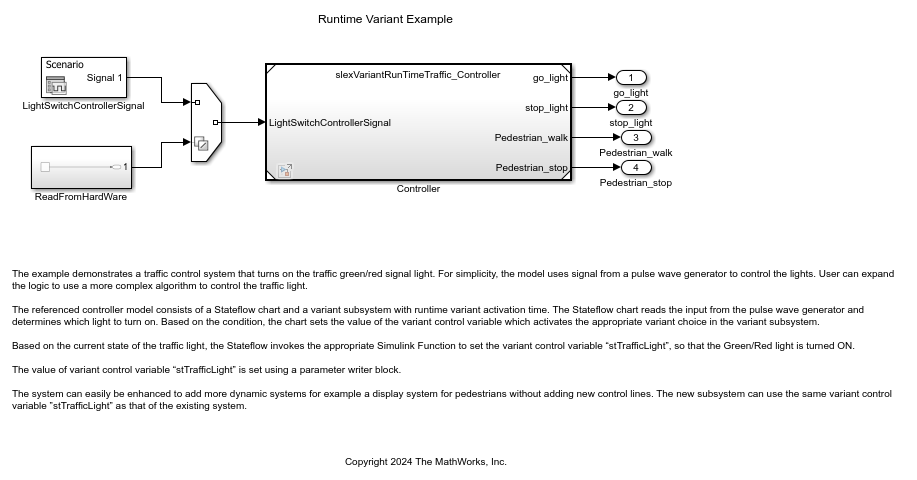
The harness model uses a Variant Source block with the Variant control mode parameter set to sim codegen switching to automatically switch the input signals between simulation and code generation.
For simulation, signals from a pulse wave generator controls the signal. For code generation, you can replace the ReadFromHardware subsystem with production logic that provides the signal inputs.
Open the traffic control system model slexVariantRunTimeTraffic_Controller.
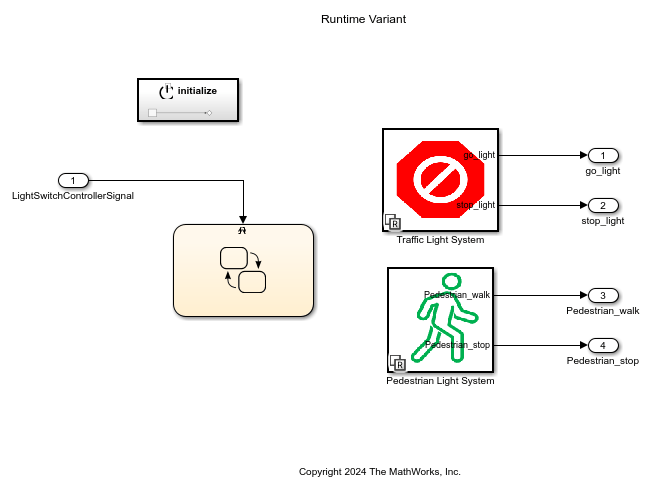
In this model, the Initialize Function block is used to initialize the variant control variable at the beginning of simulation or execution of the generated code.
The controller model contains a Stateflow® chart and a variant subsystem configured for run-time activation.
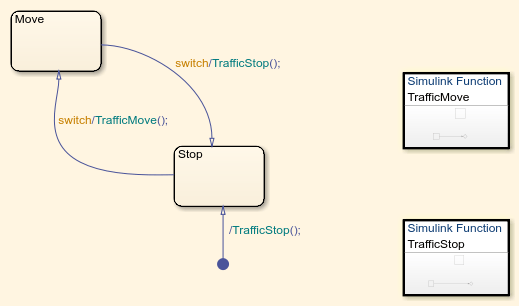
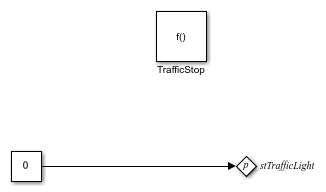
The Stateflow chart determines which light is turned on by using the input signal as a trigger. Depending on the current state of the signal, Stateflow invokes the corresponding Simulink Function block, TrafficMove or TrafficStop, to set the variant control variable stTrafficLight by using a Parameter Writer block. The variant control variable stTrafficLight activates the corresponding variant choice, go or stop, within the Variant Subsystem block.
The contents of the Simulink Function block TrafficMove.
TrafficMove
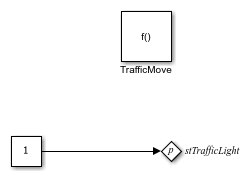
The contents of the Simulink Function block TrafficStop.
TrafficStop
Mask icons are promoted automatically to the run-time variant subsystem to show the change in active variant during simulation.
An additional variant subsystem in the controller model uses the same variant control variable stTrafficLight (with opposite logic) to control a pedestrian crossing light.
Switch Active Variants at Run Time Using a Parameter Writer Block Inside an Event Function
This example shows how to use startup and run-time variant activation times to calculate the torque demand for a truck capable of operating in both two-wheel and four-wheel drive modes.
During startup, the system assesses whether the truck is equipped for a two-wheel drive system or switchable four-wheel drive system. If the truck has a switchable four-wheel drive system, the run-time variant selects between the two-wheel and four-wheel modes during the run, taking into account the external conditions and driver overrides. A startup variant determines whether to use the two-wheel drive system or the switchable four-wheel drive system.
Open the harness model slexVariantRunTimeTruck_Harness.
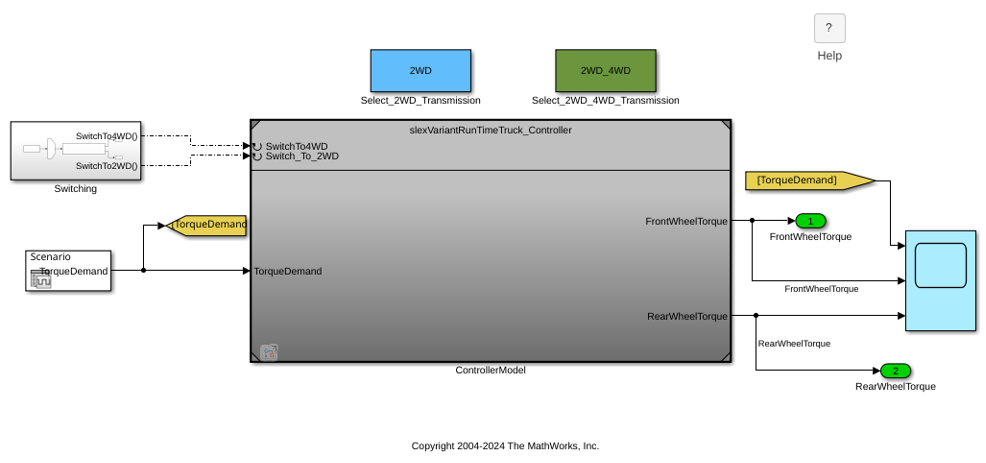
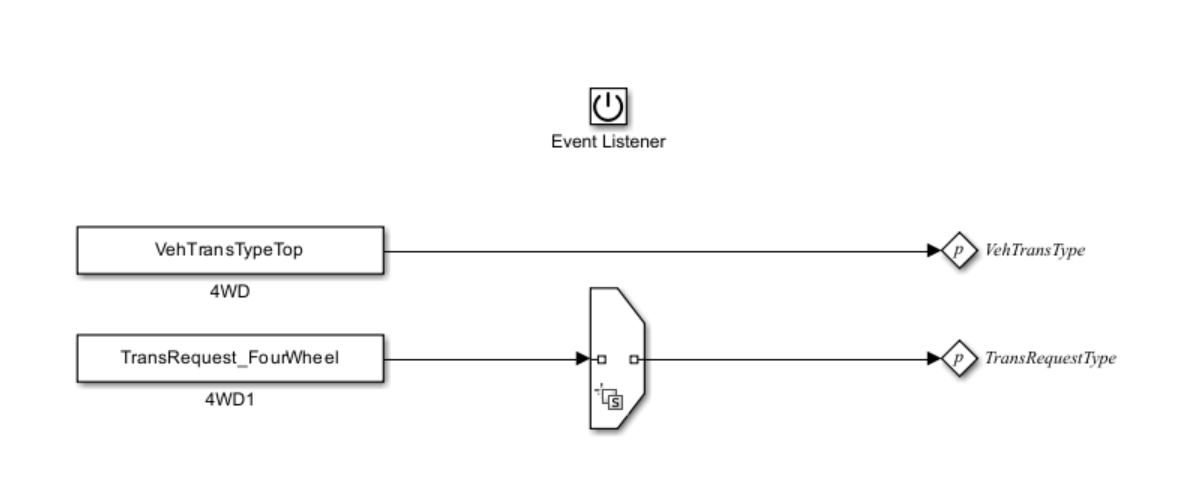
In the top model, at the top of the canvas, you can select whether to run the model as a two-wheel drive or a switchable four-wheel drive truck by double-clicking the Select_2WD_Transition or Select_2WD_4WD_Transition block. The block callbacks set the value of the variant control variable that corresponds with the selected truck design. The Reset Function block in the referenced model triggers the run-time variant switching in a switchable four-wheel drive truck.
The top model can be used only in simulation mode, but the referenced model can be used for simulation as well as code generation.
Open the referenced controller model slexVariantRunTimeTruck_Controller.
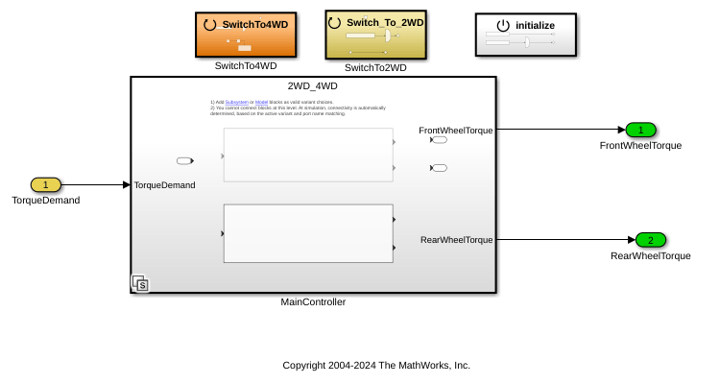
The controller model uses startup variant activation time to select the truck drive type.
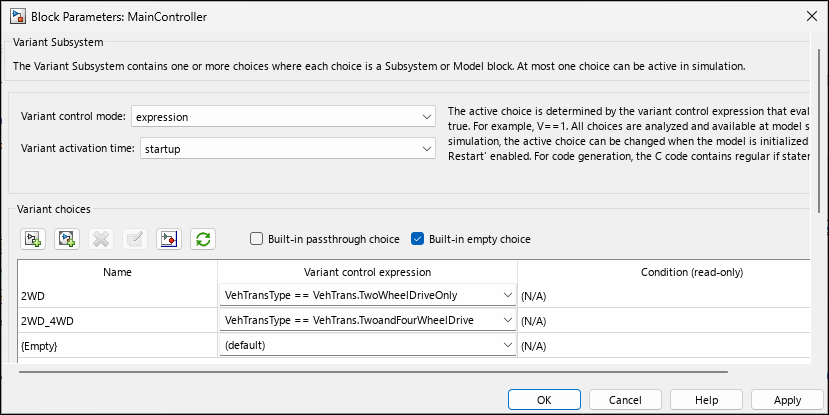
If the truck is a switchable four-wheel drive truck, the model uses run-time variant activation time to switch between drive types based on external inputs.
During run-time switching, State Reader and State Writer blocks transfer states between drive modes. State transfer ensures a smooth transition of output during run-time variant switching.
The Initialize Function block sets the truck type based on the argument received from the top model. If the truck type is set to a switchable four-wheel drive, the system is initialized to four-wheel drive mode.
Note that within the Initialize Function block, there is a Variant Source block with the variant control expression VehTransType==VehTrans.TwoandFourWheelDrive. The VehTransType value is assigned by the first Parameter Writer block. Without block priority, Simulink® sorts blocks based on their names.
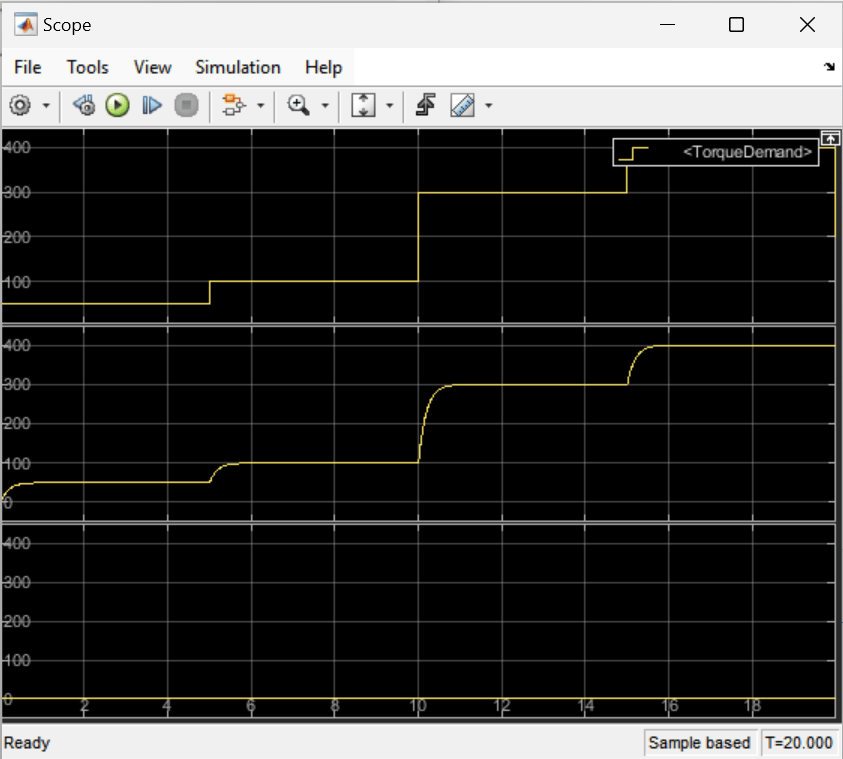
When the truck is set to the two-wheel drive configuration at startup, the torque for the rear wheels remains at zero throughout the simulation and the torque demand is met entirely by the front wheels.
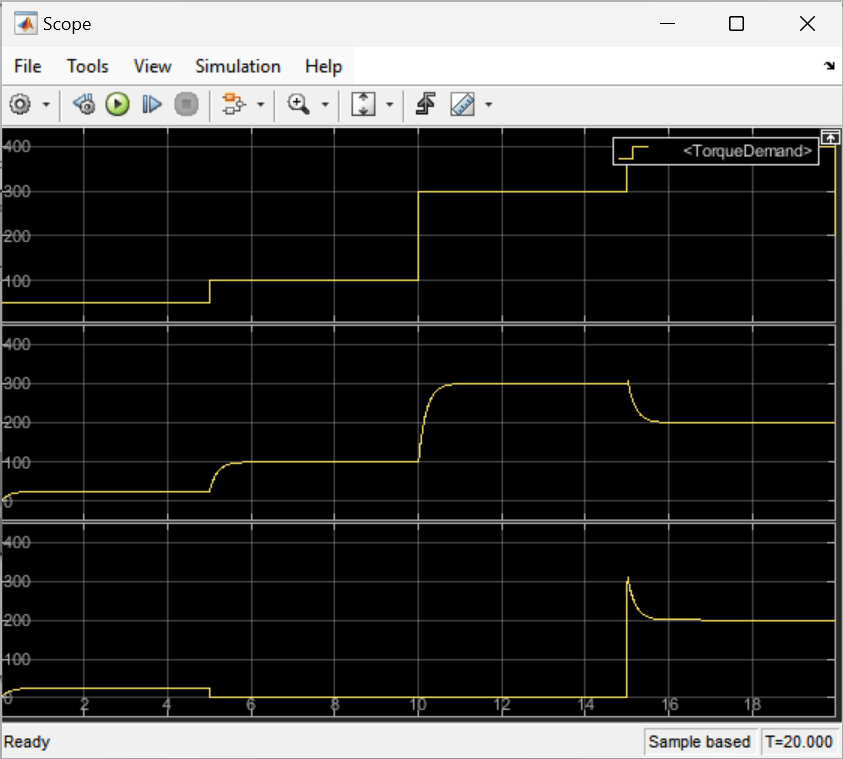
When the truck is set to the switchable four-wheel drive configuration at startup, the rear wheel torque is calculated only when the four-wheel drive is active.
Generate code for the controller model.
All states within the system are unconditionally initialized within the slexVariantRunTimeTruck_Controller_initialize() function. This function helps the initialization of states with initial condition values when explicit state initialization is not done during run-time variant switching. In this example, the run-time variant control variable TransRequestType is explicitly initialized within the Initialize Function block using a Parameter Writer block.
The state handoff happens inside the functions slexVariantRunTimeTruck_Controller_SwitchTo4WD() and slexVariantRunTimeTruck_Controller_Switch_To_2WD(). The top model invokes these functions to switch the run-time variant.
void slexVariantRunTimeTruck_Controller_SwitchTo4WD(void)
{
  if (slexVariantRunTimeTruck_C_InstP.VehTransType == TwoandFourWheelDrive) {
    slexVariantRunTimeTruck_Contr_P.TransRequestType =
      slexVariantRunTimeTruck_Contr_P.TransRequest_FourWheel;
  }
Examples Using Parameter Writer Block for Different Locations of Variant Control Variable
These examples demonstrate how to use a Parameter Writer block to write to a variant control variable in different workspaces.
Control Run-Time Variants Using Base Workspace Variable
This example shows how to control the active variant of a run-time Variant Subsystem block by using a variable in the base workspace.
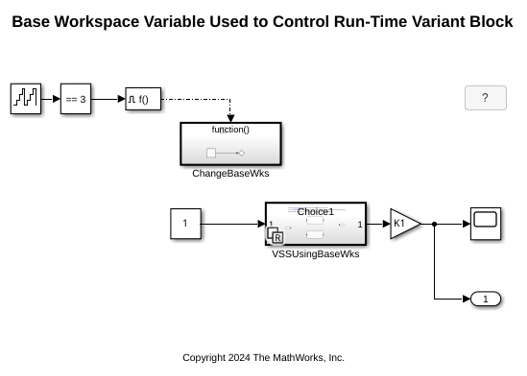
In this model, the active variant of run-time Variant Subsystem block RuntimeVariantBaseWorkspace/VSSUsingBaseWks is controlled by using the variant control expressions V_base == 1 and V_base == 2. The variable V_base is defined in the base workspace. The Parameter Writer block PW1, contained in the function-call subsystem RuntimeVariantBaseWorkspace/ChangeBaseWks, controls V_base.
During simulation, the Parameter Writer block changes the value of V_base to switch the active variant. You can see this switch by observing the change in output value at time step 3.
Control Run-Time Variants Using Mask Workspace Variable
This example shows how to control the active variant of a run-time Variant Subsystem block by using a variable in the mask workspace.
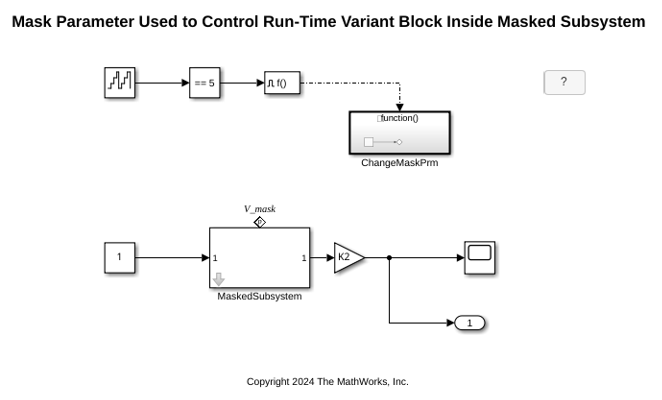
In this model, the active variant of run-time Variant Subsystem block RuntimeVariantMaskWorkspace/VSSUsingMaskParam is controlled by using the variant control expressions V_mask == 1 and V_mask == 2. Parameter V_mask is defined in the RuntimeVariantMaskWorkspace/MaskedSubsystem subsystem mask. The Parameter Writer block PW2, contained in the function-call subsystem RuntimeVariantMaskWorkspace/ChangeMaskPrm, controls this mask parameter value.
During simulation, the Parameter Writer block changes the value of V_mask to switch the active variant. You can see this switch by observing the change in output value at time step 5.
Control Run-Time Variants Using Model Argument
This example shows how to control the active variant of a run-time Variant Subsystem block by using a model argument.
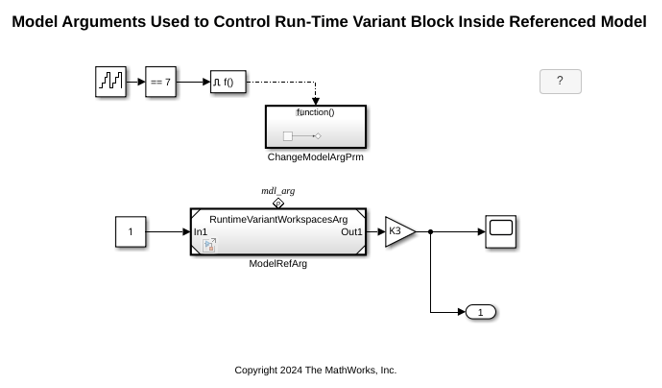
In this model, the active variant of run-time Variant Subsystem block RuntimeVariantModelArgument/VSSUsingModelWksAndArg is controlled by using the variant control expressions mdl_arg == 1 and mdl_arg == 2. Parameter mdl_arg is defined in the model workspace for subsystem RuntimeVariantWorkspacesArg.
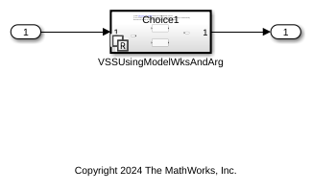
The model block RuntimeVariantWorkspacesArg/ModelRefArg uses mdl_arg as an instance parameter to control the run-time variant block in the referenced model. You can have multiple instances of the same model with different values. This model uses only one instance of the model slexRuntimeVariantWorkspacesArg/ModelRefArg. The Parameter Writer block PW3, contained in the function-call subsystem RuntimeVariantModelArgument/ChangeModelArgPrm, controls this argument value.
During simulation, the Parameter Writer block changes the value of mdl_arg to switch the active variant. You can see this switch by observing the change in output value at time step 7.
When you use model arguments, clear the Argument check box on the Instance parameters tab of the Model Reference Block Properties dialog box.
Control Run-Time Variants Using System Mask
This example shows how to control the active variant of a run-time Variant Subsystem block by using a variable in a system mask.
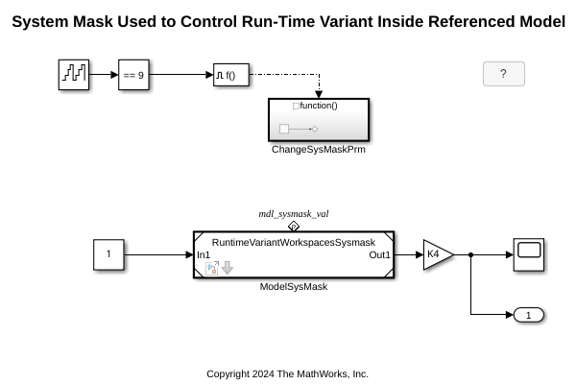
In this model, the active variant of run-time Variant Subsystem block RuntimeVariantSystemMask/VSSUsingModelWksAndSysMask is controlled by using the variant control expressions mdl_sysmask_val == 1 and mdl_sysmask_val == 2. Parameter mdl_sysmask_val is defined in the model workspace for subsystem RuntimeVariantWorkspacesSysmask.
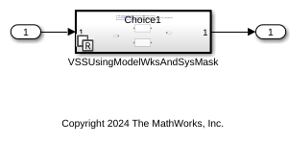
In this model, the parameter mdl_sysmask_val has a system mask so that it behaves like any other masked block. The model block ModelSysMask uses this parameter to control the run-time variant block in the bottom model. The Parameter Writer block PW4, contained in the conditional subsystem ChangeSysMaskPrm, controls this system mask parameter value.
During simulation, the Parameter Writer block changes the value of mdl_sysmask_val to switch the active variant. You can see this switch by observing the change in output value at time step 9.
Change Active Variant by Using Simulation Object
Another method to change the active variant of a Variant Subsystem block
is by using a MATLAB script to write to the variant control variable. When you use a Simulation
object to control simulation, use the setVariable function of the
object to write to the variant control variable in any workspace while simulation is
paused.
This code pauses a simulation, then switches the active variant choice for different locations of the variant control variable.
% start simulation
mdl = "runtimeVariant";
open_system(mdl);
s = simulation(mdl)

% update variant control variable stored in a base workspace
s = setVariable(s,"V",0);
step(s,PauseTime=5);
s = setVariable(s,"V",1);

% update variant control variable that is a Simulink.Parameter object
% stored in a model workspace
s = setVariable(s,"M.Value",int32(1),"Workspace","runtimeVariant");
step(s,PauseTime=5);
s = setVariable(s,"M.Value",int32(2),"Workspace","runtimeVariant");

% update variant control variable stored in a mask workspace
s = setBlockParameter(s,"runtimeVariant/MaskSubsystem","V","1");
step(s,PauseTime=5);
s = setBlockParameter(s,"runtimeVariant/MaskSubsystem","V","2");

% update a variant control variable as a model argument
s = setBlockParameter(s,"runtimeVariant/Model","ParameterArgumentValues",struct("V","1"));
step(s,PauseTime=5);
s = setBlockParameter(s,"runtimeVariant/Model","ParameterArgumentValues",struct("V","2"));

% resume simulation
step(s,PauseTime=10);
out = stop(s);
Control Run-Time Variants Using a Simulation Object to Write to Model Argument
This example shows how to change the active variant of a Variant Subsytem block by using a Simulation object to write to the variant control variable while simulation is paused.
mdl = "RuntimeVariantModelArgumentWithoutPM.slx";
open_system(mdl)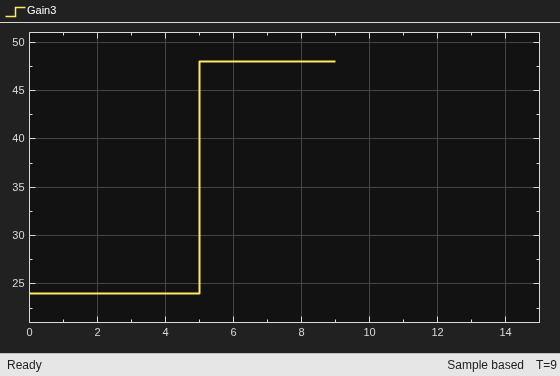
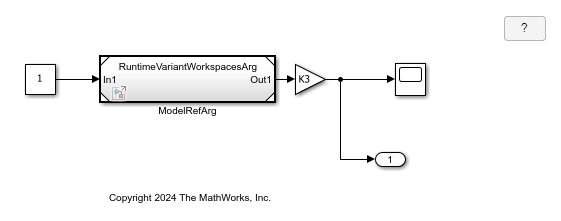
In this model, the active variant of run-time Variant Subsystem block RuntimeVariantModelArgumentWithoutPM/VSSUsingModelWksAndArg is controlled by using the variant control expressions mdl_arg == 1 and mdl_arg == 2. Parameter mdl_arg is defined in the model workspace for subsystem RuntimeVariantWorkspacesArg.
open_system("RuntimeVariantWorkspacesArg.slx")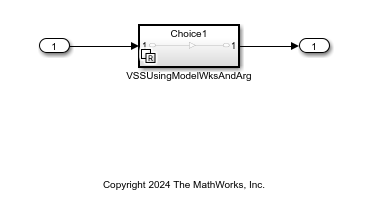
The model block RuntimeVariantWorkspacesArg/ModelRefArg uses mdl_arg as an instance parameter to control the run-time variant block in the referenced model. You can have multiple instances of the same model with different values. This model uses only one instance of the model slexRuntimeVariantWorkspacesArg/ModelRefArg.
During simulation, you can use a script to pause simulation then change the value of mdl_arg to switch the active variant. You can see this switch by observing the change in output value at time step 5. Note that you must use a structure to write to model arguments.
s = simulation(mdl);
s = setBlockParameter(s, "RuntimeVariantModelArgumentWithoutPM/ModelRefArg", ...
   "ParameterArgumentValues", struct('mdl_arg','1'));
step(s,PauseTime=5);
s = setBlockParameter(s, "RuntimeVariantModelArgumentWithoutPM/ModelRefArg", ...
   "ParameterArgumentValues", struct('mdl_arg','2'));
step(s,PauseTime=10);
out = stop(s);
Modeling Guidelines
When configuring your model to use run-time variants, consider these modeling guidelines:
Place the Variant Subsystem block with run-time activation time outside of the Initialize Function, Reset Function, or Reinitialize Function blocks. Avoid using a Variant Subsystem block with run-time activation within these functions.
To use a Parameter Writer block to model the variant change, place the Parameter Writer block inside a conditionally executed subsystem or in an event function.
To change the variant without a Parameter Writer block, use a
Simulationobject workflow.Use the equality operator in variant control expressions during run-time activation to prevent the occurrence of multiple active variants during simulation. For example, using control expressions
V ~= 1andV ~= 2can result in a scenario where the value ofVis 3 and multiple variants are active simultaneously.Use startup activation time if you do not require changing the variant at each step but require selecting the active variant just before the run.
For more information, see Configure Instance-Specific Values for Block Parameters in a Referenced Model.
A model exchange FMU block can be used as a run-time variant. Cosimulation FMU blocks are not supported for run-time activation.
For run-time activation, the Validate Parameter parameter of the Parameter Writer block must be selected.
Handling Blocks with States
When the variant choice blocks switch from active to inactive or from inactive to active, you can choose to model the state hand-off or reset explicitly. To achieve the state hand-off or reset, use the State Reader or State Writer blocks.
States with initial conditions are unconditionally initialized by the model start or initialize function. Consider explicit reset or reinitialization of the states by using the Reset Function block and Reinitialize Function block.
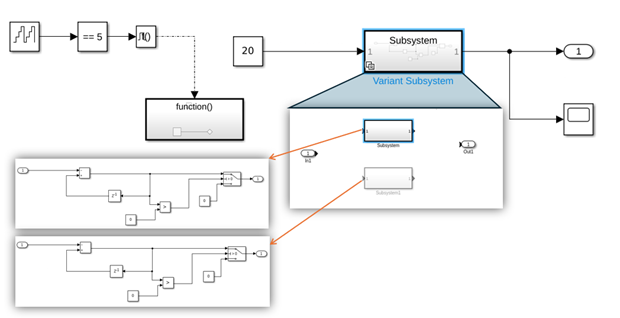
For example, the model illustrates the switching of the active variant from one to the other through the Parameter Writer block from a function-call subsystem. However, a state hand-off or reset is missing when switching occurs.
Code Generation with Run-Time Variants
The code generator generates conditional code as part of an
if-elseif-else statement similar to this:
void mParamWrWithOutIRTAndbaseW_codegen_step(void)
{
  mParamWrWithOutIRTAndbaseW_co_B.Compare =
    (mParamWrWithOutIRTAndbaseW_c_DW.Output_DSTATE ==
     mParamWrWithOutIRTAndbaseW__co_P.CompareToConstant_const);
  if (mParamWrWithOutIRTAndbaseW_co_B.Compare) {
    V = mParamWrWithOutIRTAndbaseW_co_P.Constant1_Value_c;
  }

  if (V == 1) {
    mParamWrWithOutIRTAndbaseW_co_Y.Out1 =
      mParamWrWithOutIRTAndbaseW_co_P.Gain_Gain *
      mParamWrWithOutIRTAndbaseW_co_P.Contant1_Value;
  } else if (V == 2) {
    mParamWrWithOutIRTAndbaseW_co_Y.Out1 =
      mParamWrWithOutIRTAndbaseW_co_P.Gain_Gain_a *
      mParamWrWithOutIRTAndbaseW_co_P.Contant1_Value;
  }

  mParamWrWithOutIRTAndbaseW_c_DW.Output_DSTATE +=
    mParamWrWithOutIRTAndbaseW_co_P.FixPtConstant_Value;
  if (mParamWrWithOutIRTAndbaseW_c_DW.Output_DSTATE >
      mParamWrWithOutIRTAndbaseW_co_P.WrapToZero_Threshold) {
    mParamWrWithOutIRTAndbaseW_c_DW.Output_DSTATE =
      mParamWrWithOutIRTAndbaseW_co_P.Constant_Value;
  }
}

void mParamWrWithOutIRTAndbaseW_codegen_initialize(void)
{
  mParamWrWithOutIRTAndbaseW_c_DW.Output_DSTATE =
    mParamWrWithOutIRTAndbaseW_co_P.Output_InitialCondition;
}

void mParamWrWithOutIRTAndbaseW_codegen_terminate(void)
{
}
Limitations
Limitations for run-time variants include:
Run-time variants are supported only for Variant Subsystem blocks and not inline variant blocks such as Variant Source and Variant Sink blocks.
Simulink® Real-Time™ workflows with Model blocks containing IRT ports are not supported.
HDL Coder™ does not support run-time variants.
Blocks with continuous time signals are not compatible with run-time variants.
Multiple variant control variables are not supported for run-time variants.
See Also
Variant Subsystem | Parameter Writer

