fractionalFactorialDOE
R2026bDescription
A fractionalFactorialDOE object contains a two-level fractional factorial
design for an experiment, and information about the design, experiment model, and factors.
Create a fractionalFactorialDOE object to generate a design that contains a subset of
the runs in a full factorial design.
Creation
Syntax
Description
fracdoe = fractionalFactorialDOE(n)n factors, and returns the design information in a
fractionalFactorialDOE object fracdoe. If no resolution IV
design exists, the function generates the smallest possible design. For more information
about resolution in fractional factorial designs, see Fractional Factorial Designs.
fracdoe = fractionalFactorialDOE(bounds)
fracdoe = fractionalFactorialDOE(levels1,levels2,...,levelsN)
fracdoe = fractionalFactorialDOE(___,Name=Value)
Input Arguments
Name-Value Arguments
Properties
Object Functions
addReplicates | Add replicates to design of experiments (DOE) object |
fitlm | Fit linear regression model using design runs |
randomizeRunOrder | Randomize run order of design of experiments (DOE) object |
Examples
Generate a two-level fractional factorial design for four factors.
fracdoe = fractionalFactorialDOE(4)
fracdoe =
  fractionalFactorialDOE with properties:

                Design: [8×4 table]
      StandardRunOrder: [8×1 double]
    ModelSpecification: "1 + Factor1 + Factor2 + Factor3 + Factor4"
                Levels: {[-1 1]  [-1 1]  [-1 1]  [-1 1]}
    CategoricalFactors: []
            Resolution: 4
    ConfoundingPattern: [4×2 table]
          IsRandomized: 0
         NumReplicates: 0
fracdoe is a fractionalFactorialDOE object that contains information about the generated fractional factorial design. The output displays the size of the tables describing the design and factors. The output also displays the model for the design, although the model does not affect how the software generates design runs.
Display the design table.
fracdoe.Design
ans = 8×4 table
    Factor1    Factor2    Factor3    Factor4
    _______    _______    _______    _______

      -1         -1         -1         -1
      -1         -1          1          1
      -1          1         -1          1
      -1          1          1         -1
       1         -1         -1          1
       1         -1          1         -1
       1          1         -1         -1
       1          1          1          1
The design table displays the values for the eight runs in the fractional factorial design, and shows that each factor has two levels (–1 and 1).
Generate a fractional factorial design and specify bounds for the design points.
fracdoe = fractionalFactorialDOE([10 20 30; 20 30 40])
fracdoe =
  fractionalFactorialDOE with properties:

                Design: [8×3 table]
      StandardRunOrder: [8×1 double]
    ModelSpecification: "1 + Factor1 + Factor2 + Factor3"
                Levels: {[10 20]  [20 30]  [30 40]}
    CategoricalFactors: []
            Resolution: 4
    ConfoundingPattern: [3×2 table]
          IsRandomized: 0
         NumReplicates: 0
fracdoe is a fractionalFactorialDOE object that contains information about the generated fractional factorial design.
Display the levels for the factors.
fracdoe.Levels
ans = 1×3 cell array
    {[10 20]}    {[20 30]}    {[30 40]}
The output shows that the ranges for the factors are identical to the bounds you specified when creating the object.
Generate some response data for the design points.
rng(0,"twister") %  For reproducibility
pts = fracdoe.Design;
h = height(pts);
response = 2*pts.Factor1+3*pts.Factor2+pts.Factor3+0.01*randn(h,1);
Fit a linear model using the fitlm function. Specify the design points in fracdoe as the predictor data and response as the response data.
mdl = fitlm(fracdoe,response)
mdl =
Linear regression model:
    y ~ 1 + Factor1 + Factor2 + Factor3

Estimated Coefficients:
                   Estimate        SE         tStat        pValue
                   _________    _________    ________    __________

    (Intercept)    -0.005698      0.04714    -0.12087       0.90962
    Factor1           1.9995    0.0010287      1943.7    4.2035e-13
    Factor2           2.9993    0.0010287      2915.6    8.3027e-14
    Factor3           1.0009    0.0010287      972.98    6.6948e-12


Number of observations: 8, Error degrees of freedom: 4
Root Mean Squared Error: 0.0145
R-squared: 1,  Adjusted R-Squared: 1
F-statistic vs. constant model: 4.41e+06, p-value = 1.72e-13
mdl is a LinearModel object that contains the results of fitting a linear model to the data. The model display includes the model formula, estimated coefficients, and model summary statistics.
Specify the number and factor levels for a fractional factorial design.
species = categorical(["cat","dog"]);
visitedvet = [true false];
foodmotivated = [true false];
sex = ["male" "female"];
Generate a design using the factor levels.
fracdoe = fractionalFactorialDOE(species,visitedvet,foodmotivated,sex)
fracdoe =
  fractionalFactorialDOE with properties:

                Design: [8×4 table]
      StandardRunOrder: [8×1 double]
    ModelSpecification: "1 + species + visitedvet + foodmotivated + sex"
                Levels: {[cat    dog]  [0 1]  [0 1]  ["female"    "male"]}
    CategoricalFactors: [1 2 3 4]
            Resolution: 4
    ConfoundingPattern: [4×2 table]
          IsRandomized: 0
         NumReplicates: 0
Display the design table.
fracdoe.Design
ans = 8×4 table
    species    visitedvet    foodmotivated      sex
    _______    __________    _____________    ________

      cat        false           false        "female"
      cat        false           true         "male"
      cat        true            false        "male"
      cat        true            true         "female"
      dog        false           false        "male"
      dog        false           true         "female"
      dog        true            false        "female"
      dog        true            true         "male"
The table shows the runs for the fractional factorial design. The table contains a subset of all possible combinations of the factor levels.
Generate a two-level fractional factorial resolution IV design with six factors. A resolution IV design does not confound main effects with each other, and does not confound main effects with two-way interactions. However, the design might confound two-way interactions with each other.
fracdoe=fractionalFactorialDOE(6,Resolution=4)
fracdoe =
  fractionalFactorialDOE with properties:

                Design: [16×6 table]
      StandardRunOrder: [16×1 double]
    ModelSpecification: "1 + Factor1 + Factor2 + Factor3 + Factor4 + Factor5 + Factor6"
                Levels: {[-1 1]  [-1 1]  [-1 1]  [-1 1]  [-1 1]  [-1 1]}
    CategoricalFactors: []
            Resolution: 4
    ConfoundingPattern: [6×2 table]
          IsRandomized: 0
         NumReplicates: 0
Display the runs in the design.
fracdoe.Design
ans = 16×6 table
    Factor1    Factor2    Factor3    Factor4    Factor5    Factor6
    _______    _______    _______    _______    _______    _______

      -1         -1         -1         -1         -1         -1
      -1         -1         -1          1          1          1
      -1         -1          1         -1          1          1
      -1         -1          1          1         -1         -1
      -1          1         -1         -1          1         -1
      -1          1         -1          1         -1          1
      -1          1          1         -1         -1          1
      -1          1          1          1          1         -1
       1         -1         -1         -1         -1          1
       1         -1         -1          1          1         -1
       1         -1          1         -1          1         -1
       1         -1          1          1         -1          1
       1          1         -1         -1          1          1
       1          1         -1          1         -1         -1
       1          1          1         -1         -1         -1
       1          1          1          1          1          1
Generate a two-level, resolution III (Plackett-Burman) fractional factorial design for five factors by creating a fractionalFactorialDOE object. Display factor interactions up to the second degree in the confounding pattern table.
dFF = fractionalFactorialDOE(5,Resolution=3,ConfoundingDisplay=2)
dFF =
  fractionalFactorialDOE with properties:

                Design: [8×5 table]
      StandardRunOrder: [8×1 double]
    ModelSpecification: "1 + Factor1 + Factor2 + Factor3 + Factor4 + Factor5"
                Levels: {[-1 1]  [-1 1]  [-1 1]  [-1 1]  [-1 1]}
    CategoricalFactors: []
            Resolution: 3
    ConfoundingPattern: [5×2 table]
          IsRandomized: 0
         NumReplicates: 0
Display the design table.
dFF.Design
ans = 8×5 table
    Factor1    Factor2    Factor3    Factor4    Factor5
    _______    _______    _______    _______    _______

      -1         -1         -1         -1          1
      -1         -1          1          1         -1
      -1          1         -1          1         -1
      -1          1          1         -1          1
       1         -1         -1          1          1
       1         -1          1         -1         -1
       1          1         -1         -1         -1
       1          1          1          1          1
The design table contains the factor level settings for eight runs, which is 8/27 = 0.0625 of the runs required by a full factorial design with five two-level factors.
A Plackett–Burman design is useful for simple factor screening, because the design achieves economy at the expense of confounding main effects with two-way interactions. In other words, you can determine the relative impact of each factor on the experiment response, but you cannot distinguish between the impact of a single factor and a two-way factor interaction.
Display the confounding pattern of the design.
dFF.ConfoundingPattern
ans = 5×2 table
      Term                      ConfoundedWith
    _________    _____________________________________________

    "Factor1"    "Factor1 + Factor4:Factor5"
    "Factor2"    "Factor2 + Factor3:Factor5"
    "Factor3"    "Factor3 + Factor2:Factor5"
    "Factor4"    "Factor4 + Factor1:Factor5"
    "Factor5"    "Factor5 + Factor1:Factor4 + Factor2:Factor3"
The first column in the table contains a term in the model specification, and the second column contains the interaction terms. For example, Factor1 is confounded with the two-way interaction between Factor4 and Factor5.
Create a table that contains the level settings of Factor1 and Factor4*Factor5 for each run.
tbl = array2table([dFF.Design.Factor1, dFF.Design.Factor4 .* dFF.Design.Factor5], ...
VariableNames=["Factor1","Factor4*Factor5"])
tbl = 8×2 table
    Factor1    Factor4*Factor5
    _______    _______________

      -1             -1
      -1             -1
      -1             -1
      -1             -1
       1              1
       1              1
       1              1
       1              1
Because the level settings of Factor1 and Factor4*Factor5 are identical, you cannot distinguish their impact on the response.
Suppose you are designing an experiment to determine the effects of four factors—catalyst concentration (C), temperature (T), pressure (P), and stirring speed (S)—on a response variable (the reaction rate). In your experiment, you can select one of two settings (low or high) for each factor.
Create a fractional factorial design using the fractionalFactorialDOE function.
factorLabels = ["C" "T" "P" "S"];
dFractional = fractionalFactorialDOE(4,FactorNames=factorLabels)
dFractional =
  fractionalFactorialDOE with properties:

                Design: [8×4 table]
      StandardRunOrder: [8×1 double]
    ModelSpecification: "1 + C + T + P + S"
                Levels: {[-1 1]  [-1 1]  [-1 1]  [-1 1]}
    CategoricalFactors: []
            Resolution: 4
    ConfoundingPattern: [4×2 table]
          IsRandomized: 0
         NumReplicates: 0
The function creates a fractionalFactorialDOE object that contains a design with eight runs. The factor levels are coded such that –1 corresponds to the low setting, and +1 corresponds to the high setting. By default, the function creates a resolution IV design, which does not confound main effects with one another, or main effects with two-way interactions, but might confound two-way interactions with one another. In other words, if the reaction rate is influenced by the product of two factors, you cannot determine which factors are interacting.
Load reaction1.mat, which contains the simulated response data y1 for the experimental runs.
load reaction1.matCreate a main effects plot, which displays the mean response value for each factor level setting.
D1 = table2array(dFractional.Design);
maineffectsplot(y1,D1,VarNames=factorLabels)
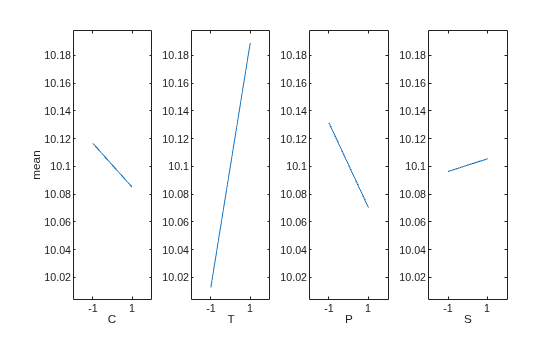
The plot indicates that the mean response is highly sensitive to the temperature setting and less sensitive to the other factor settings.
Create an interaction plot.
figure
interactionplot(y1,D1,VarNames=factorLabels,Full=false)
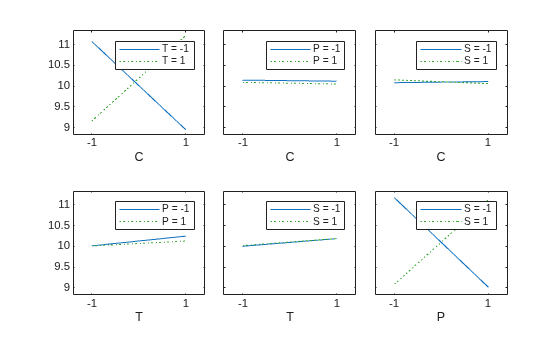
The plot indicates that the response is also sensitive to two-factor interactions. However, because two-factor interactions are confounded with each other in a resolution IV design, you need a full factorial design experiment to determine whether factors C and T or factors S and P are interacting.
Repeat the experiment by creating a full factorial design. Display the size of the design table.
dFull = fullFactorialDOE(4,FactorNames=factorLabels);
D2 = table2array(dFull.Design);
size(D2)
ans = 1×2

    16     4
The full factorial design contains = 16 runs. Load the simulated response data y2 from reaction2.mat.
load reaction2.matCreate an interaction plot.
figure
interactionplot(y2,D2,VarNames=factorLabels,Full=false)
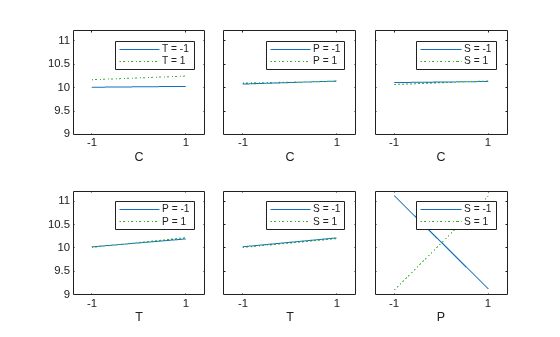
Because the full factorial design does not confound any interactions, the plot indicates that the mean response depends mainly on T and the interaction between S and P.

