eq
R2026bDefine symbolic equation
Description
Examples
Solve this trigonometric equation. Define the equation by using the == operator.
syms x
eqn = sin(x) == cos(x);
xsol = solve(eqn,x)
xsol =
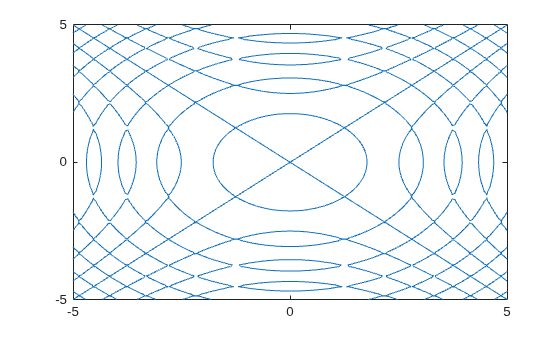
Plot the equation by using fimplicit. Define the equation by using the == operator.
syms x y
eqn = sin(x^2) == sin(y^2);
fimplicit(eqn)
Test the equality of two symbolic expressions by using isAlways.
syms x
eqn = x + 1 == x + 1;
tf = isAlways(eqn)
tf = logical
1
eqn = sin(x)/cos(x) == tan(x); tf = isAlways(eqn)
tf = logical
   1
Check the equality of two symbolic matrices by using isAlways.
A = sym(hilb(3));
B = sym([1 1/2 5; 1/2 2 1/4; 1/3 1/8 1/5]);
tf = isAlways(A == B)
tf = 3×3 logical array

   1   1   0
   1   0   1
   1   0   1
Compare a matrix and a scalar. The == operator expands the scalar into a matrix of the same dimensions as the input matrix.
A = sym(hilb(3));
B = sym(1/2);
tf = isAlways(A == B)
tf = 3×3 logical array

   0   1   0
   1   0   0
   0   0   0
Input Arguments
Tips
If both
AandBare arrays, then they must have the same dimensions.A == Breturns an array of equationsA(i,j,...) == B(i,j,...).

