ArduPlane Actuator Write
R2026bArduPlane Actuator Write block
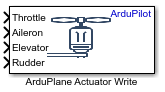
To add a block to a model, double-click the canvas and start typing the block name. Then, select the block from the list.
Libraries:
UAV Toolbox Support Package for ArduPilot Autopilots /
Controller Interface Blocks
Description
Add-On Required: This feature requires the UAV Toolbox Support Package for ArduPilot Autopilots add-on.
The ArduPlane Actuator Write block writes motor and servo actuator values
over the PWM and UAVCAN interfaces. The ArduPlane Actuator Write block
accepts single scalar values between -1 to 1 as input
and writes those values to the selected motors or servos.
An input value of 1 indicates maximum output, a value of
0 centers the servos or sets the motors to their lowest possible
thrust, and an input of -1 indicates the maximum output but in the
reverse direction. However, for motors that do not support reverse operation, any value
less than zero stops the motor.
The block accepts single scalar values between -1 to
1 as input and writes those values to the selected Motors/Servos. An
input value of 1 indicates maximum output, 0 indicates centered servos or minimum motor
thrust, and -1 indicates maximum output in the opposite direction (if
supported).
This block supports only ArduPlane vehicle types.
Ports
Input
Controls the thrust output of the motor.
A value of -1 commands minimum thrust (or maximum
reverse, if supported), 0 sets the motor to idle or no
thrust, and 1 commands maximum thrust.
Data Types: Single
Controls the deflection of the aileron control surfaces.
A value of -1 commands maximum deflection to the left,
0 centers the ailerons (neutral position), and
1 commands maximum deflection to the right.
Dependencies
To enable these ports, select the required number of motors
(1-12) from the Motors
parameter.
Data Types: single
Controls the deflection of the elevator control surface.
A value of -1 commands maximum nose-down deflection,
0 centers the elevator (neutral position), and
1 commands maximum upward deflection.
Dependencies
To enable these ports, select the required number of servos
(1-8) from the Servos
parameter.
Data Types: single
Controls the deflection of the rudder control surface.
A value of -1 commands maximum deflection to the left,
0 centers the rudder (neutral position), and
1 commands maximum deflection to the right.
Data Types: single
Connect the Motor x inputs to signals that represent
single scalar values.
If you provide an input greater than 1 or less than
-1, the block internally clips it to 1
and -1, respectively.
Dependencies
To enable these ports, add the required number of motors
(1-12) from the Motors selection
list.
Data Types: single
Controls the tilt angle of the front tilt motors.
An input value of 1 commands the motors to the minimum
tilt angle, a value of 0 sets the motors to the neutral or
intermediate tilt position, and an input of -1 commands the
motors to the maximum tilt angle.
Dependencies
To enable these ports, add the parameter from the Motors selection list.
Data Types: single
Controls the thrust output of the left motor.
An input value of 1 commands minimum thrust (or maximum
reverse, if supported), a value of 0 sets the motor to idle
or no thrust, and an input of -1 commands maximum
thrust.
Dependencies
To enable these ports, add the parameter from the Motors selection list.
Data Types: single
Controls the thrust output of the right motor.
An input value of 1 commands minimum thrust (or maximum
reverse, if supported), a value of 0 sets the motor to idle
or no thrust, and an input of -1 commands maximum
thrust.
Dependencies
To enable these ports, add the parameter from the Motors selection list.
Data Types: single
Controls the deflection of the flap control surface.
An input value of 1 indicates maximum upward deflection,
a value of 0 centers the flap (neutral position), and an
input of -1 indicates the maximum downward deflection.
Dependencies
To enable these ports, add the parameter from the Motors selection list.
Data Types: single
Controls the automatic deflection of the flap control surface, typically managed by the autopilot during specific flight modes.
An input value of 1 indicates maximum upward deflection,
a value of 0 centers the flap (neutral position), and an
input of -1 indicates the maximum downward deflection.
Dependencies
To enable these ports, add the parameter from the Motors selection list.
Data Types: single
Controls the deployment of the airbrake surfaces.
An input value of 1 indicates fully retracted airbrakes,
a value of 0 sets the airbrakes to the neutral (undeployed)
position, and an input of -1 indicates fully deployed
airbrakes.
Dependencies
To enable these ports, add the parameter from the Motors selection list.
Data Types: single
Note
The following outputs selected as motors might not function as expected:
Flap
FlapAuto
Airbrakes
This is because ArduPilot manages these flight control entities (Flap, FlapAuto, Airbrakes) based on internally calculated values. For example:
The values for Flap and FlapAuto are set by ArduPilot depending on the current flight_stage and control_mode, which determine whether manual or automatic flap inputs are used.
Airbrakes are controlled by ArduPilot based on reverse thrust logic and/or manual RC channel input.
As a result, ArduPilot’s internal recalculations might override any values you set for these outputs.
Controls the deflection of the left flaperon control surface.
An input value of 1 indicates maximum downward
deflection, a value of 0 centers the flaperon (neutral
position), and an input of -1 indicates the maximum upward
deflection.
Dependencies
To enable this port, add the parameter from the Servos selection list.
Data Types: single
Note
FlaperonRight and FlaperonLeft are implemented as a mixer between aileron input and a percentage of flap input. The flap component can be sourced from either a manual channel or from automatic flap control, depending on the current configuration and flight mode.
Controls the deflection of the right flaperon control surface.
An input value of 1 indicates maximum downward
deflection, a value of 0 centers the flaperon (neutral
position), and an input of -1 indicates the maximum upward
deflection.
Dependencies
To enable this port, add the parameter from the Servos selection list.
Data Types: single
Controls the deflection of the left elevon control surface.
An input value of 1 indicates maximum downward
deflection, a value of 0 centers the elevon (neutral
position), and an input of -1 indicates the maximum upward
deflection.
Dependencies
To enable this port, add the parameter from the Servos selection list.
Data Types: single
Controls the deflection of the right elevon control surface.
An input value of 1 indicates maximum downward
deflection, a value of 0 centers the elevon (neutral
position), and an input of -1 indicates the maximum upward
deflection.
Dependencies
To enable this port, add the parameter from the Servos selection list.
Data Types: single
Controls the deflection of the left V-tail control surface.
An input value of 1 commands maximum downward deflection,
a value of 0 centers the V-tail surface (neutral position),
and an input of -1 indicates the maximum upward deflection.
Dependencies
To enable this port, add the parameter from the Servos selection list.
Data Types: single
Controls the deflection of the right V-tail control surface.
An input value of 1 indicates maximum downward
deflection, a value of 0 centers the V-tail surface (neutral
position), and an input of -1 indicates the maximum upward
deflection.
Dependencies
To enable this port, add the parameter from the Servos selection list.
Data Types: single
Note
VTailRight and VTailLeft, as well as ElevonRight and ElevonLeft, are used to run these vtail and elevon mixers:
V-tail mixer: combines elevator and rudder controls
Elevon mixer: combines aileron and elevator controls
Controls the tilt angle of the rear tilt motors.
An input value of 1 commands the motors to the minimum
tilt angle, a value of 0 sets the motors to the neutral or
intermediate tilt position, and an input of -1 commands the
motors to the maximum tilt angle.
Dependencies
To enable this port, add the parameter from the Servos selection list.
Data Types: single
Controls the tilt angle of the rear left tilt motor.
An input value of 1 commands the motors to the minimum
tilt angle, a value of 0 sets the motors to the neutral or
intermediate tilt position, and an input of -1 commands the
motors to the maximum tilt angle.
Dependencies
To enable this port, add the parameter from the Servos selection list.
Data Types: single
Controls the tilt angle of the rear right tilt motor.
An input value of 1 indicates maximum downward
deflection, a value of 0 centers the V-tail surface (neutral
position), and an input of -1 indicates the maximum upward
deflection.
Dependencies
To enable this port, add the parameter from the Servos selection list.
Data Types: single
Controls the deflection of the first left differential spoiler surface.
An input value of 1 commands maximum retraction (spoiler
fully down), a value of 0 sets the spoiler to the neutral
(undeployed) position, and an input of -1 commands maximum
extension (spoiler fully up).
Dependencies
To enable this port, add the parameter from the Servos selection list.
Data Types: single
Controls the deflection of the first right differential spoiler surface.
An input value of 1 commands maximum retraction (spoiler
fully down), a value of 0 sets the spoiler to the neutral
(undeployed) position, and an input of -1 commands maximum
extension (spoiler fully up).
Dependencies
To enable this port, add the parameter from the Servos selection list.
Data Types: single
Note
Differential spoilers are implemented as control surfaces split across each wing to provide yaw control, similar to elevons but primarily mixed from the rudder input. The output channels for differential spoilers are set up to respond to a mix of:
ElevonRight and ElevonLeft
Aileron and Rudder
Controls the deflection of the second left differential spoiler surface.
An input value of 1 commands maximum retraction (spoiler
fully down), a value of 0 sets the spoiler to the neutral
(undeployed) position, and an input of -1 commands maximum
extension (spoiler fully up).
Dependencies
To enable this port, add the parameter from the Servos selection list.
Data Types: single
Controls the deflection of the second right differential spoiler surface.
An input value of 1 commands maximum retraction (spoiler
fully down), a value of 0 sets the spoiler to the neutral
(undeployed) position, and an input of -1 commands maximum
extension (spoiler fully up).
Dependencies
To enable this port, add the parameter from the Servos selection list.
Data Types: single
Controls the steering angle of the nosewheel or tailwheel for ground maneuvering.
An input value of 1 commands maximum deflection to the
left, a value of 0 centers the steering (neutral position),
and an input of -1 commands maximum deflection to the
right.
Dependencies
To enable this port, add the parameter from the Servos selection list.
Data Types: single
Parameters
Motors selection
Add the motors to which you want to send the single scalar values. The number of motor input ports on the block depends on the number of motors you select in this parameter.
Click Add to add a new motor. To remove a motor, first select the required motor, then click Delete.
Servos selection
Add the servos to which you want to send the single scalar values. The number of servo input ports on the block depends on the number of servos you select in this parameter.
Click Add to add a new servo. To remove a servo, first select the required servo, then click Delete.
Note
Some servo functions might not operate as expected in certain configurations. For example, TiltMotor functions may not work in specific quadplane configuration, such as Bicopter and Tailsitter configurations, because these outputs are overridden by ArduPilot’s internal logic for those vehicle types.
Version History
Introduced in R2026a
MATLAB Command
You clicked a link that corresponds to this MATLAB command:
Run the command by entering it in the MATLAB Command Window. Web browsers do not support MATLAB commands.


Seleziona un sito web
Seleziona un sito web per visualizzare contenuto tradotto dove disponibile e vedere eventi e offerte locali. In base alla tua area geografica, ti consigliamo di selezionare: .
Puoi anche selezionare un sito web dal seguente elenco:
Come ottenere le migliori prestazioni del sito
Per ottenere le migliori prestazioni del sito, seleziona il sito cinese (in cinese o in inglese). I siti MathWorks per gli altri paesi non sono ottimizzati per essere visitati dalla tua area geografica.
Americhe
- América Latina (Español)
- Canada (English)
- United States (English)
Europa
- Belgium (English)
- Denmark (English)
- Deutschland (Deutsch)
- España (Español)
- Finland (English)
- France (Français)
- Ireland (English)
- Italia (Italiano)
- Luxembourg (English)
- Netherlands (English)
- Norway (English)
- Österreich (Deutsch)
- Portugal (English)
- Sweden (English)
- Switzerland
- United Kingdom (English)