reconstruct
R2026bReconstruct 3-D scene using structure-from-motion (SfM) by incrementally processing all camera views after initialization
Since R2026b
Description
The reconstruct function reconstructs the full point cloud of
the 3-D scene and estimates camera poses by incrementally processing all remaining views in
the view graph after initialization. Use the reconstruct object function
as the final step in the SfM pipeline after you have initialized the reconstruction using the
triangulateInitialViews object function. Use the
isInitialized function to verify whether the sfm
object is ready for incremental 3-D reconstruction before calling the
reconstruct function. After all images have been processed, use the
poses and pointCloud object functions to retrieve
the estimated camera poses and the sparse point cloud of the 3-D scene,
respectively.
The reconstruct function adds images one at a time, starting from the
initial two-view reconstruction produced by the triangulateInitialViews
object function. For each new image, the function estimates the camera pose by solving the
Perspective-n-Point (PnP) problem, triangulates new 3-D points, and refines both poses and
points using bundle adjustment. For more information about the algorithm, see Algorithms.
If the reconstruction fails, the reconstruct function returns an
error. For more information on resolving issues during reconstruction, see Tips.
sfmObj = reconstruct(sfmObj)sfm object sfmObj to estimate camera poses and
reconstruct the full 3-D scene as a sparse point cloud. The function then returns a version
of the input SfM object with updated WorldPointSet,
ViewGraph, and ProcessedImages property values.
sfmObj = reconstruct(sfmObj,Name=Value)reconstruct(sfmObj,MaxReprojectionError=12,MinNumInliers=20) relaxes
the PnP and inlier thresholds, enabling the function to register more images.
Examples
Use the sfm object to recover camera poses and a sparse 3-D point cloud from images of an indoor scene.
Create Image Datastore and Define Camera Intrinsics
Create an ImageDatastore from the image sequence. Specify the camera intrinsic parameters.
unzip("sfm_images.zip")
imageFolder = fullfile(pwd,"images");
imds = imageDatastore(imageFolder);
intrinsics = cameraIntrinsics([535.1307 532.1860],[323.3722 239.7986],[480 640]);
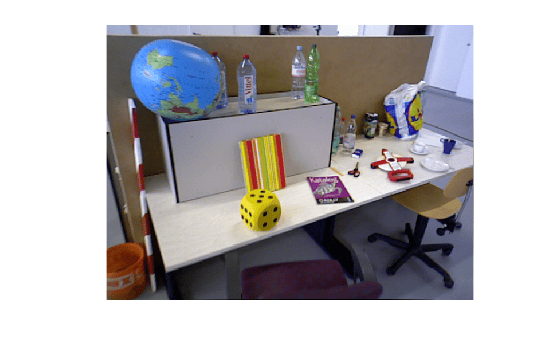
Visualize the indoor scene.
imshow(preview(imds))
Create SfM Object and Run Pipeline
Create an sfm object and execute each stage of the incremental SfM pipeline sequentially.
sfmObj = sfm(imds,intrinsics);
Connect image pairs based on visual similarity.
sfmObj = connectImagePairs(sfmObj);
Visualize the similarity matrix for the connected image pairs using the imagesc function.
imagesc(sfmObj.SimilarityMatrix)
title("Similarity Matrix for Connected Image Pairs")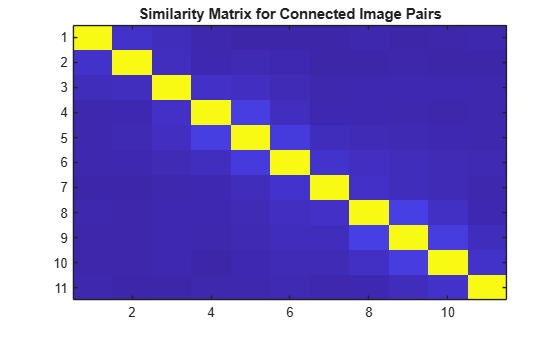
Verify that the view graph was created successfully before proceeding to geometric verification.
if isConnected(sfmObj)
    sfmObj = verifyImagePairs(sfmObj);
end
Visualize the similarity matrix for the refined image pair connections using the imagesc function.
imagesc(sfmObj.SimilarityMatrix)
title("Similarity Matrix after Refining Connected Image Pairs")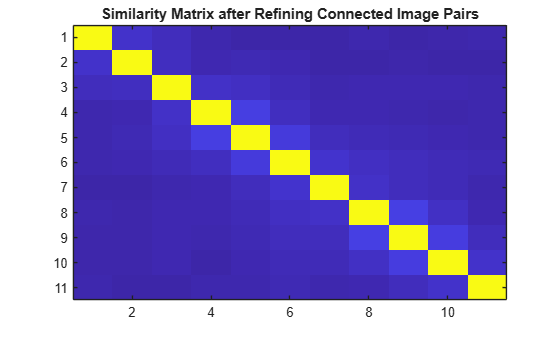
Confirm that geometric verification completed successfully before initializing the reconstruction. Specify a minimum median angle of 5 degrees and a maximum triangulation error of 4 pixels. Display the initialization metrics.
if isVerified(sfmObj)
    [sfmObj,info] = triangulateInitialViews(sfmObj,MinMedianAngle=5,MaxTriangulationError=4);
    disp(info)
end
                     ViewId1: 9
                     ViewId2: 10
                RelativePose: [1×1 rigidtform3d]
                     Matches: [380×2 uint32]
    MedianTriangulationAngle: 8.6016
       MeanReprojectionError: 0.2799
Confirm that initialization succeeded before running incremental reconstruction.
if isInitialized(sfmObj)
    sfmObj = reconstruct(sfmObj);
end
Retrieve Results
Retrieve the estimated camera poses and the sparse 3-D point cloud.
camPoses = poses(sfmObj);
sparsePoints = pointCloud(sfmObj);
Visualize Reconstruction
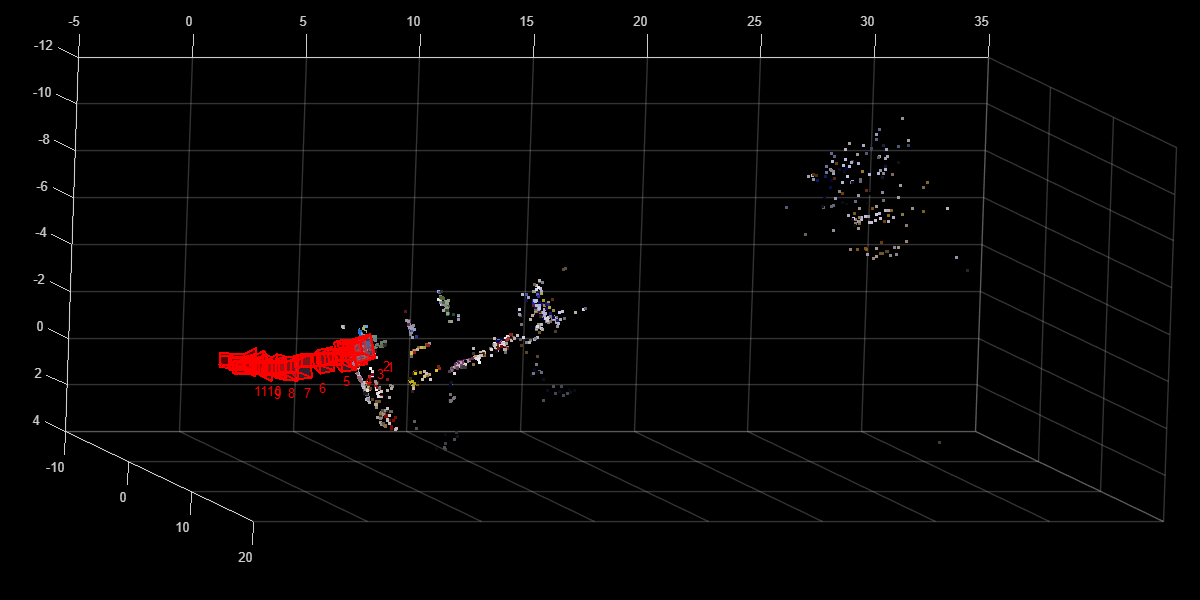
Display the reconstructed scene showing the camera trajectory and sparse point cloud. Adjust the view orientation and zoom for better visualization.
plot(sfmObj,CameraSize=0.5,MarkerSize=25)
view(82.69,-15.53)
camroll(-90)
camva(4.52)
This example shows how to improve the accuracy of sparse 3-D point cloud reconstruction in the structure-from-motion (SfM) workflow using the sfm object. The reconstruct object function handles the incremental reconstruction in the SfM pipeline. Use the parameter tuning practices from this example when the default reconstruction parameters produce excessive reprojection error or noisy 3-D points.
Create an imageDatastore object from the image sequence. Specify the camera intrinsics parameters.
imageFolder = fullfile(pwd,"images");

if ~exist(imageFolder,"dir")
    unzip("sfm_images.zip")
end

imds = imageDatastore(imageFolder);
intrinsics = cameraIntrinsics([535.1307 532.1860],[323.3722 239.7986],[480 640]);
Create an sfm object, connect image pairs to from a view graph, and then verify the view graph for geometric consistency.
sfmObj = sfm(imds,intrinsics);
sfmObjViewGraph = connectImagePairs(sfmObj);
sfmObjRefined = verifyImagePairs(sfmObjViewGraph);
Triangulate 3-D points from initial view pair.
[sfmObjInit,info] = triangulateInitialViews(sfmObjRefined);
Perform incremental 3-D reconstruction with default parameters. The verbose output reports the mean reprojection error, which measures overall reconstruction accuracy. A lower value indicates more precise 3-D point positions.
sfmObjFinal1 = reconstruct(sfmObjInit, Verbose=true);
* Reconstruct 3-D structure from 11 views...
---------------------------------------------
* Finding 2-D point tracks across views...Done. 1117 point tracks found.

* [2/11] Views 3 and 6 are used for initial reconstruction.
* [3/11] View 4 is selected as the next best view...55 new 3-D points created from triangulation.
* [4/11] View 5 is selected as the next best view...250 new 3-D points created from triangulation.
* [5/11] View 2 is selected as the next best view...69 new 3-D points created from triangulation.
* [6/11] View 1 is selected as the next best view...86 new 3-D points created from triangulation.
* [7/11] View 7 is selected as the next best view...41 new 3-D points created from triangulation.
* [8/11] View 8 is selected as the next best view...79 new 3-D points created from triangulation.
* [9/11] View 9 is selected as the next best view...97 new 3-D points created from triangulation.
* [10/11] View 10 is selected as the next best view...123 new 3-D points created from triangulation.
* Performing global bundle adjustment of 10 views...Done.
* [11/11] View 11 is selected as the next best view...77 new 3-D points created from triangulation.
* Performing global bundle adjustment of 11 views...Done.

* Reconstruction finished. All views have been processed.
* Number of images processed: 11
* Number of 3-D points created: 890
* Mean reprojection error (pixels): 0.592757
To decrease the mean reprojection error, lower MaxReprojectionError and MaxTriangulationError name-value arguments. Tighter thresholds on MaxReprojectionError and MaxTriangulationError reject more outlier correspondences, reducing mean reprojection error error at the cost of fewer 3-D points in the reconstruction.
sfmObjFinal2 = reconstruct(sfmObjInit, MaxReprojectionError=3, MaxTriangulationError=3, Verbose=true);
* Reconstruct 3-D structure from 11 views...
---------------------------------------------
* Finding 2-D point tracks across views...Done. 1117 point tracks found.

* [2/11] Views 3 and 6 are used for initial reconstruction.
* [3/11] View 4 is selected as the next best view...38 new 3-D points created from triangulation.
* [4/11] View 5 is selected as the next best view...232 new 3-D points created from triangulation.
* [5/11] View 2 is selected as the next best view...70 new 3-D points created from triangulation.
* [6/11] View 1 is selected as the next best view...88 new 3-D points created from triangulation.
* [7/11] View 7 is selected as the next best view...45 new 3-D points created from triangulation.
* [8/11] View 8 is selected as the next best view...64 new 3-D points created from triangulation.
* [9/11] View 9 is selected as the next best view...84 new 3-D points created from triangulation.
* [10/11] View 10 is selected as the next best view...124 new 3-D points created from triangulation.
* Performing global bundle adjustment of 10 views...Done.
* [11/11] View 11 is selected as the next best view...75 new 3-D points created from triangulation.
* Performing global bundle adjustment of 11 views...Done.

* Reconstruction finished. All views have been processed.
* Number of images processed: 11
* Number of 3-D points created: 858
* Mean reprojection error (pixels): 0.469105
If you set these thresholds too low, the pipeline fails because too few correspondences remain to estimate the camera pose for the next view.
sfmObjFail = reconstruct(sfmObjInit, MaxReprojectionError=0.5, MaxTriangulationError=0.5, Verbose=true);
* Reconstruct 3-D structure from 11 views...
---------------------------------------------
* Finding 2-D point tracks across views...Done. 1117 point tracks found.

* [2/11] Views 3 and 6 are used for initial reconstruction.
* [3/11] View 4 is selected as the next best view...2 new 3-D points created from triangulation.
* [4/11] View 5 is selected as the next best view...
* Reconstruction stopped: Unable to estimate the camera pose for view 5 due to insufficient 3‑D to 2‑D correspondences. Increase MaxReprojectionError and decrease MinNumInliers to estimate the camera pose.
To further improve accuracy, you can also increase the frequency of global bundle adjustment and the maximum solver iterations :
GlobalRefinementFrequency:Runs global bundle adjustment every 5 views instead of the default 10, adjusting 3-D point locations and camera poses more frequently.MaxSolverIterations:Increases from the default 20 to 30, giving the optimizer more iterations to converge.
More frequent refinement reduces reprojection error but increases computation time.
sfmObjFinal3 = reconstruct(sfmObjInit, MaxReprojectionError=3, MaxTriangulationError=3, ...
    GlobalRefinementFrequency=5, MaxSolverIterations=30, Verbose=true);
* Reconstruct 3-D structure from 11 views... --------------------------------------------- * Finding 2-D point tracks across views...Done. 1117 point tracks found. * [2/11] Views 3 and 6 are used for initial reconstruction. * [3/11] View 4 is selected as the next best view...38 new 3-D points created from triangulation. * [4/11] View 5 is selected as the next best view...233 new 3-D points created from triangulation. * [5/11] View 2 is selected as the next best view...68 new 3-D points created from triangulation. * Performing global bundle adjustment of 5 views...Done. * [6/11] View 1 is selected as the next best view...86 new 3-D points created from triangulation. * [7/11] View 7 is selected as the next best view...39 new 3-D points created from triangulation. * [8/11] View 8 is selected as the next best view...57 new 3-D points created from triangulation. * [9/11] View 9 is selected as the next best view...85 new 3-D points created from triangulation. * [10/11] View 10 is selected as the next best view...124 new 3-D points created from triangulation. * Performing global bundle adjustment of 10 views...Done. * [11/11] View 11 is selected as the next best view...72 new 3-D points created from triangulation. * Performing global bundle adjustment of 11 views...Done. * Reconstruction finished. All views have been processed. * Number of images processed: 11 * Number of 3-D points created: 860 * Mean reprojection error (pixels): 0.467562
Input Arguments
Name-Value Arguments
Output Arguments
Tips
If not all images registered during reconstruction, the most common reasons and countermeasures are:
Insufficient 3-D to 2-D correspondences — Increase the
MaxReprojectionErrorargument or decrease theMinNumInliersargument to enable the function to register more images.No covisible 3-D points with the processed views — Increase the
MaxTriangulationErrorargument or decrease theMinTriangulationAngleargument to enable the function to register more images.
If the reconstruction looks noisy, decrease the value of the
MaxTriangulationErrorargument to keep only well-triangulated 3-D points, or increase the value of theMaxSolverIterationsargument to perform more precise bundle adjustment.If the processing is too slow, decrease the values of the
NumViewsRefinedandMaxNumRefinementarguments to speed up local bundle adjustment, or increase the value of theGlobalRefinementFrequencyargument to reduce the frequency of global bundle adjustment.Inspect the next‑best‑view selection by checking the processing order of image views using the
ProcessedImagesproperty of the outputsfmobject. Ideally, thereconstructfunction processes views with strong overlap and good geometric coverage early. If the function processes views with good overlap late or not at all, consider adjusting feature matching, pose estimation, or triangulation parameters to better match your scene.Specify the
Verboseargument astrueto monitor which views the function registers, enabling you to spot any issues during reconstruction.For more information, see Best Practices for 3-D Reconstruction Using Structure from Motion.
Algorithms
After initialization, the reconstruct function incrementally
registers the remaining views to expand the 3‑D reconstruction. It adds one view at a time by
selecting a well‑supported next view, estimating its camera pose from the existing 3‑D
structure, triangulating new 3‑D points, and refining camera poses and the scene structure
using bundle adjustment. Throughout the process, the algorithm merges duplicate points and
removes outliers to maintain a stable and consistent reconstruction. It performs local
refinement for each newly added view and periodically performs global refinement to correct
accumulated drift.
The function produces incremental reconstruction using these steps:
Next best view selection — The algorithm selects the unprocessed view that shares the largest number of reliable 2‑D to 3‑D correspondences with the current reconstruction. It prioritizes views that already observe sufficient triangulated 3‑D points, reducing pose uncertainty and maximizing the contribution of well‑conditioned geometry.
Camera pose estimation — The algorithm estimates the camera pose of the selected view by solving the Perspective‑n‑Point problem with RANSAC, using 2‑D feature observations and their corresponding 3‑D world points. RANSAC rejects outlier correspondences and retains a pose supported by a consistent inlier set.
Triangulation and point merging — After registering the new view, the algorithm triangulates new 3‑D points from feature correspondences between the new view and previously registered views. It merges duplicate 3‑D points that represent the same scene point to keep the reconstruction consistent.
Local bundle adjustment and outlier filtering — For each newly processed view, the algorithm performs local bundle adjustment to jointly refine the pose of the new view, the poses of strongly connected neighboring views, and the 3‑D points they observe. The algorithm selects neighboring views that share sufficient tracks and provide strong geometric constraints, such as larger triangulation angles. The number of neighboring views refined is controlled by the
NumViewsRefinedargument. After optimization, the algorithm removes 3‑D points and correspondences with high reprojection error.Re‑triangulation — Using the refined camera poses from bundle adjustment, the algorithm triangulates additional 3‑D points to enable more point tracks to qualify and improve reconstruction accuracy.
Global bundle adjustment — At regular intervals controlled by the
GlobalRefinementFrequencyargument, and again after all views have been processed, the algorithm performs global bundle adjustment. This step jointly refines all registered camera poses and all reconstructed 3‑D points to correct drift and improve scene‑wide consistency.
Version History
Introduced in R2026b
See Also
sfm | connectImagePairs | isConnected | verifyImagePairs | isVerified | triangulateInitialViews | isInitialized | poses | pointCloud | plot

