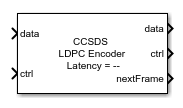
CCSDS LDPC Encoder
Libraries:
Wireless HDL Toolbox /
Error Detection and Correction
Description
The CCSDS LDPC Encoder block encodes data with low-density parity-check
(LDPC) code specified in the Consultative Committee for Space Data Systems (CCSDS) Telemetry
standard. The block accepts data bits and a stream of control signals as inputs. The block
outputs encoded bits, a stream of control signals, and a signal that indicates when the block
is ready to accept new inputs. The block supports the configuration types,
(8160,7136) LDPC, and AR4JA
LDPC.
The block supports scalar input and vector inputs of size 8. The block provides an architecture suitable for HDL code generation and hardware deployment. You can use this block in a CCSDS transmitter for satellite communication for deep space missions and also for any application that requires exceptional forward error correction performance. To know more about CCSDS Telemetry standard, see [1].
Examples
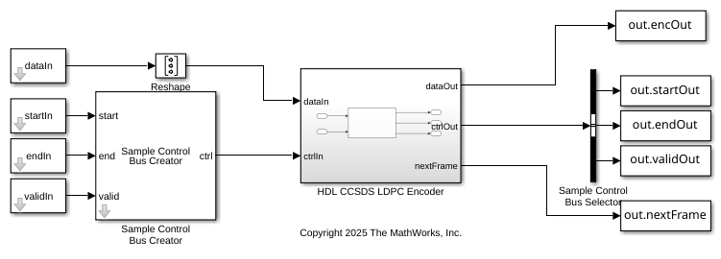
Encode Data with LDPC Code in CCSDS Telemetry Standard
Use CCSDS LDPC Encoder block to encode data bits with LDPC code.
- Since R2025a
- Open Script
Ports
Input
Input data bits, specified as a Boolean scalar or an
eight-element Boolean column vector. The block supports only scalar
input when you set the Configuration type parameter to
AR4JA LDPC.
Data Types: Boolean
Control signals accompanying the sample stream, specified as a
samplecontrol bus. The bus includes the start,
end, and valid control signals, which indicate the
boundaries of the frame and the validity of the samples.
start— Indicates the start of the input frameend— Indicates the end of the input framevalid— Indicates that the data on the input data port is valid
For more details, see Sample Control Bus.
Data Types: bus
Since R2026a
Code rate index, specified as 0, 1, or
2. You must specify this value in the
fixdt(0,2,0) format. Each code rate index value represents a
specific code rate, as this table shows.
codeRateIdx Value | Code Rate |
|---|---|
0
| 1/2 |
1 | 2/3 |
2 | 4/5 |
Dependencies
To enable this port, set the Configuration type parameter
to AR4JA LDPC and then set the Code rate
source parameter to Input port.
Data Types: fixdt(0,2,0)
Since R2026a
Block length index, specified as 0, 1, or
2. You must specify this value in the
fixdt(0,2,0) format.
The block length varies with the specified block length index. The input block length must be a multiple of 8. This table shows the block length index values and their corresponding block lengths.
blkLenIdx Value | Block Length |
|---|---|
0
| 1024 |
1 | 4096 |
2 | 16384 |
Dependencies
To enable this port, set the Configuration type parameter
to AR4JA LDPC and then set the Block length
source parameter to Input port.
Data Types: fixdt(0,2,0)
Output
Encoded output data bits, returned as a Boolean scalar or an
eight-element Boolean column vector. The block returns only a
scalar output when you set the Configuration type parameter to
AR4JA LDPC.
The output data size and type are same as the input data.
Data Types: Boolean
Control signals accompanying the sample stream, returned as a samplecontrol
bus. The bus includes the start, end, and
valid control signals, which indicate the boundaries of the frame
and the validity of the samples.
start— Indicates the start of the output frameend— Indicates the end of the output framevalid— Indicates that the data on the output data port is valid
For more details, see Sample Control Bus.
Data Types: bus
Block ready indicator, returned as a Boolean scalar.
The block sets this signal to 1 when the block is ready to
accept the start of the next frame. If the block receives an input
ctrl.start signal while nextFrame is
0, the block discards the frame in progress and begins processing
the new data.
Data Types: Boolean
Parameters
To edit block parameters interactively, use the Property Inspector. From the Simulink® Toolstrip, on the Simulation tab, in the Prepare gallery, select Property Inspector.
Since R2026a
Select the configuration type as (8160,7136) LDPC or
AR4JA LDPC. For more information about the supported
configurations, see [1].
Since R2026a
Select the code rate source as Property or
Input port.
Property— Select this option to enable the Code rate parameter.Input port— Select this option to enable the codeRateIdx input port.
Dependencies
To enable this parameter, set the Configuration type
parameter to AR4JA LDPC.
Since R2026a
Select the code rate as 1/2,
2/3, or 4/5.
To enable this parameter, set the Configuration type parameter
to AR4JA LDPC and then set the Code rate
source parameter to Property.
Since R2026a
Select the block length source as Property or
Input port.
Property— Select this option to enable the Block length parameter.Input port— Select this option to enable the blkLenIdx input port.
Dependencies
To enable this parameter, set the Configuration type
parameter to AR4JA LDPC.
Since R2026a
Select a block length as 1024,
4096, or 16384. The block length
indicates the number of bits.
Dependencies
To enable this parameter, set the Configuration type
parameter to AR4JA LDPC and then set the Block
length source parameter to Property.
Algorithms
The CCSDS LDPC Encoder block supports the following configuration types:
(8160,7136) LDPC, and AR4JA
LDPC.
(8160, 7136) LDPC
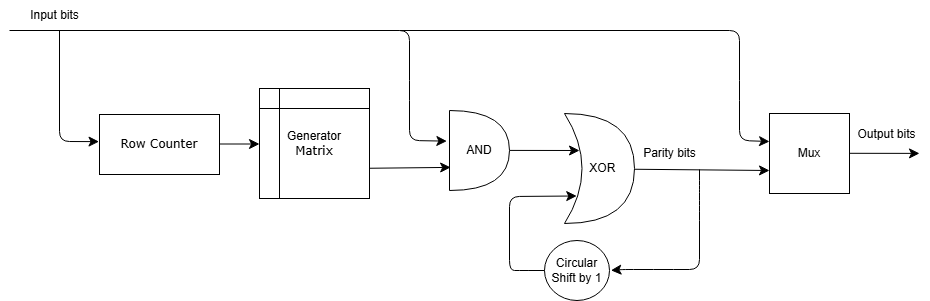
This figure shows the block architecture for the configuration type
(8160,7136) LDPC.
For each batch of 511 input bits, the row counter increases by one. Using the current row count, the Generator Matrix look-up table (LUT) provides the corresponding row of the matrix. The algorithm XORs each input bit with the parity bits, which are circularly shifted by one position. This operation is repeated for the entire set of input bits.
AR4JA LDPC
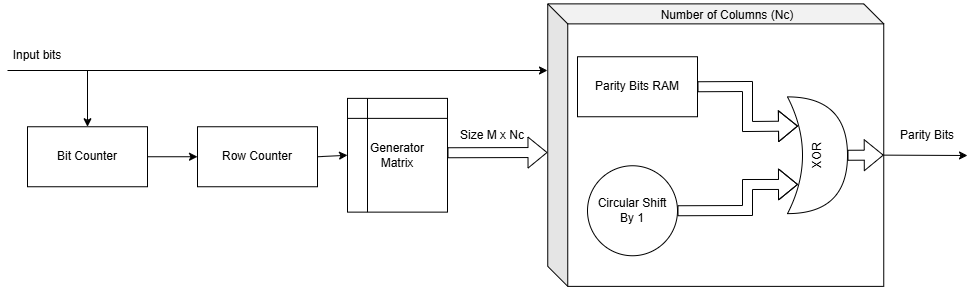
This figure shows the block architecture for the configuration type AR4JA
LDPC.
For each group of M input bits, the row counter increments by one, prompting Generator Matrix LUT block to output the corresponding row of the matrix, which consists of M rows and Nc columns. The algorithm computes parity bits using Nc parallel processing units. In each unit, depending on the value of the input bit, M parity bits are XORed with the corresponding M elements from the generator matrix. Here M is the submatrix size. The algorithm repeats this process for all inputs, circularly shifting the generator matrix by one position after each input bit is processed. Upon completion of the input bit processing, Parity Bits RAM provides the final parity bits as output.
This section provides information about the latency of the block for each of the selected configuration types.
When you set the Configuration type parameter to
(8160,7136) LDPC, the latency of the block varies based on
the type of input. Because the latency varies, use the nextFrame
control signal output port to determine when the block is ready for a new input frame.
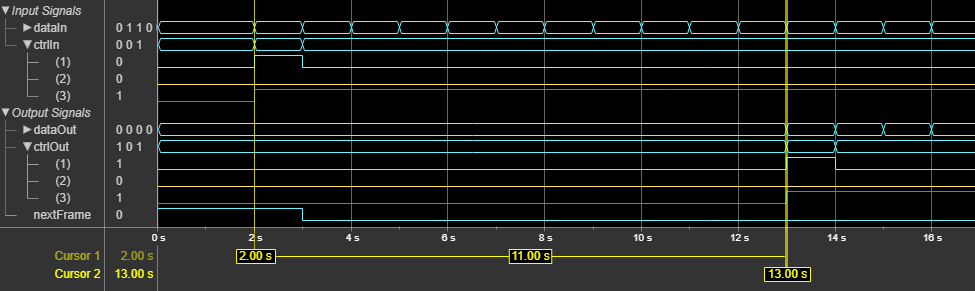
This figure shows a sample output and latency of the block for a scalar input. The latency of the block is 5 clock cycles.

This figure shows a sample output and latency of the block for an eight-element column vector input. The latency of the block is 11 clock cycles.
When you set the Configuration type parameter to
AR4JA LDPC, the latency of the block varies based on the
block length, code rate, and input source type. Because the latency varies, use the
nextFrame control signal output port to determine when the block is
ready for a new input frame.
The following table lists the latency values of the block for different code rates and
block lengths, when specified through Property.
| Block Length | Code Rate | Latency |
|---|---|---|
| 1024 | 1/2 | 10 |
| 4096 | 10 | |
| 16384 | 49168 | |
| 1024 | 2/3 | 10 |
| 4096 | 10 | |
| 16384 | 16400 | |
| 1024 | 4/5 | 10 |
| 4096 | 10 | |
| 16384 | 10 |
The following table lists the latency values of the block for different code rates and
block lengths, when specified through Input port.
| Block Length | Code Rate | Latency |
|---|---|---|
| 1024 | 1/2 | 16 |
| 4096 | 16 | |
| 16384 | 49168 | |
| 1024 | 2/3 | 16 |
| 4096 | 16 | |
| 16384 | 16400 | |
| 1024 | 4/5 | 16 |
| 4096 | 16 | |
| 16384 | 16 |
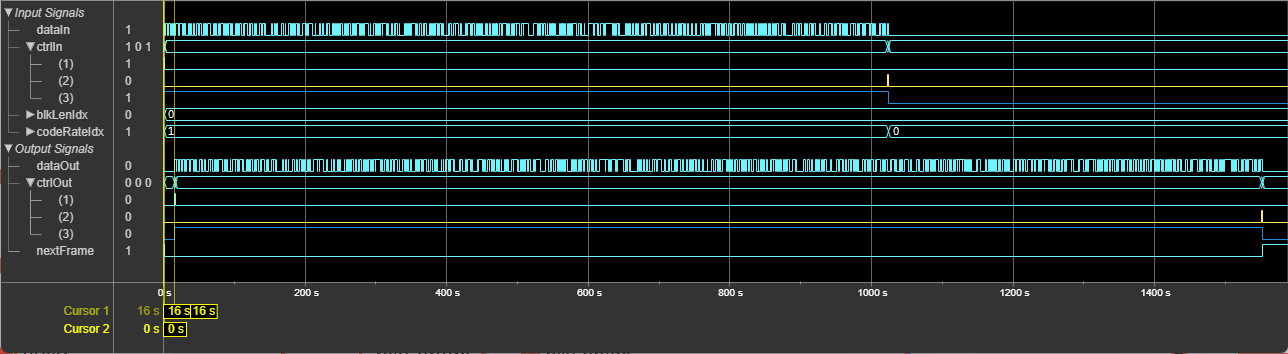
This figure shows a sample output and latency of the block when you set the
Configuration type parameter to AR4JA
LDPC with the default configuration. When you specify
blkLenIdx input port value as 0 and the
codeRateIdx input port value as 0, the latency
of the block is 16 clock cycles.
The performance of the synthesized HDL code varies with the target and synthesis options. The performance also varies based on the type of input.
This table shows the resource and performance data synthesis results of the block for
a scalar and vector inputs using the (8160,7136) LDPC configuration.
The generated HDL targets to the AMD®
Zynq®
UltraScale+™ MPSoC - ZCU102 Evaluation Board.
| Input Type | CLB LUTs | Slice Registers | Block RAMs | Maximum Frequency in MHz |
|---|---|---|---|---|
| Scalar | 3152 | 3157 | 0 | 724.6 |
| Vector | 7152 | 2143 | 0 | 573.39 |
The performance of the synthesized HDL code varies with the target and synthesis options. The performance also varies depending on the block length and code rate input source.
This table shows the resource and performance data synthesis results of the block for
a scalar input using the AR4JA LDPC configuration. The generated HDL
targets to the AMD
Zynq
UltraScale+ MPSoC - ZCU102 Evaluation Board.
| Slice LUTs | Slice Registers | Block RAMs | Maximum Frequency in MHz |
|---|---|---|---|
| 22106 | 10059 | 45.5 | 430 |
References
[1] TM Synchronization and Channel Coding. Recommendation for Space Data System Standards. CCSDS 131.0-B-3. Blue Book. Issue 3. Washington, D.C.: CCSDS, September 2017.
[2] TM Synchronization and Channel Coding. Summary of Concept and Rationale CCSDS 130.1-G-3. Green Book. Issue 3, June 2020.
Extended Capabilities
This block supports C/C++ code generation for Simulink accelerator and rapid accelerator modes and for DPI component generation.
HDL Coder™ provides additional configuration options that affect HDL implementation and synthesized logic.
This block has one default HDL architecture.
| ConstrainedOutputPipeline | Number of registers to place at
the outputs by moving existing delays within your design. Distributed
pipelining does not redistribute these registers. The default is
|
| InputPipeline | Number of input pipeline stages
to insert in the generated code. Distributed pipelining and constrained
output pipelining can move these registers. The default is
|
| OutputPipeline | Number of output pipeline stages
to insert in the generated code. Distributed pipelining and constrained
output pipelining can move these registers. The default is
|
| SynthesisAttributes |
Specifies the synthesis attributes for the blocks and block output signals in the model. The generated HDL code contains these attributes. For more information, see SynthesisAttributes (HDL Coder). |
You cannot generate HDL code for this block inside a Resettable Synchronous Subsystem (HDL Coder).
Version History
Introduced in R2025aThe CCSDS LDPC Encoder
block now supports data encoding with accumulate-repeat-4-jagged-accumulate (AR4JA)
low-density parity-check (LDPC) code specified in the Consultative Committee for Space Data
Systems (CCSDS) Telemetry standard. For this configuration, the block supports code rates of
1/2, 2/3, and
4/5 and block lengths of 1024,
4096, and 16384 bits.
The block supports scalar inputs and provides a hardware-friendly interface and architecture to generate HDL code with HDL Coder.
MATLAB Command
You clicked a link that corresponds to this MATLAB command:
Run the command by entering it in the MATLAB Command Window. Web browsers do not support MATLAB commands.
Seleziona un sito web
Seleziona un sito web per visualizzare contenuto tradotto dove disponibile e vedere eventi e offerte locali. In base alla tua area geografica, ti consigliamo di selezionare: .
Puoi anche selezionare un sito web dal seguente elenco:
Come ottenere le migliori prestazioni del sito
Per ottenere le migliori prestazioni del sito, seleziona il sito cinese (in cinese o in inglese). I siti MathWorks per gli altri paesi non sono ottimizzati per essere visitati dalla tua area geografica.
Americhe
- América Latina (Español)
- Canada (English)
- United States (English)
Europa
- Belgium (English)
- Denmark (English)
- Deutschland (Deutsch)
- España (Español)
- Finland (English)
- France (Français)
- Ireland (English)
- Italia (Italiano)
- Luxembourg (English)
- Netherlands (English)
- Norway (English)
- Österreich (Deutsch)
- Portugal (English)
- Sweden (English)
- Switzerland
- United Kingdom (English)