nodePositionGrid
R2026bSyntax
Description
The nodePositionGrid function generates node positions in a
grid or within a given polygon. It can divide a specified area into a grid of rectangular
cells, placing a serving node such as a next generation NodeB (gNB), access point (AP), or
Central node in each cell and returning a vector of polyshape objects,
with each object representing a cell. You can then use this vector of polyshape objects
as an input to the nodePositionGrid function again to place served nodes
such as user equipment (UE) node, Station node, and Peripheral node within each
cell.
Generate Node Positions in Grid
[
generates a node position at the center of a rectangle with the specified dimensions
nodePosition,polygonShapeOut] = nodePositionGrid(boundaryDimension)boundaryDimension. The rectangle is centered at the origin.
[
sets the node position configuration parameters using one or more optional name-value
arguments. nodePosition,polygonShapeOut] = nodePositionGrid(boundaryDimension,Name=Value)PlacementType="center" generates node positions at the
center of each cell of the grid within the specified boundary.
Generate Node Positions in Polygonal Area
[
generates a node position within the rectangular boundary specified by the polygon
nodePosition,polygonShapeOut] = nodePositionGrid(polygonShapeIn)polygonShapeIn.
[sets
the node position configuration parameters using one or more optional name-value
arguments. For example, nodePosition,polygonShapeOut] = nodePositionGrid(polygonShapeIn,Name=Value)NumNodesPerCell=2 specifies to place two nodes
within the specified boundary.
Examples
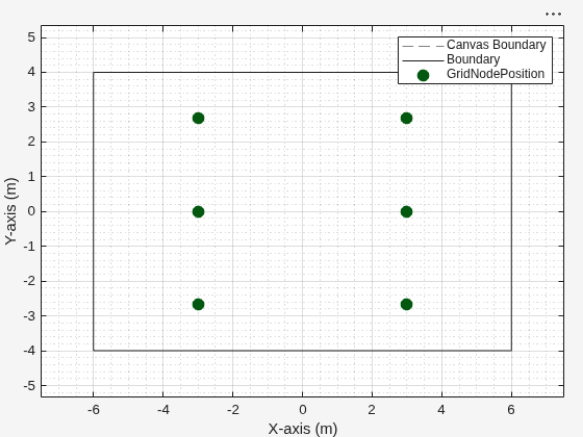
Generate and visualize a grid placement of wireless nodes within a rectangular area. Using the nodePositionGrid function, place six nodes in a 3-by-2 grid inside a 12-by-8 meter region, centered at (0, 0). Then, use wirelessNetworkViewer to display the resulting node positions.
Set the area dimensions, center, and grid size of the placement area.
areaLength = 12;            % Rectangle length (meters)
areaWidth = 8;              % Rectangle width (meters)
centerCoord = [0 0 0];      % Center of rectangle (x, y, z)
gridRows = 3;               % Number of rows
gridCols = 2;               % Number of columns
zCoord = 2;                 % z-coordinate for all nodes
Generate node positions in the rectangle using a grid.
[nodePosition,polygonShapeOut] = nodePositionGrid([areaLength areaWidth], ...
    Center=centerCoord, ...
    GridSize=[gridRows gridCols], ...
    ZCoordinate=zCoord);
Visualize the positions using the wireless network viewer.
viewer = wirelessNetworkViewer(CanvasSize=[12 8]);
addNodes(viewer,nodePosition,Type="GridNodePosition")
Show the rectangular boundary.
showBoundary(viewer, ...
    Position=centerCoord, ...
    BoundaryShape="rectangle", ...
    Bounds=[areaLength areaWidth], ...
    Name="RectangleBoundary")
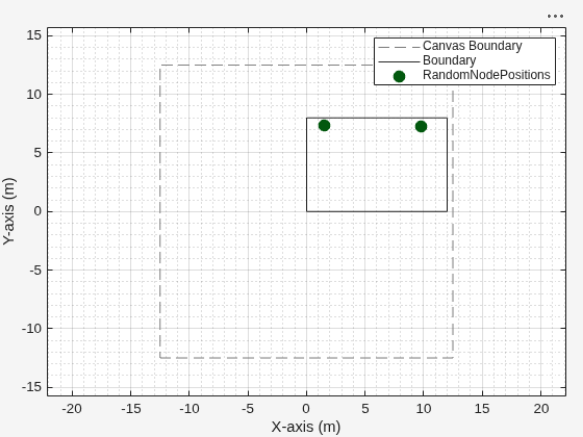
Place wireless nodes randomly within a polygonal area using nodePositionGrid. Then, visualize the node positions and the polygon boundary by using wirelessNetworkViewer.
Define the polygonal region.
polygonShapeIn = polyshape([0 0 12 12], [0 8 8 0]);
Generate node positions.
[nodePosition, polygonShapeOut] = nodePositionGrid(polygonShapeIn, ...
    NumNodesPerCell=2, ...
    PlacementType="random", ...
    ZCoordinate=2);
View the positions using the wireless network viewer.
viewer = wirelessNetworkViewer(CanvasSize=[25 25]);
addNodes(viewer,nodePosition,Type="RandomNodePositions");
Show the boundary.
showBoundary(viewer, ...
    Position=[6 4 0], ...           % Center of the rectangle (x, y, z)
    BoundaryShape="rectangle", ...
    Bounds=[12 8], ...              % Rectangle length and width
    Name="PolygonBoundary");
Input Arguments
Name-Value Arguments
Output Arguments
Version History
Introduced in R2026a

