mdl_color

Remove or return colors to Simulink object backgrounds

Al momento, stai seguendo questo contributo

Many Simulink developers have a policy against setting block background colors to anything other than white. The standard argument against coloring of blocks and subsystems is that colors are exclusively reserved to convey sample times in the model. To color a block would be to the detriment of readability when reviewing sample times.
While there is merit in this argument, the developer pays a heavy cost in readability when sample time colors are off. It is far easier to grasp what a model is doing when blocks are color-coded by function.
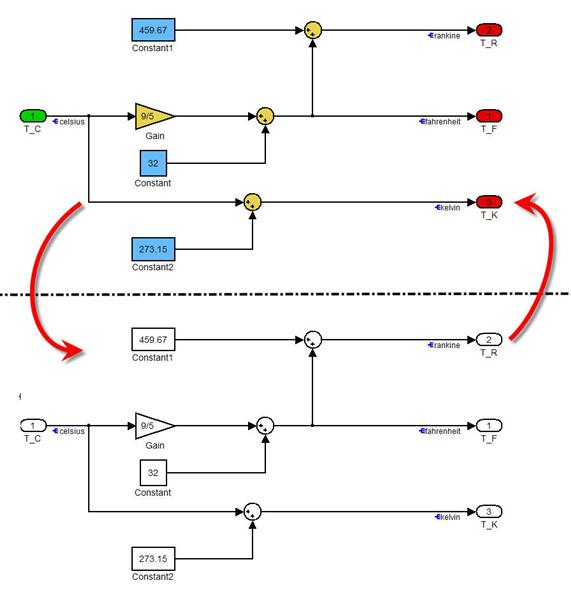
MDL_COLOR was created to provide the user the best of both worlds. When run, this utility will set the background color of all Simulink objects in a model to white. This facilitates model inspection when sample times colors are enabled.

Once sample time colors are no longer needed, simply call MDL_COLOR again, and all blocks will revert to their previous color.

Cita come

Will Campbell (2026). mdl_color (https://it.mathworks.com/matlabcentral/fileexchange/26456-mdl_color), MATLAB Central File Exchange. Recuperato .

Riconoscimenti

Ispirato: Transformerless Inverter

Categorie

Scopri di più su Modeling in Help Center e MATLAB Answers

Informazioni generali

Compatibilità della release di MATLAB

  • Compatibile con qualsiasi release

Compatibilità della piattaforma

  • Windows
  • macOS
  • Linux
Versione Pubblicato Note della release Action
1.1.0.1

Updated license

1.1.0.0

Added a missing file, set_params.m.

1.0.0.0