Contenuto principale

designParamEQ

Design parametric equalizer

The designParamEQ function has changed. For more information, see Version History.

Description

[B,A] = designParamEQ(Name=Value) designs a parametric equalizer with options specified using one or more name-value arguments. You can specify design options, including gain, center frequency, and bandwidth.

example

Examples

collapse all

Specify the filter order, peak gain in dB, normalized center frequencies, and normalized bandwidth of the bands of the parametric equalizer.

N = [2, ...
     4];
 
GdB = [6, ...
      -4]; 
  
wc = [0.25, ...
              0.75]; 
          
bw = [0.12, ...
              0.1];

Generate the filter coefficients using the specified parameters.

[B,A] = designParamEQ(FilterOrder=N,Gain=GdB, ...
    CenterFrequency=wc,Bandwidth=bw);

Visualize the frequency response of the designed filter.

freqz([B,A]);
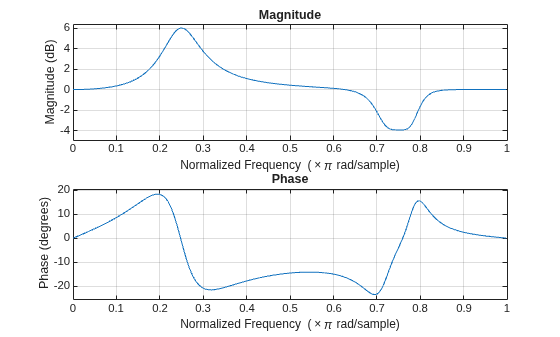
Figure contains 2 axes objects. Axes object 1 with title Phase, xlabel Normalized Frequency (\times\pi rad/sample), ylabel Phase (degrees) contains an object of type line. Axes object 2 with title Magnitude, xlabel Normalized Frequency (\times\pi rad/sample), ylabel Magnitude (dB) contains an object of type line.

Design a second-order sections (SOS) parametric equalizer using designParamEQ and filter an audio stream.

Create audio file reader and audio device writer System objects. Use the sample rate of the reader as the sample rate of the writer.

frameSize = 256;
fileReader = dsp.AudioFileReader("RockGuitar-16-44p1-stereo-72secs.wav",SamplesPerFrame=frameSize);
sampleRate = fileReader.SampleRate;
deviceWriter = audioDeviceWriter(SampleRate=sampleRate);

Play the audio signal through your device.

count = 0;
while count < 2500
    audio = fileReader();
    deviceWriter(audio);
    count = count + 1;
end
reset(fileReader)

Design an SOS parametric equalizer suitable for use with dsp.SOSFilter.

N = [4,4];
G = [-25,35];
wc = [0.01,0.5];
bw = [0.35,0.5];
[B,A] = designParamEQ(FilterOrder=N,Gain=G, ...
    CenterFrequency=wc,Bandwidth=bw);

Create an SOS filter.

myFilter = dsp.SOSFilter(B,A);

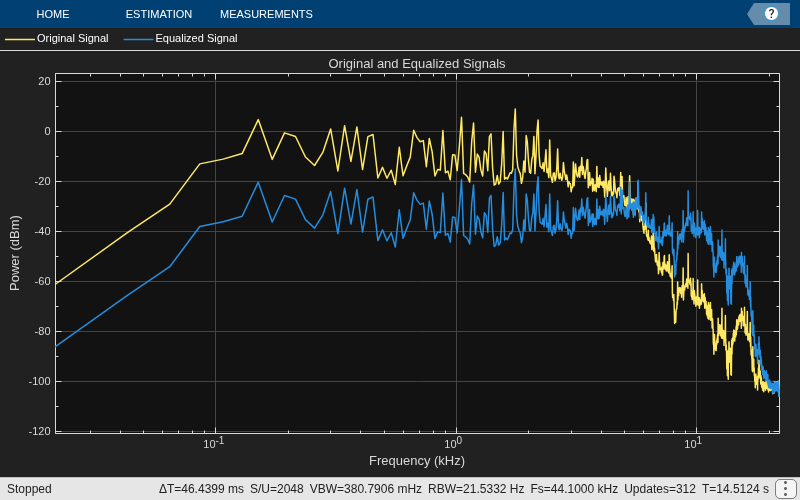
Create a spectrum analyzer to visualize the original audio signal and the audio signal passed through the parametric equalizer.

scope = spectrumAnalyzer( ...
    SampleRate=sampleRate, ...
    PlotAsTwoSidedSpectrum=false, ...
    FrequencyScale="log", ...
    Title="Original and Equalized Signals", ...
    ShowLegend=true, ...
    ChannelNames=["Original Signal","Equalized Signal"]);

Play the filtered audio signal and visualize the original and filtered spectrums.

count = 0;
while count < 2500
    originalSignal = fileReader();
    equalizedSignal = myFilter(originalSignal);
    scope([originalSignal(:,1),equalizedSignal(:,1)]);
    deviceWriter(equalizedSignal);
    count = count + 1;
end

As a best practice, release the objects once done.

release(deviceWriter)
release(fileReader)
release(scope)
Design a fourth-order sections (FOS) parametric equalizer using designParamEQ and filter an audio stream.

Construct audio file reader and audio device writer System objects. Use the sample rate of the reader as the sample rate of the writer.

frameSize = 256;
fileReader = dsp.AudioFileReader( ...
    "RockGuitar-16-44p1-stereo-72secs.wav",SamplesPerFrame=frameSize);
sampleRate = fileReader.SampleRate;
deviceWriter = audioDeviceWriter(SampleRate=sampleRate);

Play the audio signal through your device.

count = 0;
while count < 2500
    x = fileReader();
    deviceWriter(x);
    count = count + 1;
end
reset(fileReader)

Design FOS parametric equalizer coefficients.

N = [2 4];
G = [5 10];
wc = [0.025 0.65];
Q = [1 1.86];
mode = "fos";

[B,A] = designParamEQ(FilterOrder=N,Gain=G, ...
    CenterFrequency=wc,QualityFactor=Q,CascadeSectionsForm=mode);

Construct FOS IIR filters.

myFilter = dsp.FourthOrderSectionFilter(B,A);

Visualize the frequency response of the parametric equalizer.

freqz(myFilter)
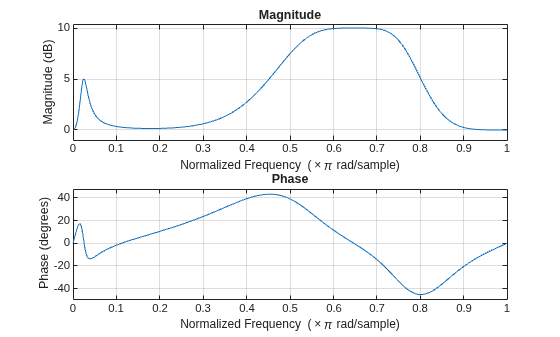
Figure contains 2 axes objects. Axes object 1 with title Phase, xlabel Normalized Frequency (\times\pi rad/sample), ylabel Phase (degrees) contains an object of type line. Axes object 2 with title Magnitude, xlabel Normalized Frequency (\times\pi rad/sample), ylabel Magnitude (dB) contains an object of type line.

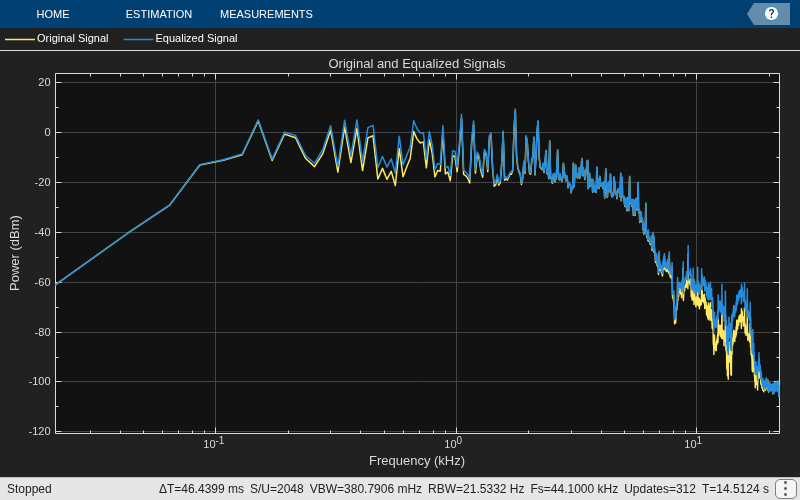
Construct a spectrum analyzer to visualize the original audio signal and the audio signal passed through the parametric equalizer.

scope = spectrumAnalyzer( ...
    SampleRate=sampleRate, ...
    PlotAsTwoSidedSpectrum=false, ...
    FrequencyScale="log", ...
    Title="Original and Equalized Signals", ...
    ShowLegend=true, ...
    ChannelNames=["Original Signal","Equalized Signal"]);

Play the filtered audio signal and visualize the original and filtered spectra.

count = 0;
while count < 2500
    x = fileReader();
    y = myFilter(x);
    
    scope([x(:,1),y(:,1)]);
    
    deviceWriter(y);
    
    count = count + 1;
end

As a best practice, release the objects once done.

release(fileReader)
release(deviceWriter)
release(scope)
Name-Value Arguments

collapse all

Specify optional pairs of arguments as Name1=Value1,...,NameN=ValueN, where Name is the argument name and Value is the corresponding value. Name-value arguments must appear after other arguments, but the order of the pairs does not matter.

Example: [B,A] = designParamEQ(CenterFrequency=0.5,QualityFactor=4) designs a parametric equalizer with a center frequency of 0.5π rad/sample and a quality factor of 4.

Normalized center frequency of the equalizer bands, specified as a scalar or row vector.

  • CenterFrequency must be real valued and in the range (0,1), where 1 corresponds to the Nyquist frequency (π rad/sample).

  • If you specify CenterFrequency as a row vector, then designParamEQ designs one equalizer for each element of the specified row vector.

  • If you specify CenterFrequency as a row vector, then you can specify one of these bandwidth specifications: Bandwidth, QualityFactor, or OctaveBandwidth. You cannot specify BandEdgeFrequencies in this case. For more information, see Bandwidth Specifications.

  • If you specify CenterFrequency and a bandwidth specification (Bandwidth, QualityFactor, or OctaveBandwidth) as row vectors, then both vectors must have the same size.

Data Types: single | double

Normalized bandwidth of the equalizer bands, specified as a scalar or row vector.

The function measures the normalized bandwidth at G/2 dB, where G is the gain specified in Gain. If the gain is -Inf dB (notch filter), then designParamEQ measures the normalized bandwidth at the 3 dB attenuation point, 10⋅log10(0.5).

Data Types: single | double

Since R2026a

Quality factor (or Q factor) of the equalizer bands, specified as a positive scalar or row vector of positive scalars.

The Q factor is defined as the center frequency ωc divided by the bandwidth BW, or Q = ωc/BW.

Data Types: single | double

Since R2026a

Octave bandwidth of the equalizer bands, specified as a positive scalar or row vector of positive scalars.

The octave bandwidth is defined as the base-2 logarithmic ratio between the upper band edge frequency and the lower band edge frequency.

Data Types: single | double

Since R2026a

Normalized upper and lower band edge frequencies of the equalizer bands, specified as a two-element vector or two-row matrix.

  • BandEdgeFrequencies must be real valued and in the range (0,1), where 1 corresponds to the Nyquist frequency (π rad/sample).

  • The first and second element or row in the specified vector or matrix represent the lower and upper band edge frequencies, respectively.

  • If you specify BandEdgeFrequencies as a matrix, the function interprets each column as a separate equalizer band.

  • If you specify BandEdgeFrequencies, do not specify CenterFrequency, Bandwidth, QualityFactor, or OctaveBandwidth. For more information, see Bandwidth Specifications.

Data Types: single | double

Filter order, specified as a scalar or row vector the same length as CenterFrequencies.

If you specify FilterOrder as a vector, each element must be an even number.

Peak gain in dB, specified as a scalar or row vector the same length as centerFreq. Elements of the vector must be real valued.

Data Types: single | double | int8 | int16 | int32 | int64 | uint8 | uint16 | uint32 | uint64

Design mode, specified as one of these values:

  • "sos" –– designParamEQ implements the equalizer as a cascade of second-order filters.

  • "fos" –– designParamEQ implements the equalizer as a cascade of fourth-order filters. Typically, this implementation is computationally more efficient because fourth-order sections do not require computing the polynomial roots.

Output Arguments

collapse all

Numerator filter coefficients, returned as a matrix. The size and interpretation of B depends on how you specify CascadeSectionsForm:

  • If you specify CascadeSectionsForm as "sos", then designParamEQ returns B as an L-by-3 matrix. Each row lists the numerator coefficients of a cascaded second-order section.

  • If you specify CascadeSectionsForm as "fos", then designParamEQ returns B as an L-by-5 matrix. Each row lists the numerator coefficients of a cascaded fourth-order section.

Denominator filter coefficients, returned as a matrix. The size and interpretation of A depends on the Orientation and mode:

  • If you specify CascadeSectionsForm as "sos", then designParamEQ returns A as an L-by-3 matrix. Each row lists the denominator coefficients of a cascaded second-order section.

  • If you specify CascadeSectionsForm as "fos", then designParamEQ returns A as an L-by-5 matrix. Each row lists the denominator coefficients of a cascaded fourth-order section.

More About

collapse all

References

[1] Orfanidis, Sophocles J. "High-Order Digital Parametric Equalizer Design." Journal of the Audio Engineering Society. Vol. 53, November 2005, pp. 1026–1046.

Extended Capabilities

expand all

C/C++ Code Generation
Generate C and C++ code using MATLAB® Coder™.

Version History

Introduced in R2016a

expand all