autosar.api.upgrade
R2026bUpgrade AUTOSAR Adaptive and AUTOSAR Classic software component modeling styles
Since R2026b
Syntax
Description
autosar.api.upgrade(
applies the transformation specified by modelName,modelTransformation)modelTransformation to the
AUTOSAR model specified by modelName.
When modelName specifies an AUTOSAR Adaptive software component
model then modelTransformation must be set to
"UpgradeAdaptiveModelingStyle". This transformation upgrades the model
to the current release. You can also upgrade models by running the Upgrade Advisor check Check AUTOSAR Adaptive modeling style
and applying the suggested fix.
Before R2026b: AUTOSAR Blockset used message-based communication to model AUTOSAR Adaptive software applications by using the Event Send and Event Receive blocks.
When modelName specifies an AUTOSAR Classic software component
model then modelTransformation must be set to
"UseBusElementPorts". This transformation automatically replaces
root-level Inport and Outport ports with In Bus Element and Out
Bus Element blocks. You can also upgrade models by running the Upgrade Advisor check Replace root ports with bus ports in AUTOSAR
Classic model and applying the suggested fix.
autosar.api.upgrade(___,BackupModel=
specifies whether to save a copy of the model with the same name with
createBackupModel)_backup appended before upgrading.
Examples
Upgrade the example model autosar_LaneGuidance, named autosar_LaneGuidance_messages, which was created in a release before R2026b and has root-level Inport and Outport blocks with Event Send and Event Receive blocks.
Open the model autosar_LaneGuidance_messages, which is configured for the AUTOSAR Adaptive Platform and was created in a release before R2026b.
modelName = "autosar_LaneGuidance_messages";
open_system(modelName);
Warning: Model 'autosar_LaneGuidance_messages' is configured for the AUTOSAR Adaptive Platform and was created in a previous release. To generate code, use Upgrade Advisor to upgrade your model.
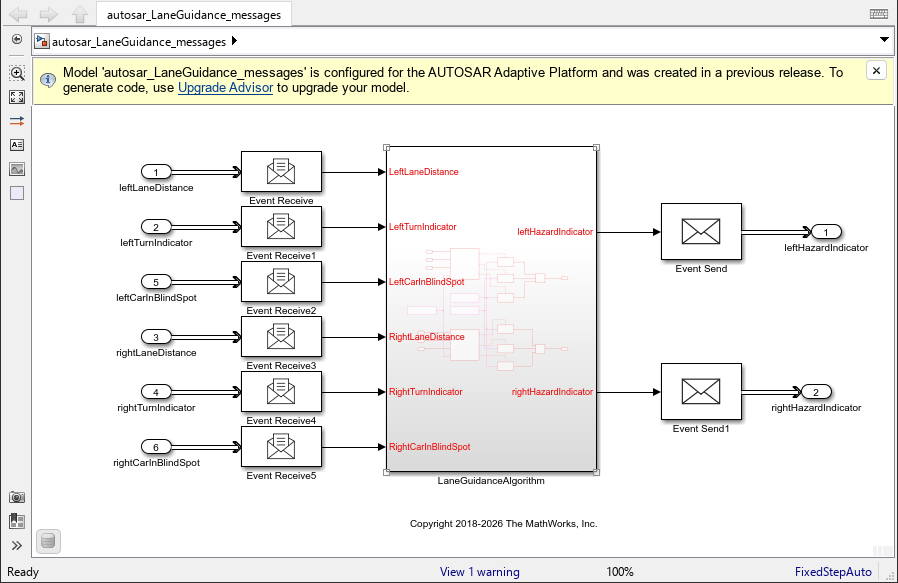
Upgrade the model by using the autosar.api.upgrade function.
autosar.api.upgrade(modelName,"UpgradeAdaptiveModelingStyle")### Saving original model as autosar_LaneGuidance_messages_backup.slx
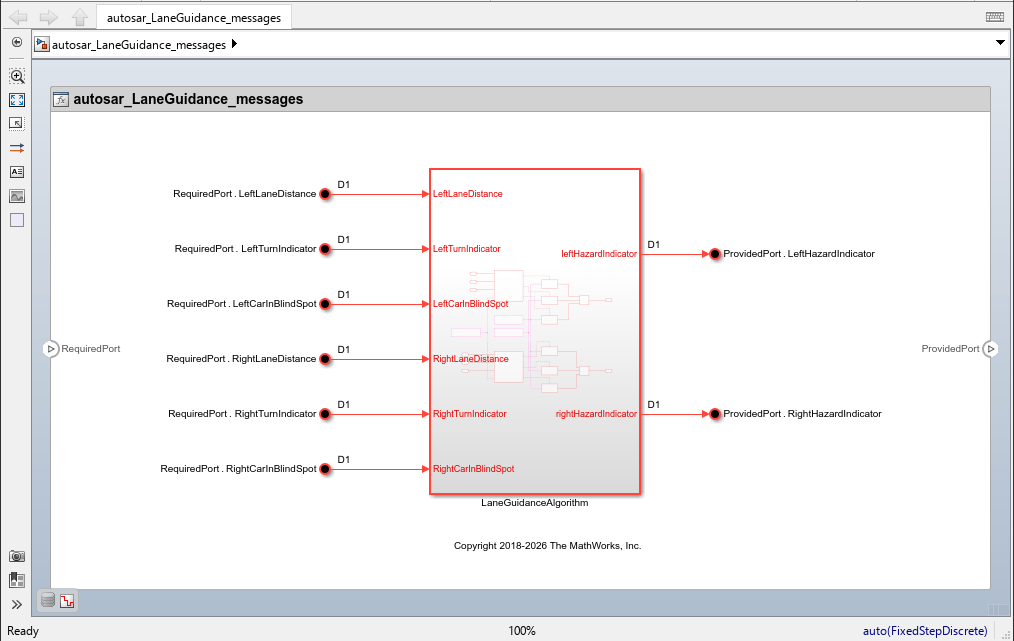
After upgrading the model, it opens in the AUTOSAR software component perspective, which has an explicit boundary that separates the model algorithm from software component service specifications. Notice that root-level Inport, Ouport, Event Receive, and Event Send blocks have been replaced with In Bus Element and Out Bus Element blocks which map to required and provided ports on the software component boundary. For more information about upgrading AUTOSAR Adaptive models, see Upgrade AUTOSAR Adaptive Models.
Upgrade the software component model
mMultitasking_4rates, which is configured for the AUTOSAR Classic
Platform, so that root-level Inport and Outport blocks are replaced by In
Bus Element and Out Bus Element blocks in an AUTOSAR Classic
software component model.
Open the model.
modelName = "mMultitasking_4rates";
open_system(modelName);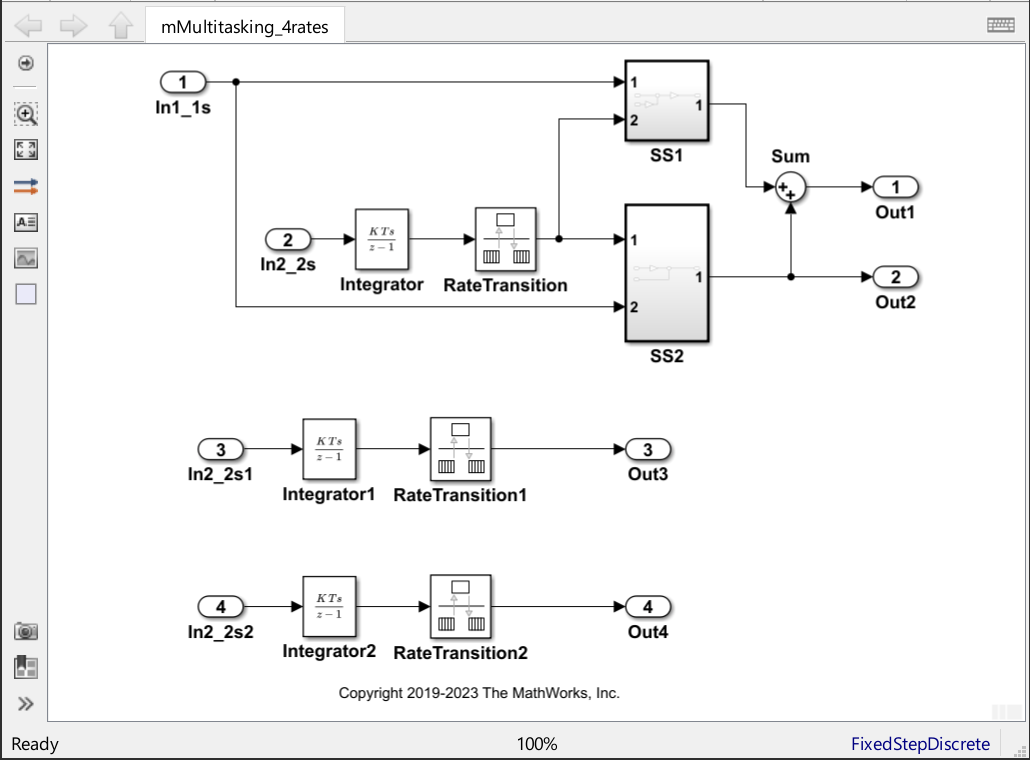
Upgrade the model to use bus element ports without creating a backup.
autosar.api.upgrade(modelName,"UseBusElementPorts",BackupModel=false);
After upgrading the model, root-level Inport and Outport blocks are replaced by In Bus Element and Out Bus Element blocks.
Input Arguments
Considerations
Exporting AUTOSAR Adaptive models to a release before R2026b, that were created in or upgraded to R2026b or later is not supported.
Without upgrading, AUTOSAR Adaptive software component models created in a release earlier than R2026b support only modification and simulation. To generate C++ code compliant with the AUTOSAR Adaptive Platform, you must first upgrade the model.
Tips
Before upgrading your AUTOSAR Adaptive software component model, you can preserve C++ class names and namespaces applied to data types and interfaces used in the model by creating and linking a Simulink® data dictionary to the model. You can programmatically move interfaces and data types to the Architectural Data section by using the
moveToDictionaryfunction. Architectural Data interfaces and data types store C++ class names and namespaces as properties, which are preserved during an upgrade.Some models might require you to make manual changes after using the
autosar.api.upgradefunction. When the software cannot complete an automatic upgrade, it displays warnings that list the problematic port or modeling element. For example, if you use Send or Receive blocks and have connections to the Port_Enable or Port_S ports, then the software does not connect the signals that were connected to these ports once the blocks are removed by the upgrade process. For communication error handling, use status elements. For more information, see Configure Sender-Receiver Service Communication Error Status Handling.You can upgrade AUTOSAR Adaptive software component models by running the Upgrade Advisor check Check AUTOSAR Adaptive Modeling Style and applying the suggested fix.
You can replace Inport and Outport blocks with In Bus Element and Out Bus Element blocks in AUTOSAR Classic software component models by running the Upgrade Advisor check Replace root ports with bus ports in AUTOSAR Classic model and applying the suggested fix.
Version History
Introduced in R2026b

