Predict Protein Secondary Structure Using Biopipeline Designer
R2026bThis example uses a feed-forward neural network to predict protein secondary structures in Biopipeline Designer. Neural network models attempt to simulate the information processing that occurs in the brain and are widely used in a variety of applications, including automated pattern recognition. The example requires Deep Learning Toolbox™ and Bioinformatics Toolbox™.
Enter the following command to open the prebuilt pipeline in Biopipeline Designer.
openExample('bioinfo/ProteinStructurePredictionExample.m')
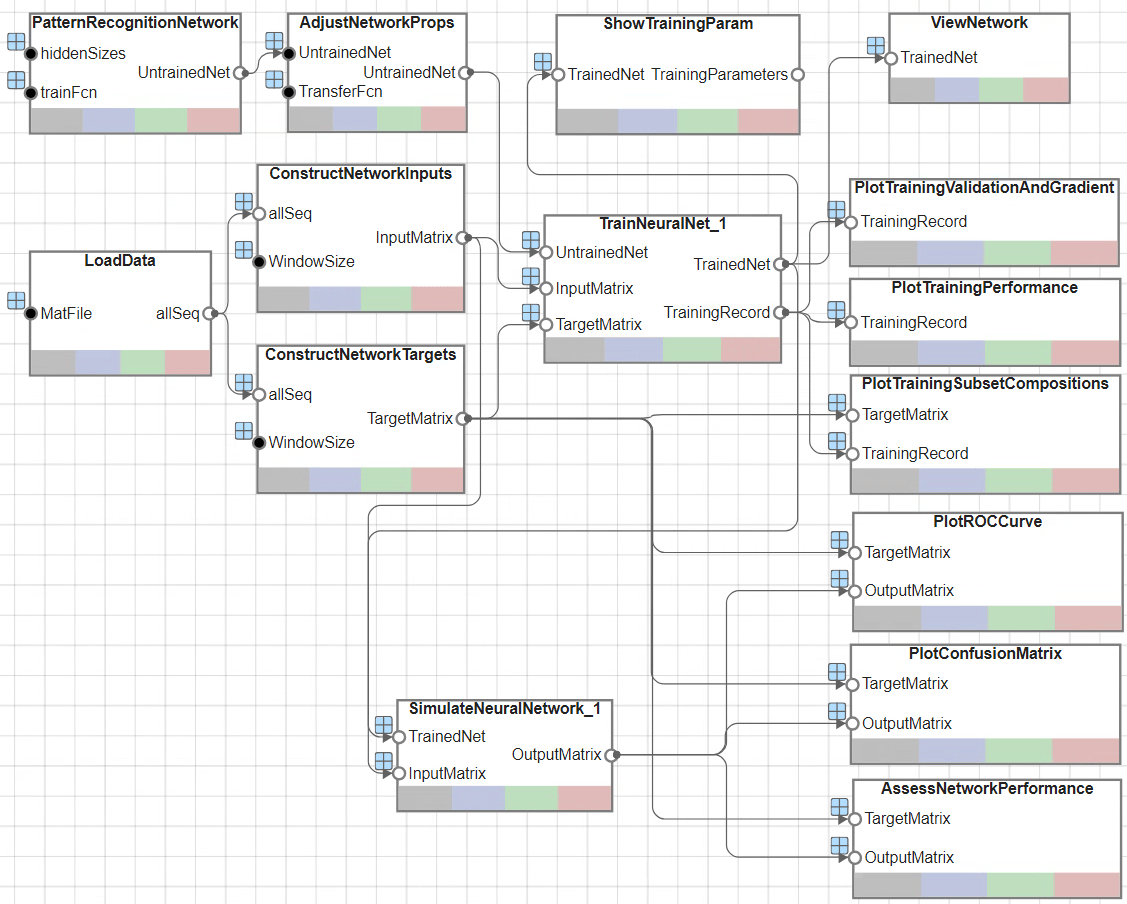
The app opens the pipeline as shown next.
Due to the random nature of some steps in the following approach, numeric results might be slightly different every time the network is trained or a prediction is simulated. For reproducible results, set the global random generator using the rng function before running the pipeline.
rng(0)
Load Data and Set Random Seed
The example uses the Rost-Sander dataset [1] that consists of proteins whose structures span a relatively wide range of domain types, composition, and length. The file RostSanderDataset.mat contains a subset of this data, where the structural assignment of every residue is reported for each protein sequence.
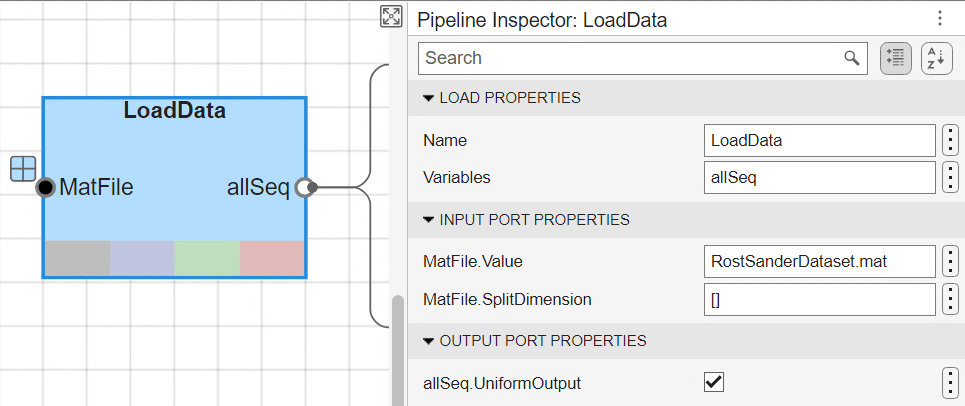
The block LoadData loads the data and specifically extracts the variable allSeq from the RostSanderDataset.mat file. This block is a built-in Load Block, and you can customize the block properties in the Pipeline Inspector pane.
Define Network Architecture
This example builds a neural network to learn the structural state (helix, sheet, or coil) of each residue in a given protein, based on the structural patterns observed during a training phase. In this pipeline, the input and output layers, that is, the input and target matrices, are defined within the UserFunction blocks named ConstructNetworkInputs and ConstructNetworkTargets, respectively.
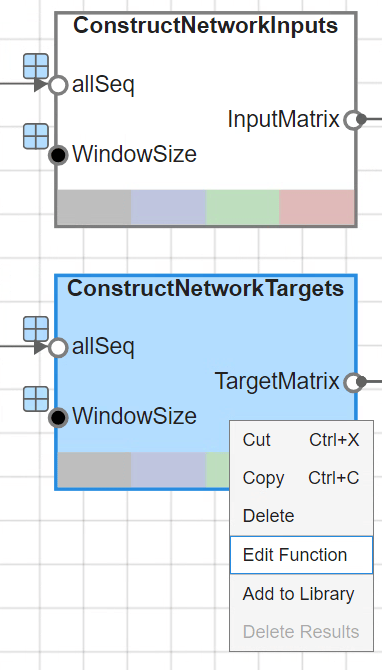
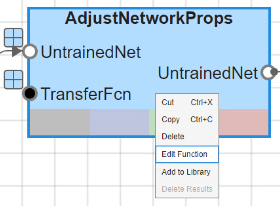
To view the underlying custom functions of these blocks, right-click either block and select Edit Function. The function definition is then shown in the MATLAB editor.
Build Neural Network
The problem of secondary structure prediction is similar to a pattern recognition problem, where you can train the network to recognize the structural state of the central residue most likely to occur when specific residues in the given sliding window are observed.
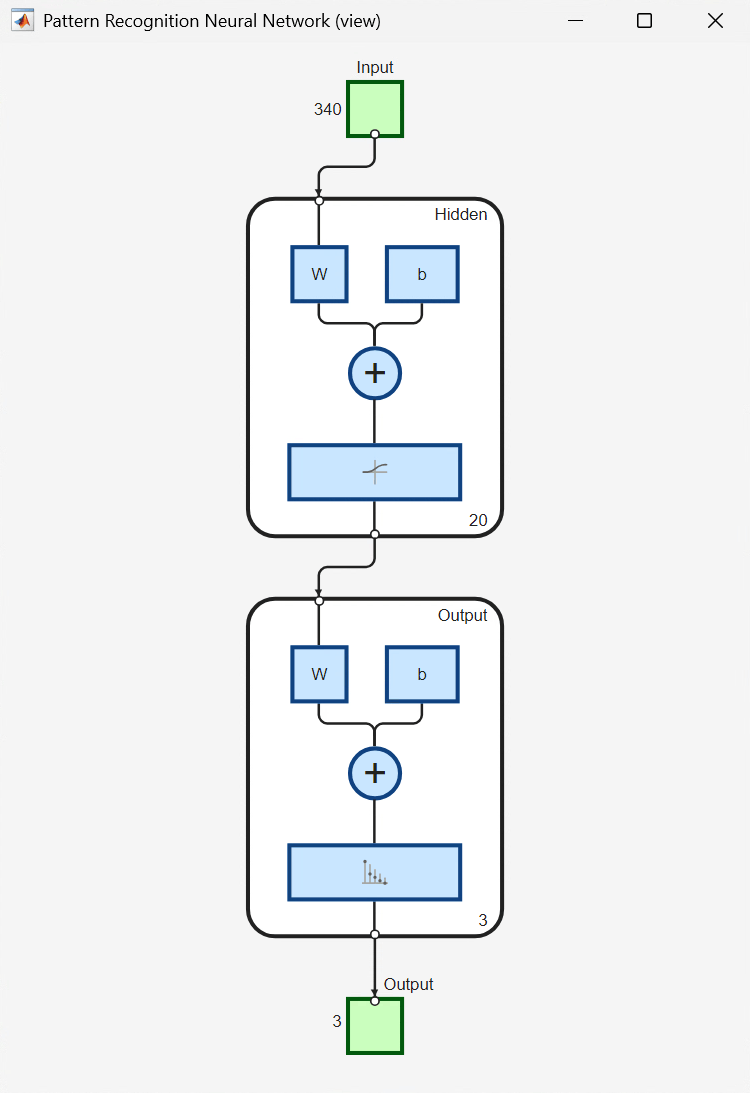
Create a pattern recognition neural network using the input and target matrices defined above and specify a hidden layer of particular size. The pipeline uses the size of 20, which you can modify in the Pipeline Inspector pane after selecting the PatternRecognitionNetwork block.
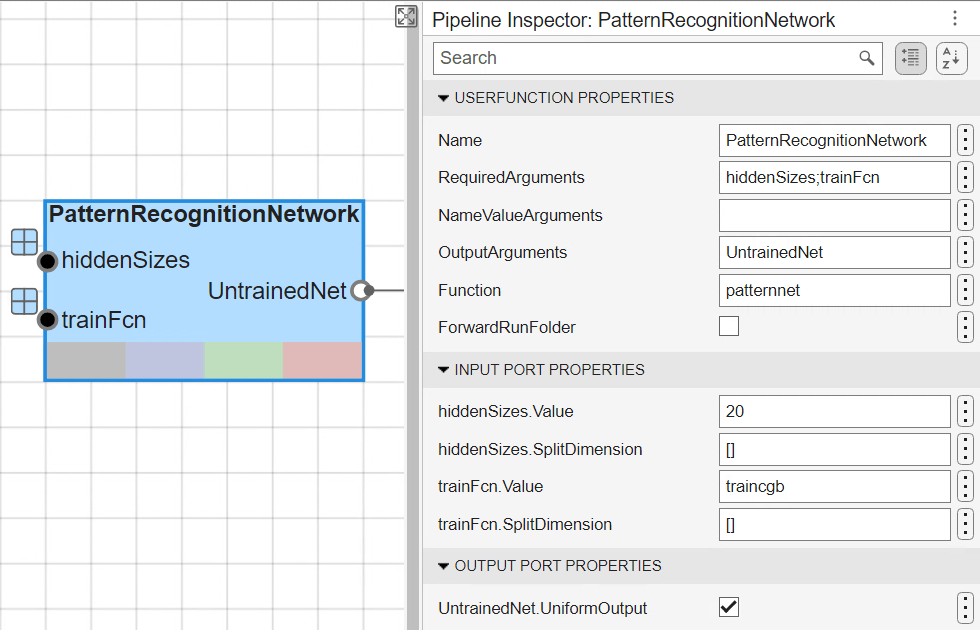
This block uses the built-in MATLAB function patternnet to build the neural network as defined in the Function property shown in the image above.
Train Neural Network
The pattern recognition network uses the default scaled conjugate gradient algorithm for training, but other algorithms are available in Deep Learning Toolbox. You can modify the training function by adjusting the property value for the trainFcn input port seen in the Pipeline Inspector pane of the PatternRecognitionNetwork block.
This network uses the logsig transfer function between the input and hidden layers to produce an output signal that is between and close to either 0 or 1, simulating the firing of a neuron [2]. For details on the network training, see Training the Neural Network in Predicting Protein Secondary Structure Using a Neural Network. You can modify which transfer function is used by updating the code within the UserFunction block named AdjustNetworkProps.
The UserFunction block named TrainNeuralNet leverages the built-in train function to train the neural network on the input data. The input port Net is the patternnet created earlier by the block PatternRecognitionNetwork, after the transfer function has been defined in AdjustNetworkProps.
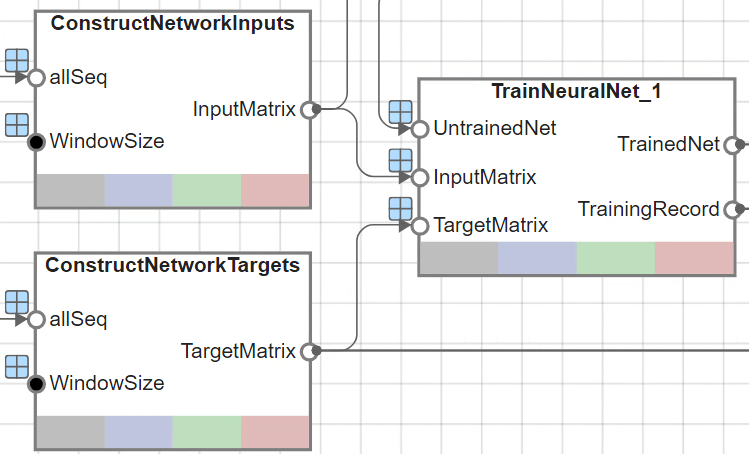
You can also modify the number of hidden layers or the size of the hidden layer could be modified in the Pipeline Inspector pane for the PatternRecognitionNetwork block.
During training, the training tool window opens and displays the progress.
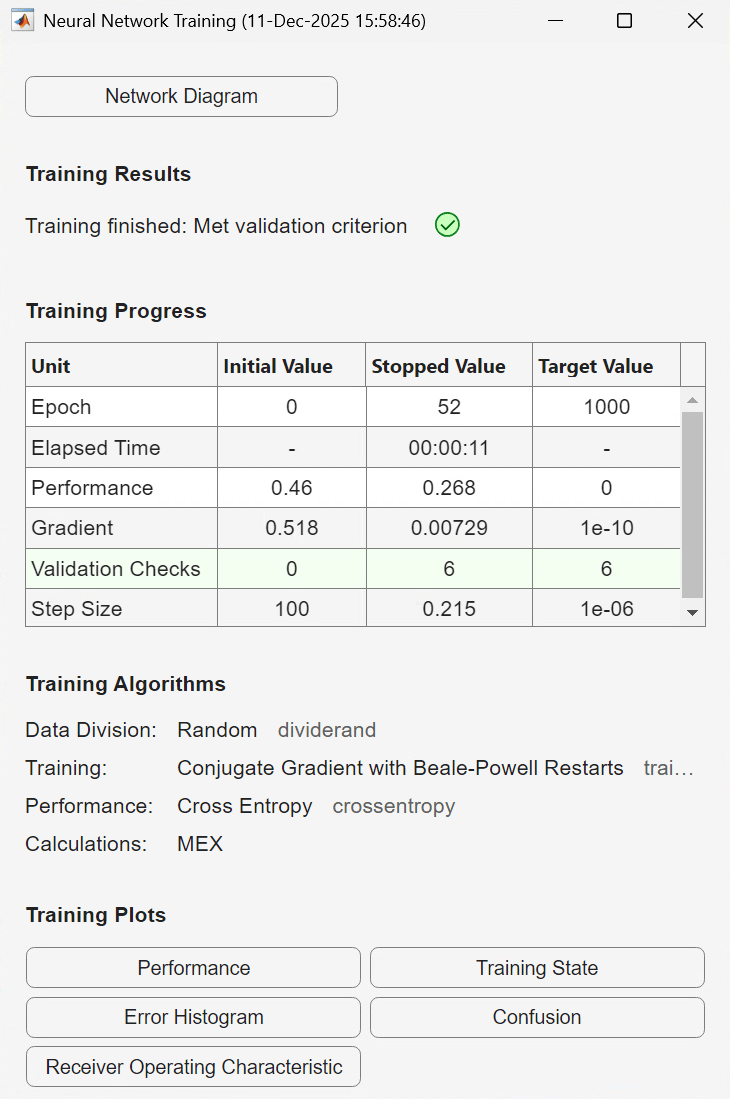
You can see the training details such as the algorithm, the performance criteria, the type of error considered, and so on. The ViewNetwork block also generates a graphical view of the neural network.
This example uses the early stopping criterion to avoid data overfitting. For details, see Training the Neural Network in Predicting Protein Secondary Structure Using a Neural Network.
The train function, by default, divides the available training data set into three subsets. The function assigns:
60% of the samples to the training set, which is used for computing the gradient and updating the network weights and biases
20% to the validation set, which is used to monitor the cross-entropy error during the training process because it tends to increase when data is overfitted
20% to the test set, which is used to assess the quality of the division of the data set
You can apply other types of partitioning by specifying the property net.divideFnc (default dividerand). This property can be easily modified within the AdjustNetworkProps block, similar to the transfer function described previously.
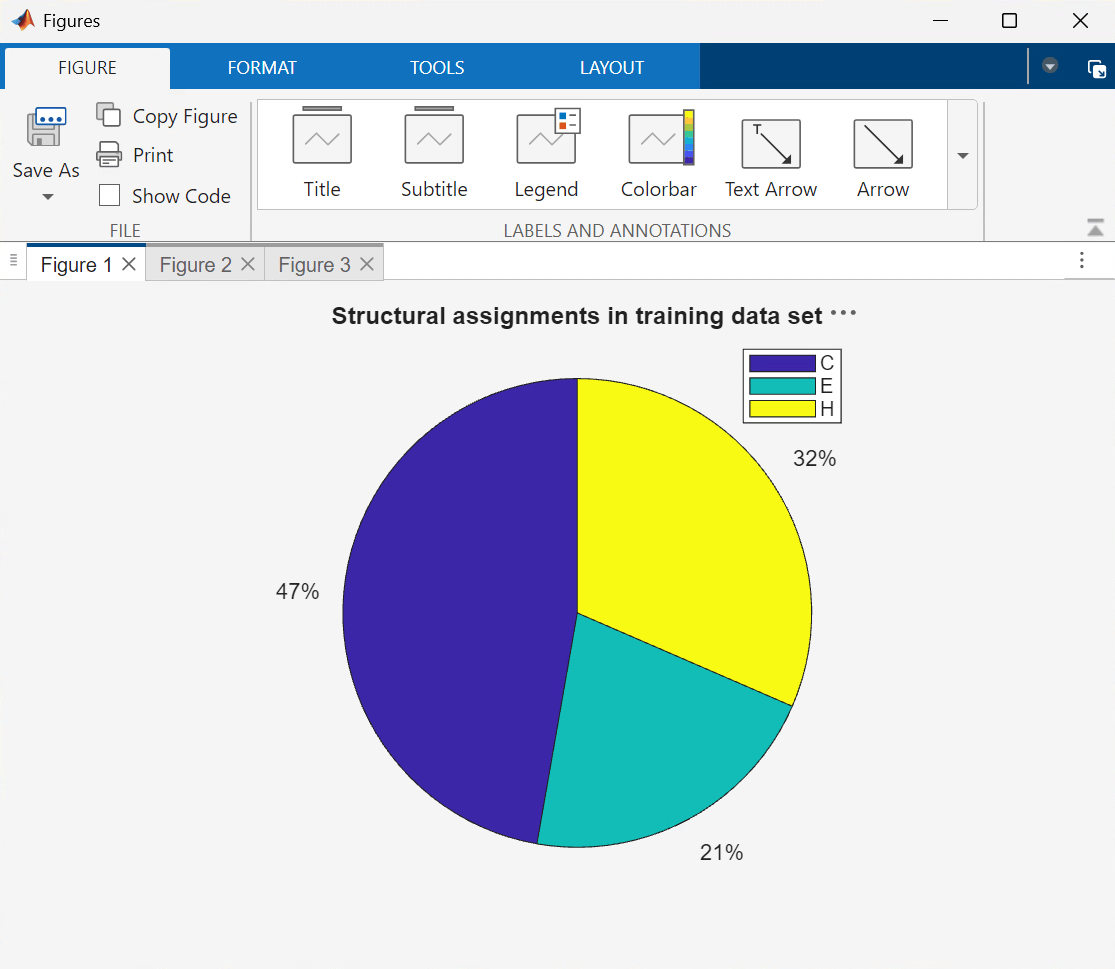
The structural composition of the residues in the three subsets is comparable, as seen from the following three figures generated by the UserFunction block named PlotTrainingSubsetCompositions.
The block PlotTrainingPerformance uses the plotperform function to display the trends of the training, validation, and test errors as training iterations pass.
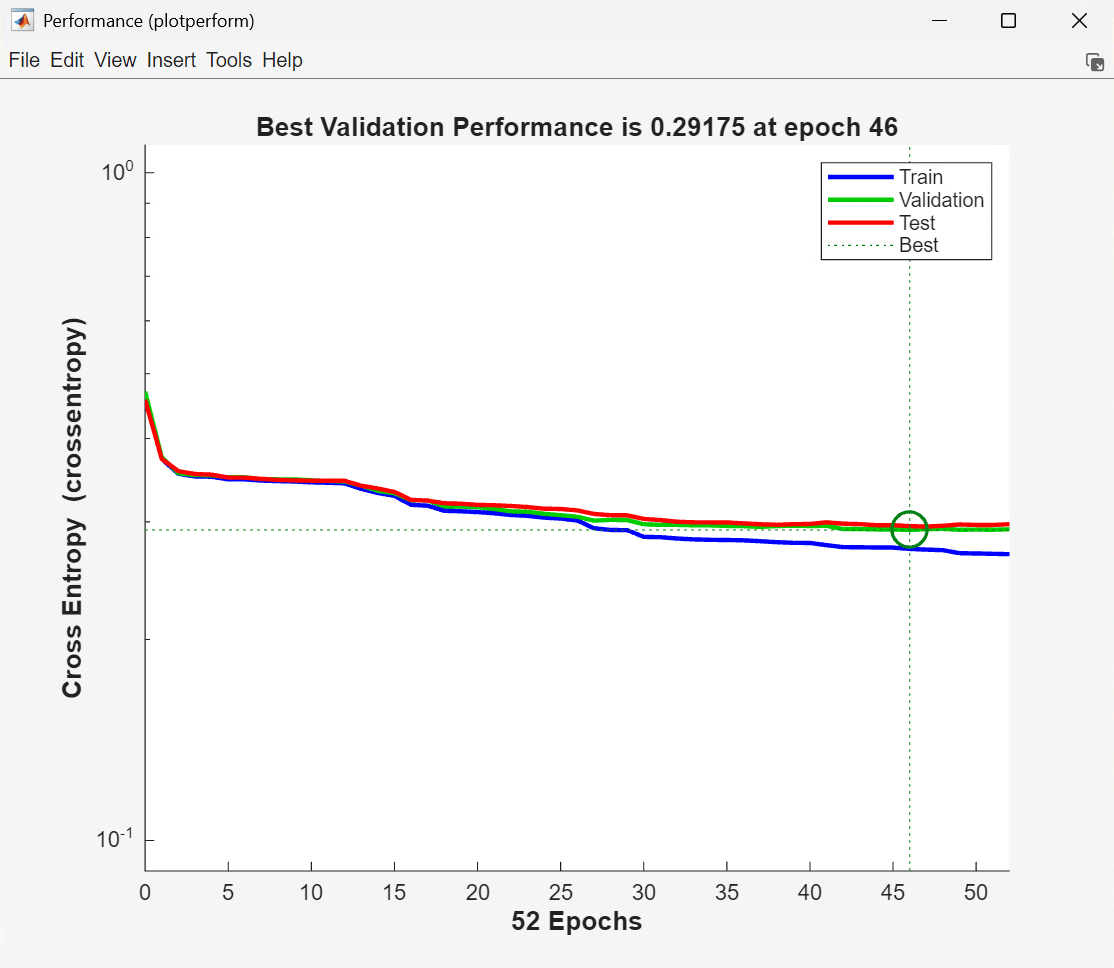
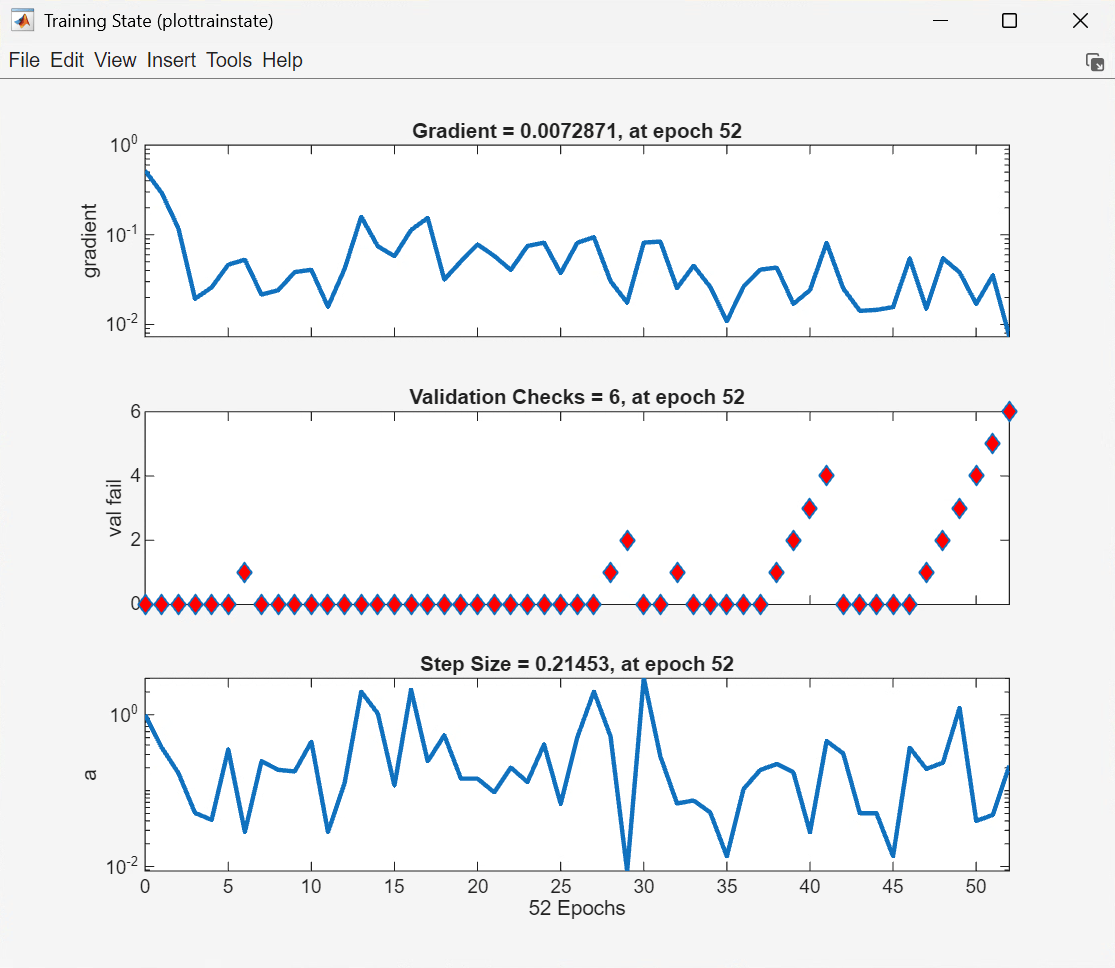
The training process stops when one of several conditions (see net.trainParam which can also be viewed within the AdjustNetworkProps block) is met. For example, in the training considered, the training process stops when the validation error increases for a specified number of iterations (6) or the maximum number of allowed iterations is reached (1000).
Analyze the Network Response
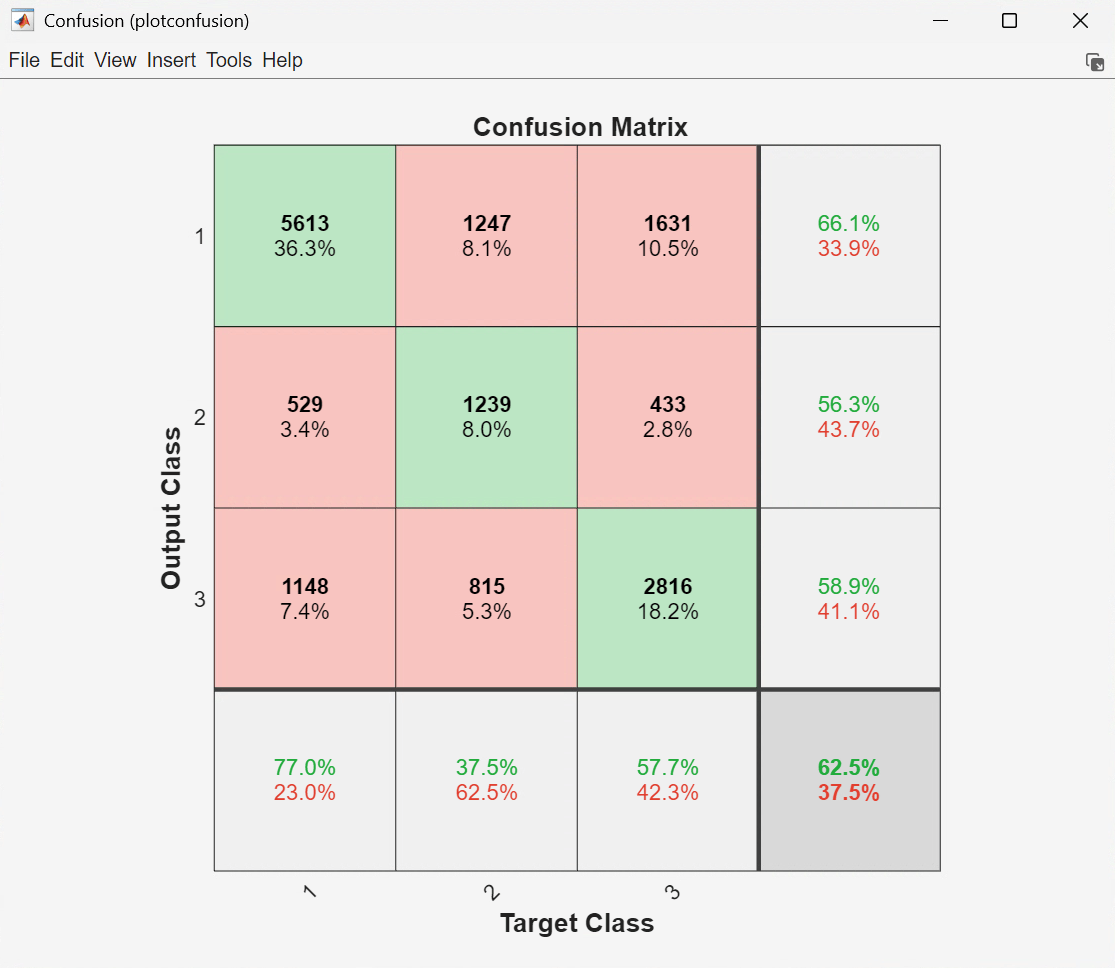
To analyze the network response, examine the confusion matrix by considering the outputs of the trained network and comparing them to the expected results (targets). The PlotConfusionMatrix block leverages the MATLAB function plotconfusion to generate the following figure.
Plot the Receiver Operating Characteristic (ROC) curve, which is a plot of the true positive rate (sensitivity) versus the false positive rate (1 - specificity), using the PlotROCCurve block.
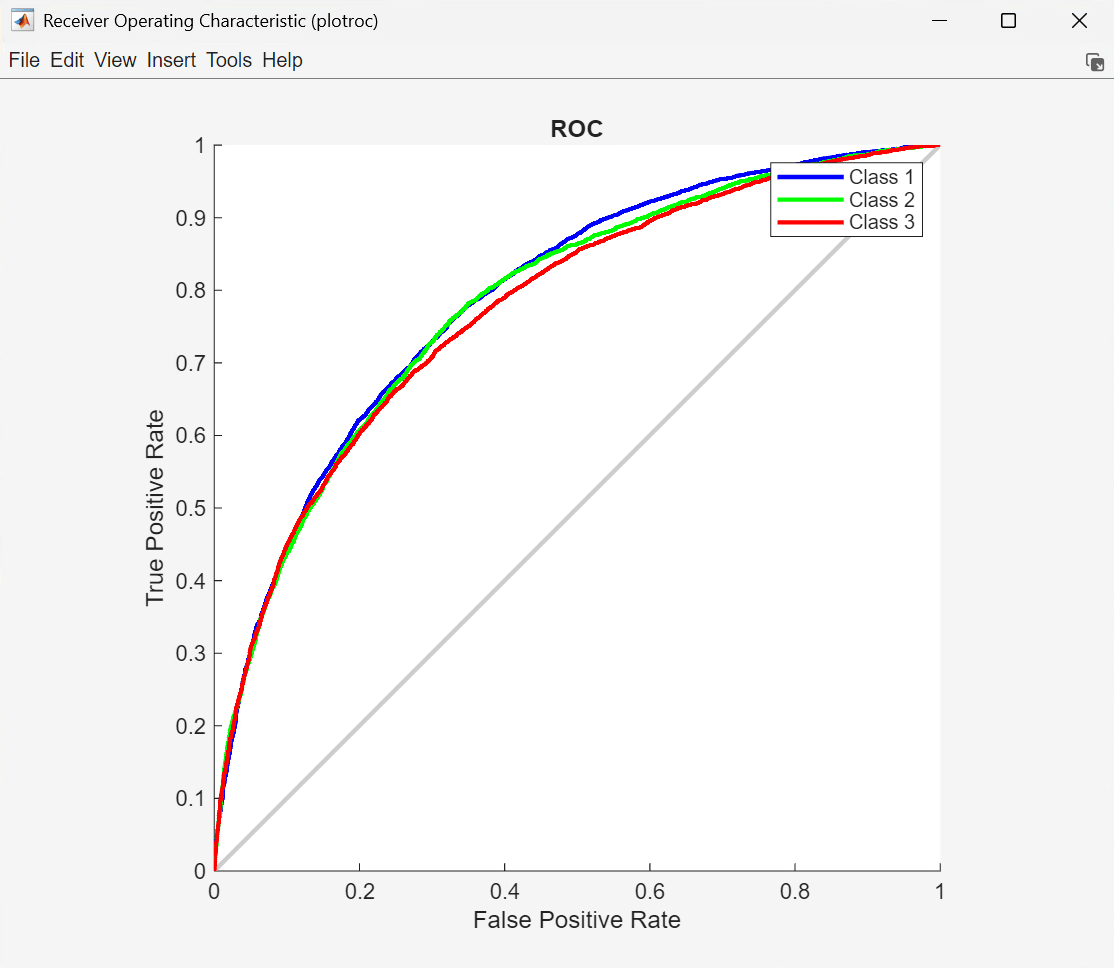
For more details on these plots and the information that they explain, see Analyzing the Network Response in Predicting Protein Secondary Structure Using a Neural Network.
Assess Network Performance
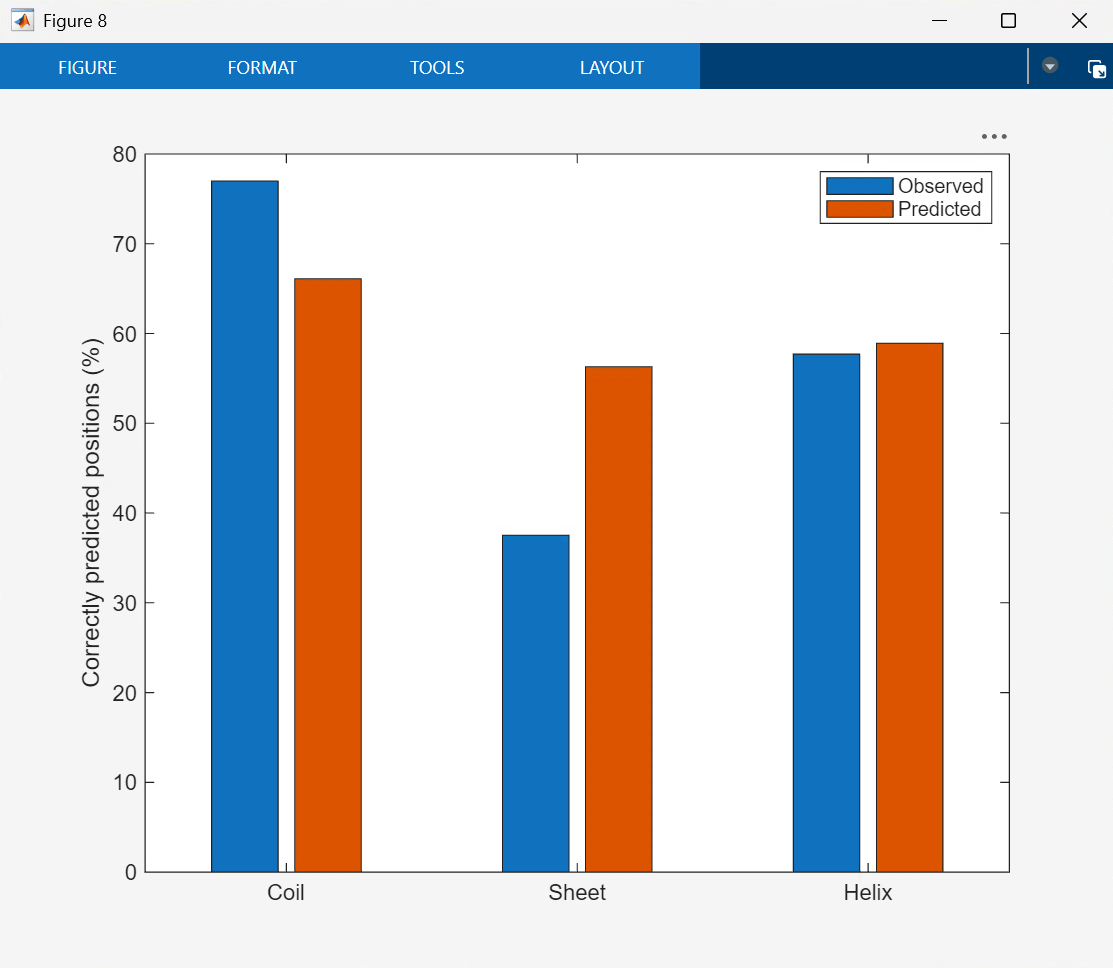
You can evaluate structure predictions in detail by calculating prediction quality indices [3], which indicate how well a particular state is predicted and whether overprediction or underprediction has occurred. Calculate the network performance in the AssessNetworkPerformance block, whose implementation can be viewed by opening the block's function using the same Edit Function workflow. More details on this calculation can also be found here Assessing Network Performance in Predicting Protein Secondary Structure Using a Neural Network.
References
[1] Rost, B., and Sander, C., "Prediction of protein secondary structure at better than 70% accuracy", Journal of Molecular Biology, 232(2):584-99, 1993.
[2] Holley, L H, and M Karplus. “Protein Secondary Structure Prediction with a Neural Network.” Proceedings of the National Academy of Sciences 86, no. 1 (1989): 152–56. https://doi.org/10.1073/pnas.86.1.152.
[3] Kabsch, Wolfgang, and Christian Sander. “How Good Are Predictions of Protein Secondary Structure?” FEBS Letters 155, no. 2 (1983): 179–82. https://doi.org/10.1016/0014-5793(82)80597-8.
See Also
Biopipeline
Designer | bioinfo.pipeline.block.Load | bioinfo.pipeline.block.UserFunction

