Software Quality Objective Subsets for MISRA Coding Standards
R2026bSome MISRA™ coding rules help address design issues in your code. Polyspace® groups these rules into two subsets:
Software quality subset 1 (SQO1) — These coding rules correspond to Polyspace Bug Finder™ quality objective level 1. These rules are classified to be of the highest importance in the standards.
Software quality subset 2 (SQO2) — These coding rules correspond to Polyspace Bug Finder quality objective level 5. This subset includes the coding rules in SQO1 and other advisory coding rules that can help reduce design issues in your code.
For details about Bug Finder quality objective levels see Evaluate Polyspace Bug Finder Results Against Bug Finder Quality Objectives.
To use the coding rules belonging to SQO1 and SQO2, you can use either the Polyspace user interface or the command line.
Select Software Quality Objective Subsets
When running a Polyspace analysis, select software quality objective (SQO) subsets either using the Polyspace user interface or the command line interface.
To select SQO subsets using the Polyspace user interface, open the Checkers Selection dialog box:
In the Configuration node of the Polyspace desktop user interface, locate the Static Analysis tab.
In Defects and Coding Standards, select
Use custom
                checkers file
and click Open ( ) to open the Checkers Selection dialog box.
In the Checkers Selection dialog box, click New to create a new checkers file. Optionally, clear the coding rules that are already selected.
Select a MISRA coding standard.
Select the check box SQO Level 1 to select the rules in the SQO1 subset. Alternatively, select the check box SQO Level 2 to select the rules in the SQO2 subset.
Save your selection as an XML file.
You can use the saved XML file to activate coding rules from the SQO subsets in subsequent Polyspace Bug Finder analysis.
Alternatively, to select the SQO subsets when running a Polyspace
Bug Finder analysis at the command line, specify one of SQO-subset1 or SQO-subset2 when using the MISRA coding standards. For example: -misra3 SQO-subset1 or -misra-c-2023 SQO-subset1.
Review Results for Specific Software Quality Objective Subset
After running a Polyspace analysis, you can choose to review violations that block a specific SQO. After running an analysis, review the results either using the Polyspace user interface or the Polyspace Access™ web interface.
In the Polyspace user interface, use Custom Filters to limit the review to specific SQO subset. For example, to limit your review to the SQO Level 1 of MISRA C:2023:
In the toolstrip, select Custom Filters > Manage Filters to open the Custom Filters dialog box.
Click New to create a new custom filter for the software quality subset. Give the filter a name such as
MISRA C 2023 SQO1and a corresponding description in the dialog box and select Create.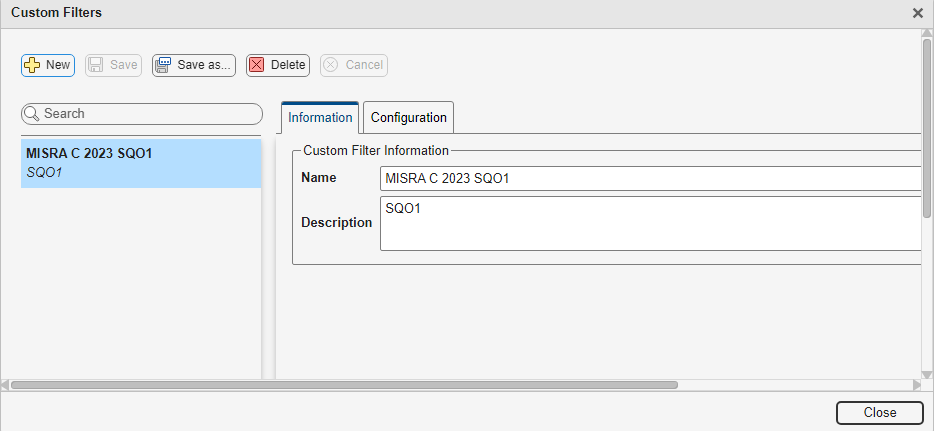
To configure this new filter, select the tab Configuration. In this tab, you can select the checkers that you want to review using this filter.
In the left navigation, select MISRA C:2023. Check SQO Level 1. This selection contains 25 MISRA C:2023 rules.
Save the filter and close the dialog box.
To use this new custom filter, during result review, select Custom Filters > MISRA C 2023 SQO1:
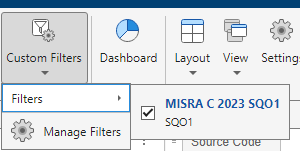
After applying this filter, Polyspace user interface limits your review to the checkers you selected in the filter.
In the Polyspace Access web interface, you can filter the results based on Bug Finder software quality objectives that you configure in Access. In this workflow, you can decide which coding rules and defects apply for a quality objective. See Monitor Code Quality Using Quality Objectives Dashboard in Polyspace Access (Polyspace Access).
See Also
Check MISRA C:2012 (-misra3) | Check MISRA C:2023 (-misra-c-2023) | Check MISRA C++:2008 (-misra-cpp) | Check MISRA C++:2023 (-misra-cpp-2023)

