Create MATLAB Production Server Archive Using Production Server Archive Compiler App
R2026bSupported platforms: Windows®, Linux®, Mac
This example shows how to use the Production Server Archive Compiler app to package a MATLAB® function into a MATLAB Production Server™ archive. You can deploy the archive to MATLAB Production Server.
Before R2025a: See Create Deployable Archive for MATLAB Production Server (R2024b).
Create MATLAB Function
Write a MATLAB program that you want to deploy. For information on writing MATLAB code for MATLAB Production Server, see MATLAB Coding Guidelines.
For this example, create a function named addmatrix.m.
function a = addmatrix(a1, a2)
a = a1 + a2;
At the MATLAB command prompt, enter addmatrix([1 4 7; 2 5 8; 3 6 9], [1 4 7; 2 5
8; 3 6 9]).
The output is a 3-by-3 matrix.
     2     8    14
     4    10    16
     6    12    18
Create Project and Compiler Task
Create a compiler task for your function using the Production Server Archive Compiler. Compiler tasks allow you to compile files in a project for a specific deployment target.
To open the app, on the Apps tab, expand the Apps gallery. In the Application Deployment section, click Production Server Archive Compiler.
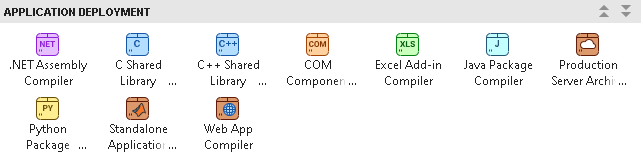
You can also open the app using the productionServerArchiveCompiler
function at the MATLAB Command Window.
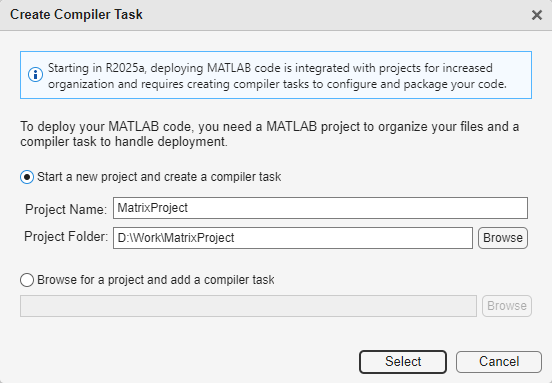
After you open the app, the Create Compiler Task dialog box prompts
you to add a compiler task to a new or an existing MATLAB project. For this example, select Start a new project and create a
compiler task and create a new project named
MatrixProject in your working folder. For more information on creating and using MATLAB projects, see Create Projects.
A new compiler task named ProductionServerArchive1 opens in the
Editor. You can compile code for other deployment targets by opening the Compiler Task Manager or going to the Manage Tasks tab and creating a new compiler task.
Specify Build Options
You can specify options for the MATLAB Production Server archive before packaging to customize the building and packaging process. For instance, you can obfuscate the MATLAB code or add a function signature file. For information on function signatures, see MATLAB Function Signatures in JSON (MATLAB Production Server).
For this example, in the Exported Functions section of the
compiler task, click Add Exported Function and select
addmatrix.m. In the Project panel, the file now has the labels
Design and Exported Function File.

In the Package Info section, replace the string
MyProductionServerArchive with the name for your MATLAB
Production Server package, AddMatrixArchive.
View Code and Package MATLAB Production Server Archive
To view code that contains instructions on building and packaging your component, click
the arrow next to the Export Build Script button and select
Show Code. On the right, a window opens that displays a deployment
script with the compiler.build.productionServerArchive function that corresponds to your
build options.
You can convert this code to a MATLAB script file by clicking the Export Build Script button. Running the generated build script is equivalent to clicking the Package button.

To create the MATLAB Production Server archive, click Package.
The compiler generates files in the
<compiler_task_name>/output
Test and Deploy Archive
After creating the deployable archive, you write source code for a client application
that calls the MATLAB function in the archive using HTTP or HTTPS requests. To create a client for
this example using the MWHttpClient class from the Java® client API, see Create MATLAB Production Server Java Client Using MWHttpClient Class (MATLAB Production Server).
You can test your RESTful API or Java client using the development version of MATLAB Production Server. MATLAB Compiler SDK™ includes the development version of MATLAB Production Server for testing and debugging application code and Excel® add-ins before deploying them to web applications and enterprise systems. To test your client, see Testing and Debugging RESTful APIs and Java Clients with the Development Version of MATLAB Production Server.
There are several ways to deploy archives to MATLAB Production server:
To deploy archives directly from the app, see Deploy Archive from Within Production Server Archive Compiler App.
To deploy archives by copying them into the
auto_deploydirectory, see Deploy Archive to MATLAB Production Server (MATLAB Production Server).To deploy archives using the RESTful API, see RESTful API for Secure Management of Deployable Archives (MATLAB Production Server).
Deploy Archive from Within Production Server Archive Compiler App
You can deploy archives to a MATLAB Production Server instance directly through the app.
Prerequisites
Complete these steps on the machine hosting the MATLAB Production Server instance.
Create an instance of MATLAB Production Server to deploy to. For more information, see Create Server Instance Using Command Line (MATLAB Production Server).
Configure access control through an identity provider and generate a JWT (JSON web token). For more information, see Configure Identity Provider and Specify Access Control Policy Rules (MATLAB Production Server).
Acquire an SSL certificate and key. For more information, see Acquire and Copy SSL Certificate and Key (MATLAB Production Server).
Configure your access control configuration file and access control policy file. For more information, see Application Access Control (MATLAB Production Server).
Configuration Properties
To deploy archives directly from the app, enable and set the following configuration
properties in the main_config file for your server instance. For more
information about configuration properties, see Server Configuration Properties (MATLAB Production Server).
Set certificate and key paths:
Set the private key path.
--x509-private-key <path-to-key-file>
Set the certificate chain path.
--x509-cert-chain <path-to-cert-chain-file>
Enable HTTPS:
Uncomment the following line to enable HTTPS on port 9920.
--https 9920
Specify configuration file paths:
Point to your access control configuration file.
--access-control-config ./config/jwt_idp.json
Point to your access control policy file.
--access-control-policy ./config/ac_policy.json
Enable Access Control:
--access-control-provider OAuth2
Enable archive management:
--enable-archive-management
Deploy Archive
After you package your MATLAB Production Server archive, you can deploy directly from the app.
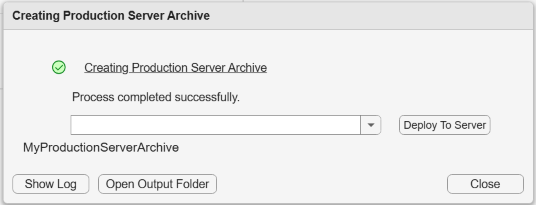
To deploy your archive, click Deploy To Server.
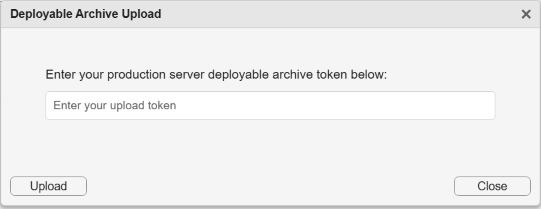
Next, enter your JSON web token and click Upload.
For other ways to deploy archives to MATLAB Production Server, see Deploy Archive to MATLAB Production Server (MATLAB Production Server). To deploy and manage archives using the RESTful API, see RESTful API for Secure Management of Deployable Archives (MATLAB Production Server).
See Also
Production Server Archive Compiler | compiler.build.productionServerArchive
Topics
- MATLAB Coding Guidelines
- Create MATLAB Production Server Java Client Using MWHttpClient Class (MATLAB Production Server)
- Create a C# Client (MATLAB Production Server)
- Create a Python Client (MATLAB Production Server)
- Create a C++ Client (MATLAB Production Server)
- Testing and Debugging RESTful APIs and Java Clients with the Development Version of MATLAB Production Server
- Deploy Archive to MATLAB Production Server (MATLAB Production Server)
- RESTful API for Secure Management of Deployable Archives (MATLAB Production Server)

