Contenuto principale

dsp.DUC

R2026b

Digital upconverter

Since R2026b

Description

The dsp.DUC System object™ filters a digital input signal using a user-defined multirate filter cascade and mixes the result with an oscillator. Use this object to interpolate a baseband signal and translate it to an intermediate frequency (IF) band.

Block diagram of dsp.DUC: input x[m] passes through the filter, then feeds into a mixer that multiplies with the oscillator to produce output y[n].

You specify the filter cascade directly or use the designDUC function to generate a CIC-based filter design and populate the object.

Use filterAnalyzer to visualize the frequency response of the filter cascade.

To digitally upconvert the input signal:

  1. Create the dsp.DUC object and set its properties.

  2. Call the object with arguments, as if it were a function.

To learn more about how System objects work, see What Are System Objects?

Creation

Description

You can create a dsp.DUC System object in one of these ways:

  • Use the designDUC function, which automatically designs a CIC-based multirate filter cascade from interpolation factors and sample rate specifications. For example:

    duc = designDUC(InterpolationFactors=[2 50],InputSampleRate=1e3)

  • Use the dsp.DUC creation function, described here.

duc = dsp.DUC creates a digital upconverter System object with default property values.

duc = dsp.DUC(PropertyName=Value) creates a digital upconverter with properties set using one or more name-value arguments. For example, dsp.DUC(Filter=dsp.FIRInterpolator(10),InputSampleRate=1e3) creates a DUC object with a FIR interpolation filter and input sample rate of 1 kHz.

example

Properties

expand all

Unless otherwise indicated, properties are nontunable, which means you cannot change their values after calling the object. Objects lock when you call them, and the release function unlocks them.

If a property is tunable, you can change its value at any time.

For more information on changing property values, see System Design in MATLAB Using System Objects.

Option to use normalized frequency, specified as true or false. When this property is true, frequency values are expressed in units of radians per sample. When this property is false, frequency values are expressed in hertz and the InputSampleRate property is active.

Set this property at construction time using the InputSampleRate constructor argument. Specify InputSampleRate="normalized" to set this property to true, or specify a positive scalar value to set it to false.

To change the sample rate after construction, use the setInputSampleRate object function.

Data Types: logical

Input sample rate, specified as a positive finite scalar in hertz.

At construction time, the InputSampleRate argument accepts:

  • A positive scalar — Sets the input sample rate to the specified value and sets NormalizedFrequency to false.

  • "normalized" — Sets NormalizedFrequency to true.

  • "auto" — Inherits the sample rate from the filter specified in the Filter property.

Setting this property directly does not scale CenterFrequency. To update the sample rate and scale CenterFrequency proportionally, use the setInputSampleRate object function instead.

Dependencies

To enable this property, set NormalizedFrequency to false.

Data Types: double

Type of oscillator used for frequency translation, specified as one of these values:

  • "Sine wave" — Use a sinusoidal oscillator for mixing.

  • "NCO" — Use a numerically controlled oscillator for mixing. When you set this property to "NCO", additional NCO configuration properties become active.

Data Types: string

Center frequency of the oscillator used for mixing, specified as a real finite scalar. The units depend on the value of the NormalizedFrequency property. When NormalizedFrequency is true, the center frequency is in normalized units. When NormalizedFrequency is false, the center frequency is in hertz.

If you do not specify CenterFrequency, the software computes the center frequency from the sample rate.

The value of the center frequency must be less than or equal to half the output sample rate (the input sample rate multiplied by the overall interpolation factor of the filter cascade).

Data Types: double

Multirate filter or filter cascade used for interpolation, specified as a filter System object that supports filter analysis. You can specify a single filter object or a dsp.FilterCascade object containing multiple filter stages. The cascade supports CIC filters, FIR filters, Farrow rate converters, and custom filters. By default, the filter is dsp.FIRInterpolator(4).

Use the designDUC function to design a multistage CIC-based interpolation cascade suitable for this property.

You can tune individual filter stage parameters, such as coefficients, after construction. For example, you can modify the Numerator property of a dsp.FIRInterpolator stage within the cascade.

You cannot replace the filter object after the object is locked.

Number of accumulator bits in the NCO, specified as a positive integer.

Dependencies

To enable this property, set Oscillator to "NCO".

Data Types: double

Number of quantized accumulator bits in the NCO, specified as a positive integer.

Dependencies

To enable this property, set Oscillator to "NCO".

Data Types: double

Option to enable dithering in the NCO, specified as true or false.

Dependencies

To enable this property, set Oscillator to "NCO".

Data Types: logical

Number of dither bits in the NCO, specified as a positive integer.

Dependencies

To enable this property, set Oscillator to "NCO" and Dither to true.

Data Types: double

Data type of the mixer output, specified as "Same as input" or a numerictype object. When you set this property to "Same as input", the mixer output data type is the same as the input data type.

Usage

Description

y = duc(x) filters the input signal x using the filter cascade specified in the Filter property and mixes the result with the oscillator. The object passes the input through the interpolation filter first, and then multiplies the filtered signal by the complex exponential generated by the oscillator. The output is the real part of the mixed signal.

example

Input Arguments

expand all

Input signal, specified as a column vector or matrix. Each column is treated as an independent channel. For pure-interpolation cascades, there is no frame length constraint. For general cascades that include rate converters, the number of input rows times the interpolation factor L must be an integer multiple of the decimation factor M, where [L:M] is the overall rate conversion ratio of the filter cascade.

Data Types: single | double | fi
Complex Number Support: Yes

Output Arguments

expand all

Upconverted and interpolated output signal, returned as a column vector or matrix. The number of rows equals the number of input rows multiplied by the overall interpolation factor of the filter cascade. The output is real-valued.

Data Types: single | double | fi

Object Functions

To use an object function, specify the System object as the first input argument. For example, to release system resources of a System object named obj, use this syntax:

release(obj)

expand all

setInputSampleRateSpecify input sample rate in filter objects
addFilterStageAdd filter stage to digital converter cascade
infoInformation about filter System object
stepRun System object algorithm
releaseRelease resources and allow changes to System object property values and input characteristics
resetReset internal states of System object

Examples

collapse all

Upconvert a 1 kHz sine wave to 50 kHz using a dsp.DUC object, then downconvert it back to baseband using a dsp.DDC object.

Create a 1 kHz sine wave at a sample rate of 6 kHz.

Fs = 6e3;
sine = dsp.SineWave(Frequency=1000, ...
    SampleRate=Fs, ...
    SamplesPerFrame=1024);
x = sine();

Design a dsp.DUC object that interpolates by a factor of 20 and upconverts to 50 kHz. Upconvert the signal.

duc = designDUC(InterpolationFactors=[2 2 5], ...
    InputSampleRate=Fs, ...
    Bandwidth=2e3, ...
    StopbandAttenuation=55);
duc.CenterFrequency = 50e3;
xUp = duc(x);

Design a dsp.DDC object that decimates by a factor of 20 and downconverts from 50 kHz to baseband. Downconvert the signal.

ddc = designDDC(DecimationFactors=[5 2 2], ...
    InputSampleRate=Fs*20, ...
    Bandwidth=2e3, ...
    StopbandAttenuation=55);
ddc.CenterFrequency = 50e3;
xDown = ddc(xUp);

Visualize the spectrum at each stage.

window = hamming(floor(length(x)/10));
pwelch(x,window,[],[],Fs,"centered")
title("Spectrum of Baseband Signal")
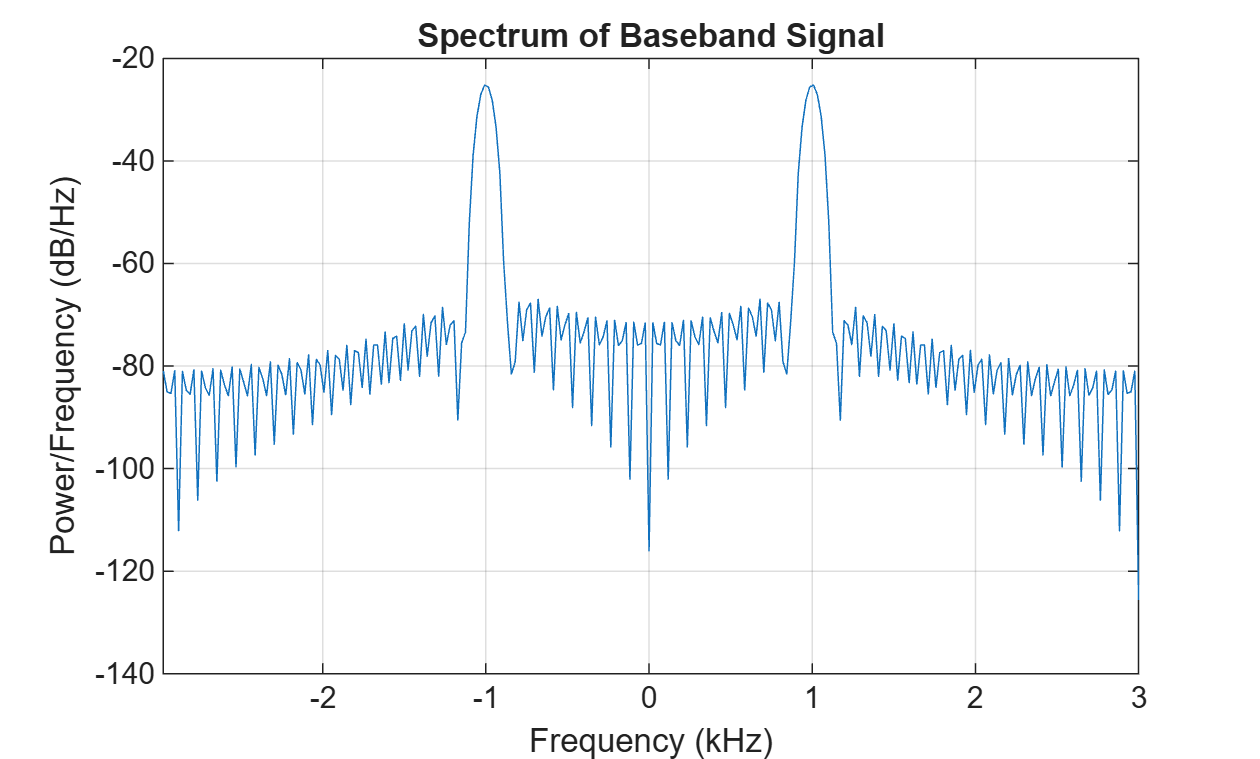
Figure contains an axes object. The axes object with title Spectrum of Baseband Signal, xlabel Frequency (kHz), ylabel Power/Frequency (dB/Hz) contains an object of type line.

window = hamming(floor(length(xUp)/10));
figure
pwelch(xUp,window,[],[],Fs*20,"centered")
title("Spectrum of Upconverted Signal")
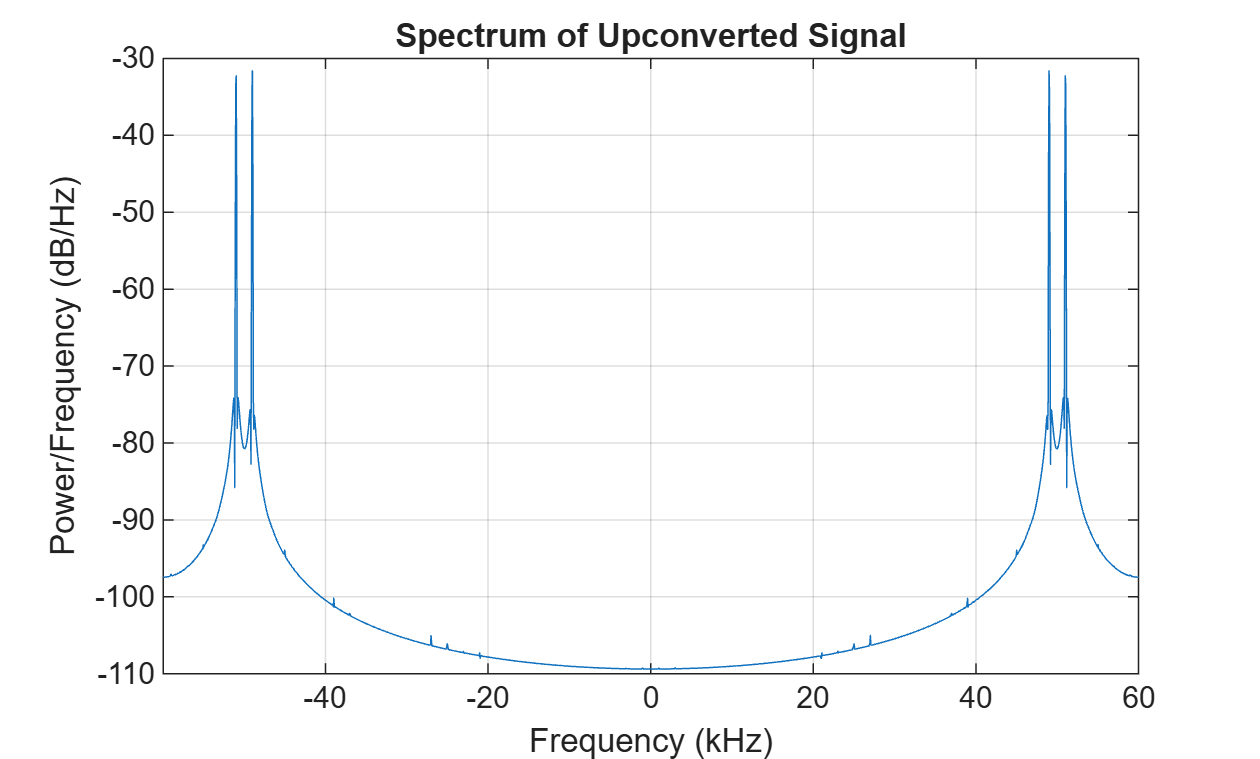
Figure contains an axes object. The axes object with title Spectrum of Upconverted Signal, xlabel Frequency (kHz), ylabel Power/Frequency (dB/Hz) contains an object of type line.

window = hamming(floor(length(xDown)/10));
figure
pwelch(xDown,window,[],[],Fs,"centered")
title("Spectrum of Downconverted Signal")
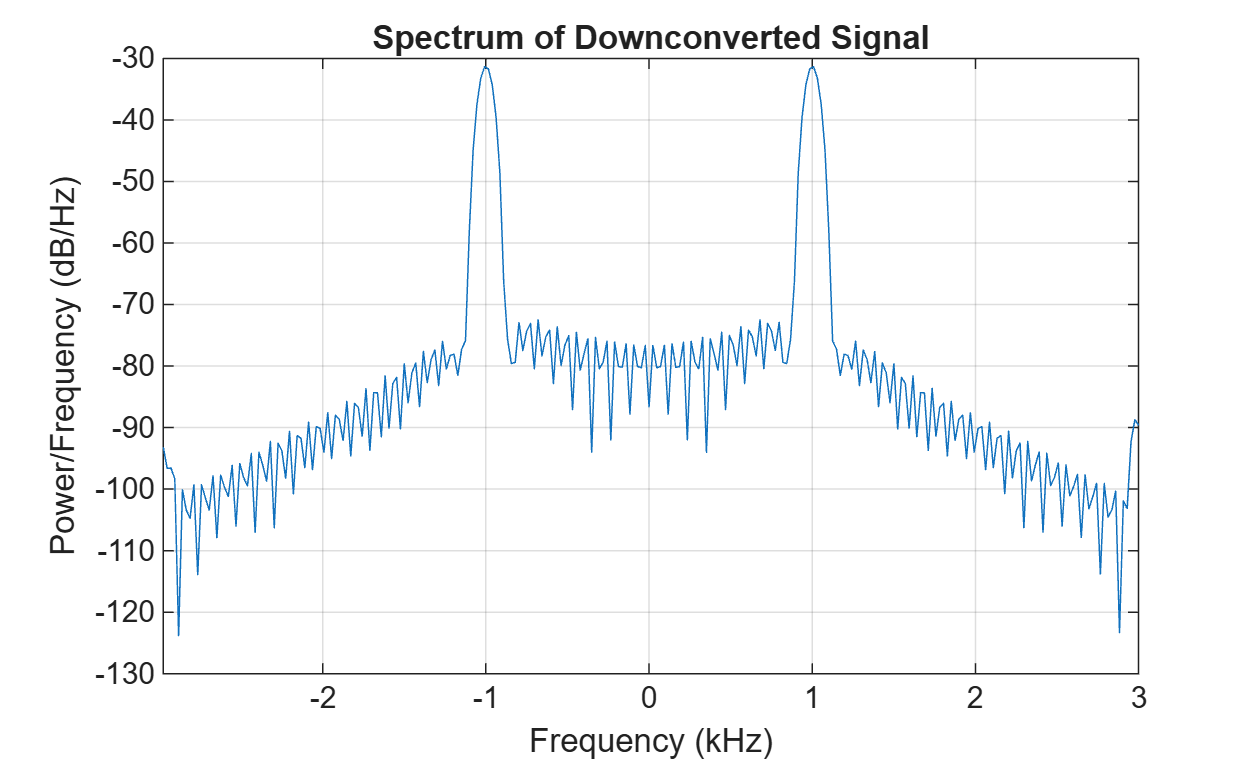
Figure contains an axes object. The axes object with title Spectrum of Downconverted Signal, xlabel Frequency (kHz), ylabel Power/Frequency (dB/Hz) contains an object of type line.

Create a dsp.DUC object with a custom multirate filter cascade and inspect the design.

Create individual filter stages for a 3-stage DUC: an auxiliary dsp.FIRInterpolator object, a CIC compensator dsp.FIRInterpolator object, and a dsp.CICInterpolator object with gain normalization.

auxFilt = dsp.FIRInterpolator(2,fir1(15,0.8));
compFilt = dsp.FIRInterpolator(2,fir1(31,0.4));
cicFilt = dsp.CICInterpolator(InterpolationFactor=10,NumSections=4);

Combine the stages into a filter cascade and create the dsp.DUC object.

F = cascade(auxFilt,compFilt,cicFilt,1/cicFilt.gain());
duc = dsp.DUC(Filter=F,InputSampleRate=1e3,CenterFrequency=50e3);

Display design information and visualize the filter response.

info(duc)
ans = 
    'Digital Up Converter
     ----------------------------
     Input sample rate                    : 1 kHz
     Oscillator type                      : Sine wave
     Oscillator center frequency          : 50 kHz
     
     ----------------------------------------------------
     Filter type           : dsp.FilterCascade
     Rate conversion ratio : 40:1
     
     Discrete-Time Filter Cascade                                  
     ----------------------------                                  
     Number of stages: 4                                           
     Stage cloning: enabled                                        
     ----------------------------                                  
     Stage1: dsp.FIRInterpolator                                   
     -------                                                       
     Discrete-Time FIR Multirate Filter (real)                     
     -----------------------------------------                     
     Filter Structure      : Direct-Form FIR Polyphase Interpolator
     Interpolation Factor  : 2                                     
     Polyphase Length      : 8                                     
     Filter Length         : 16                                    
     Stable                : Yes                                   
     Linear Phase          : Yes (Type 2)                          
                                                                   
     Stage2: dsp.FIRInterpolator                                   
     -------                                                       
     Discrete-Time FIR Multirate Filter (real)                     
     -----------------------------------------                     
     Filter Structure      : Direct-Form FIR Polyphase Interpolator
     Interpolation Factor  : 2                                     
     Polyphase Length      : 16                                    
     Filter Length         : 32                                    
     Stable                : Yes                                   
     Linear Phase          : Yes (Type 2)                          
                                                                   
     Stage3: dsp.CICInterpolator                                   
     -------                                                       
     Discrete-Time FIR Multirate Filter (real)                     
     -----------------------------------------                     
     Filter Structure      : Cascaded Integrator-Comb Interpolator 
     Interpolation Factor  : 10                                    
     Differential Delay    : 1                                     
     Number of Sections    : 4                                     
     Stable                : Yes                                   
     Linear Phase          : Yes (Type 1)                          
                                                                   
     Stage4: double                                                
     -------                                                       
                                                                   
     
     '

filterAnalyzer(duc.Filter)

Algorithms

expand all

Version History

Introduced in R2026b