CAN Channel
R2026bSpecify the vendor-specific CAN channel
Since R2026b
Model Configuration Pane: Hardware Implementation / Hardware board settings / Target hardware resources / Connectivity
Description
Specify the vendor-specific CAN channel used for universal measurement and calibration protocol (XCP)-based external mode simulation over CAN.
Dependencies
To enable this parameter, set Communication interface to
CAN and Connectivity interface parameter
to CAN (MCAN. The value of
x)x depends on the
Device
Series parameter value.
Settings
<empty>
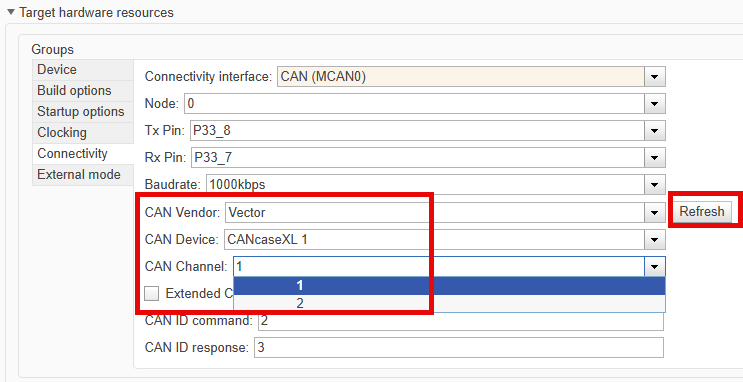
(default) | options vary depending on the CAN interface device connectedChoose the CAN channel after connecting the CAN interface device to the hardware board. For example, the screenshot shows the configuration settings for Vector CAN interface device.
Tips
If the expected CAN channel does not appear in the list, ensure that the CAN interface device is properly connected to the hardware board and click Refresh button to update the available CAN channel options.
Recommended Settings
No recommendation.
Programmatic Use
| No programmatic use is available. |
Version History
Introduced in R2026b

