Real Reciprocal Square Root HDL Optimized
R2026bCompute reciprocal of square root of real input and generate optimized HDL code
Since R2026b
Real Reciprocal Square Root HDL Optimized block
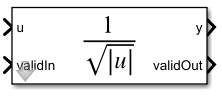
To add a block to a model, double-click the canvas and start typing the block name. Then, select the block from the list.
Libraries:
Fixed-Point Designer HDL Support /
Math Operations
Description
The Real Reciprocal Square Root HDL Optimized block computes
y such that y =
1/sqrt(abs(u))
Examples
The Real Reciprocal Square Root HDL Optimized block uses a lookup table and linear interpolation to compute the reciprocal square root of the absolute value of a real-valued input.
I/O Interface
The Real Reciprocal Square Root HDL Optimized block uses a fully parallel architecture. The block can accept input data on any cycle, including on consecutive clock cycles. Use the validIn port to indicate a valid input. When the block has finished the computation, the validOut port outputs true for one clock cycle. For valid inputs sent on consecutive clock cycles, validOut is also set to true on consecutive clock cycles.
Define Input Data and Simulation Parameters
To set up the model for simulation, define input data, input data type, and output data type.
Select the input data type: fixed, scaledDouble, single, or double.
DT =  'fixed';
For a fixed-point data type, specify the input word length, fraction length, and output data type.
inputWordLength = 16;
inputFractionLength = 10;
InputType = numerictype(1,inputWordLength,inputFractionLength);
OutputType = fixdt(1,27,20);
Generate random input data u. Ensure the input data contains at least one 0 value to demonstrate block behavior for division by zero.
rng('default');
numSamples = 10;
u = randn(1,numSamples);
u(2) = 0;
Cast the input data u to the selected input data type. If the input is floating point, set the output data type to floating point.
switch lower(DT)
    case 'fixed'
        u = cast(u,'like',fi([],InputType));
    case 'scaleddouble'
        u = cast(u,'like',fi([],InputType,'DataType','ScaledDouble'));
        OutputType = numerictype(OutputType,'DataType','ScaledDouble');
    case 'single'
        u = single(u);
        OutputType = 'single';
    case 'double'
        u = double(u);
        OutputType = 'double';
    otherwise
        u = double(u);
        OutputType = 'double';
end
Open and Simulate Model
Open the RealReciprocalSqrtModel model.
model = 'RealReciprocalSqrtModel';
open_system(model);
Configure the model workspace and run the simulation.
fixed.example.setModelWorkspace(model,'u',u,'numSamples',numSamples,'OutputType',OutputType);
out = sim(model);
Verify Output Solutions
Verify the output solutions returned by the Real Reciprocal Square Root HDL Optimized block.
Compare the fixed-point result from the Real Reciprocal Square Root HDL Optimized block to the floating-point result from the MATLAB divide and square root functions.
Verify the relative error is smaller than the estimated upperbound except for the division by zero case.
y = out.y(1:numSamples)';
u_nonzero = real(double(u(u~=0)));
y_nonzero = real(double(y(u~=0)));
yBuiltIn = 1./sqrt(abs(u_nonzero));

if isfi(u)&&isfixed(u)
    iIn = u.WordLength-u.FractionLength-issigned(u);
    relTolUpperbound = 2^max([-19,ceil(iIn/2)-OutputType.FractionLength+1]);
else
    relTolUpperbound = double(cast(max(sqrt(double(eps(u(:))))),'like',y));
end
Check if any relative error is greater than the estimated error upper bound.
relError = abs((double(y_nonzero)-yBuiltIn)./yBuiltIn);
if any(relError > relTolUpperbound)
    warning('numeric error exceeds estimated upper bound by %f',relError-relTolUpperbound);
end
Verify that when the input is 0, the output value is the upperbound of the specified output data type and that the division by zero flag returns true.
dbzFlagCorrect = find(u==0)==find(out.dbz==true)
dbzFlagCorrect = logical
   1
if isfi(u)
    dbzValueCorrect = y(out.dbz==true) == upperbound(numerictype(OutputType))
else
    dbzOutput = y(out.dbz==true)
end
dbzValueCorrect = logical
   1
If the input is fixed point, verify that the output is bit-exact with the MATLAB function equivalent, embblk.realReciprocalSqrt.
if isfi(u)&&isfixed(u)
    yMATLAB = embblk.realReciprocalSqrt(u,OutputType);
    bitExactWithMLTwin = ispropequal(y,yMATLAB)
end
bitExactWithMLTwin = logical
   1
Block Latency
The block latency is defined as the number of clock cycles between a successful input and when the corresponding output becomes valid. The latency of this block depends on the data type of the input.
if isfi(u)
    explatency = (u.WordLength > 9)*2 + issigned(u) + 5 + max(nextpow2(u.WordLength) - 3,0)
else
    explatency = 0
end
explatency =
9
Retrieve block latency from the simulation.
tDataIn = find(out.logsout.get('validIn').Values.Data == 1);
tDataOut = find(out.logsout.get('validOut').Values.Data == 1);
actualLatency = tDataOut(1:numSamples) - tDataIn(1:numSamples);
actualLatency = actualLatency(1)
actualLatency =
10
Ports
Input
Output
Parameters
Tips
The output of the Real Reciprocal Square Root HDL Optimized block is bit-exact to the
embblk.realReciprocalSqrtfunction for binary-point scaled fixed-point data types.
Algorithms
Because of its fully pipelined nature, the Real Reciprocal Square Root HDL
Optimized block is able to accept input data on any cycle, including consecutive
clock cycles. To send input data to the block, the validIn signal must be
true. When the block has finished the computation and is ready to send
the output, it will change validOut to true for one
clock cycle. For inputs set of consecutive cycles, validOut will also be
set to true on consecutive cycles.

Extended Capabilities
Version History
Introduced in R2026b

