Optimize Lookup Tables for Multiple Functions
R2026bWhen multiple functions in a design share input signals, you can speed up lookup table optimization for these functions by sharing breakpoints and prelookup tasks. Using multi-function lookup table optimization, you can generate optimized lookup tables from:
Existing Lookup Table blocks
Functions or function handles with up to three dimensions
Simulink® blocks including Math Function blocks, subsystems, and MATLAB Function blocks
Curve fit and surface fit objects
Multi-function approximation is available at the command line when you specify multiple
functions as inputs to a FunctionApproximation.Problem object.
Set Up a Multi-Function Approximation Problem
To create optimized lookup tables for multiple functions simultaneously, define a
multi-function approximation problem. Pass a cell array of functions as the
function argument when you create a
FunctionApproximation.Problem object. In this example, specify the
functions sin and exp.
funcs = {@(x) sin(x), @(x) exp(-x)};
problem = FunctionApproximation.Problem(funcs)
problem =
1×1 FunctionApproximation.Problem with properties:
FunctionToApproximate: {[@(x)sin(x)] [@(x)exp(-x)]}
NumberOfInputs: 1
NumberOfOutputs: 2
InputTypes: "numerictype(0,16,13)"
InputLowerBounds: 0
InputUpperBounds: 6.2832
OutputType: ["numerictype(1,16,14)" "numerictype(1,16,14)"]
Options: [1×1 FunctionApproximation.Options]
The FunctionToApproximate property shows both functions to
approximate. The problem has one input and two outputs.
These properties apply to both functions: InputLowerBounds,
InputUpperBounds, and InputTypes. Adjust the shared
properties.
problem.InputLowerBounds = 0;
problem.InputUpperBounds = 1.5;
problem.InputTypes = "numerictype(1,16,12)";
Each function can have a unique OutputType. To set unique output
types, provide the output types as an ordered array. Each entry in the array corresponds to
the function at the same position in the cell array used as the
function argument.
problem.OutputType = ["numerictype(1,16,14)", "numerictype(1,16,13)"];
Configure Optimization Options
Edit the FunctionApproximation.Options object to specify constraints
for the optimization. To generate MATLAB® function files, set ApproximateSolutionType to
"MATLAB".
problem.Options.WordLengths = 16;
problem.Options.BreakpointSpecification = "EvenSpacing";
problem.Options.Interpolation = "Linear";
problem.Options.ApproximateSolutionType = "MATLAB";
Settings for FunctionApproximation.Options properties apply to all
input functions. These properties can have unique settings for each function:
AbsTolRelTolOnCurveTableValues
Set per-function constraints using ordered arrays where each element corresponds to one function.
problem.Options.AbsTol = [2^-7, 2^-6];
problem.Options.RelTol = [2^-6, 2^-5];
If values that can be specified per-function are specified as a scalar value rather than as an ordered array, the value will apply to all functions.
problem.Options.OnCurveTableValues = true;
Some properties of FunctionApproximation.Options are not supported for
multi-function problems. For a comprehensive list, see Multi-Function Lookup Table Optimization Limitations.
Solve the Optimization Problem
Use the solve method to find a solution that meets all per-function
accuracy constraints simultaneously. The solver explores multiple candidate solutions with
varying table sizes and breakpoint specifications.
sol = solve(problem)
Searching for fixed-point solutions.

|  ID | Total Memory (bits) | Feasible | Table Size | Breakpoints WLs | TableData WL | BreakpointSpecification | Normalized error (%) |
|   0 |                  96 |        0 |          2 |              16 |      [16 16] |             EvenSpacing |           1943.1491% |
|   1 |                 352 |        1 |         10 |              16 |      [16 16] |             EvenSpacing |             22.4934% |
|   2 |                 320 |        1 |          9 |              16 |      [16 16] |             EvenSpacing |             28.3716% |
|   3 |                 288 |        1 |          8 |              16 |      [16 16] |             EvenSpacing |             37.1316% |
|   4 |                 256 |        1 |          7 |              16 |      [16 16] |             EvenSpacing |             50.3955% |
|   5 |                 224 |        1 |          6 |              16 |      [16 16] |             EvenSpacing |             72.2261% |
|   6 |                 192 |        0 |          5 |              16 |      [16 16] |             EvenSpacing |            113.6880% |
|   7 |                 160 |        0 |          4 |              16 |      [16 16] |             EvenSpacing |            200.7924% |
|   8 |                  96 |        0 |          2 |              16 |      [16 16] |         EvenPow2Spacing |           1000.9284% |
|   9 |                 160 |        0 |          4 |              16 |      [16 16] |         EvenPow2Spacing |            200.7924% |
|  10 |                 256 |        1 |          7 |              16 |      [16 16] |         EvenPow2Spacing |             50.3955% |

Best Solution
|  ID | Total Memory (bits) | Feasible | Table Size | Breakpoints WLs | TableData WL | BreakpointSpecification | Normalized error (%) |
|   5 |                 224 |        1 |          6 |              16 |      [16 16] |             EvenSpacing |             72.2261% |
sol =
  1×1 FunctionApproximation.LUTSolution with properties:

          ID: 5
    Feasible: "true"
The search progress table in the solver displays a TableData WL
column that shows an ordered vector with the word length applied to each function.
The Normalized error in the table shows the maximum of the
per-function normalized error values.
Compare Solutions to Original Functions
Compare the numerical behavior of the original functions with the lookup table approximation. The comparison plot shows the approximation error for each function.
compare(sol)
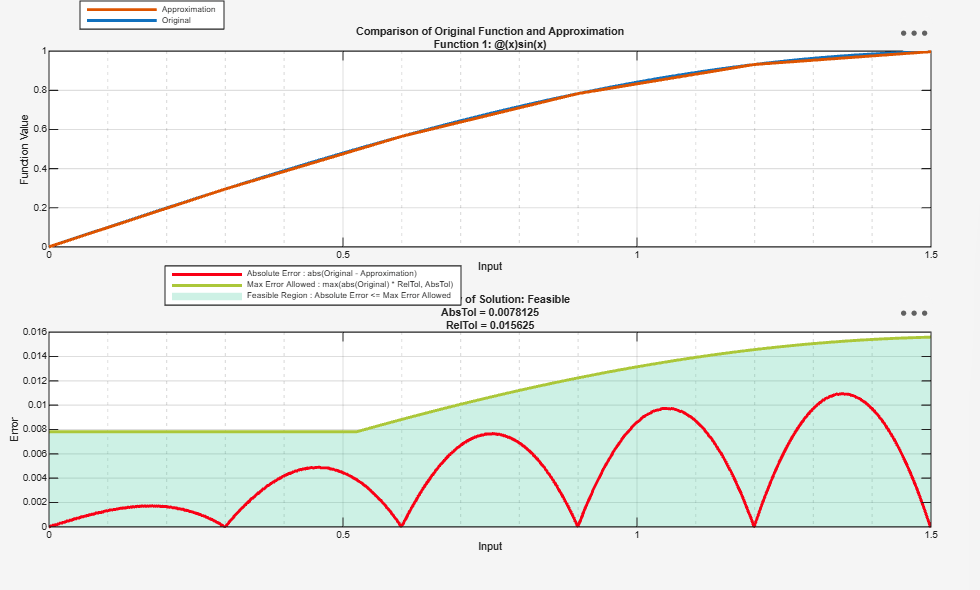
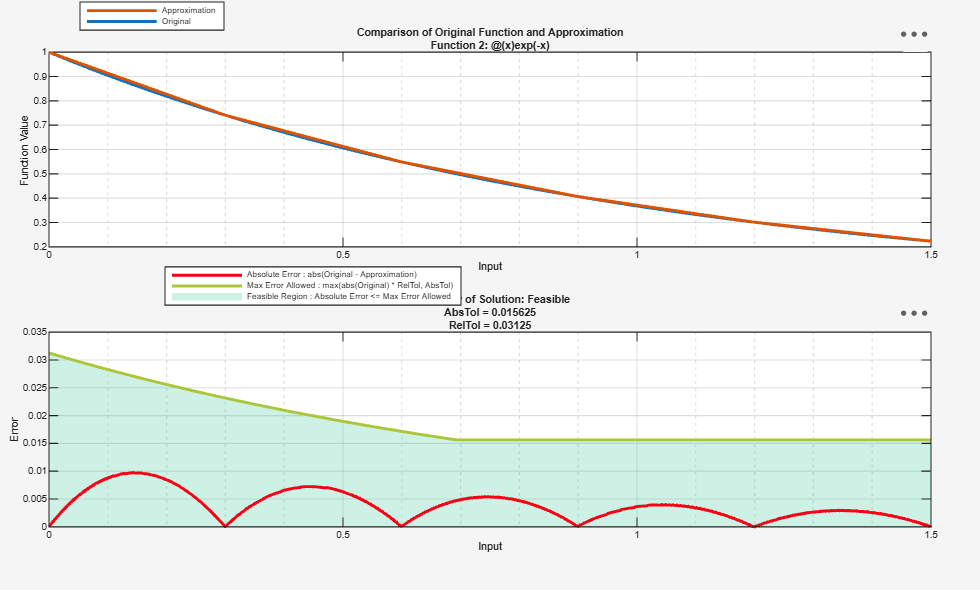
ans = struct with fields:
    Breakpoints: {[6145×1 double]}
       Original: [6145×2 double]
    Approximate: [6145×2 double]
Use the TableData structure to access the shared breakpoints and
per-function table values.
t = sol.TableData
t = struct with fields:
       BreakpointValues: {[0 0.2998 0.5996 0.8994 1.1992 1.4990]}
    BreakpointDataTypes: [1×1 embedded.numerictype]
            TableValues: {[0 0.2953 0.5643 0.7830 0.9318 0.9974]  [1 0.7410 0.5491 0.4069 0.3014 0.2234]}
          TableDataType: [1×2 embedded.numerictype]
          IsEvenSpacing: 1
          Interpolation: Linear
Get the total memory usage of the optimized solution in bits. This value is the combined memory required for all shared breakpoints and table values.
sol.totalMemoryUsage
ans =
224
Generate the Lookup Table Approximation
Use the approximate method to generate MATLAB function files
containing the optimized lookup tables. Use the "Name" argument to
specify output file names for each function.
approximate(sol, "Name", ["sinApprox", "expApprox"])
Multi-Function Lookup Table Optimization Limitations
The multi-function optimization workflow is available at the command line only. The Lookup Table Optimizer app does not support multiple input functions.
Subsystems with multiple outputs are not supported inputs to a multi-function
FunctionApproximation.Problem..
The replaceWithApproximate and revertToOriginal
methods are not supported.
These FunctionApproximation.Options properties and settings are not
supported:
AUTOSARCompliant,UseParallel, andHDLOptimizedset totrue.BreakpointSpecificationproperty set toExplicitValues.Interpolationproperty set toNone.

