Build an FMU from a CMake-Based C++ Project
R2026bThis example shows how to use the Code to FMU tool to generate a Co-Simulation Functional Mock-up Unit (FMU) from a C++ project that uses CMake as its build system.
The example integrates a mass-spring-damper system implemented as a modular CMake project with multiple library targets. The project includes both an analytical closed-form solver and a numerical 4th-order Runge-Kutta solver. This demonstrates how Code to FMU handles multi-target CMake projects with shared and static libraries.
Create a new Code to FMU project or open an existing project. To create a new project, on the HOME tab of the MATLAB toolstrip, click Simulink. This opens the Simulink Start Page. Click Code to FMU from the Simulink FMU Builder section.
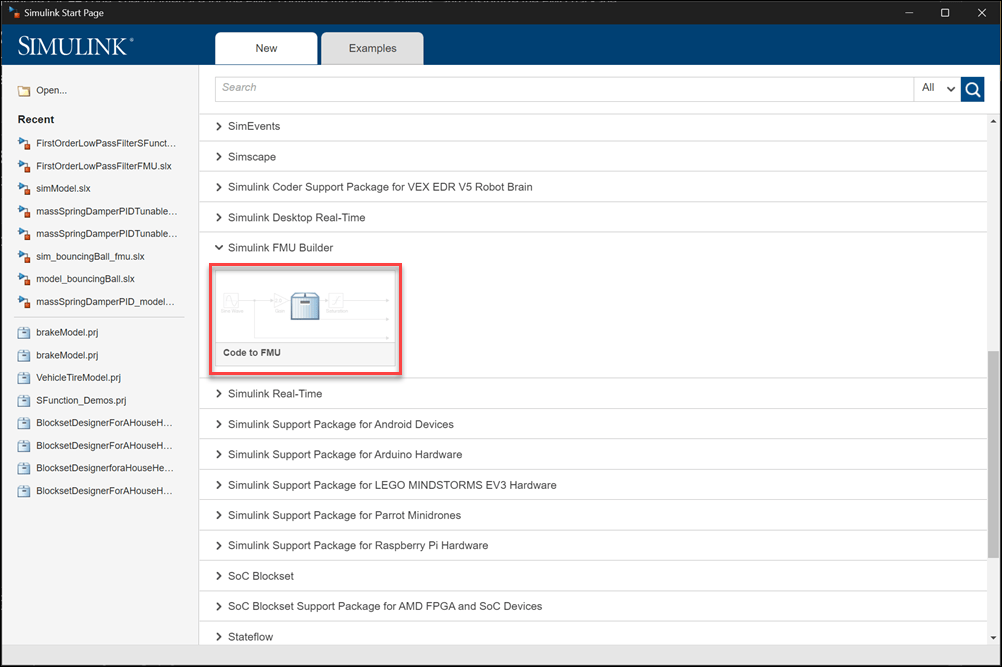
This opens the Create Project dialog. Specify the name and folder for your project msdCMake.prj and click OK. This opens the project in MATLAB along with a Code to FMU window.
You can also open and access the Code to FMU window from the Project tab in the MATLAB toolstrip.

Examine the CMake Project Structure
The C++ source code is organized as a CMake project under the mass_on_spring folder with the following structure:
mass_on_spring/
  CMakeLists.txt              % Root CMake file
  driver.h / driver.cpp       % Entry point called by FMU
  analytical/
    header/exact/exact.h
    src/exact.cpp             % Closed-form solution
  numerical/
    header/solver/solver.h
    src/solver.cpp            % RK4 numerical integrator
The system models a damped harmonic oscillator governed by the equation:
where is mass, is damping, and is spring stiffness.
The root CMakeLists.txt defines three library targets:
cmake_minimum_required(VERSION 3.10)
project(mass_on_spring)
set(CMAKE_CXX_STANDARD 17)
set(CMAKE_CXX_STANDARD_REQUIRED True)

add_library(exact_src STATIC
    analytical/src/exact.cpp
)
target_include_directories(exact_src PUBLIC
    ${CMAKE_CURRENT_SOURCE_DIR}/analytical/header
)

add_library(solver_src SHARED
    numerical/src/solver.cpp
)
set_target_properties(solver_src PROPERTIES WINDOWS_EXPORT_ALL_SYMBOLS ON)
target_include_directories(solver_src PUBLIC
    ${CMAKE_CURRENT_SOURCE_DIR}/numerical/header
)

add_library(driver
    driver.cpp
    driver.h
)
target_include_directories(driver PUBLIC
    ${CMAKE_CURRENT_SOURCE_DIR}
)
target_link_libraries(driver
    exact_src
    solver_src
)
The driver library serves as the entry point for the FMU. It exposes a single function sys_step that advances the system state by one time step. The function selects either the analytical or numerical solver based on a parameter:
d_v sys_step(bool use_analytical,
             double timeStep,
             d_v& currentState,
             const double* mass,
             const double* spring_const,
             const double* damping);
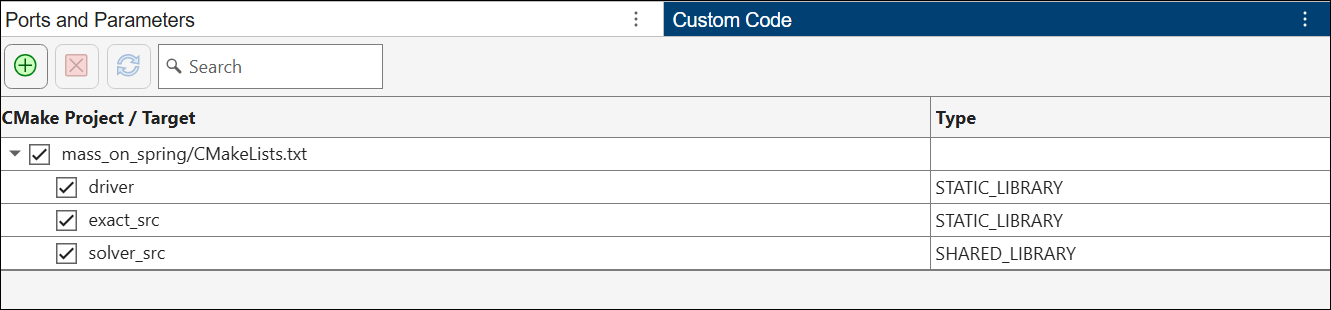
The CMake project defines targets of different types: exact_src is a static library, solver_src is a shared library (DLL), and driver links to both. Code to FMU handles these target types and their dependencies automatically.
Configure Code to FMU to Use a CMake Project
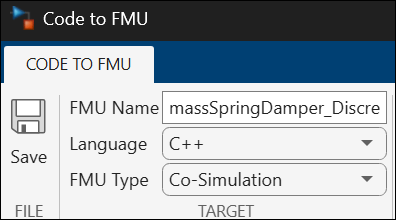
Open the Code to FMU window from the Project tab in the MATLAB toolstrip. Specify the FMU Name, Language (C++), and FMU Type (Co-Simulation) in the CODE TO FMU toolstrip.
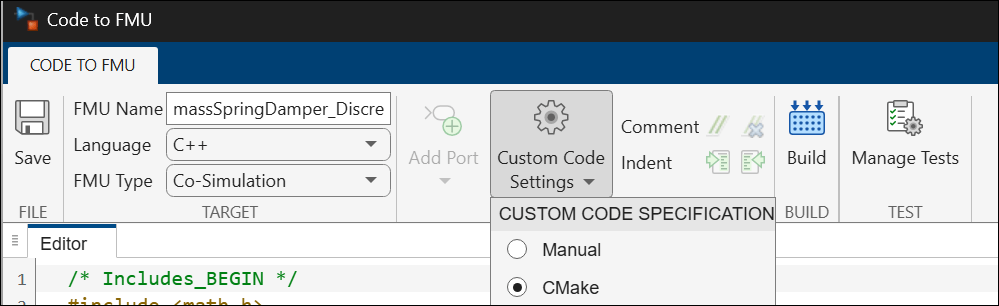
To use a CMake project as the source of custom code, set the Custom Code Specification to CMake in the Code to FMU window. This replaces the manual source/include/library table with a CMake project interface.
In the Custom Code table, click the  button to specify the path to the root
 CMakeLists.txt file. In this example, point to mass_on_spring/CMakeLists.txt within the project. Code to FMU parses the CMake file and discovers all library targets defined in the project.
The discovered targets are displayed in the CMake targets table. Select the targets that should be linked into the FMU. In this example, select all three targets.
Code to FMU automatically resolves include directories and link dependencies declared in the CMake project using target_include_directories and target_link_libraries.
Configure Ports, Parameters, and Callbacks
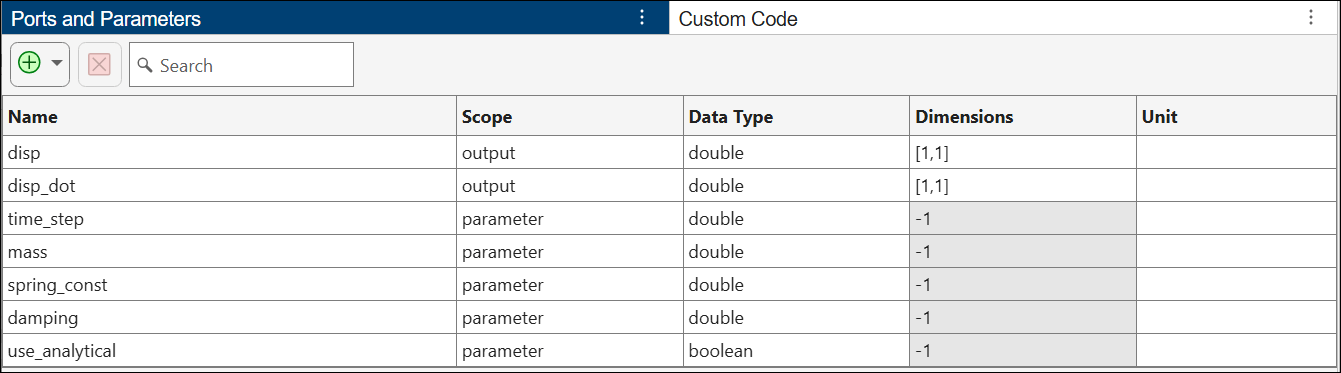
Configure the FMU interface in the Ports and Parameters table. This system is time-invariant, so it requires no input ports. The system state is maintained internally using discrete states.
Configure the following:
Outputs: 2 scalar outputs (disp and disp_dot) for displacement and velocity
Parameters: 5 tunable parameters
time_step(double) - integration step sizemass(double) - mass of the oscillatorspring_const(double) - spring stiffnessdamping(double) - damping coefficientuse_analytical(boolean) - toggle between analytical and numerical solver
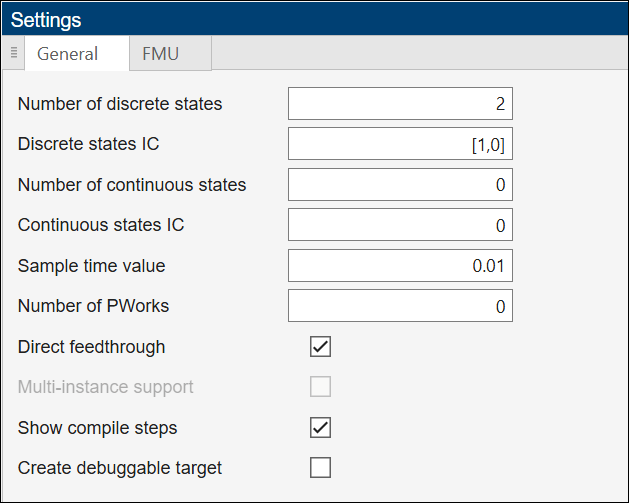
Specify General and FMU settings in the Settings pane.
Discrete States: 2 states with initial conditions
[1, 0](initial displacement of 1, zero velocity)Sample Time: 0.01 seconds
In the Callbacks section, specify the code that executes at each discrete time step. The Update callback calls the sys_step function from the CMake project to advance the system state:
double time_step_calculated;
    time_step_calculated = time_step[0];

    std::vector<double> stateToPass = {xD[0], xD[1]};

    std::vector<double> updatedState = sys_step(use_analytical[0],
        time_step_calculated, stateToPass,
        mass, spring_const, damping);

    xD[0] = updatedState[0];
    xD[1] = updatedState[1];
This callback reads the current discrete states (xD[0] for position, xD[1] for velocity), passes them to sys_step along with the system parameters, and updates the discrete states with the result.
The Output callback exposes the discrete states as FMU outputs:
    disp[0] = xD[0];
    disp_dot[0] = xD[1];
In the Custom Code header section, add the include directive for the driver interface:
#include <math.h>
#include "mass_on_spring/driver.h"
Generate the FMU
To generate the FMU, click Build on the CODE TO FMU toolstrip. The generated FMU is stored in the buildOutput folder of the project.
During the build, Code to FMU:
Generates a top-level
CMakeLists.txtthat incorporates your CMake project usingadd_subdirectoryCompiles the FMI interface code and your custom code callbacks
Links the FMU shared library against the selected CMake targets
Packages the resulting binaries into an FMU archive (
.fmufile)
openProject("msdCMake/msdCMake.prj");

c2fObj = FMUBuilder.CodeToFMU(currentProject());
c2fObj.build();
### Creating 'C:\Users\user\OneDrive - MathWorks\Documents\MATLAB\ExampleManager\user.Bdoc26b.j3355174\fmubuilder-ex68500463\msdCMake\buildOutput\code_to_fmu_cmake_build\CMakeLists.txt' ... ********************************************************************** ** Visual Studio 2022 Developer Command Prompt v17.6.6 ** Copyright (c) 2022 Microsoft Corporation ********************************************************************** [vcvarsall.bat] Environment initialized for: 'x64' Not searching for unused variables given on the command line. -- Configuring done -- Generating done -- Build files have been written to: C:/Users/user/OneDrive - MathWorks/Documents/MATLAB/ExampleManager/user.Bdoc26b.j3355174/fmubuilder-ex68500463/msdCMake/buildOutput/code_to_fmu_cmake_build/build [1/10] Building CXX object user_custom_code_build_1\CMakeFiles\exact_src.dir\analytical\src\exact.cpp.obj [2/10] Building CXX object user_custom_code_build_1\CMakeFiles\driver.dir\driver.cpp.obj [3/10] Linking CXX static library user_custom_code_build_1\exact_src.lib [4/10] Building CXX object user_custom_code_build_1\CMakeFiles\solver_src.dir\numerical\src\solver.cpp.obj C:\Users\user\OneDrive - MathWorks\Documents\MATLAB\ExampleManager\user.Bdoc26b.j3355174\fmubuilder-ex68500463\msdCMake\mass_on_spring\numerical\src\solver.cpp(115): warning C4018: '<': signed/unsigned mismatch C:\Users\user\OneDrive - MathWorks\Documents\MATLAB\ExampleManager\user.Bdoc26b.j3355174\fmubuilder-ex68500463\msdCMake\mass_on_spring\numerical\src\solver.cpp(127): warning C4267: '+=': conversion from 'size_t' to 'int', possible loss of data [5/10] Building CXX object CMakeFiles\massSpringDamper_Discrete.dir\massSpringDamper_Discrete.cpp.obj [6/10] Building C object CMakeFiles\massSpringDamper_Discrete.dir\fmi3Functions.c.obj C:\Users\user\OneDrive - MathWorks\Documents\MATLAB\ExampleManager\user.Bdoc26b.j3355174\fmubuilder-ex68500463\msdCMake\buildOutput\code_to_fmu_cmake_build\fmi3Functions.c(1498): warning C4996: 'strdup': The POSIX name for this item is deprecated. Instead, use the ISO C and C++ conformant name: _strdup. See online help for details. C:\Users\user\OneDrive - MathWorks\Documents\MATLAB\ExampleManager\user.Bdoc26b.j3355174\fmubuilder-ex68500463\msdCMake\buildOutput\code_to_fmu_cmake_build\fmi3Functions.c(1499): warning C4996: 'strdup': The POSIX name for this item is deprecated. Instead, use the ISO C and C++ conformant name: _strdup. See online help for details. [7/10] Building CXX object CMakeFiles\massSpringDamper_Discrete.dir\massSpringDamper_Discrete_wrapper.cpp.obj [8/10] Linking CXX shared library user_custom_code_build_1\solver_src.dll [9/10] Linking CXX static library user_custom_code_build_1\driver.lib [10/10] Linking CXX shared library massSpringDamper_Discrete.dll \#\#\# Created SHARED library: C:/Users/user/OneDrive - MathWorks/Documents/MATLAB/ExampleManager/user.Bdoc26b.j3355174/fmubuilder-ex68500463/msdCMake/buildOutput/code_to_fmu_cmake_build/build/massSpringDamper_Discrete.dll -- Install configuration: "Release" -- Installing: C:/Users/user/OneDrive - MathWorks/Documents/MATLAB/ExampleManager/user.Bdoc26b.j3355174/fmubuilder-ex68500463/msdCMake/buildOutput/code_to_fmu_cmake_build/././massSpringDamper_Discrete.lib -- Installing: C:/Users/user/OneDrive - MathWorks/Documents/MATLAB/ExampleManager/user.Bdoc26b.j3355174/fmubuilder-ex68500463/msdCMake/buildOutput/code_to_fmu_cmake_build/././massSpringDamper_Discrete.dll -- Installing: C:/Users/user/OneDrive - MathWorks/Documents/MATLAB/ExampleManager/user.Bdoc26b.j3355174/fmubuilder-ex68500463/msdCMake/buildOutput/code_to_fmu_cmake_build/./export/massSpringDamper_Discrete.cmake -- Installing: C:/Users/user/OneDrive - MathWorks/Documents/MATLAB/ExampleManager/user.Bdoc26b.j3355174/fmubuilder-ex68500463/msdCMake/buildOutput/code_to_fmu_cmake_build/./export/massSpringDamper_DiscreteTargets.cmake -- Installing: C:/Users/user/OneDrive - MathWorks/Documents/MATLAB/ExampleManager/user.Bdoc26b.j3355174/fmubuilder-ex68500463/msdCMake/buildOutput/code_to_fmu_cmake_build/./export/massSpringDamper_DiscreteTargets-release.cmake -- Installing: C:/Users/user/OneDrive - MathWorks/Documents/MATLAB/ExampleManager/user.Bdoc26b.j3355174/fmubuilder-ex68500463/msdCMake/buildOutput/code_to_fmu_cmake_build/./lib/driver.lib -- Installing: C:/Users/user/OneDrive - MathWorks/Documents/MATLAB/ExampleManager/user.Bdoc26b.j3355174/fmubuilder-ex68500463/msdCMake/buildOutput/code_to_fmu_cmake_build/./lib/exact_src.lib -- Installing: C:/Users/user/OneDrive - MathWorks/Documents/MATLAB/ExampleManager/user.Bdoc26b.j3355174/fmubuilder-ex68500463/msdCMake/buildOutput/code_to_fmu_cmake_build/build/target_binaries/solver_src.dll Packaging FMU: FMU 'massSpringDamper_Discrete.fmu' created successfully.
Import and Simulate the FMU in Simulink
Use the FMU Import block to import the generated FMU into a Simulink model. To compare the FMU output against a reference solution, the attached model simulationModel contains the imported FMU block alongside a continuous Simulink model of the same mass-spring-damper system.
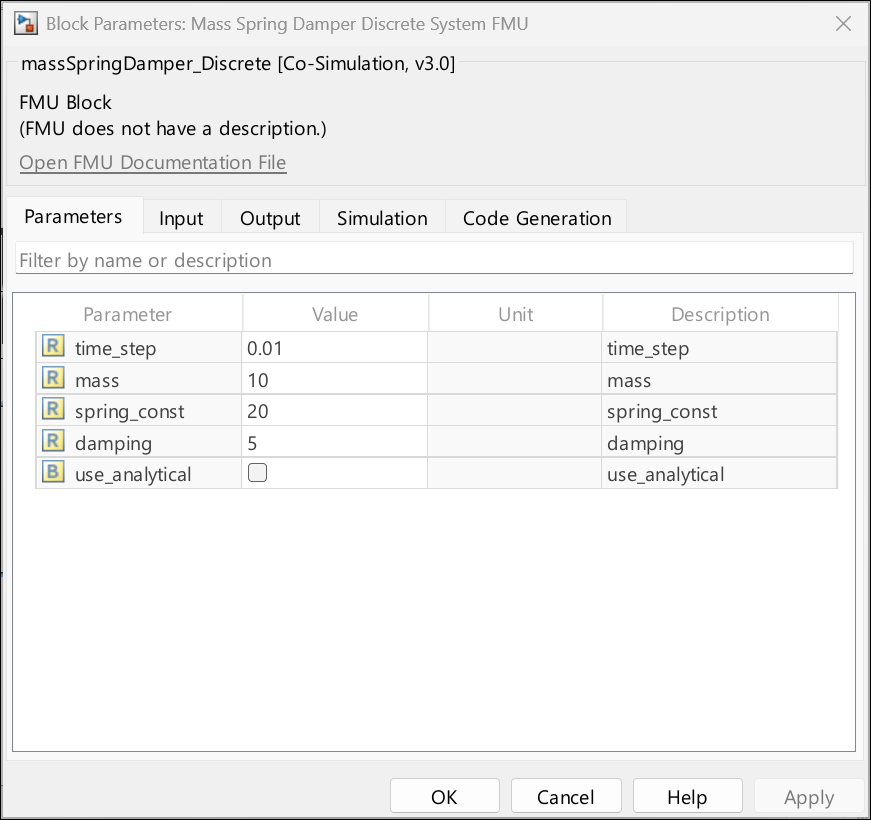
open_system("simulationModel.slx");Open the FMU block dialog to verify that the port and parameter configuration matches what was specified in the Code to FMU editor. The block should show two output ports, disp and disp_dot, and the five parameters.
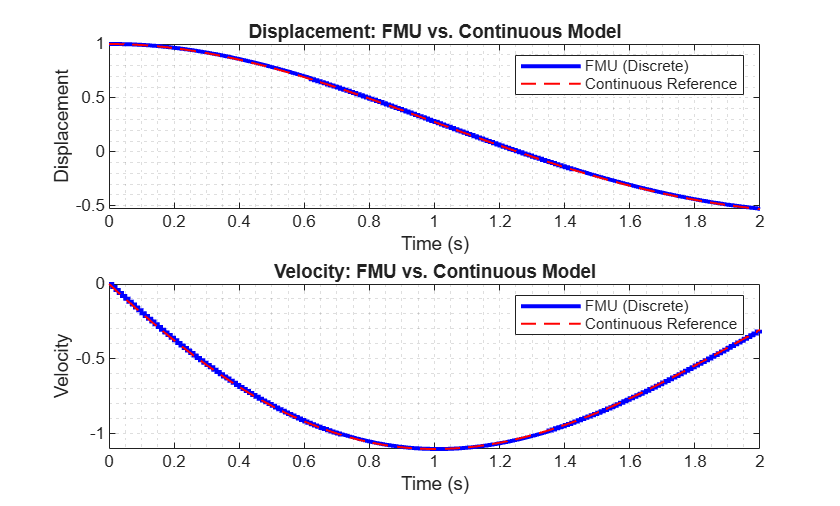
Simulate the model and compare the displacement output of the FMU against the continuous Simulink reference model.
simOut = sim("simulationModel.slx");

figure
subplot(2,1,1)
plot(simOut.yout{1}.Values, 'b', 'LineWidth', 2);
hold on;
plot(simOut.yout{3}.Values, '--r', 'LineWidth', 1);
grid minor
xlabel('Time (s)')
ylabel('Displacement')
title('Displacement: FMU vs. Continuous Model')
legend('FMU (Discrete)', 'Continuous Reference')

subplot(2,1,2)
plot(simOut.yout{2}.Values, 'b', 'LineWidth', 2);
hold on;
plot(simOut.yout{4}.Values, '--r', 'LineWidth', 1);
grid minor
xlabel('Time (s)')
ylabel('Velocity')
title('Velocity: FMU vs. Continuous Model')
legend('FMU (Discrete)', 'Continuous Reference')