Configure Model to Export as FMU with Tunable Parameters
R2026bThis example shows how to configure a Simulink® model to export it as a Functional Mockup Unit (FMU) with tunable parameters. Tunable parameters enable you to change FMU block parameter values during simulation of the FMU in Simulink. A tunable parameter is an FMU variable that has its causality attribute set as parameter in the modelDescription.xml file.
In a Simulink model, you can export variables in base workspace, model workspace, or linked data dictionaries as tunable parameters of an FMU.
Open Model and Configure Tunable Parameters
Open the massSpringDamperPIDTunableParams model. This model contains a PID controller that controls the position of a mass in a mass-spring-damper system.
modelForExport = 'massSpringDamperPIDTunableParams';
open_system(modelForExport);
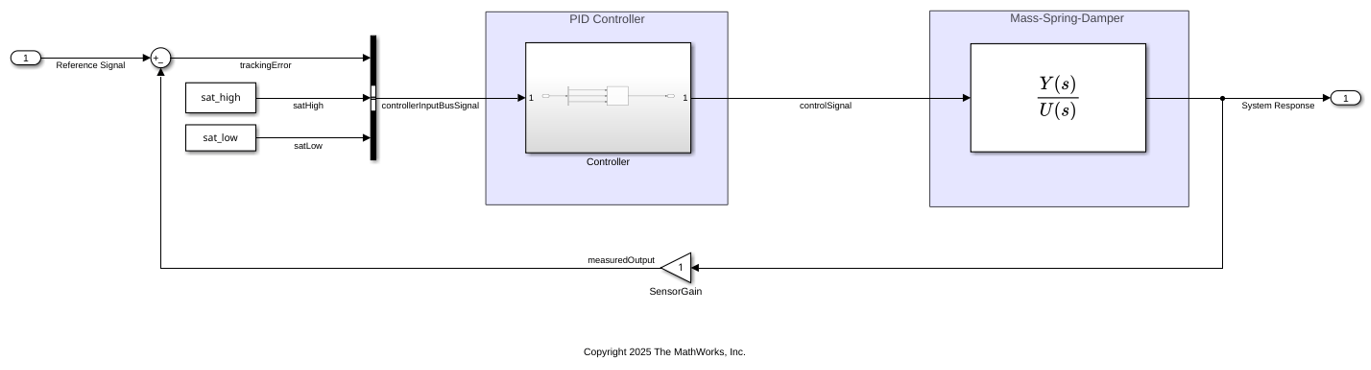
This model contains the following parameters:
PID Controllers
Kp KiandKdin the model workspace.Input saturation limits
sat_highandsat_lowin the base workspace.Transfer function coefficients
transFcn_numandtransFcn_denin the data dictionarymodelSystemTransFcn.
All the valid variables in the base workspace and design data section of the data dictionary is compatible for export as tunable parameter of the FMU. For more information about limitations on parameter tunability, see Limitations for Parameter Tunability in Generated FMUs. You must link the data dictionary to the Simulink model. For more information, see Migrate Models to Use Simulink Data Dictionary. To specify a model workspace variable for export as tunable parameter of the FMU, select the Argument option for the variable in the Model Explorer.

Export Model as FMU
Use the exportToFMU function to export this model as FMU. Specify the value of ExportedParameters argument as a cell array containing all the variables you want to expose as tunable parameters.
exportToFMU(modelForExport,'FMUType','CS','FMIVersion','3.0','ExportedParameters',{'Kp','Ki','Kd','sat_high','sat_low','transFcn_num','transFcn_den'});
Setting System Target to FMU 'Co-Simulation' for model 'massSpringDamperPIDTunableParams'.
Setting Hardware Implementation > Device Type to 'MATLAB Host' for model 'massSpringDamperPIDTunableParams'.
### Searching for referenced models in model 'massSpringDamperPIDTunableParams'.
### Total of 1 models to build.
### Starting top model code generation target build for: massSpringDamperPIDTunableParams
### 'GenerateComments' is disabled for 'Co-Simulation' FMU Export.

Build Summary

Top model targets:

Model                             Build Reason                                                Status                        Build Duration
==========================================================================================================================================
massSpringDamperPIDTunableParams  Target (massSpringDamperPIDTunableParams.c) did not exist.  Code generated and compiled.  0h 0m 6.3678s

1 of 1 models built (0 models already up to date)
Build duration: 0h 0m 6.9335s
### Model was successfully exported to 'Co-Simulation' FMU 'massSpringDamperPIDTunableParams.fmu' in '/tmp/Bdoc26b_3351752_1229001/tpb614ced1/fmubuilder-ex81857754'.
Import and Simulate FMU
Open and simulate the massSpringDamperPIDTunableParams_model model that imports the FMU into Simulink and simulates the mass-spring-damper system for a specified reference position.
modelForSimulation = 'massSpringDamperPIDTunableParams_model';
open_system(modelForSimulation);
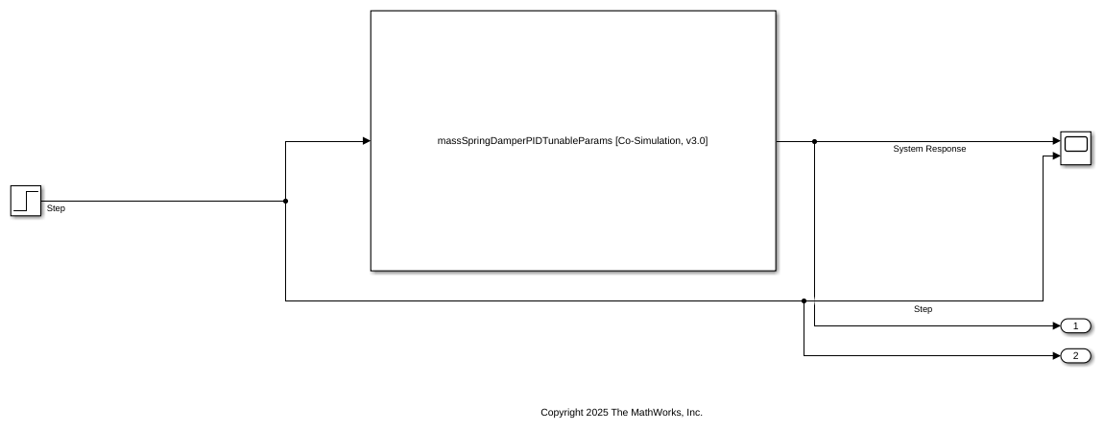
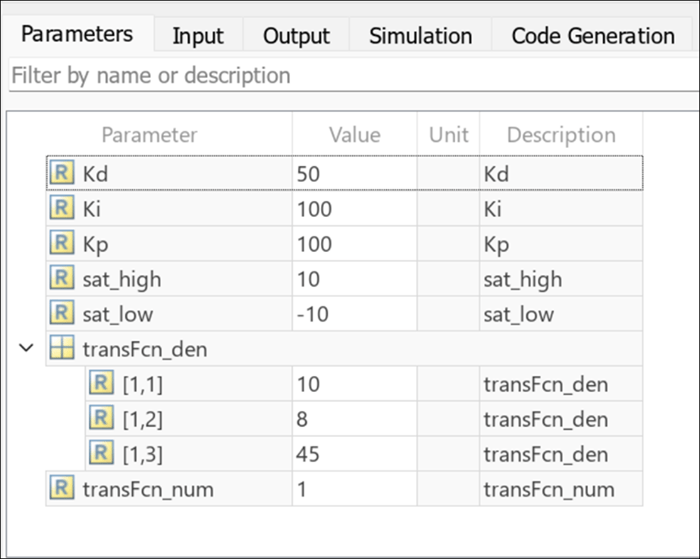
You can view and change the parameters in the FMU block dialog box.
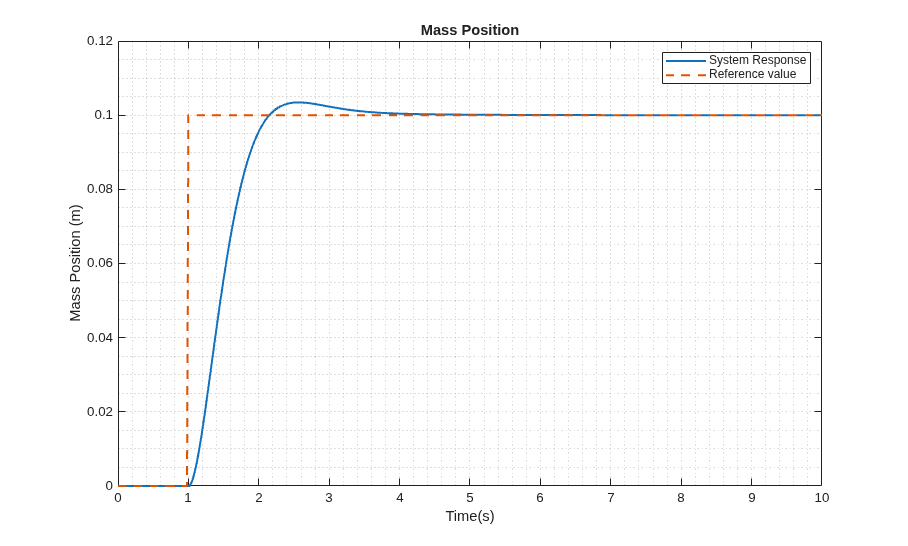
sim_data = sim(modelForSimulation);
plotData = figure(1);
plot(sim_data.yout{1}.Values,'LineWidth',1.5);
hold on
plot(sim_data.yout{2}.Values,'LineWidth',1.5,'LineStyle','--')
xlabel('Time(s)');
ylabel('Mass Position (m)');
legend('System Response', 'Reference value')
title('Mass Position')
grid minor;
See Also
exportToFMU | Limitations for Parameter Tunability in Generated FMUs | Export Simulink Models to Functional Mock-up Units

