summary
Generate tabular summary of tracking architecture
Syntax
Description
returns a
summary of the s = summary(ta)trackingArchitecture object ta in a tabular form. To
display the summary, do not use a semicolon ";" at the end of the command
line, as shown in the Create and Show trackingArchitecture example. To hide the
display, add a semicolon at the end of the command.
Examples
Create a tracking architecture.
ta = trackingArchitecture;
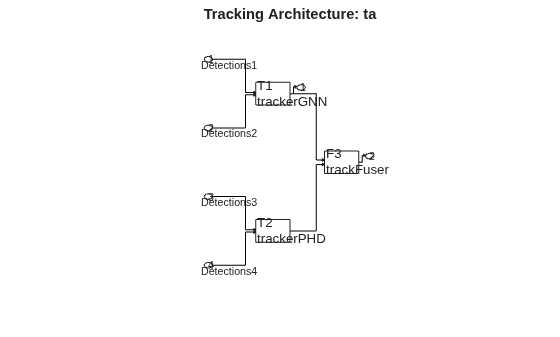
Create a trackerGNN object. The tracker takes detection inputs from sensors 1 and 2. Add the tracker to the tracking architecture.
tracker1 = trackerGNN('TrackerIndex',1); addTracker(ta,tracker1,'SensorIndices',[1,2]);
Create a trackerPHD object. The tracker takes detection inputs from sensors 3 and 4. Add the tracker to the tracking architecture and disable its direct output.
tracker2 = trackerPHD('TrackerIndex',2,'SensorConfigurations',... {trackingSensorConfiguration(3),trackingSensorConfiguration(4)}); addTracker(ta,tracker2,'ToOutput',false); % Disable output
Create a trackFuser object. The track fuser takes track inputs from the two trackers.
fuser = trackFuser('FuserIndex',3,'SourceConfigurations',... {fuserSourceConfiguration(1),fuserSourceConfiguration(2)}); addTrackFuser(ta,fuser);
Display the summary of the tracking architecture.
sum = summary(ta)
sum=3×4 table
System ArchitectureInputs FuserInputs ArchitectureOutput
_________________ __________________ __________________ __________________
{'T1:trackerGNN'} {'1 2' } {'Not applicable'} {[ 1]}
{'T2:trackerPHD'} {'3 4' } {'Not applicable'} {0×0 double}
{'F3:trackFuser'} {0×0 char} {'1 2' } {[ 2]}
Show the tracking architecture.
show(ta)
![]()
Input Arguments
Tracking architecture, specified as a trackingArchitecture object.
Output Arguments
Tracking architecture summary, returned as a table. The number of rows of the table is equal to the total number of trackers and track fusers in the tracking architecture. The table contain these columns:
System— A description of the system organized as'T'or'F'for tracker or fuser, respectively, followed by the tracker or fuser index and the class of the system. For example,'T1: trackerJPDA'is a tracker with index 1 and class oftrackerJPDA.ArchitectureInputs— The indices of inputs of the tracking architectures that report detections to the specific tracker or track fuser, shown as a cell containing a character vector. Each integer is an index of the architecture input.FuserInputs— The indices of track inputs to the specific fuser in the tracking architecture, shown as a cell containing a character vector. Each integer is the index of a tracker or track fuser in the architecture.ArchitectureOutputs— The output index of the specific tracker or track fuser, shown as an integer. Each integer is the index of an output in the architecture.
Version History
Introduced in R2021a
See Also
MATLAB Command
You clicked a link that corresponds to this MATLAB command:
Run the command by entering it in the MATLAB Command Window. Web browsers do not support MATLAB commands.
Seleziona un sito web
Seleziona un sito web per visualizzare contenuto tradotto dove disponibile e vedere eventi e offerte locali. In base alla tua area geografica, ti consigliamo di selezionare: .
Puoi anche selezionare un sito web dal seguente elenco:
Come ottenere le migliori prestazioni del sito
Per ottenere le migliori prestazioni del sito, seleziona il sito cinese (in cinese o in inglese). I siti MathWorks per gli altri paesi non sono ottimizzati per essere visitati dalla tua area geografica.
Americhe
- América Latina (Español)
- Canada (English)
- United States (English)
Europa
- Belgium (English)
- Denmark (English)
- Deutschland (Deutsch)
- España (Español)
- Finland (English)
- France (Français)
- Ireland (English)
- Italia (Italiano)
- Luxembourg (English)
- Netherlands (English)
- Norway (English)
- Österreich (Deutsch)
- Portugal (English)
- Sweden (English)
- Switzerland
- United Kingdom (English)