Contenuto principale

Valve Section with Detached Shaft (IL-PB)

R2026b

Valve section with detached shaft for hydromechanical valves

Since R2026b

  • Block icon

Libraries:
Simscape / Fluids / Isothermal Liquid / Valves & Orifices / Hydromechanical Valves

Description

The Valve Section with Detached Shaft (IL-PB) block represents a section of a valve with a detached shaft. The valve section has rigid spacing along the valve body and flexible spacing along the moving spool.

Port Relations

Ports F and B are hydromechanical valve composite ports that have valve_body, spool, and fluid nodes, where:

  • The position of F.valve_body relative to B.valve_body is equal to the value of the Valve body section length parameter.

  • The position of F.spool relative to B.spool is the gap length. When the gap length is 0 a hard stop engages.

  • When you clear Valve section contains liquid, the valve section does not contain liquid and does not use the nodes B.fluid and F.fluid.

  • When you select Valve section contains liquid, the block models liquid flow inside the valve section and:

    • The liquid volume is V=A∗L, where L is the gap length and A is the value of the Liquid cross-sectional area in valve section parameter.

    • You can enable the isothermal liquid port Af, which models a branching flow path, by selecting Enable port Af for the liquid in the valve section.

Block Sub-Components

The Valve Section with Detached Shaft (IL-PB) block is equivalent to a composite component that comprises these Simscape Foundation and Fluids library blocks:

This image shows the equivalent diagram when you select Enable spring between spool at B and F and Valve section contains liquid:
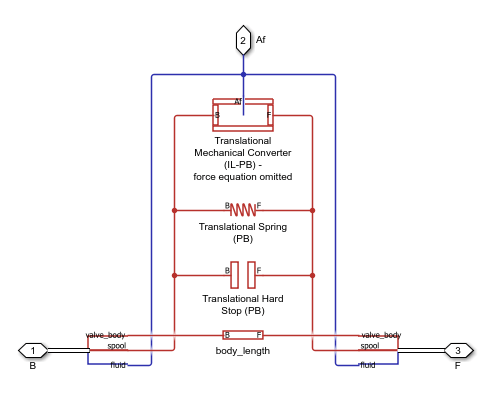
system screenshot

This image shows the equivalent diagram when you select Enable spring between spool at B and F and clear Valve section contains liquid:

system screenshot

Variables

To set the priority and initial target values for the block variables prior to simulation, use the Initial Targets section in the block dialog box or Property Inspector. For more information, see Set Priority and Initial Target for Block Variables.

Nominal values provide a way to specify the expected magnitude of a variable in a model. Using system scaling based on nominal values increases the simulation robustness. Nominal values can come from different sources, one of which is the Nominal Values section in the block dialog box or Property Inspector. For more information, see Modify Nominal Values for a Block Variable.

Ports

Conserving

expand all

Hydromechanical valve composite port that comprises three nodes:

  • B.valve_body — Position-based translational node along the valve body.

  • B.spool — Position-based translational node that moves along the spool.

  • B.fluid — Isothermal liquid node associated with the flow path inside the valve. If you select Valve section contains liquid, this node represents flow to and from an adjacent valve component. Otherwise, this node is unused.

Programmatic Use

Port: B

Hydromechanical valve composite port that comprises three nodes:

  • F.valve_body — Position-based translational node along the valve body.

  • F.spool — Position-based translational node that moves along the spool.

  • F.fluid — Isothermal liquid node associated with the flow path inside the valve. If you select Valve section contains liquid, this node represents flow to and from an adjacent valve component. Otherwise, this node is unused.

Programmatic Use

Port: F

Isothermal liquid conserving port that represents a branching flow path for the fluid.

Dependencies

To enable this port, select Valve section contains liquid and Enable port Af for the liquid in valve section.

Programmatic Use

Port: Af

Parameters

expand all

Valve Section

Length of the body section of the valve.

Programmatic Use

Parameter: body_length

Whether the valve section contains liquid.

Programmatic Use

Parameter: contains_liquid
Values: "true" | "false"

Cross-sectional area of the liquid in the valve

Dependencies

To enable this parameter, select Valve section contains liquid.

Programmatic Use

Parameter: section_area

Liquid volume when the gap length is zero, which means the positions of F.spool and B.spool are the same.

Dependencies

To enable this parameter, select Valve section contains liquid.

Programmatic Use

Parameter: dead_volume

Option to enable the isothermal liquid port Af, which represents a branching flow path for the fluid.

Dependencies

To enable this parameter, select Valve section contains liquid.

Programmatic Use

Parameter: enable_liquid_port
Values: "true" | "false"

Whether to model the dynamic compressibility of the liquid. Dynamic compressibility affects the transient response of the system at small timescales. If you select this parameter, the pressure responds dynamically based on the accumulation of fluid mass in the volume. If you clear this parameter, the volume does not accumulate mass and the pressure response is instantaneous. Clearing this setting can improve simulation performance, but may have a negative effect on the simulation robustness. Only clear this setting for small fluid volumes or models with long simulation times.

Dependencies

To enable this parameter, select Valve section contains liquid.

Programmatic Use

Parameter: enable_dynamic_compressibility
Values: "true" | "false"

Pressure for the isothermal liquid at the start of the simulation.

Dependencies

To enable this parameter, select Valve section contains liquid and Enable fluid dynamic compressibility.

Programmatic Use

Parameter: p_init

Liquid pressure in the valve at nominal operating conditions.

Dependencies

To enable this parameter, select Valve section contains liquid and clear Enable fluid dynamic compressibility.

Programmatic Use

Parameter: p_nominal

Spring

Option to model a spring between the nodes F.spool and B.spool.

Programmatic Use

Parameter: enable_spring
Values: "true" | "false"

Spring rate.

Dependencies

To enable this parameter, select Enable spring between spool at B and F.

Programmatic Use

Parameter: spring_stiffness

Spring force when the gap between the nodes F.spool and B.spool is the value of the Reference gap length between spool at B and F parameter.

Dependencies

To enable this parameter, select Enable spring between spool at B and F.

Programmatic Use

Parameter: spring_force_ref

Length between the nodes F.spool and B.spool that corresponds to the Spring force at reference gap length parameter.

Dependencies

To enable this parameter, select Enable spring between spool at B and F.

Programmatic Use

Parameter: gap_length_ref

Hard Stop

Method to use to model the hard stop:

  • Stiffness and damping applied smoothly through transition region, damped rebound — Specify the transition region in which the force ramps up from zero. At the end of the transition region, the block applies the full stiffness and damping. This option applies damping on the rebound, but limits it to the value of the stiffness force. Therefore, damping can reduce or eliminate the force provided by the stiffness, but never exceed it. All equations are smooth and produce no zero crossings.

  • Full stiffness and damping applied at bounds, undamped rebound — This option applies full stiffness and damping with impact, and applies no damping on the rebound. The equations produce no zero crossings when velocity changes sign, but there are position-based zero crossings. This option uses nonlinear equations.

  • Full stiffness and damping applied at bounds, damped rebound — This model has full stiffness and damping applied with impact, with damping applied on the rebound as well. The equations are switched linear, but produce position-based zero crossings. Use this option if the simscape.findNonlinearBlocks function indicates that this block prevents the network from being switched linear.

Programmatic Use

Parameter: hardstop_model
Values: "foundation.enum.HardStopStiffness.Smooth" | "foundation.enum.HardStopStiffness.FullUndamped" | "foundation.enum.HardStopStiffness.FullDamped"

Elastic property of the colliding bodies. The greater the value of this parameter, the less the bodies penetrate into each other and the more rigid the impact becomes. Setting this parameter to lesser values makes contact softer, but improves convergence and computational efficiency.

Programmatic Use

Parameter: hardstop_stiffness

Dissipating property of the colliding bodies. The greater the value of this parameter, the more energy dissipates during impact.

Programmatic Use

Parameter: hardstop_damping

Region where the force ramps up from zero to the full value. At the end of the transition region, the block applies full stiffness and damping.

Dependencies

To enable this parameter, set Hard stop model between spool at B and F to Stiffness and damping applied smoothly through transition region, damped rebound.

Programmatic Use

Parameter: hardstop_transition

Extended Capabilities

expand all

C/C++ Code Generation
Generate C and C++ code using Simulink® Coder™.

Version History

Introduced in R2026b