Contenuto principale

imfindcirclesYOLO

Find circles using YOLOX object detector

Since R2026a

    Description

    Add-On Required: This feature requires the Image Processing Toolbox Model for Circle Detection add-on.

    centers = imfindcirclesYOLO(img) finds circular objects in grayscale or color image img using a pretrained YOLOX object detector. By default, the function finds circles using the YOLOX-Tiny model [1]. The function returns the (x,y) coordinates of the centers of the detected circles.

    centers = imfindcirclesYOLO(img,Name=Value) also specifies options using one or more name-value arguments. For example, specify Method="yolox-small" to find circles using the pretrained YOLOX-Small model.

    example

    [centers,radii] = imfindcirclesYOLO(___) also returns the radii of the detected circles.

    [centers,radii,scores] = imfindcirclesYOLO(___) also returns the confidence scores for the detected circles.

    example

    Examples

    collapse all

    Read an image into the workspace.

    img = imread("pillsetc.png");

    Detect circular objects in the image using the imfindcirclesYOLO function.

    [centers,radii,scores] = imfindcirclesYOLO(img);

    Display the input image, then draw circle annotations over the detected circular objects by using the viscircles function. Display a label for each circle with its confidence score.

    imshow(img)
    hold on
    viscircles(centers,radii);
    text(centers(:,1),centers(:,2),num2str(scores),Color="g", ...        
        HorizontalAlignment="center",VerticalAlignment="middle")
    hold off
    title("Detected Circular Objects with Confidence Scores")
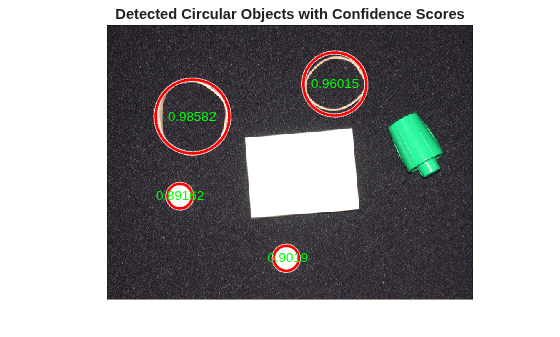
    Figure contains an axes object. The hidden axes object with title Detected Circular Objects with Confidence Scores contains 7 objects of type line, image, text.

    Load a MAT file containing an image sequence into the workspace.

    load("cellsequence.mat");
    I = cellsequence;

    Check the size of the input array. The array has three dimensions, which indicates that image sequence consists of grayscale images. The array has size m-by-n-by-p, which indicates that the sequence consists of p images of size m-by-n.

    size(I)
    ans = 1×3
    
       480   640    10


    For grayscale image sequences, the imfindcirclesYOLO function requires the input array to have four dimensions with size m-by-n-by-1-by-p, where the third dimension (channels) is explicitly set to 1. Reshape the input array to add a singleton third dimension.

    [m,n,p] = size(I);
    seqGray = reshape(I,[m n 1 p]);

    Detect circular objects within each image of the grayscale image sequence by using the imfindcirclesYOLO function, specifying the YOLOX-Small model. Set the radii of the circular objects to lie in the range [10, 50]. Set the minimum confidence score to 0.85.

    [centers,radii] = imfindcirclesYOLO(seqGray,Method="yolox-small", ...
        RadiusRange=[10 50],ConfidenceThreshold=0.85);

    Annotate each image with the detection results. Annotated images must be in RGB format so that colored overlays are visible. To convert the image sequence from grayscale to RGB, replicate the sequence three times in the third (channel) dimension.

    seqRGB = cat(3,seqGray,seqGray,seqGray);

    For each image in the sequence, perform these operations to add the annotation to the RGB image.

    • Extract the center coordinates and radii of detected objects in the current RGB image.

    • Create a binary mask of circles by using the circles2mask function with the center coordinates and radii.

    • Find the perimeter of circles in the binary mask by using the bwperim function with a connectivity of 8.

    • Increase the linewidth of the circle perimeters by using the imdilate function with a disk-shaped structuring element.

    • Overlay the perimeter of circles on the current RGB image by using the imoverlay function.

    • Replace the current image in the RGB image sequence with the annotated RGB image.

    for idx = 1:p
        centersP = centers{idx};
        radiiP = radii{idx};
        imRGB = seqRGB(:,:,:,idx);
        
        mask = circles2mask(centersP,radiiP,[m n]);
        maskEdge = bwperim(mask,8);
        maskEdge = imdilate(maskEdge,strel("disk",1));
        imAnnotated = imoverlay(imRGB,maskEdge,"g");
        seqRGB(:,:,:,idx) = imAnnotated;
    end

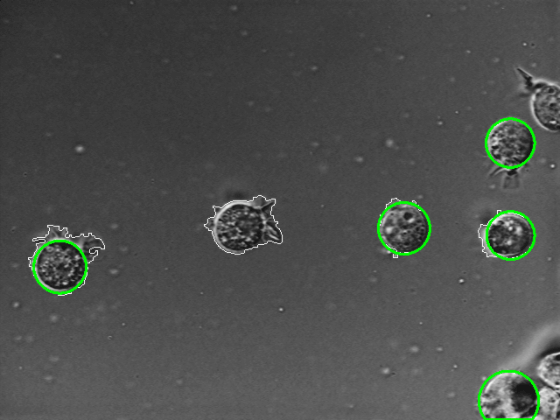
    Display the first image with circle annotations.

    imageshow(seqRGB(:,:,:,1))
    Display a montage of all images in the image sequence with the circle annotations.

    montage(seqRGB,BorderSize=2,BackgroundColor="w")
    title("Detected Circular Objects")
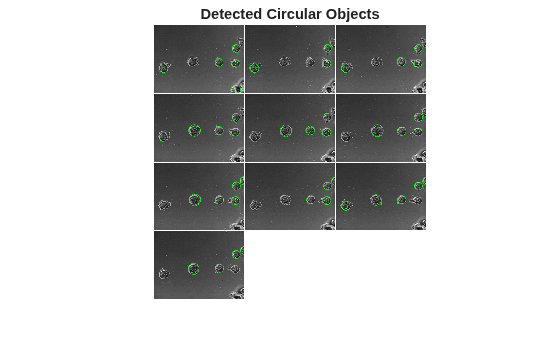
    Figure contains an axes object. The hidden axes object with title Detected Circular Objects contains an object of type image.

    Input Arguments

    collapse all

    Grayscale or color image, specified in one of these formats:

    • m-by-n matrix for a single grayscale image. m and n are the height and the width of the image, respectively.

    • m-by-n-by-3 array for a single color image.

    • m-by-n-by-c-by-p array for a batch of p images. The number of color channels, c, must be 1 for grayscale images and 3 for color images.

    Data Types: uint8 | uint16 | int16 | double | single

    Name-Value Arguments

    collapse all

    Specify optional pairs of arguments as Name1=Value1,...,NameN=ValueN, where Name is the argument name and Value is the corresponding value. Name-value arguments must appear after other arguments, but the order of the pairs does not matter.

    Example: centers = imfindcirclesYOLO(img,Method="yolox-small") finds circles using the pretrained YOLOX-Small model.

    Name of the pretrained YOLOX model, specified as "yolox-tiny" or "yolox-small".

    • "yolox-tiny" finds circles using the YOLOX-Tiny model [1]. Use this model for fast computations when you have limited computational resources.

    • "yolox-small" finds circles using the YOLOX-Small model. Choose this model for better detection accuracy over "yolox-tiny" when you have moderate computational resources.

    Data Types: string | char

    Minimum confidence score for a valid detection, specified as a number in the range (0, 1]. To reduce the number of false detections, increase the minimum confidence score.

    Data Types: single | double | int8 | int16 | int32 | int64 | uint8 | uint16 | uint32 | uint64

    Image size for detection, specified as a 2-element vector of the form [h w]. h is the height and w is the width of the resized image. The imfindcirclesYOLO function resizes the input image to the specified ProcessingSize to standardize feature scales for faster and more reliable detection.

    • To achieve faster detection and lower memory usage, reduce the processing size. However, this may cause small objects to be missed.

    • To detect small circular objects or preserve more image detail, increase the processing size. However, this may reduce detection speed and increase memory usage.

    Data Types: single | double

    Range of radii of circles to detect, in pixels, specified as a 2-element vector of the form [minRadius maxRadius].

    • The minimum radius, minRadius, must be greater than or equal to 1. The default value of minRadius is 1.

    • The maximum radius, maxRadius, must be less than or equal to half of the larger of the image dimensions, height m or width n. By default, maxRadius is max(m,n)/2.

    Specifying the range enables you to detect only circles within a certain size, potentially reducing false positives.

    Data Types: single | double | int8 | int16 | int32 | int64 | uint8 | uint16 | uint32 | uint64

    Hardware resource on which to run the detector, specified as "auto", "gpu", or "cpu".

    • "auto" — Use a GPU if it is available. Otherwise, use the CPU.

    • "gpu" — Use the GPU. To use a GPU, you must have a Parallel Computing Toolbox™ license and a CUDA® enabled NVIDIA® GPU. If a suitable GPU is not available, the function returns an error. For information about the supported compute capabilities, see GPU Computing Requirements (Parallel Computing Toolbox).

    • "cpu" — Use the CPU.

    Data Types: string | char

    Output Arguments

    collapse all

    Center coordinates of the detected circles, returned as one of these values:

    • d-by-2 matrix, when the input is a single image. d is the number of circles detected in the image. The x-coordinates of the circle centers are in the first column and the y-coordinates are in the second column.

    • p-by-1 cell array, when the input is a batch of p images. Each cell contains a d-by-2 matrix representing the center coordinates of the detected circles in the corresponding image.

    centers is of data type single unless the input image img is of data type double, in which case centers is of data type double.

    Data Types: single | double

    Radii of the detected circles, returned as one of these values:

    • d-element vector, when the input is a single image. d is the number of circles detected in the image. Each element is the radius of a detected circle.

    • p-by-1 cell array, when the input is a batch of p images. Each cell contains a d-element vector representing the radii of the detected circles in the corresponding image.

    radii is of data type single unless the input image img is of data type double, in which case radii is of data type double.

    Data Types: single | double

    Confidence scores, returned as one of these values:

    • d-element vector, when the input is a single image. d is the number of circles detected in the image. Each element represents the confidence score for a detected circle.

    • p-by-1 cell array, when the input is a batch of p images. Each cell contains a d-element vector representing the confidence scores for the detected circles in the corresponding image.

    scores is of data type single unless the input image img is of data type double, in which case scores is of data type double.

    Data Types: single | double

    Algorithms

    The pretrained YOLOX networks are trained on a curated subset of images from the Landscapes HQ data set [2].

    References

    [1] Ge, Zheng, Songtao Liu, Feng Wang, Zeming Li, and Jian Sun. “YOLOX: Exceeding YOLO Series in 2021.” arXiv, August 5, 2021. https://arxiv.org/abs/2107.08430.

    [2] Skorokhodov, Ivan, Grigorii Sotnikov, and Mohamed Elhoseiny. “Aligning Latent and Image Spaces to Connect the Unconnectable.” arXiv:2104.06954. Preprint, arXiv, April 14, 2021. https://doi.org/10.48550/arXiv.2104.06954.

    Version History

    Introduced in R2026a