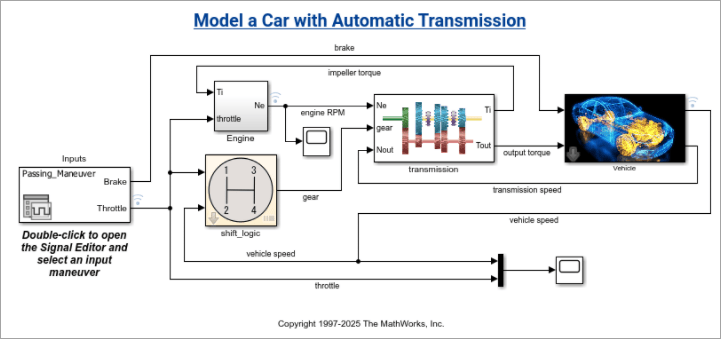
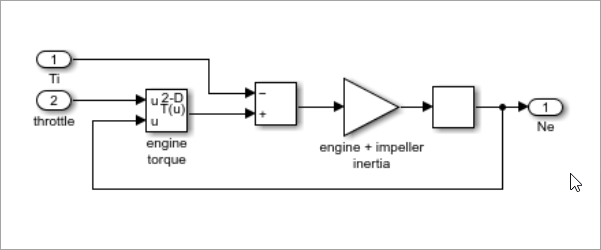
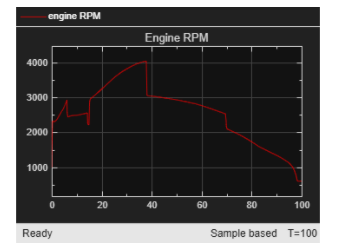
simulinkScreenshot(model) takes a screenshot
of the specified Simulink model, subsystem, or scope result and displays it in a figure
window. The specified model must be loaded before running
simulinkScreenshot.
Simulink model, subsystem, or scope name, specified as a string or character vector.
Supported model types include Simulink models and their subsystems, as well as Stateflow
charts. To specify a subsystem or scope, use the relative path from the model.
Example: simulinkScreenshot("sf_car");
Example: simulinkScreenshot("sf_car/Engine");
Version History
Introduced in R2026b
MATLAB Command
You clicked a link that corresponds to this MATLAB command:
Run the command by entering it in the MATLAB Command Window.
Web browsers do not support MATLAB commands.
Seleziona un sito web
Seleziona un sito web per visualizzare contenuto tradotto dove disponibile e vedere eventi e offerte locali. In base alla tua area geografica, ti consigliamo di selezionare: .
Puoi anche selezionare un sito web dal seguente elenco:
Come ottenere le migliori prestazioni del sito
Per ottenere le migliori prestazioni del sito, seleziona il sito cinese (in cinese o in inglese). I siti MathWorks per gli altri paesi non sono ottimizzati per essere visitati dalla tua area geografica.