issatisfied
R2026bConstraint satisfaction of an optimization problem at a set of points
Since R2024a
Syntax
Description
Check constraint satisfaction.
issatisfied checks constraint satisfaction at a point or set of
points for several argument types:
A constraint object, which is an
OptimizationConstraintobject, anOptimizationEqualityobject, or anOptimizationInequalityobject. For a constraint object,issatisfiedchecks all constraints at a single point.A problem object, which is an
OptimizationProblemobject or anEquationProblemobject. For a problem object that contains constraints,issatisfiedcan check satisfaction of multiple constraints at multiple points, and also checks the bound and integer constraints. For definitions of integer constraints, seevar.An optimization variable, which is an
OptimizationVariableobject. For an optimization variable,issatisfiedchecks whether the variable satisfies its bound and integer constraints at a point, where the integer constraint means integer, semi-integer, or semicontinuous constraints. For definitions of integer constraints, seevar.
For all argument types, issatisfied can check the constraint
satisfaction to within a settable tolerance.
[
also returns the argument allsat,sat] = issatisfied(___)sat that is an
OptimizationValues object when checking problem objects, or is a
logical array when checking variables or constraint objects. An
OptimizationValues object contains Constraints or
Equation properties that are logical indications of the constraint
satisfactions for the associated constraints or equation at the corresponding evaluation
point, and contains Variables properties that are logical arrays matching
the size of the variables in prob and indicating the satisfaction of bound and integer
constraints.
Examples
Create an optimization problem with several linear and nonlinear constraints.
x = optimvar("x");
y = optimvar("y");
obj = (10*(y - x^2))^2 + (1 - x)^2;
cons1 = x^2 + y^2 <= 1;
cons2 = x + y >= 0;
cons3 = y <= sin(x);
cons4 = 2*x + 3*y <= 2.5;
prob = optimproblem(Objective=obj);
prob.Constraints.cons1 = cons1;
prob.Constraints.cons2 = cons2;
prob.Constraints.cons3 = cons3;
prob.Constraints.cons4 = cons4;
Create 100 test points randomly.
rng default % For reproducibility
xvals = randn(1,100);
yvals = randn(1,100);
Convert the points to an OptimizationValues object for the problem, and determine where all the constraints are satisfied among the points.
vals = optimvalues(prob,x=xvals,y=yvals);
allsat = issatisfied(prob,vals);
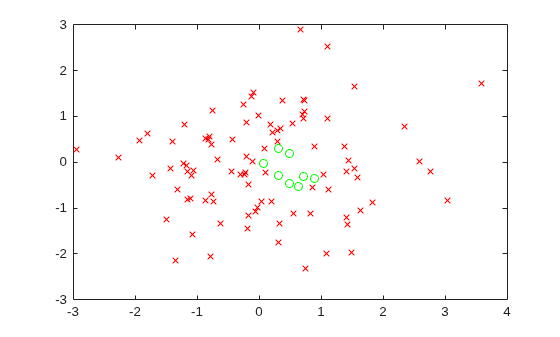
Plot the feasible (satisfied) points with green circles and the infeasible points with red x marks.
xsat = xvals(allsat);
ysat = yvals(allsat);
xnosat = xvals(~allsat);
ynosat = yvals(~allsat);
plot(xsat,ysat,"go",xnosat,ynosat,"rx")
Create two optimization variables and a 3-by-2 array of inequality constraints.
x = optimvar("x");
y = optimvar("y");
cons = optimconstr(3,2);
cons(1,1) = x^2 + y^2/4 <= 2;
cons(1,2) = 3*x + y <= 4;
cons(2,1) = -x - y^3 <= -3;
cons(2,2) = 2*x^2 + x*y + 4*y^2 <= 6;
cons(3,1) = 2*x + 4*x*y + y^2 <= 5;
cons(3,2) = (4 + x*y)^2 <= 24;
Check whether all constraints are satisfied at the point x = 1/2, y = -1/2.
pt.x = 1/2;
pt.y = -1/2;
allsat = issatisfied(cons,pt)
allsat = logical
   0
Not all of the constraints are satisfied. Find out which ones are satisfied.
[allsat,sat] = issatisfied(cons,pt)
allsat = logical
   0
sat = 3×2 logical array

   1   1
   0   1
   1   1
All but constraint(2,1) are satisfied.
Create an optimization problem with several linear and nonlinear constraints.
x = optimvar("x");
y = optimvar("y");
obj = (10*(y - x^2))^2 + (1 - x)^2;
cons1 = x^2 + y^2 <= 1;
cons2 = x + y >= 0;
cons3 = y <= sin(x);
cons4 = 2*x + 3*y <= 2.5;
prob = optimproblem(Objective=obj);
prob.Constraints.cons1 = cons1;
prob.Constraints.cons2 = cons2;
prob.Constraints.cons3 = cons3;
prob.Constraints.cons4 = cons4;
Create 100 test points randomly.
rng default % For reproducibility
xvals = randn(1,100);
yvals = randn(1,100);
Convert the points to an OptimizationValues object for the problem, and determine where all the constraints are satisfied among the points.
vals = optimvalues(prob,x=xvals,y=yvals);
allsat = issatisfied(prob,vals);
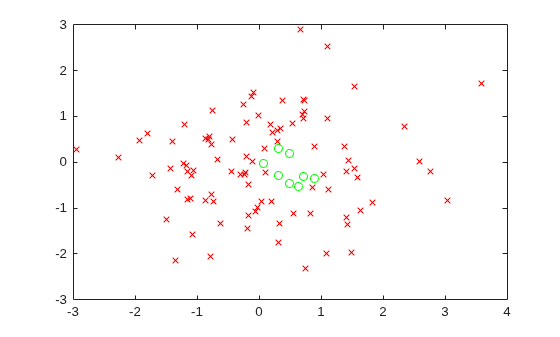
Plot the feasible (satisfied) points with green circles and the infeasible points with red x marks.
xsat = xvals(allsat);
ysat = yvals(allsat);
xnosat = xvals(~allsat);
ynosat = yvals(~allsat);
plot(xsat,ysat,"go",xnosat,ynosat,"rx")
Determine which points are feasible with respect to a tolerance of 1 rather than the default 1e-6.
tol = 1;
allsat1 = issatisfied(prob,vals,tol);
Plot the feasible (satisfied) points with green circles and the infeasible points with red x marks.
xsat1 = xvals(allsat1);
ysat1 = yvals(allsat1);
xnosat1 = xvals(~allsat1);
ynosat1 = yvals(~allsat1);
plot(xsat1,ysat1,"go",xnosat1,ynosat1,"rx")
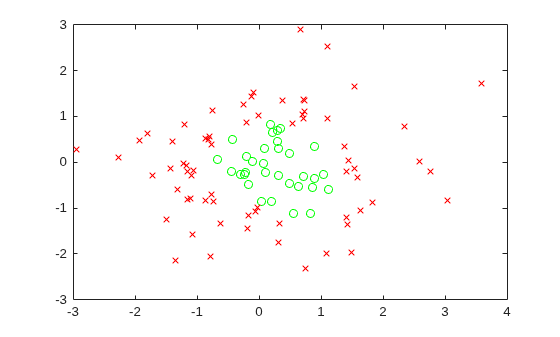
With a looser definition of constraint satisfaction, more points are feasible.
Create an optimization problem with several linear and nonlinear constraints.
x = optimvar("x");
y = optimvar("y");
obj = (10*(y - x^2))^2 + (1 - x)^2;
cons1 = x^2 + y^2 <= 1;
cons2 = x + y >= 0;
cons3 = y <= sin(x);
cons4 = 2*x + 3*y <= 2.5;
prob = optimproblem(Objective=obj);
prob.Constraints.cons1 = cons1;
prob.Constraints.cons2 = cons2;
prob.Constraints.cons3 = cons3;
prob.Constraints.cons4 = cons4;
Create 100 test points randomly.
rng default % For reproducibility
xvals = randn(1,100);
yvals = randn(1,100);
Convert the points to an OptimizationValues object for the problem.
vals = optimvalues(prob,x=xvals,y=yvals);
Evaluate the constraints at the points. issatisfied evaluates all the constraint satisfactions at all the test points simultaneously.
[~,sat] = issatisfied(prob,vals);
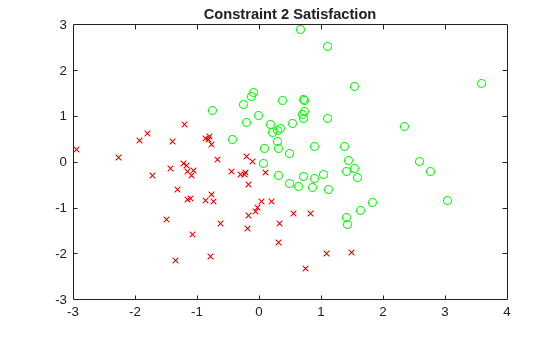
Plot the feasible (satisfied) points for the first constraint with green circles and the infeasible points with red x marks.
x1sat = xvals(sat.cons1);
y1sat = yvals(sat.cons1);
x1nosat = xvals(~sat.cons1);
y1nosat = yvals(~sat.cons1);
plot(x1sat,y1sat,"go",x1nosat,y1nosat,"rx")
title("Constraint 1 Satisfaction")
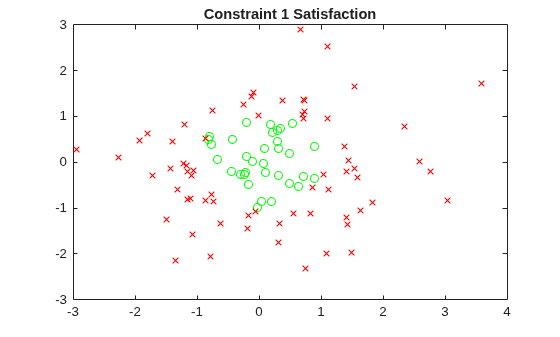
Repeat this process for the other three constraints.
x2sat = xvals(sat.cons2);
y2sat = yvals(sat.cons2);
x2nosat = xvals(~sat.cons2);
y2nosat = yvals(~sat.cons2);
plot(x2sat,y2sat,"go",x2nosat,y2nosat,"rx")
title("Constraint 2 Satisfaction")
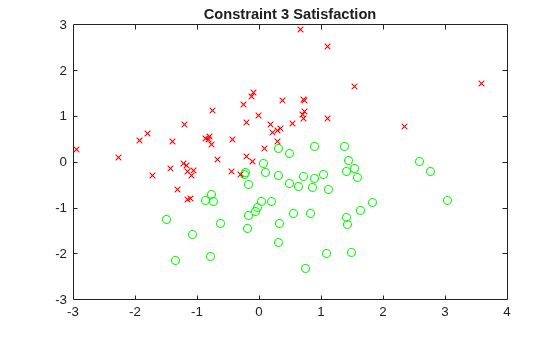
x3sat = xvals(sat.cons3);
y3sat = yvals(sat.cons3);
x3nosat = xvals(~sat.cons3);
y3nosat = yvals(~sat.cons3);
plot(x3sat,y3sat,"go",x3nosat,y3nosat,"rx")
title("Constraint 3 Satisfaction")
x4sat = xvals(sat.cons4);
y4sat = yvals(sat.cons4);
x4nosat = xvals(~sat.cons4);
y4nosat = yvals(~sat.cons4);
plot(x4sat,y4sat,"go",x4nosat,y4nosat,"rx")
title("Constraint 4 Satisfaction")
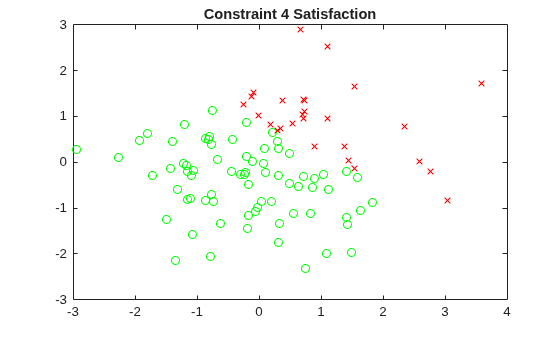
The plots show the different regions of satisfaction for each constraint.
Create optimization variables with bounds, integer, and semicontinuous constraints.
x = optimvar("x",LowerBound=-2,UpperBound=2,Type="integer");
y = optimvar("y",LowerBound=1/2,Type="semi-continuous");
Create an optimization problem with several linear and nonlinear constraints.
obj = (10*(y - x^2))^2 + (1 - x)^2;
cons1 = x^2 + y^2 <= 1;
cons2 = x + y >= 0;
cons3 = y <= sin(x);
cons4 = 2*x + 3*y <= 2.5;
prob = optimproblem(Objective=obj);
prob.Constraints.cons1 = cons1;
prob.Constraints.cons2 = cons2;
prob.Constraints.cons3 = cons3;
prob.Constraints.cons4 = cons4;
Create 50 test points randomly without regard to variable bounds and integer constraints, and 50 points that respect the variable bounds and integer constraints.
rng default % For reproducibility
xvals = randn(1,50);
yvals = randn(1,50);
xvals2 = randi(5,1,50) - 3; % Row vector, integer values from -2 to 2
yvals2 = abs(randn(1,50)); % Can violate the semicontinuous constraint
yvals2(yvals2 <= 1/2) = 0; % No violation of semicontinuous constraint
xvals = [xvals xvals2];
yvals = [yvals yvals2];
Convert the points to an OptimizationValues object for the problem.
vals = optimvalues(prob,x=xvals,y=yvals);
Evaluate the constraints at the points. issatisfied evaluates all the constraint satisfactions at all the test points simultaneously.
[allsat,sat] = issatisfied(prob,vals);
Find points that satisfy all of the constraints.
idx = find(allsat)
idx = 1×6

    55    58    80    93    94   100
Examine the first point in this set.
i1 = idx(1);
vals(i1)
ans =
  OptimizationValues with properties:

   Variables properties:
            x: 1
            y: 0

   Objective properties:
    Objective: NaN

   Constraints properties:
        cons1: NaN
        cons2: NaN
        cons3: NaN
        cons4: NaN
The Variables property for y is false. Examine the x and y values of this variable.
[xvals(i1),yvals(i1)]
ans = 1×2

     1     0
The y variable does not satisfy the bound constraint, so its variable property is false. However, y does satisfy the semicontinuous constraint, so the variable satisfaction is true, as are all of the constraint satisfactions:
sat(i1)
ans =
  OptimizationValues with properties:

   Variables properties:
            x: 1
            y: 1

   Objective properties:
    Objective: NaN

   Constraints properties:
        cons1: 1
        cons2: 1
        cons3: 1
        cons4: 1
For plots of the satisfaction of the other constraints, see Determine Which Constraints Are Satisfied.
Create a set of equations in two optimization variables.
x = optimvar("x");
y = optimvar("y");
prob = eqnproblem;
prob.Equations.eq1 = x^2 + y^2/4 == 2;
prob.Equations.eq2 = x^2/4 + 2*y^2 == 2;
Solve the system of equation starting from .
x0.x = 1;
x0.y = 1/2;
sol = solve(prob,x0)
Solving problem using fsolve.

Equation solved.

fsolve completed because the vector of function values is near zero
as measured by the value of the function tolerance, and
the problem appears regular as measured by the gradient.

<stopping criteria details>
sol = struct with fields:
    x: 1.3440
    y: 0.8799
Evaluate the equations at the points x0 and sol.
vars = optimvalues(prob,x=[x0.x sol.x],y=[x0.y sol.y]);
vals = evaluate(prob,vars)
vals =
  1×2 OptimizationValues vector with properties:

   Variables properties:
      x: [1 1.3440]
      y: [0.5000 0.8799]

   Equation properties:
    eq1: [0.9375 8.4322e-10]
    eq2: [1.2500 6.7431e-09]
The first point, x0, has nonzero values for both equations eq1 and eq2. The second point, sol, has nearly zero values of these equations, as expected for a solution.
Find the degree of equation satisfaction using issatisfied.
[satisfied details] = issatisfied(prob,vars)
satisfied = 1×2 logical array

   0   1
details =
  1×2 OptimizationValues vector with properties:

   Variables properties:
      x: [1 1]
      y: [1 1]

   Equation properties:
    eq1: [0 1]
    eq2: [0 1]
The first point, x0, is not a solution, and satisfied is 0 for that point. The second point, sol, is a solution, and satisfied is 1 for that point. The equation properties show that neither equation is satisfied at the first point, and both are satisfied at the second point.
Input Arguments
Output Arguments
More About
Tips
The toolbox has three functions to compute the feasibility of points.
infeasibility— Compute the numeric violation value of anOptimizationVariable(with respect to its bound and type constraints) or anOptimizationConstraintat a point.issatisfied— Check if the infeasibility of anOptimizationVariableor anOptimizationConstraintor components of anOptimizationProblemorEquationProblemat a point exceed some threshold.evaluate— Compute the value of anOptimizationVariable,OptimizationExpression,OptimizationConstraint, or components of anOptimizationProblemorEquationProblemat a point.

