phased.STAPSMIBeamformer
R2026bSample matrix inversion (SMI) beamformer
Description
The phased.STAPSMIBeamformer
System object™ implements a sample matrix inversion space-time adaptive beamformer. The
beamformer works on the space-time covariance matrix.
To compute the space-time beamformed signal:
Create the
phased.STAPSMIBeamformerobject and set its properties.Call the object with arguments, as if it were a function.
To learn more about how System objects work, see What Are System Objects?
Creation
Description
array = phased.STAPSMIBeamformer creates a sample matrix
inversion (SMI) beamformer System object, array. The object performs the SMI space-time adaptive
processing (STAP) on the input data.
array = phased.STAPSMIBeamformer(
creates an SMI object, Name=Value)array, with each specified property Name set to
the specified Value. You can specify additional name-value pair arguments in any order as
(Name1=Value1,...,NameN=ValueN).
Properties
Usage
Syntax
Description
Y = array(X,CUTIDX)X. X
must be a 3-dimensional
M-by-N-by-P numeric array whose
dimensions are (range, channels, pulses). The processing weights are calculated according
to the range cell specified by CUTIDX. The targeting direction and
the targeting Doppler are specified by Direction and
Doppler properties, respectively. Y is a
column vector of length M. This syntax is available when the
DirectionSource property is "Property" and the
DopplerSource property is "Property".
The size of the first dimension of the input matrix can vary to simulate a changing signal length. A size change can occur, for example, in the case of a pulse waveform with variable pulse repetition frequency.
Y = array(X,CUTIDX,ANG)ANG as the targeting direction. This syntax is available when
the DirectionSource property is "Input port".
ANG must be a 2-by-1 vector in the form of [AzimuthAngle;
ElevationAngle] (in degrees). The azimuth angle must be between –180° and
180°. The elevation angle must be between –90° and 90°.
Note
The object performs an initialization the first time the object is executed. This
initialization locks nontunable properties
and input specifications, such as dimensions, complexity, and data type of the input data.
If you change a nontunable property or an input specification, the System object issues an error. To change nontunable properties or inputs, you must first
call the release method to unlock the object.
Input Arguments
Output Arguments
Object Functions
To use an object function, specify the
System object as the first input argument. For
example, to release system resources of a System object named obj, use
this syntax:
release(obj)
Examples
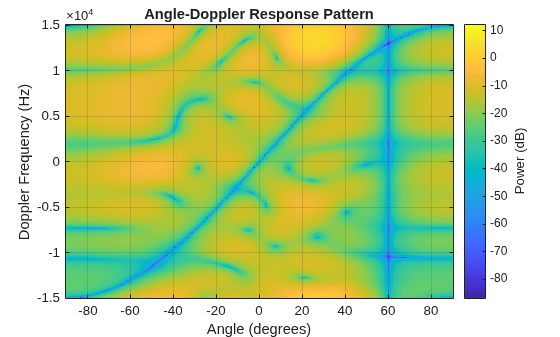
Process a data cube using an SMI beamformer. The weights are calculated for the 71st cell of a collected data cube pointing in the azimuth and elevation direction (45°,-35°) and with a Doppler of 12.980 kHz.
Load the cube data and create the SMI beamformer.
load STAPExampleData;
beamformer = phased.STAPSMIBeamformer(SensorArray=STAPEx_HArray, ...
    PRF=STAPEx_PRF,PropagationSpeed=STAPEx_PropagationSpeed, ...
    OperatingFrequency=STAPEx_OperatingFrequency, ...
    NumTrainingCells=100,WeightsOutputPort=true, ...
    DirectionSource="Input port",DopplerSource="Input port");
[y,w] = beamformer(STAPEx_ReceivePulse,71,[45;-35],12.980e3);
Plot the angle-doppler response.
response = phased.AngleDopplerResponse( ...
    SensorArray=beamformer.SensorArray, ...
    OperatingFrequency=beamformer.OperatingFrequency, ...
    PRF=beamformer.PRF,PropagationSpeed=beamformer.PropagationSpeed);
plotResponse(response,w)
Algorithms
References
[1] Guerci, J. R. Space-Time Adaptive Processing for Radar. Boston: Artech House, 2003.
[2] Ward, J. “Space-Time Adaptive Processing for Airborne Radar Data Systems,” Technical Report 1015, MIT Lincoln Laboratory, December, 1994.
Extended Capabilities
Version History
Introduced in R2011a

