bistaticSurfaceReflectivityLand
Description
The bistaticSurfaceReflectivityLand
System object™ creates a normalized bistatic reflectivity object for a land surface. Use
bistaticSurfaceReflectivityLand to generate normalized bistatic radar cross section (NBRCS)
values, and optionally speckle, as a function of geometry for supported land surface types.
Built-in land surface models are applicable to in-plane and out-of-plane bistatic
configurations for X-band frequencies. bistaticSurfaceReflectivityLand also supports custom,
user-defined bistatic reflectivity models.
NBRCS is the normalized bistatic radar cross section (BRCS) of a unit area of a surface. Multiplying by the total area of a surface or the illuminated area of a surface gives the total BRCS. NBRCS is used to calculate BRCS and surface clutter returns. Speckle is a multiplicative factor used to make surface clutter appear noisier for imaging applications.
To compute the normalized bistatic reflectivity:
Create the
bistaticSurfaceReflectivityLandobject and set its properties.Call the object with arguments, as if it were a function.
To learn more about how System objects work, see What Are System Objects?
Creation
Syntax
Description
creates a normalized bistatic reflectivity System object, brefl = bistaticSurfaceReflectivityLandbrefl, for a land surface. Use
brefl to generate NBRCS values as a function of geometry. This
syntax creates a normalized reflectivity object with InPlaneModel set
to "Domville", InPlaneLandType set to
"Rural", and OutofPlaneModel set to
"RuralInterpolation".
creates a normalized bistatic reflectivity object for a land surface with each specified
brefl = bistaticSurfaceReflectivityLand(PropertyName=Value)PropertyName set to the corresponding Value.
For example, the InPlaneModel and
InPlaneLandType properties specify built-in reflectivity models.
You can specify additional pairs of arguments in any order as
(PropertyName1=Value1, …
,PropertyNameN=ValueN).
Properties
Unless otherwise indicated, properties are nontunable, which means you cannot change their
values after calling the object. Objects lock when you call them, and the
release function unlocks them.
If a property is tunable, you can change its value at any time.
For more information on changing property values, see System Design in MATLAB Using System Objects.
In-plane land reflectivity model, specified as one of "Domville"
or "Custom". In-plane refers to bistatic configurations in which the
transmitter and receiver lie in the same plane (see In-Plane Geometry for more
information).
The "Domville" in-plane model is based on data acquired using an
X-band vertically polarized radar as described in [1-2]. The "Custom"
option enables you to specify a user-defined in-plane model using the
CustomInPlaneFcn property.
Tip
It is not recommended to use the "Domville" model outside of
the valid X-band frequency range.
Data Types: char | string
Out-of-plane land reflectivity model, specified as one of
"RuralInterpolation" or "Custom". Out-of-plane
refers to bistatic configurations in which the transmitter and receiver positions are
non-coplanar (see Out-of-Plane Geometry for more
information).
The out-of-plane "RuralInterpolation" model [3] is based on an
experimentally-verified interpolation between backscattering and forward scattering
geometries of the in-plane rural land type presented in [1-2]. The
"Custom" option enables you to specify a user-defined out-of-plane
model using the CustomOutOfPlaneFcn property.
Tip
It is not recommended to use the "RuralInterpolation" X-band
model to represent other land types or at other frequencies.
Data Types: char | string
In-plane land type, specified as one of "Rural",
"Forest", or "Urban". Land types are valid for
the "Domville" in-plane model, which is based on data acquired using
an X-band vertically polarized radar as described in [1-2].
Dependencies
To enable this property, set the InPlaneLandModel property to
"Domville".
Data Types: char | string
Handle to a custom, user-defined in-plane function, specified in the form of
@custom_inPlane_fnc, where custom_inPlane_fnc is
the name of the custom function. By default, the handle points to an internal function
that returns NBRCS values of 1 m²/m², which is equivalent to 0 dB.
The custom function must accept three positional input arguments
AngIn, Theta, and Freq and
return NBRCS as a Q-by-R matrix, with dimensions
as detailed in the NBRCS output argument
description.
function nbrcs = custom_inPlane_fcn(AngIn,Theta,Freq)See Generate and Plot Custom In-Plane Model for a full example.
Input arguments into the custom in-plane function are:
| Input Argument | Description | Expected Value |
|---|---|---|
AngIn | Incident grazing angle or the angle of the incident ray relative to the surface plane, with values between 0 and 90°. See AngIn for more information. | Scalar in the range of [0,90] or Q-length column vector. |
Theta | The in-plane scattering angle Theta is equivalent to the
scattering grazing angle AngScat for
backscattering geometries and 180 - AngScat for forward scattering geometries, with values that can range
from 0 to 180° (see In-Plane Geometry for more
information). | Scalar in the range of [0,180] or Q-length column vector. |
Freq | Transmitted frequencies. See Freq for more information. | Positive scalar or R-length row vector. |
The custom in plane function should cover all expected bistatic configurations and frequencies.
Dependencies
To enable this property, set the InPlaneLandModel property to
"Custom".
Handle to a custom, user-defined out-of-plane function, specified in the form of
@custom_outPlane_fnc, where custom_outPlane_fcn
is the name of the custom function. By default, the function handle points to an
internal function that performs a basic linear interpolation between the in-plane
forward and backscattering geometries.
The custom out-of-plane function must accept five positional input arguments
inPlaneFcnPlaceHolder, AngIn,
AngScat, AngAz, and Freq and
return NBRCS as a Q-by-R matrix, with dimensions
as detailed in the NBRCS output argument
description.
function nbrcs = custom_outPlane_fcn(inPlaneFcnPlaceHolder,AngIn,AngScat,AngAz,Freq)In addition, the custom out-of-plane function must perform interpolation between the
forward and backscattering geometries defined by the in-plane function. Bistatic
configurations are considered to be forward scattering for AngAz
values of 0 to 90° and 0 to –90° and backscattering for AngAz
values of 90 to 180° and –90 to –180°. Here is a simple example custom function.
function nbrcs = linInterpInPlane(inPlaneFcnPlaceHolder,AngIn,AngScat,AngAz,Freq) AngAz = abs(AngAz); fwdScat = 180-AngScat; bwdScat = AngScat; inPlaneNrcsFwd = inPlaneFcnPlaceHolder(AngIn,fwdScat,Freq); inPlaneNrcsBwd = inPlaneFcnPlaceHolder(AngIn,bwdScat,Freq); f = (AngAz/180); nbrcs = inPlaneNrcsBwd .* f + inPlaneNrcsFwd .* (1-f); end
Input arguments into the custom out-of-plane function are:
| Input Argument | Description | Expected Value |
|---|---|---|
inPlaneFcnPlaceHolder | Expects the in-plane function handle name.
| Name of handle to in-plane function. |
AngIn | Incident grazing angle or the angle of the incident ray relative to the surface plane, with values between 0 and 90°. See AngIn for more information. | Scalar in the range of [0,90] or Q-length column vector. |
AngScat | Scattering grazing angle or the angle of the scattered ray relative to the surface plane, with values between 0 and 90°. See AngScat for more information. | Scalar in the range of [0,90] or Q-length column vector. |
AngAz | Scattering azimuth angle or the angle between the projection of the incident ray onto the surface and the projection of the scattered ray onto the surface, with values between -180 and 180°. See AngAz for more information. | Scalar in the range of [-180,180] or Q-length column vector. |
Freq | Transmitted frequencies. See Freq for more information. | Positive scalar or R-length row vector. |
The custom out-of-plane function should cover all expected bistatic configurations and frequencies.
Dependencies
To enable this property, set the OutOfPlaneLandModel property
to "Custom".
Speckle distribution type, specified as one of "None",
"Lognormal", "Rayleigh", or
"Weibull". Speckle is a multiplicative factor used to make
surface clutter appear noisier and is especially applicable to imaging applications. See
Speckle Model for more
information.
"None"– No speckle is applied."Lognormal"– Speckle has a lognormal distribution. Define the distribution using theSpeckleMeanandSpeckleStandardDeviationproperties. Default values of these properties create speckle with a normalized mean lognormal distribution."Rayleigh"– Speckle has a Rayleigh distribution. Define the distribution using theSpeckleScaleproperty. The default value of this property creates speckle with a unit mean Rayleigh distribution."Weibull"– Speckle has a Weibull distribution. Define the distribution using theSpeckleScaleandSpeckleShapeproperties. The default values of these properties create speckle with a unit mean Weibull distribution.
Data Types: char | string
Mean value of lognormal-distributed speckle, specified
as a scalar. When the Speckle
property is set to "Lognormal",
speckle has a lognormal distribution and you can
define the distribution using the
SpeckleMean and
SpeckleStandardDeviation
properties. Default values of these properties
create speckle with a normalized mean lognormal
distribution.
A lognormal distribution is parameterized with a mean, μlog, and a standard deviation, σlog. The expected value of the speckle distribution can be expressed as
A
μlog of
-0.5*log(2) and a
σlog of
sqrt(log(2)) results in a
speckle_dist equal to
one.
Dependencies
To enable this property, set the
Speckle property to
"Lognormal".
Data Types: double
Standard deviation of lognormal-distributed speckle, specified as a
non-negative scalar. When the Speckle
property is set to "Lognormal", speckle has a
lognormal distribution and you can define the distribution using
the SpeckleMean and
SpeckleStandardDeviation
properties. Default values of these properties create speckle
with a normalized mean lognormal distribution.
A lognormal distribution is parameterized with a mean, μlog, and a standard deviation, σlog. The expected value of the speckle distribution can be expressed as
A
μlog of
-0.5*log(2) and a
σlog of
sqrt(log(2)) results in a
speckle_dist equal to one.
Dependencies
To enable this property, set the
Speckle property to
"Lognormal".
Data Types: double
Scale parameter for speckle for the Rayleigh and Weibull distributions, specified as a positive scalar.
When the
Speckleproperty is set to"Rayleigh", speckle has a Rayleigh distribution. The default value ofSpeckleScalecreates speckle with a unit mean Rayleigh distribution. A Rayleigh distribution is parameterized only by the speckle scale, λscale. The expected value of the speckle distribution can be expressed asA λscale of
sqrt(4/π)results in a speckle_dist equal to one.When the
Speckleproperty is set to"Weibull", speckle has a Weibull distribution and you can define the distribution using theSpeckleScaleandSpeckleShapeproperties. The default values of these properties create speckle with a unit mean Weibull distribution. A Weibull distribution is parameterized by the speckle scale, λscale, and speckle shape, kshape.where is Γ is the
gammafunction. A λscale ofsqrt(4/π)and a kshape of2results in a speckle_dist equal to one.
Dependencies
To enable this property, set the Speckle property to
"Rayleigh" or "Weibull".
Data Types: double
Shape value for the Weibull speckle distribution, specified as a positive scalar. When the
Speckle property is set to "Weibull",
speckle has a Weibull distribution and you can define the distribution using the
SpeckleScale and SpeckleShape properties.
The default values of these properties create speckle with a unit mean Weibull
distribution.
A Weibull distribution is parameterized by the speckle scale, λscale, and speckle shape, kshape.
where Γ is the gamma function. A λscale of
sqrt(4/π) and a kshape
of 2 results in a speckle_dist equal to
one.
Dependencies
To enable this property, set the Speckle property to
"Weibull".
Data Types: double
Usage
Description
returns the normalized bistatic radar cross section, NBRCS = brefl(AngIn,AngScat,AngAz,Freq)NBRCS, of a land
surface for the bistatic configuration defined by AngIn,
AngScat, and AngAz at the specified frequency
Freq. Built-in models are valid for X-band frequencies, and custom
models are valid for user-defined frequencies.
Input Arguments
Incident grazing angle or the angle of the incident ray relative to the surface
plane, specified as a scalar or Q-length column vector, with values
between 0 and 90°. If AngIn is a column vector, it must have the
same size as other column vector inputs, which may include
AngScat and AngAz. Incident grazing angles
are defined similarly to a monostatic Grazing Angle
for the case that the sensor is the transmitter. See In-Plane Geometry and Out-of-Plane Geometry for more
information. Units are in degrees.
Data Types: double
Scattering grazing angle or the angle of the scattered ray relative to the surface
plane, specified as a scalar or Q-length column vector, with values
between 0 and 90°. If AngScat is a column vector, it must have
the same size as other column vector inputs, which may include
AngIn and AngAz. Scattering grazing angles
are defined similarly to a monostatic Grazing Angle
for the case that the sensor is the receiver. See In-Plane Geometry and Out-of-Plane Geometry for more
information. Units are in degrees.
Data Types: double
Scattering azimuth angle or the angle between the projection of the incident ray
onto the surface and the projection of the scattered ray onto the surface, specified
as a scalar or Q-length column vector, with values between –180 and
180°. If AngAz is a column vector, it must have the same size as
other column vector inputs, which may include AngIn and
AngScat. Following the right-hand rule convention, positive
scattering azimuth angles are measured counterclockwise from the projection of the
incident ray onto the surface. See Out-of-Plane Geometry for more
information. Units are in degrees.
Data Types: double
Transmitted frequencies, specified as a positive scalar or
R-length row vector of positive values. When the
InPlaneLandModel property is set to
"Domville", valid frequencies are in the X-band, and changing the
frequency does not impact returned NBRCS values. In other words,
the specified frequency is only relevant to "Custom" models. Units
are in Hz.
Data Types: double
Output Arguments
Normalized bistatic radar cross section, also referred to as normalized bistatic
reflectivity or surface σ0, returned as a real-valued
Q-by-R matrix, where Q is
the length of AngIn, AngScat, or
AngAz and R is the length of
Freq. Units are dimensionless, but often expressed as m²/m². An
NBRCS value of 1 m²/m² is equivalent to 0 dB.
The returned normalized bistatic reflectivity for custom models is calculated
using nearest neighbor interpolation at a given bistatic configuration and frequency.
To avoid interpolation errors, CustomInPlaneFcn and
CustomOutofPlaneFcn should cover all expected geometries and
frequencies.
Multiplicative speckle, returned as a real-valued
Q-by-R matrix, where Q is a
scalar or the length of AngIn, AngScat, or
AngAz and R is the length of
Freq.
Object Functions
To use an object function, specify the
System object as the first input argument. For
example, to release system resources of a System object named obj, use
this syntax:
release(obj)
Examples
Create a bistatic reflectivity object using the Domville model for rural land. Return NBRCS for an X-band radar at transmitter angles of 20 to 60 degrees and a receiver angle of 5 degrees for a forward scattering geometry (0 degree azimuth angle).
angIns = [20:10:60]'; angScat = 5; angAz = 0; freq = 9.4e9; brefl = bistaticSurfaceReflectivityLand(InPlaneModel='Domville',... InPlaneLandType="Rural",OutOfPlaneModel="RuralInterpolation"); nbrcs = brefl(angIns,angScat,angAz,freq)
nbrcs = 5×1
0.2688
0.1383
0.0803
0.0375
0.0192
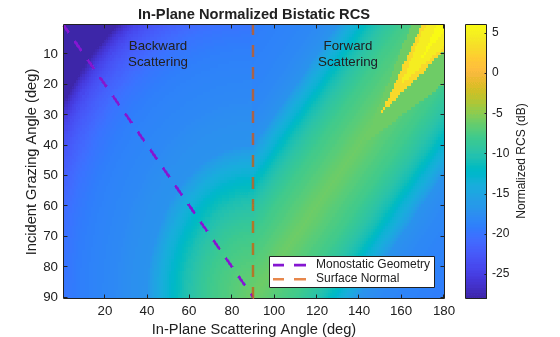
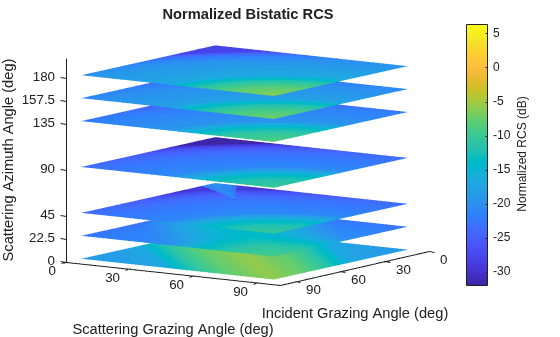
Create a bistatic reflectivity object using the Domville model for rural land and plot in-plane and out-of-plane normalized bistatic radar cross section (NBRCS) model values.
brefl = bistaticSurfaceReflectivityLand(InPlaneModel="Domville",... InPlaneLandType="Rural",OutOfPlaneModel="RuralInterpolation");
Plot the in-plane and out-of-plane models. For the out-of-plane model, display azimuths of 0, 22.5, 45, 90, 135, 157.5, and 180 degrees.
plot(brefl,"InPlane")
plot(brefl,Azimuth=[0 22.5 45 90 135 157.5 180])
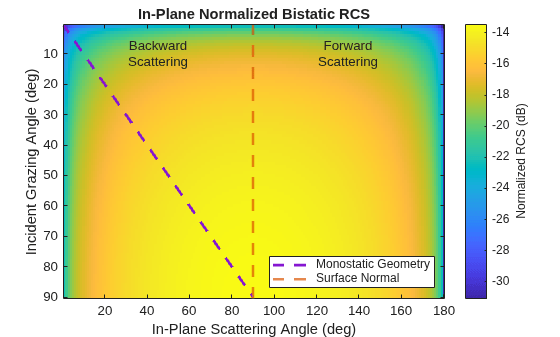
Define a custom function called in_plane_bartonFarm and use a gamma value of -15 dB at 10 GHz for reference. This value is taken from the surfaceReflectivityLand "Barton" Model "Farm" LandType. The custom function converts the gamma value to linear units and adds a frequency dependence. Then it uses bsxfun to modify the gamma value based on the bistatic geometry. [1] suggests that you can use the geometric mean of the monostatic normalized radar cross section (RCS) to generate a custom in-plane normalized bistatic RCS model for backscattering bistatic geometries.
function nbrcs = in_plane_bartonFarm(angIn,angScat,freq) inOutAngles = [angIn, angScat]; gammaCdB = -15; gammaCdB = gammaCdB + 5*log10(freq./10e9); gammaC = db2pow(gammaCdB); nbrcs = bsxfun(@times,gammaC,sqrt(prod(sind(inOutAngles),2))); end
Create a bistaticSurfaceReflectiivityLand object and set the custom in-plane function handle to @in_plane_bartonFarm.
bref = bistaticSurfaceReflectivityLand(InPlaneModel="Custom",... CustomInPlaneFcn=@in_plane_bartonFarm)
bref =
bistaticSurfaceReflectivityLand with properties:
InPlaneModel: 'Custom'
CustomInPlaneFcn: @in_plane_bartonFarm
OutOfPlaneModel: 'RuralInterpolation'
Speckle: 'None'
Plot in-plane NBRCS values at 20 GHz.
bref.plot("InPlane",Frequency=20e9)
Return NBRCS values at specified bistatic configurations and frequencies.
nbrcs=bref([45;40],45,180,[20e9 21e9])
nbrcs = 2×2
0.0319 0.0327
0.0304 0.0311
[1] Barton, David K. "Land Clutter Models for Radar Design and Analysis." Proceedings of the IEEE 73, no. 2 (1985): 198-204.
More About
The plots below provide example in-plane bistatic configurations in which transmitted
(black) and received (blue) signals lie in the same plane. The incident grazing angle
AngIn and the scattering grazing angle AngScat
are input arguments that are measured relative to the surface plane, with values that can
vary between 0 and 90°. The in-plane scattering angle θ
(Theta) is relevant to the CustomInPlaneFcn and
plot method
and is shown in green. θ is measured from the same surface as
AngIn and is defined as the angle between the projection of the
incident ray onto the surface and the scattered ray, with values that can vary between 0 and
180°. For backscattering configurations, θ is equivalent to
AngScat and for forward scattering configurations,
θ is equal to 180 - AngScat. The surface normal is shown for reference. Note: plots are shown with
flat ground surfaces for simplicity. Tilted surfaces will modify AngIn
and AngScat, similar to the effect illustrated for the monostatic Grazing Angle.
Backscattering geometries occur when the receiver is positioned to receive surface
reflections that are scattered back towards the direction of the transmitter and forward
scattering geometries occur when reflections that continue to travel away from the
transmitter are received. Bistatic configurations are considered to be backscattering for
AngAz values of 180 or –180° (left and right plots) and forward
scattering when the AngAz value is 0° (middle plot). The backscattering
azimuths correspond to θ values between 0 and 90° and the forward
scattering azimuth of 0° corresponds to θ values between 90 and
180°.
The 3-D plots below provide example out-of-plane bistatic configurations for transmitter
positions shown in black and receiver positions in blue. The incident grazing angle
AngIn and the scattering grazing angle AngScat
are input arguments that are measured relative to the surface plane, with values that can
vary between 0 and 90°. The scattering azimuth AngAz, shown in orange,
is the angle between the projection of the incident ray onto the surface and the projection
of the scattered ray onto the surface. Following the right-hand rule convention, positive
AngAz angles are measured counterclockwise from the projection of
the incident ray onto the surface. The surface normal is shown for reference. Note: plots
are shown with flat ground surfaces for simplicity. Tilted surfaces will modify
AngIn and AngScat, similar to the effect
illustrated for the monostatic Grazing Angle.
Backscattering geometries occur when the receiver is positioned to receive surface
reflections that are scattered back towards the direction of the transmitter and forward
scattering geometries occur when reflections that continue to travel away from the
transmitter are received. Bistatic configurations are considered to be backscattering for
AngAz values of 90 to 180° and –90 to –180° and forward scattering
for AngAz values of 0 to 90° and 0 to –90°.
Speckle is modeled as an uncorrelated, multiplicative factor I = σ*n, where σ is the NBRCS and n represents random numbers drawn from an independent identically-distributed unity mean noise statistical distribution. Because speckle is correlated with underlying terrain BRCS, it is usually applied to radar intensity. Speckle noise model distributions include lognormal, Rayleigh, and Weibull.
References
[1] A. R. Domville. "The Bistatic Reflection From Land and Sea of X-Band Radio Waves, Part I." GEC (Electronics) Ltd., Stanmore, England, Memorandum SLM1802 (1967).
[2] A. R. Domville. "The Bistatic Reflection From Land and Sea of X-Band Radio Waves, Part II." GEC (Electronics) Ltd., Stanmore, England, Memorandum SLM2116 (1968).
[3] C. Maitland et al. "Development of a Bistatic Clutter Tool and Validation by Experimental Data," International Conference on Radar Systems, Hybrid Conference, Edinburgh, UK (2022): 125-129, doi: 10.1049/icp.2022.2303.
Extended Capabilities
C/C++ Code Generation
Generate C and C++ code using MATLAB® Coder™.
Version History
Introduced in R2026a
See Also
MATLAB Command
You clicked a link that corresponds to this MATLAB command:
Run the command by entering it in the MATLAB Command Window. Web browsers do not support MATLAB commands.
Seleziona un sito web
Seleziona un sito web per visualizzare contenuto tradotto dove disponibile e vedere eventi e offerte locali. In base alla tua area geografica, ti consigliamo di selezionare: .
Puoi anche selezionare un sito web dal seguente elenco:
Come ottenere le migliori prestazioni del sito
Per ottenere le migliori prestazioni del sito, seleziona il sito cinese (in cinese o in inglese). I siti MathWorks per gli altri paesi non sono ottimizzati per essere visitati dalla tua area geografica.
Americhe
- América Latina (Español)
- Canada (English)
- United States (English)
Europa
- Belgium (English)
- Denmark (English)
- Deutschland (Deutsch)
- España (Español)
- Finland (English)
- France (Français)
- Ireland (English)
- Italia (Italiano)
- Luxembourg (English)
- Netherlands (English)
- Norway (English)
- Österreich (Deutsch)
- Portugal (English)
- Sweden (English)
- Switzerland
- United Kingdom (English)