Linearize Simulink Block to Uncertain Model
R2026bThis example shows how to make a Simulink® block linearize to an uncertain variable at the command line. To learn how to specify an uncertain block linearization using the Simulink model editor, see Specify Uncertain Linearization for Core or Custom Simulink Blocks.
For this example, open the Simulink model massSpringDamperSubsys.
mdl = 'massSpringDamperSubsys';
open_system(mdl)
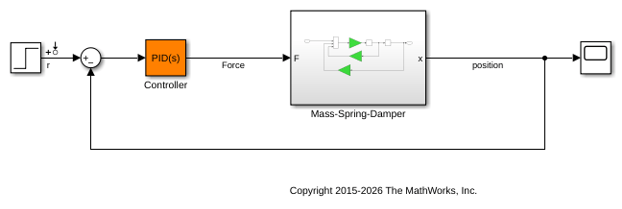
Examine the subsystem Mass-Spring-Damper.
subsys = [mdl,'/Mass-Spring-Damper'];
open_system(subsys)
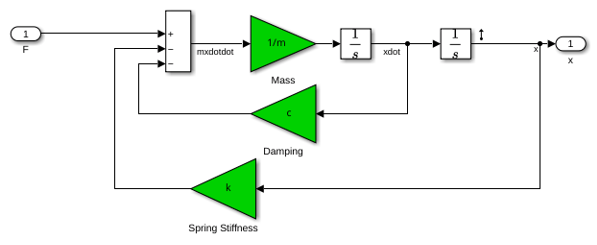
Suppose you want to specify the following uncertain real values for the gain blocks m, c, and k.
m_unc = ureal('m',3,'Percentage',40);
c_unc = ureal('c',1,'Percentage',20);
k_unc = ureal('k',2,'Percentage',30);
To specify these values as the linearization for these blocks, create a BlockSubs structure to pass to the linearize function. The field names are the names of the Simulink blocks, and the values are the corresponding uncertain values. Note that in this model, the name of the m block is Mass, c block is Damping, and k block is Spring Stiffness.
m_name = [subsys,'/Mass'];
c_name = [subsys,'/Damping'];
k_name = [subsys,'/Spring Stiffness'];

BlockSubs(1).Name = m_name;
BlockSubs(1).Value = m_unc;
BlockSubs(2).Name = c_name;
BlockSubs(2).Value = c_unc;
BlockSubs(3).Name = k_name;
BlockSubs(3).Value = k_unc;
Compute the uncertain linearization. linearize linearizes the model at operating point specified in the model, making the substitutions specified by BlockSubs. The result is an uncertain state-space model with an uncertain real parameter for each of the three uncertain gains.
io = getlinio(mdl);
sys = linearize(mdl,BlockSubs,io)
sys =

Uncertain continuous-time state-space model with 1 outputs, 1 inputs, 3 states.
The model uncertainty consists of the following blocks:
  c: Uncertain real, nominal = 1, variability = [-20,20]%, 1 occurrences
  k: Uncertain real, nominal = 2, variability = [-30,30]%, 1 occurrences
  m: Uncertain real, nominal = 3, variability = [-40,40]%, 1 occurrences

Type "sys.NominalValue" to see the nominal value and "sys.Uncertainty" to interact with the uncertain elements.
Examine the uncertain model response.
step(sys)
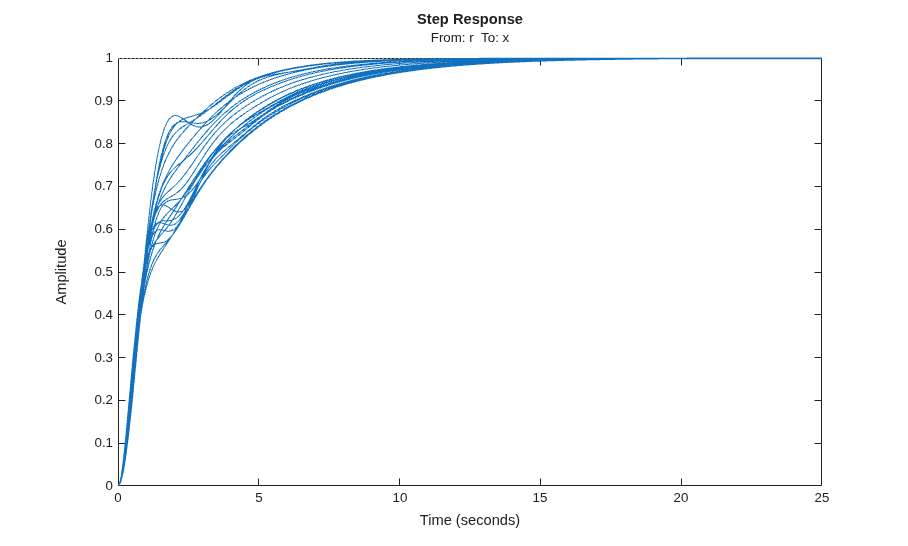
step takes random samples and provides a sense of the range of responses within the uncertainty of the linearized model.
See Also
linearize (Simulink Control Design)

