Find Nonzero Elements
R2026bFind nonzero elements in array
Find Nonzero Elements block

To add a block to a model, double-click the canvas and start typing the block name. Then, select the block from the list.
Libraries:
Simulink /
Math Operations
Description
The Find Nonzero Elements block locates all nonzero elements of the input signal and returns the linear indices of those elements. If the input is a multidimensional signal, the Find Nonzero Elements block can also return the subscripts of the nonzero input elements. In both cases, you can show an output port with the nonzero input values.
The Find Nonzero Elements block outputs a variable-size signal. The sample time for any variable-size signal must be discrete. If your model does not already use a fixed-step solver, you may need to select a fixed-step solver in the Configuration Parameters dialog box. For more information, see Compare Solvers and Choose a Solver.
Examples
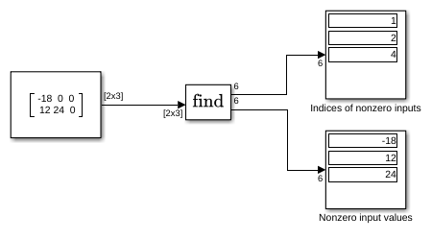
This example shows how to use the Find block to find nonzero elements in an array. In the following model, the block is configured to output both the one-based linear index and the value of each nonzero element.
Extended Examples
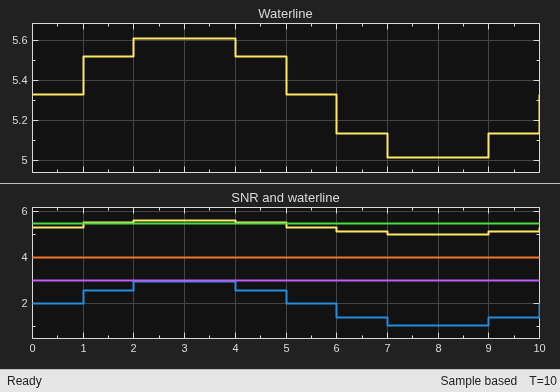
Parallel Channel Power Allocation
A potential use of the Find Nonzero Elements block. This block outputs a variable-size signal containing the indices of the nonzero values of the input.
Ports
Input
Output
Parameters
Main
Select the output format for the indices of the nonzero input values.
Selecting
Linear indicesprovides the element indices of any dimension signal in a vector form. For one dimension (vector) signals, indices correspond to the position of nonzero values within the vector. For signals with more than one dimension, the conversion of subscripts to indices is along the first dimension. You do not need to know the signal dimension of the input signal.Selecting
Subscriptsprovides the element indices of a two-dimension or larger signal in a subscript form. Because the block shows an output port for each dimension, this option requires you to specify the Number of input dimensions.
Programmatic Use
To set the block parameter value programmatically, use
the set_param function.
| Parameter: | IndexOutputFormat |
| Values: | 'Linear indices' (default) | "Subscripts" |
| Data Types: | char | string |
Example: set_param("myModel/Find Nonzero
Elements",IndexOutputFormat="Subscripts")
Specify the number of dimensions for the input signal as a positive integer value from 1 to 32.
Dependencies
To enable this parameter, set Index output
format to
Subscripts.
Programmatic Use
To set the block parameter value programmatically, use
the set_param function.
| Parameter: | NumberOfInputDimensions |
| Values: | '1' (default) | scalar |
| Data Types: | char | string |
Example: set_param("myModel/Find Nonzero
Elements",NumberOfInputDimensions="2")
Specify the indexing mode as Zero-based or
One-based.
For
Zero-basedindexing, an index of0specifies the first element of the input vector. An index of1specifies the second element, and so on.For
One-basedindexing, an index of1specifies the first element of the input vector. An index of2, specifies the second element, and so on.
Programmatic Use
To set the block parameter value programmatically, use
the set_param function.
| Parameter: | IndexMode |
| Values: | 'Zero-based' (default) | "One-based" |
| Data Types: | char | string |
Example: set_param("myModel/Find Nonzero
Elements",IndexMode="One-based")
Show or hide the output port for nonzero input values.
When you clear this check box (
off), the block hides the output port for nonzero input values.When you select this check box (
on), the block displays the output port for nonzero input values. The additional output port provides values of the nonzero input elements.
Programmatic Use
To set the block parameter value programmatically, use
the set_param function.
| Parameter: | ShowOutputPortForNonzeroInputValues |
| Values: | 'off' (default) | "on" |
| Data Types: | char | string |
Example: set_param("myModel/Find Nonzero
Elements",ShowOutputPortForNonzeroInputValues="on")
Specify the time interval between samples. To inherit the sample time, set this
parameter to -1. For more information, see Specify Sample Time.
Dependencies
This parameter is visible only if you set it to a value other than
-1. To learn more, see Blocks for Which Sample Time Is Not Recommended.
Programmatic Use
To set the block parameter value programmatically, use
the set_param function.
| Parameter: | SampleTime |
| Values: | "-1" (default) | scalar or vector in quotes |
Data Types
Specify the output data type.
The Data Type Assistant helps you set data
attributes. To use the Data Type Assistant, click  . For more information, see Specify Data Types Using Data Type Assistant.
Programmatic Use
To set the block parameter value programmatically, use
the set_param function.
| Parameter: | OutDataTypeStr |
| Values: | 'Inherit: Inherit via internal rule' (default) | "int8" | "uint8" | "int16" | "uint16" | "int32" | "uint32" | "int64" | "uint64" | "fixdt(1,16)" | "<data type expression>" |
| Data Types: | char | string |
Example: set_param("myModel/Find Nonzero
Elements",OutDataTypeStr="int32")
Select the category of data to specify.
Inherit— Inheritance rules for data types. SelectingInheritenables a second menu/text box to the right where you can select the inheritance mode.Built in— Built-in data types. SelectingBuilt inenables a second menu/text box to the right where you can select a built-in data type.Fixed point— Fixed-point data types. SelectingFixed pointenables additional parameters that you can use to specify a fixed-point data type.Expression— Expressions that evaluate to data types. SelectingExpressionenables a second menu/text box to the right, where you can enter the expression.
For more information, see Specify Data Types Using Data Type Assistant.
Dependencies
To enable this parameter, click the Show data type assistant button.
Select the data type override mode for this signal.
When you select
Inherit, Simulink inherits the data type override setting from its context, that is, from the block,Simulink.Signalobject or Stateflow® chart in Simulink® that is using the signal.When you select
Off, Simulink ignores the data type override setting of its context and uses the fixed-point data type specified for the signal.
For more information, see Specify Data Types Using Data Type Assistant in the Simulink documentation.
Dependencies
To enable this parameter, set Mode to Built
in or Fixed point.
Tips
The ability to turn off data type override for an individual data type provides greater control over the data types in your model when you apply data type override. For example, you can use this option to ensure that data types meet the requirements of downstream blocks regardless of the data type override setting.
Specify whether the fixed-point data is signed or unsigned. Signed data can represent positive and negative values, but unsigned data represents positive values only.
Signed, specifies the fixed-point data as signed.Unsigned, specifies the fixed-point data as unsigned.
For more information, see Specify Data Types Using Data Type Assistant.
Dependencies
To enable this parameter, set the Mode to Fixed
point.
Specify the bit size of the word that holds the quantized integer. For more information, see Specify Fixed-Point Data Types with the Data Type Assistant (Fixed-Point Designer).
Dependencies
To enable this parameter, set Mode to
Fixed
                    point
.
Specify the method for scaling your fixed-point data to avoid overflow
conditions and minimize quantization errors. Selecting
Integer specifies a binary point location
for fixed-point data and sets the fraction length to
0. For more information, see Specify Data Types Using Data Type Assistant.
Dependencies
To enable this parameter, set Mode to
Fixed point.
Block Characteristics
Data Types |
|
Direct Feedthrough |
|
Multidimensional Signals |
|
Variable-Size Signals |
|
Zero-Crossing Detection |
|
Programmatic Use: Add Block
To add the block programmatically, use the add_block function with one of these library block paths as the source.
"simulink/Math Operations/Find Nonzero Elements"
Example: add_block("simulink/Math Operations/Find Nonzero Elements","myModel/myBlock",MakeNameUnique="on")
For information about programmatic access to individual block parameters, see the Programmatic Use section of parameter descriptions on this page.
Extended Capabilities
Version History
Introduced in R2010a

