Simulink.BlockDiagram.resizeBlocksToFitContent
R2026bSyntax
Description
resizedBlocks = Simulink.BlockDiagram.resizeBlocksToFitContent(sys)
When the blocks are too small to display the parameter value, the blocks display a
placeholder letter instead, for example, -K-.
The Simulink.BlockDiagram.resizeBlocksToFitContent function does
not act on blocks in model references.
resizedBlocks = Simulink.BlockDiagram.resizeBlocksToFitContent(sys,ReportOnly="true")
resizedBlocks = Simulink.BlockDiagram.resizeBlocksToFitContent(sys,BlockList=blocksToResize)
Examples
This example shows how to programmatically resize all value-displaying blocks in a model to be large enough to display their values instead of placeholder letters.
Open the sldemo_hardstop_resized model.
model = "sldemo_hardstop_resized";
open_system(model);
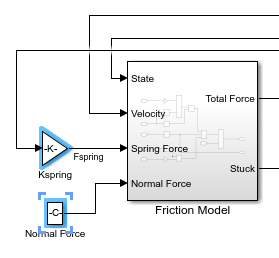
At the top level of the model, the Gain block named Kspring and the Constant block named Normal Force are too small to display their values. Instead, the blocks respectively display the placeholder letters -K- and -C-. Programmatically select the blocks so that you can see where the blocks are located in the model.
set_param(model+"/Kspring",Selected="on");
set_param(model+"/Normal Force",Selected="on");
Open the Friction Model subsystem.
subsys = model+"/Friction Model";
open_system(subsys);
In the subsystem, the Gain blocks named Mu Static and Mu Kinetic are too small to display their values. Instead, the blocks display -K-.
set_param(subsys+"/Mu Static",Selected="on");
set_param(subsys+"/Mu Kinetic",Selected="on");
Get the names of all the blocks that are too small to display their values.
resizedBlocks = Simulink.BlockDiagram.resizeBlocksToFitContent(model,ReportOnly="true")resizedBlocks = 4×1 cell
{'sldemo_hardstop_resized/Friction Model/Mu Kinetic'}
{'sldemo_hardstop_resized/Friction Model/Mu Static' }
{'sldemo_hardstop_resized/Kspring' }
{'sldemo_hardstop_resized/Normal Force' }
Resize only the blocks in the subsystem named Friction Model that are too small to display their values. Use the find_system function to get the paths of the blocks in the subsystem.
blocks = find_system(subsys);
Simulink.BlockDiagram.resizeBlocksToFitContent(model,BlockList=blocks);
Check the blocks again. The blocks in the subsystem now display values, but the blocks at the top level of the model still display placeholder letters.
Resize all the blocks in the model that are too small to display their values.
Simulink.BlockDiagram.resizeBlocksToFitContent(model);
All blocks now display values instead of placeholder letters.
Input Arguments
Name-Value Arguments
Output Arguments
Version History
Introduced in R2024b

