isActive
R2026bDetermine if state is active
Syntax
Description
Examples
Open the
sf_carmodel.openExample("sf_car")For more information about this model, see Model a Car with Automatic Transmission.
Set the model to save the final operating point. Open the Configuration Parameters dialog box and, in the Data Import/Export pane:
Select Final states and enter a name for the operating point. For this example, use
xSteadyState.Select Save final operating point.
Click OK.
Set the stop time for this simulation segment. In the Simulation tab, set Stop Time to
3.Run the simulation.
Access the
Stateflow.op.BlockOperatingPointobject that contains the operating point information for theshift_logicchart.blockpath = "sf_car/shift_logic"; op = get(xSteadyState,blockpath)op = Block: "shift_logic" (handle) (active) Path: sf_car/shift_logic Contains: + gear_state "State (AND)" (active) + selection_state "State (AND)" (active) gear "State output data" gearType [1, 1] down_th "Local data" double [1, 1] up_th "Local data" double [1, 1] datasetWrittenToVector "Data set written to vector" logical 4x1Access the
Stateflow.op.OperatingPointContainerobject that contains the operating point information for thegear_statestate.op.gear_state
ans =

State: "gear_state"    (handle)    (active)
  Path:     sf_car/shift_logic/gear_state

  Contains:

    + first          "State (OR)"         (active)
    + fourth         "State (OR)"
    + second         "State (OR)"
    + third          "State (OR)"
Highlight the states that are active in the chart at t = 3.
highlightActiveStates(op)
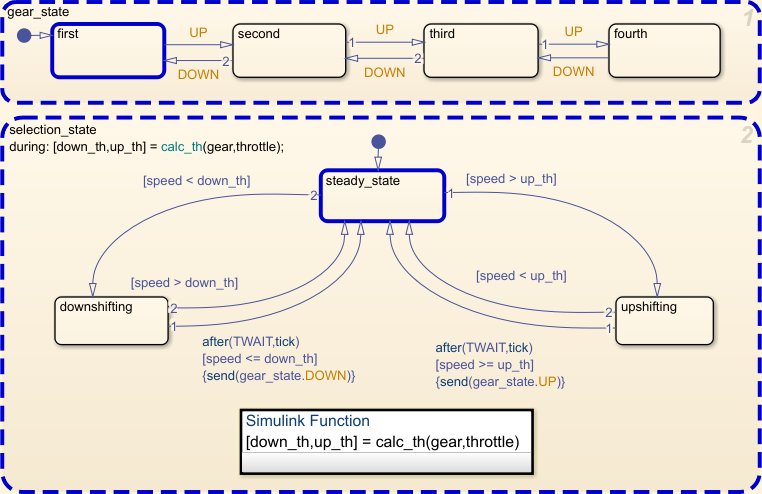
Change the substate activity in the state
gear_stateto reflect a change in gear.setActive(op.gear_state.second)
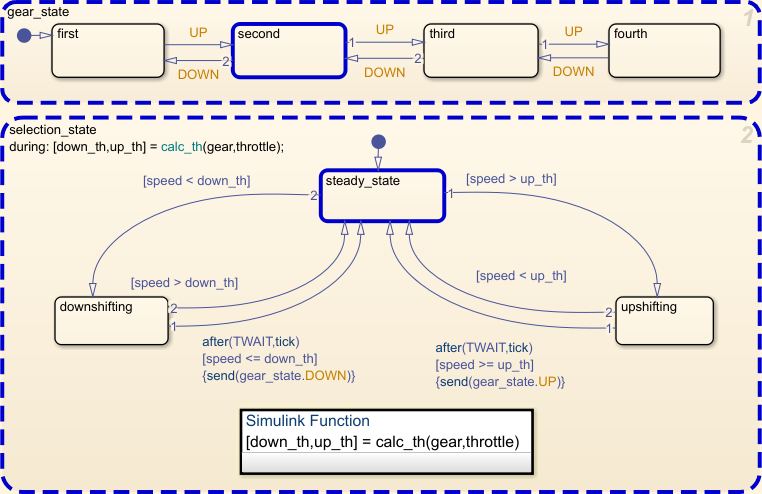
Verify that the substate
secondin the stategear_stateis active in the modified operating point.isActive(op.gear_state.second)
ans =

  logical

   1
Remove the highlighting of active states in the Stateflow® Editor.
removeHighlighting(op)
Input Arguments
Version History
Introduced in R2009b

