Contenuto principale

run

Execute pipeline or component for inference after learning

Since R2026a

    Description

    output1 = run(learnedPipe,input1,...,inputN) uses the provided inputs to evaluate all nodes in the pipeline or component learnedPipe that are required to return output1. The function ignores nodes that are not required to return the output.

    [output1,...,outputM] = run(learnedPipe,input1,...,inputN) also returns the outputs corresponding to the pipeline or component outputs in the Outputs property. You can see the identity and order of the pipeline outputs using learnedPipe.Outputs.

    example

    ___ = run(___,Name,Value) specifies optional run parameters in addition to any of the input or output argument combinations in previous syntaxes. The software forwards the run parameter values to individual components during the execution of learnedPipe.

    • If learnedPipe is a LearningPipeline object, then specify Name as the component name with / as a prefix to the parameter name, to disambiguate between components that have the same parameter name. For example, specify run(learnedPipe,X,Y,"ClassificationSVM/LossFun","classifcost").

    • If learnedPipe is a learning component object, then specify Name as the parameter name. In this case, you can use the Name=Value syntax. For example, specify run(learnedPipe,X,Y,LossFun="classifcost"). Use help(learnedPipe) to see the available run parameters.

    Examples

    collapse all

    Create a pipeline with two components: one that performs principal component analysis and retains three components, and one that performs ECOC classification.

    pca = pcaComponent(NumComponents=3);
    ecoc = classificationECOCComponent;
    pipeline = series(pca,ecoc);
    

    Load sample data and partition the data into training and test data.

    fisheriris = readtable("fisheriris.csv");
    rng("default")
    cvp = cvpartition(fisheriris.Species,Holdout=0.25,Stratify=true);
    
    idxTrain = training(cvp);
    Xtrain = fisheriris(idxTrain,1:end-1);
    Ytrain = fisheriris(idxTrain,end);
    
    idxTest = test(cvp);
    Xtest = fisheriris(idxTest,1:end-1);
    Ytest = fisheriris(idxTest,end);

    Evaluate the pipeline using the training data.

    learnedPipeline = learn(pipeline,Xtrain,Ytrain);
    

    Compute the predicted response values for the test data, and plot the confusion matrix to compare the results with the actual labels. Provide only the input required for predicting the response values.

    Ypredicted = run(learnedPipeline,Xtest);
    confusionchart(Ytest{:,:},Ypredicted{:,:})

    Confusion matrix. Values along the diagonal (in blue) indicate correct classifications, and values off the diagonal (in red) indicate misclassifications.

    You can ask for additional outputs in the order specified by the pipeline Outputs property. Compute the predictions, classification scores, and loss on the test set.

    [predictions,scores,loss] = run(learnedPipeline,Xtest,Ytest);

    Create a pipeline that performs principal component analysis and classification using ECOC.

    pca = pcaComponent;
    ecoc = classificationECOCComponent;
    pipeline = series(pca,ecoc);

    Load sample data and define the predictor and response variables.

    fisheriris = readtable("fisheriris.csv");
    X = fisheriris(:,1:end-1);
    Y = fisheriris(:,end);

    Execute the pipeline for different numbers of principal components, and plot the loss values.

    numComponents = 1:4;
    losses = zeros(1,numel(numComponents));
    
    for j = 1:numel(numComponents)
        pipeline.Components.PCA.NumComponents = numComponents(j);
        learnedPipeline = learn(pipeline,X,Y);
        [~,~,losses(j)] = run(learnedPipeline,X,Y);
    end
    
    plot(numComponents,losses,"o:")
    xlabel("Number of Components")
    ylabel("Loss")
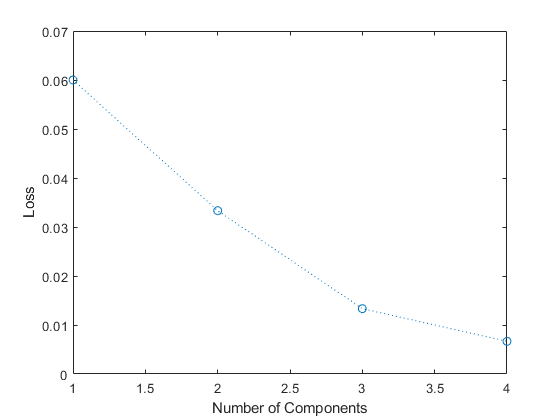
    Plot of loss, given number of principal components

    The resubstitution loss value decreases as the number of principal components increases.

    Input Arguments

    collapse all

    Pipeline or component to evaluate, specified as a LearningPipeline object or a learning component object in one of the following tables. Any data-dependent parameters (learnables) in learnedPipe must already be learned.

    Data Preprocessing Components

    ComponentPurpose
    equalWidthBinnerComponentGrouping data into equal-width bins
    frequencyEncoderComponentFrequency encoding categorical variables
    kmeansEncoderComponentFeature extraction using k-means clustering
    normalizerComponentNormalizing data
    observationImputerComponentImputing missing values
    observationRemoverComponentRemoving observations
    oneHotEncoderComponentEncoding categorical data into one-hot vectors
    outlierImputerComponentImputing outlier values
    outlierRemoverComponentRemoving outlier values
    pcaComponentPrincipal component analysis (PCA)
    quantileBinnerComponentBinning data into equally probable bins
    ricaComponentFeature extraction using reconstruction independent component analysis (RICA)
    sparseFilterComponentFeature extraction using sparse filtering

    Feature Selection and Engineering Components

    ComponentPurpose
    featureSelectionClassificationANOVAComponentFeature selection using one-way ANOVA test
    featureSelectionClassificationChi2ComponentFeature selection using chi-square tests
    featureSelectionClassificationKruskalWallisComponentFeature selection using Kruskal-Wallis test
    featureSelectionClassificationMRMRComponentMinimum redundancy maximum relevance (MRMR) feature selection in classification workflow
    featureSelectionClassificationNCAComponentNeighborhood component analysis (NCA) feature selection in classification workflow
    featureSelectionClassificationReliefFComponentReliefF feature selection in classification workflow
    featureSelectionRegressionFTestComponentFeature selection using F-tests
    featureSelectionRegressionMRMRComponentMinimum redundancy maximum relevance (MRMR) feature selection in regression workflow
    featureSelectionRegressionNCAComponentNeighborhood component analysis (NCA) feature selection in regression workflow
    featureSelectionRegressionReliefFComponentReliefF feature selection in regression workflow
    variableSelectorComponentManual variable selection

    Classification Model Components

    ComponentPurpose
    classificationDiscriminantComponentDiscriminant analysis classification
    classificationECOCComponentMulticlass classification using error-correcting output codes (ECOC) model
    classificationEnsembleComponentEnsemble classification
    classificationGAMComponentBinary classification using generalized additive model (GAM)
    classificationKernelComponentClassification using Gaussian kernel with random feature expansion
    classificationKNNComponentClassification using k-nearest neighbor model
    classificationLinearComponentBinary classification of high-dimensional data using a linear model
    classificationNaiveBayesComponentMulticlass classification using a naive Bayes model
    classificationNeuralNetworkComponentClassification using a neural network model
    classificationSVMComponentOne-class and binary classification using a support vector machine (SVM) classifier
    classificationTreeComponentDecision tree classifier

    Regression Model Components

    ComponentPurpose
    regressionEnsembleComponentEnsemble regression
    regressionGAMComponentRegression using generalized additive model (GAM)
    regressionGPComponentGaussian process regression
    regressionKernelComponentKernel regression using explicit feature expansion
    regressionLinearComponentLinear regression
    regressionNeuralNetworkComponentNeural network regression
    regressionSVMComponentRegression using a support vector machine (SVM)
    regressionTreeComponentDecision tree regression

    Custom Components

    ComponentPurpose
    functionComponentCustom function

    Input data required by the pipeline or component learnedPipe, specified as a table. Input data can be predictor data, response values, observation weights, and so on. The order of the inputs 1, …, N must match the order of the pipeline or component inputs, as listed in the Inputs property. You can see the identity and order of the pipeline inputs using learnedPipe.Inputs.

    Data Types: table

    Output Arguments

    collapse all

    Output data computed by the component based on the input data, returned as separate variables.

    Version History

    Introduced in R2026a