visualinspection.detection.yolox.resizeLetterbox
R2026bSyntax
Description
Resize an image while preserving the aspect ratio using the
visualinspection.detection.yolox.resizeLetterbox function. This function is
useful when you preprocess input images for YOLOX object detection in ONNX Runtime. Resizing
an image while preserving the aspect ratio avoids distortion of objects in the image while
still matching the size of the image to the input size of the object detector. This process is
known as letterboxing.
Export a trained YOLOX object detector to an ONNX model file using the
exportONNXNetworkfunction.Preprocess test images for inference in ONNX Runtime using the
visualinspection.detection.yolox.resizeLetterboxfunction.Run the inference using the ONNX model externally or by simulating ONNX inference in MATLAB®.
Postprocess raw predictions from the ONNX inference using the
visualinspection.detection.yolox.postprocessfunction.
The detect
object function of the yoloxObjectDetector object performs the preprocessing and postprocessing
internally. If you do not need to run inference in ONNX Runtime, you can continue using the
detect function.
[
resizes the image resizedImage,resizeFactor] = visualinspection.detection.yolox.resizeLetterbox(I,targetSize)I to the target size targetSize
while applying constant value padding to preserve its aspect ratio. The function returns the
resized image resizedImage and the resize factor
resizeFactor. To accurately identify the locations of detected
objects, you must use the same resize factor during postprocessing to convert the raw
predictions to bounding boxes.
[___] = visualinspection.detection.yolox.resizeLetterbox(___,PadValue=
specifies the constant value of the padding in addition to the arguments from the previous
syntax.padValue)
Examples
Create a pretrained YOLOX object detector.
net = yoloxObjectDetector("small-coco")net =
yoloxObjectDetector with properties:
ClassNames: {80×1 cell}
InputSize: [640 640 3]
NormalizationStatistics: [1×1 struct]
ModelName: 'small-coco'
networkInputSize = net.InputSize(1:2)
networkInputSize = 1×2

    640    640
Export the YOLOX object detector to an ONNX model file.
exportONNXNetwork(net,"yoloxSmallCoco.onnx")To simulate ONNX inference, import the ONNX model.
netONNX = importNetworkFromONNX("yoloxSmallCoco.onnx",InputDataFormats="BCSS");
Load a test image into the workspace.
I = imread("visionteam.jpg");
inputImageSize = size(I)
inputImageSize = 1×3
413 800 3
Resize the input image to match the input size of the ONNX model while preserving the aspect ratio.
[resizedImage,resizeFactor] = visualinspection.detection.yolox.resizeLetterbox(I,networkInputSize);
The import of the ONNX model follows the BCSS input data format. Because the ONNX input in BCSS format is equivalent to a dlarray with the SSCB format, convert the resized image to a dlarray of the SSCB format. For more information, see Conversion of ONNX Input Tensors into Deep Learning Toolbox Layers (Deep Learning Toolbox).
resizedImage = dlarray(single(resizedImage),"SSCB");Obtain the raw predictions from the ONNX model.
rawPredictions = extractdata(predict(netONNX,resizedImage));
Postprocess the raw predictions to obtain bounding boxes, scores, and labels.
[bboxes,scores,labels] = visualinspection.detection.yolox.postprocess(net,rawPredictions,ResizeFactor=resizeFactor);
Visualize the detected objects.
detectedImg = insertObjectAnnotation(I,"Rectangle",bboxes,scores,LineWidth=4);
figure
imshow(detectedImg)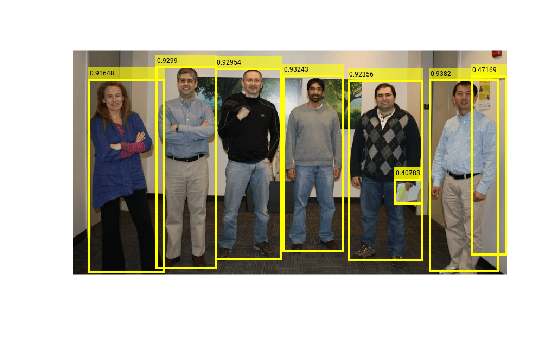
Input Arguments
Output Arguments
Extended Capabilities
Version History
Introduced in R2026b

