Verify Student-Teacher Anomaly Detection Deployment Using Processor-in-the-Loop on NVIDIA Jetson
R2026bThis example shows how to deploy a pretrained Student-Teacher anomaly detector to NVIDIA® Jetson™ hardware and verify deployment correctness using a processor-in-the-loop (PIL) workflow. PIL execution enables you to compare the anomaly detection results produced on the target hardware with those from the host machine, verifying that the model behaves consistently after deployment.
Prerequisites
These are the requirements for the target hardware and the development host computer.
Target Hardware Requirements
NVIDIA Jetson embedded platform.
Ethernet crossover cable to connect the target board and host computer, if you cannot connect the target board to a local network.
GStreamer and SDL libraries on the target.
Environment variables for the compilers and libraries. For more information, see Prerequisites for Generating Code for NVIDIA Boards (MATLAB Coder).
A monitor connected to the display port of the target.
Development Host Requirements
MATLAB Coder™ for C++ code generation. For a tutorial, see Get Started with MATLAB Coder (MATLAB Coder).
GPU Coder for CUDA code generation. For a tutorial, see Get Started with GPU Coder (GPU Coder).
NVIDIA CUDA toolkit on the host and environment variables for the compilers and libraries. For more information, see Third-Party Hardware (GPU Coder) and Setting Up the Prerequisite Products (GPU Coder).
Connect to NVIDIA Jetson Board
The MATLAB Coder Support Package for NVIDIA Jetson and NVIDIA DRIVE™ Platforms uses an SSH connection over TCP/IP to execute commands while building and running the generated CUDA code on the Jetson platform. Connect the target board to the same network as the host computer or use an Ethernet crossover cable to connect the board directly to the host computer. For information on how to set up and configure your board, see the NVIDIA documentation.
To communicate with the NVIDIA hardware, create a live hardware connection object by using the jetson (MATLAB Coder) function. You can connect to the target board using the device address, the username, and the password such as these:
hwObj = jetson("jetson-board-name","ubuntu","ubuntu");
When connecting to the target board for the first time, you must provide the host name or IP address, the username, and the password of the target board. On subsequent connections, you do not need to supply the address, the username, and the password. The hardware object reuses these settings from the most recent successful connection to an NVIDIA board.
This example reuses the settings from the most recent successful connection to an NVIDIA Jetson board.
hwObj = jetson;
### Checking for CUDA availability on the target...
### Checking for 'nvcc' in the target system path...
### Checking for cuDNN library availability on the target...
### Checking for TensorRT library availability on the target...
### Checking for prerequisite libraries is complete.
### Gathering hardware details...
### Checking for third-party library availability on the target...
### Gathering hardware details is complete.
Board name              : NVIDIA Jetson Orin Nano Developer Kit
CUDA Version            : 12.6
cuDNN Version           : 9.3
TensorRT Version        : 10.3.0
GStreamer Version       : 1.20.3
V4L2 Version            : 1.22.1
SDL Version             : 1.2
OpenCV Version          : 4.7.0
Available Webcams       :
Available GPUs          : Orin
Available Digital Pins  : 7  11  12  13  15  16  18  19  21  22  23  24  26  29  31  32  33  35  36  37  38  40
Verify GPU Environment on Target Board
Verify that the compilers and libraries necessary for running this example are set up correctly, using the coder.checkGpuInstall (GPU Coder) function. The environment configuration specifies the target NVIDIA Jetson hardware, enables basic code generation checks, suppresses command-line output, and links the configuration to the connected hardware.
envCfg = coder.gpuEnvConfig('jetson');
envCfg.BasicCodegen = 1;
envCfg.Quiet = 1;
envCfg.HardwareObject = hwObj;
coder.checkGpuInstall(envCfg);
Prepare Entry-Point Function for Deployment
The studentTeacherInference.m entry-point function, which is attached to this example as a supporting file, loads a pretrained Student-Teacher anomaly detection network, processes an input image, and returns the anomaly classification, prediction score, and anomaly map.
type studentTeacherInference.mfunction [TF, score, map] = studentTeacherInference(I,matfile,varargin)
%#codegen
persistent mynet;
if isempty(mynet)
mynet = coder.loadDeepLearningNetwork(matfile,'detector');
end
[TF, score, map] = classify(mynet, I, varargin{:});
end
Configure GPU Coder for PIL Execution on Target Board
To run PIL execution on the target, create a GPU code configuration object for a static library and set the verification mode to 'PIL'.
cfg = coder.gpuConfig('lib');
cfg.VerificationMode = 'PIL';
Create a configuration object for the NVIDIA Jetson platform and assign it to the Hardware property of the code configuration object using the coder.hardware (MATLAB Coder) function.
cfg.Hardware = coder.hardware('NVIDIA Jetson');Load Sample Input Image
Choose an input image to perform inference on. The example provides a sample anomalous image from the screen test subset of the MulsenAD data set [1].
Read the inference image, using the imread function.
image = imread("screenSampleImageTest.png");Normalize the input image to single precision to match the preprocessing used during training of the pretrained Student-Teacher model.
image = im2single(image);
Load the Pretrained Model
Download the pretrained Student-Teacher anomaly detection network.
trainedModelURL = "https://ssd.mathworks.com/supportfiles/visualinspection/data/trainedScreenDefectDetectorModel.zip";
downloadTrainedNetwork(trainedModelURL,pwd);
Network extracted successfully.
Generate CUDA Code for PIL Execution
Generate CUDA code using the codegen (MATLAB Coder) function and pass the GPU code configuration object along with the input argument specifications to the studentTeacherInference entry-point function. The code generator creates a MEX function named studentTeacherInference_pil for PIL execution.
inputArgs = {image,coder.Constant("trainedScreenDefectDetectorModel.mat")};
codegen("-config",cfg,"-args",inputArgs,"studentTeacherInference.m","-report");
### Checking for CUDA availability on the target... ### Checking for 'nvcc' in the target system path... ### Connectivity configuration for function 'studentTeacherInference': 'NVIDIA Jetson' PIL execution is using Port 17725. PIL execution is using 30 seconds for receive timeout. Code generation successful: View report
Run PIL Execution and Visualize Results
To run the generated code on the target board and return the results to MATLAB, call the studentTeacherInference_pil MEX function with the input image and model file.
[TF,score,map] = studentTeacherInference_pil(image,"trainedScreenDefectDetectorModel.mat");### Starting application: 'codegen/lib/studentTeacherInference/pil/studentTeacherInference.elf'
To terminate execution: clear studentTeacherInference_pil
### Launching application studentTeacherInference.elf...
Display the anomaly score and the classification result.
labels = ["Normal","Anomalous"];
disp("The anomaly score is " + score + " and the image is classified as " + labels(TF + 1))
The anomaly score is 0.8319 and the image is classified as Anomalous
To view the detected anomalous regions, display the input image and the anomaly heatmap.
heatMapImage = anomalyMapOverlay(image,map);
montage({image,heatMapImage})
title("Heatmap of Anomalous Image")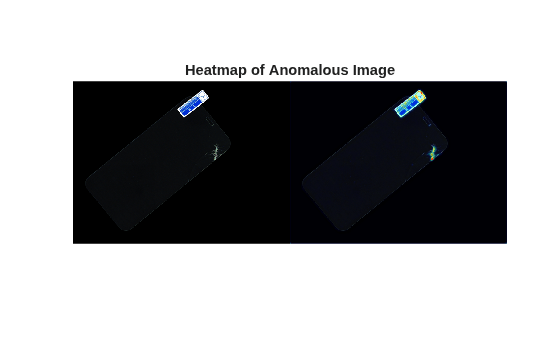
Terminate PIL Execution
Terminate the PIL execution process.
clear studentTeacherInference_pil;Runtime log on Target: [sudo] password for ubuntu: PIL execution terminated on target.
You can also use the command clear mex to clear all MEX functions from memory.
References
[1] Li, Wenqiao, Bozhong Zheng, Xiaohao Xu, Jinye Gan, Fading Lu, Xiang Li, Na Ni et al. "Multi-sensor object anomaly detection: Unifying appearance, geometry, and internal properties." In Proceedings of the computer vision and pattern recognition conference, pp. 9984-9993. 2025.
See Also
studentTeacherAnomalyDetector | codegen (MATLAB Coder)

