Transparent background for figures to make a movie
Hey,
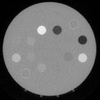
I have some cloud data (ice optical depths) to plot and make a movie that shows the evolution of clouds over time. I managed to make a movie with the cloud data, but now I want to include the topography map as the transparent background. In the movie it should look like that clouds are moving over the topography map. I tried several methods and failed. The topography map is attached. Cloud data are in an array with dimensions (120,120,365). The dimensions represent, (latitide, longitude, time). So each cloud map (120X120) should plot on the attached picture with a 0.01 time interval. I just need to know how to include the map as the transparent background. Does anyone think this is possible? I have included the movie I made and some of the cloud data (120X120X40). Any help will be appreciated.
Also, the clouds should be in grey color scale and the topography map can be modified in order to fit the cloud data.
Below is the code I used to make the movie.
figure(1);
vidfile = VideoWriter('Olympus10.mp4','MPEG-4');
% vidfile.FrameRate = 60;
open(vidfile);
for ind = 1:365%(change 365 to 40 to run with the data I uploaded)
imagesc(H(:,:,ind));
colormap(gray);
c=[0.01 1];
h=imagesc(squeeze(H(:,:,ind)),c);
h1 = colorbar;
stng='F';
title(h1,stng);
h1 = colorbar;
fclose all
grid on
ax=gca;
ax.GridColor = 'w';
ax.GridLineStyle='--';
ax.GridAlpha = 0.5;
ax.Layer='top';
set(gca,'ytick',[0:24:120],'fontsize',18);
yticklabels(27:-3:12);
set(gca,'xtick',[0:24:120],'fontsize',18);
xticklabels(-141:3:-126);
xlabel('East Longitude (\circ)')
ylabel('Latitude (\circ)')
s = num2str(ind);
t = strcat(s);
title(t);
drawnow;
pause(0.01);
F(ind) = getframe(gcf);
writeVideo(vidfile,F(ind));
end
close(vidfile);
Risposta accettata
8 Commenti

Più risposte (0)
Categorie
Scopri di più su Interactive Control and Callbacks in Centro assistenza e File Exchange
Community Treasure Hunt
Find the treasures in MATLAB Central and discover how the community can help you!
Start Hunting!
Translated by 

