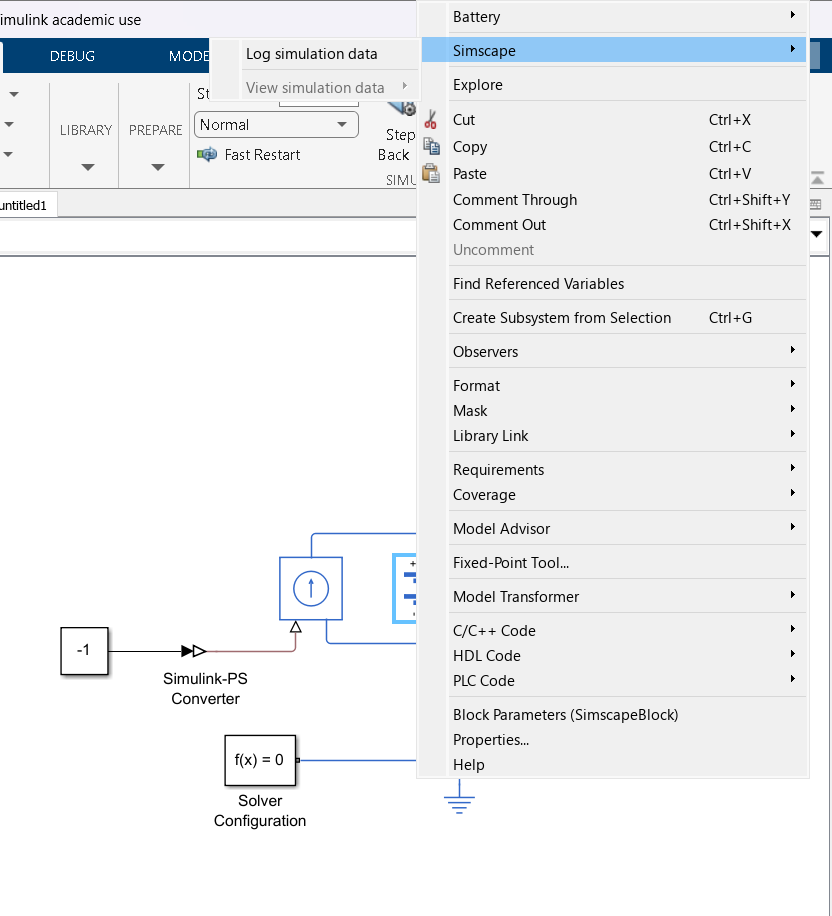
"block choice " button doesn't seem on Simulink

ı m tryna prepare a battery simulation with simulink but when ı push right click on "battery-table based" , and then ı go simscape button, and ı just only see "log simulation data" . Have you any reccomend for this problem? It s probably an easy solution, but ı can't

Risposte (1)

Vinay
Vinay il 30 Gen 2025
The 'block choice' is disabled in the MATLAB R2023b for the 'Battery' block. The thermal port can be modeled by enabling the thermal port in the block parameters.
  1. Open the 'Battery' block parameters.
  2. In the 'Thermal' tab , change 'Thermal port' as 'Model'
  3. Model the 'Thermal mass' parameter for the block.
Also the modeling option can be configured by enabling the 'Fade characteristic' in the block parameter as shown below
Kindly refer to the below documentation of 'Battery' and Matlab answer for more details
I hope this helps!

1 Commento

As you said, it s done. I changed "thermal port and the others options(by the way there is too an option for the SOC port ) " Thanks for helping.

Accedi per commentare.

Categorie

Scopri di più su Simulink in Centro assistenza e File Exchange

Richiesto:

il 27 Gen 2025

Commentato:

il 1 Feb 2025

Community Treasure Hunt

Find the treasures in MATLAB Central and discover how the community can help you!

Start Hunting!

Translated by