FFT with normalized spatial frequency for image sensor MTF
Mostra commenti meno recenti
I'm attempting to use the slanted edge method to calculate the MTF for a camera system according to Harvest Imaging (https://harvestimaging.com/blog/?p=1328), and struggling to plot the result correctly. The method involves taking the Fourier transform of a line spread function and plotting it from DC to the sampling frequency. I have chosen the sampling frequency to equal 2, since that is the minimum number of pixels required to record contrast. Here is my code:
LSF = [];
LSF(1:250) = 0;
LSF(51:70) = 140;
Fs = 2; % Sampling frequency (pixels/lp)
T = 1/Fs; % Sampling period (lp/pixel)
L = length(LSF); % Length of signal (length of line in pixels)
P2 = abs(fft(LSF/L));
P1 = P2(1:L/2+1);
P1(2:end-1) = 2*P1(2:end-1);
f = Fs*(0:(L/2))/L;
nP1 = P1-min(P1);
nP1 = nP1./max(nP1);
plot(f,nP1,'linewidth',3)
title('MTF')
xlabel('Normalized Spatial Frequency')
According to the example, I should reach my first minimum of the sinc function at x=1
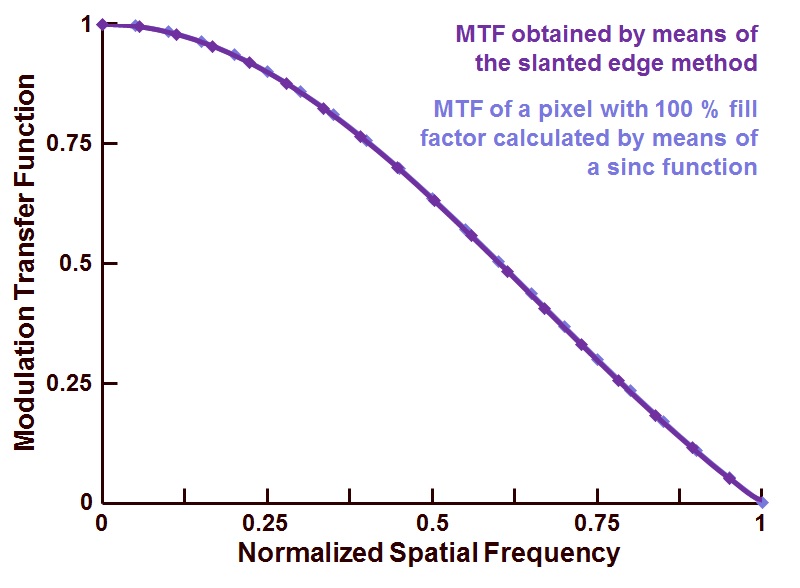
But, I appear to be off by a factor of 10.

Can anyone point out where I'm going wrong? I'm sure it's a simple fix.
Thanks much!
7 Commenti

David Goodmanson
il 20 Apr 2020
Modificato: David Goodmanson
il 21 Apr 2020
Hello Ben,
No comment on the interpretation, but a width-two pulse is the only one whose fft is a sinc-like function with its first zero at the edges of the resulting frequency array.

Ben Hendrickson
il 20 Apr 2020
David Goodmanson
il 21 Apr 2020
Hello Ben,
I could have been clearer in the comment so I modified it.
Ben Hendrickson
il 21 Apr 2020
Hey David,
Appreciate the clarification. I’m curious how the author of the tutorial got that result from this LSF:

Am I misinterpreting the sampling frequency somehow? He gave an example of using Fs=200, which stems from assuming a 5 micron pixel pitch -> 200 line pairs per millimeter at the sampling frequency (a standard unit when measuring MTF, i.e. 200 lap/mm = 1 normalized spatial frequency)
I understand your not the author of the tutorial, but if you have a guess I’m all ears. It’s as good as mine!
David Goodmanson
il 21 Apr 2020
Modificato: David Goodmanson
il 21 Apr 2020
Hello Ben, see these two for a clearer explanation of the method.
The Harvest blog calls the original function (before taking a derivative) the 'spectral frequency response' which I think is confusing if not incorrect. Certainly the idea is to fourier transform a 1d point spread function in pixels to obtain the modulation transfer function in cycles / pixel. Knowing pixel pitch produces cycles per mm. Then a factor of 1/2 to get line pairs / mm ?
Ben Hendrickson
il 21 Apr 2020

Ali Madani
il 22 Ott 2020
Hi Ben, did you figure out how to normalized the x-axis? I've been having the same question and cannot figure out how to do this.
Risposte (1)

Hi Ben,
You are off by a factor of 10 because there are 10 samples in one of your 'pixels'. The result of the FT is in cycles/set, which can also be expressed in other units as shown below (see here for a detailed explanation). I used similar figures to yours that however result in the sinc having samples at MTF nulls.
Jack
n = 256; %samples per set
px = 16; %samples per pixel
LSF = zeros(1,n);
LSF(1:px)=140; %the pixel has intensity 140
MTF = 1/sum(LSF) * abs(fft(LSF));
f = 0:n-1; %cycles per set
figure; plot(f,MTF); %cycles per set
xlabel('cycles/set'); ylabel('MTF')
figure; plot(f/n,MTF); %cycles per sample
xlabel('cycles/sample'); ylabel('MTF')
figure; plot (f/n*px,MTF) %cycles per pixel
xlabel('cycles/pixel'); ylabel('MTF'); xlim([0 1])
Categorie
Scopri di più su Logical in Centro assistenza e File Exchange
Prodotti
il 19 Apr 2020
il 22 Ott 2020
Community Treasure Hunt
Find the treasures in MATLAB Central and discover how the community can help you!
Start Hunting!
Translated by 

