Al momento, stai seguendo questo contributo
- Vedrai gli aggiornamenti nel tuo feed del contenuto seguito
- Potresti ricevere delle email a seconda delle tue preferenze per le comunicazioni
This GUI implements a chaos based image encryption algorithm. If you use this code, please cite the following work:
Moysis, L., Kafetzis, I., Tutueva, A., Butusov, D., & Volos, C. (2022). Chaos-Based Image Encryption Based on Bit Level Cubic Shuffling. In Cybersecurity: A New Approach Using Chaotic Systems (pp. 157-191). Cham: Springer International Publishing.
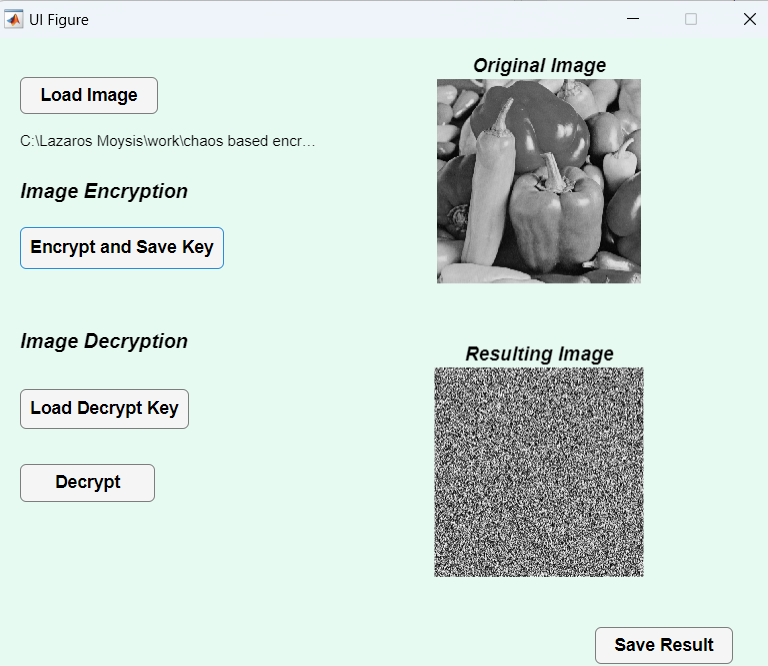
The GUI works as this:
Encryption:
- Load the image you want to encrypt
- Press Encrypt and Save key
- The image in encrypted, and you get automatically prompted to save the encryption key in a .txt file
- You can then save your encrypted image
Decryption
- Load the image you want to decrypt
- Load the decryption key
- Choose the Decryption option
- You can now save your decrypted image.
The encryption method is implemented from the paper above.
Remember, save the images in png format.
Video explaining the GUI is available here:
Lazaros Moysis
Youtube channel
The GUI was developed by Ioannis Kafetzis.
X: @IoKaf
Cita come
Lazaros Moysis (2026). GUI for Chaotic Image Encryption (https://it.mathworks.com/matlabcentral/fileexchange/159166-gui-for-chaotic-image-encryption), MATLAB Central File Exchange. Recuperato .
Informazioni generali
- Versione 1.0.3 (5,52 KB)
Compatibilità della release di MATLAB
- Compatibile con qualsiasi release
Compatibilità della piattaforma
- Windows
- macOS
- Linux