Al momento, stai seguendo questo contributo
- Vedrai gli aggiornamenti nel tuo feed del contenuto seguito
- Potresti ricevere delle email a seconda delle tue preferenze per le comunicazioni
The GUI implements the chaotic encryption algorithm proposed in the following work:
Moysis, L., Lawnik, M., Alexan, W., Goudos, S. K., Baptista, M. S., & Fragulis, G. F. (2025). Exploiting Circular Shifts for Efficient Chaotic Image Encryption. IEEE Access.
Please cite this work if you use the code below.
The work is open access, so you can find information about the algorithm and its steps in the pdf.
The encryption code is also available in: https://uk.mathworks.com/matlabcentral/fileexchange/181195-circular-shifts-for-efficient-chaotic-image-encryption?s_tid=srchtitle
The algorithm uses the DataHash function by Jan, from:
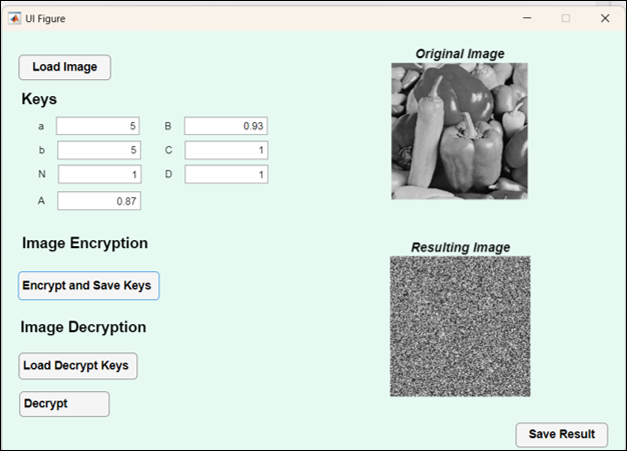
The GUI works as this:
Encryption:
- Load the image you want to encrypt.
- Press Encrypt and Save key.
- The image in encrypted, and you get automatically prompted to save the encryption key in a .txt file.
- You can then save your encrypted image.
Decryption:
- Load the image you want to decrypt.
- Load the decryption key.
- Choose the Decryption option.
- You can now save your decrypted image.
Remember, save the images in png format.
Video explaining the encryption:
Lazaros Moysis
See also a GUI for another encryption method: https://uk.mathworks.com/matlabcentral/fileexchange/159166-gui-for-chaotic-image-encryption?s_tid=srchtitle#
Cita come
Lazaros Moysis (2026). GUI - Circular Shifts for Efficient Chaotic Image Encryption (https://it.mathworks.com/matlabcentral/fileexchange/181208-gui-circular-shifts-for-efficient-chaotic-image-encryption), MATLAB Central File Exchange. Recuperato .
Riconoscimenti
Ispirato da: DataHash, GUI for Chaotic Image Encryption, Circular Shifts for Efficient Chaotic Image Encryption
Informazioni generali
- Versione 1.0.3 (170 KB)
Compatibilità della release di MATLAB
- Compatibile con qualsiasi release
Compatibilità della piattaforma
- Windows
- macOS
- Linux